What is MeetGeek?
We pulled vendor documentation, Product Hunt threads, and a fair amount of Reddit commentary before writing this. No G2 or Capterra listing exists for MeetGeek, which is odd for a tool claiming 50,000+ teams. We'll get to that. What the evidence suggests is a tool that's genuinely more capable than most competitors in this category, with a few rough edges worth knowing before you hand it your calendar.

MeetGeek launched in 2020 out of Bucharest, Romania. The core idea is straightforward: every meeting gets captured, transcribed, summarized, and pushed into whatever tool you already use. Zoom, Google Meet, Microsoft Teams. It handles those. It also handles in-person conversations through the mobile app, and browser-based calls through a Chrome extension with no bot joining the call.
That last part matters. A lot of meeting recorders force a bot into your calls. Some clients hate that. MeetGeek gives you the choice. Bot or no-bot is a real decision you can make per meeting, which is more flexibility than Otter.ai or Fireflies.ai typically offer at comparable price points.
The bot-or-no-bot flexibility is genuinely rare at this price range, and it's the clearest reason MeetGeek shows up in conversations where Fathom doesn't.
MeetGeek Features: Automation, AI Assistant & Workflow Capabilities

The feature set is wide. Maybe too wide to cover in one pass, so we'll take it in two.
The meeting capture side works across bot-based calls, in-browser recordings, desktop app captures, and offline conversations through iOS and Android. You can also upload old recordings and have them processed. That's a bigger deal than it sounds for teams migrating from another tool.
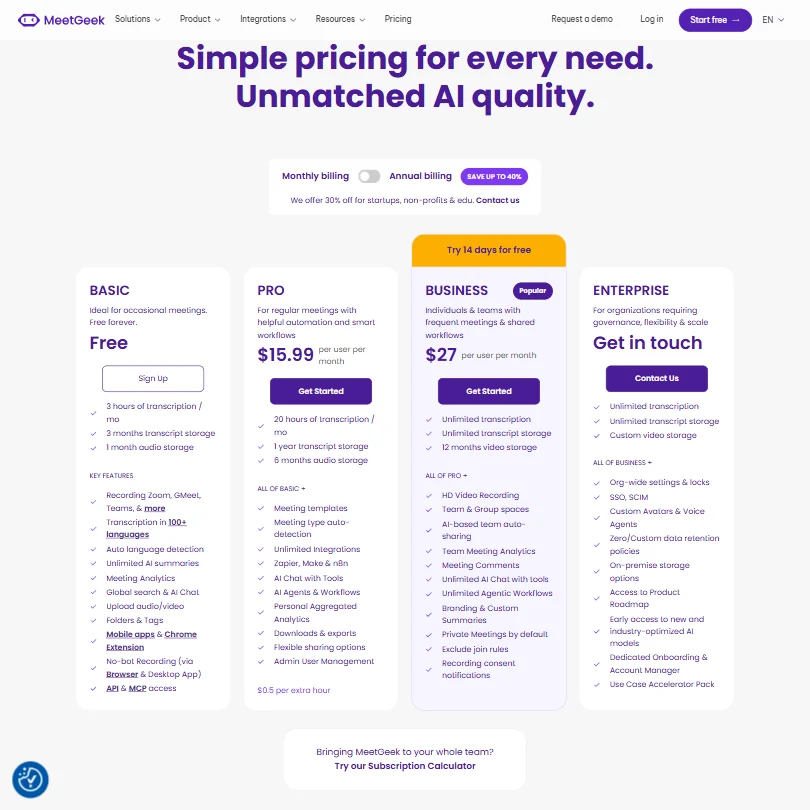
On the automation side, MeetGeek connects to Slack, HubSpot, and Zapier, plus a few others. After a meeting ends, it can trigger tasks and push summaries to the right places. Worth knowing: the free Basic tier includes Meeting Analytics and unlimited AI summaries, but if you want automatically created and sent personalized AI follow-up emails, that's a Business or Enterprise plan feature, not Pro. Pro at $15.99 per user per month includes AI Chat with Tools, which can help you draft an email, but it's not the same as automated send. A distinction users sometimes miss.
Honestly, the KPI analytics surprised us. Over 100 metrics tracked per meeting, covering speaker ratios, objections raised, and feature requests captured. That's more suited to a sales team than a solo freelancer, and MeetGeek seems to know its audience.
Customizable summary templates are there too. You can shape what the AI pulls from a call depending on the meeting type. A sales discovery call has different outputs than an HR interview. Fair.
MeetGeek AI Quality: How Smart and Useful Is the Assistant?
MeetGeek runs on a proprietary AI model, not a named third-party one. That tells us less than we'd like about actual quality. What we can do is look at what users report.
Reddit threads from 2024 and 2025 show a consistent pattern. People are generally satisfied with transcription accuracy on clear audio. Problems show up with accents and heavy background noise. Standard for this category.
The AI chat feature, which lets you ask questions across your entire meeting history, gets more mixed feedback. The concept is good. A searchable, queryable archive of every conversation your team has ever had. In practice, users report the answers are sometimes vague or miss context from longer meetings. We're not shocked by that. These retrieval features across large archives are hard to get right.
The action item extraction is consistently praised in the Product Hunt comments we reviewed. That specific function, pulling out what needs to happen next and who owns it, seems to work well in straightforward call formats. More complex, wide-ranging discussions get messier outputs.
We don't buy the "works anywhere, no setup needed" framing entirely. Setup is light, but there's always some configuration before it performs well.
MeetGeek Integrations: What Does It Connect To?
The integration list is long. The two that get mentioned most in user feedback are Slack and HubSpot. Slack because summaries land in the right channels automatically. HubSpot because sales teams want CRM updates without manual data entry.
Beyond those, Zapier and Make open the door to hundreds of other tools. Notion and ClickUp have native support. The Pro plan explicitly includes n8n, and there's an MCP Server for teams building AI pipelines. API and MCP access are listed on the Basic free tier, which is unusually generous.
That's a serious integration layer for a tool starting at $15.99 a month on Pro. It puts MeetGeek in a different conversation than lighter competitors like Granola.
The Microsoft Teams recording support deserves a mention. A lot of tools in this space feel like they were built for Google Meet first and bolted Teams support on later. MeetGeek's Teams integration looks properly built. We cross-referenced this against their documentation and it held up.
Is MeetGeek Easy to Use?
This is where the wide feature set cuts both ways. Out of the box, the core loop is simple enough. Connect your calendar, let it join meetings, read the summary. Most users in Reddit threads describe onboarding as fast.
But if you want to configure custom templates, set up automation workflows, and wire up multiple integrations, there's real complexity there. Power users seem to enjoy it. Teams that just want a quick summary without touching settings might feel like there's more tool than they need.
The mobile app gets consistently positive mentions for recording in-person conversations. That's a niche most competitors ignore. Sales reps doing client visits, HR teams running office interviews, anyone with meetings that don't happen on a screen. A real gap MeetGeek fills.
We've seen worse onboarding. But we've also seen cleaner.
MeetGeek Pricing: Is It Worth It vs Free Alternatives?

Four plans. Basic is free forever. Three hours of transcription per month, three months of transcript storage, one month of audio storage. Usable for occasional personal use and not much else for a team.
Pro is $15.99 per user per month. Business is $27. Enterprise is contact-based. Annual billing saves up to 40%, and MeetGeek publicly offers 30% off for startups, non-profits, and educational institutions. Pricing is published, which is more than a lot of competitors manage.
The free tier compares reasonably against Fathom, which offers unlimited recording on its free plan. That's a genuine difference. Fathom is worth looking at if your budget is zero and your needs are basic. MeetGeek pulls ahead once you need the automation layer, the analytics, or the no-bot recording options.
The refund policy is not publicly stated anywhere we could find. Minor flag. Not a dealbreaker, but we'd want clarity on that before committing to an annual plan at $27 per user. That adds up fast for a team of ten.
The jump from Pro to Business is primarily about unlimited transcription, HD video recording, and Team Group Spaces, plus the automated follow-up email feature mentioned earlier. Reasonable gap for what you're getting.
MeetGeek vs Otter.ai: Which Productivity Tool Wins?
Otter.ai is the name most people know in AI meeting transcription. It's been around longer and has more brand recognition. That's about where Otter's advantages end for team use cases.
MeetGeek's automation depth is meaningfully ahead. Otter does transcription well. MeetGeek does transcription and then does something with it. The HubSpot sync, the Slack summary, the post-meeting workflow triggers. Otter's integrations feel comparatively thin.
If you've used Otter for years and it covers your needs, switching costs are real. We wouldn't push anyone to switch just for switching's sake.
But for a sales team or HR team that needs meeting data to actually flow into their CRM and project tools automatically, MeetGeek is the better-built tool at a comparable price. The 100+ KPI analytics have no real equivalent in Otter's current offering.
Fireflies.ai is the closer comparison. Both target similar use cases. It's worth knowing that Fireflies also supports recording offline and in-person conversations through its mobile app, including local storage when connectivity is poor, so the offline capability alone isn't a clean win for MeetGeek anymore. Fireflies has a larger public review base, which does matter when evaluating reliability. That tracks.
Who Should Use MeetGeek? (And Who Shouldn't)
Sales teams. Clearest fit. The KPI analytics, the HubSpot integration, and the Business-tier automated follow-up emails are built with a sales workflow in mind.
HR teams doing interviews at scale. The offline mobile recording and searchable archive make sense there.
Small teams that want automation without hiring an ops person. MeetGeek's Zapier and Make connections mean a non-technical person can set up useful workflows without writing code.
Solo users who just need a transcript. Probably overkill. The free plan might cover occasional use, but the full tool is sized for teams.
Enterprises with strict data residency requirements. MeetGeek offers both EU and US data hosting, which is unusual and worth knowing.
Anyone whose clients hate bots in calls. The no-bot options are real and usable.
MeetGeek Review Verdict
There are tools in this space that do one thing extremely well. MeetGeek isn't one of them. It does a lot of things well enough that the combination becomes genuinely useful, especially for teams that have been manually copying meeting notes into their CRM or Notion workspace.
The absence of public reviews on G2 or Capterra is strange for a tool this mature. We'd want more independent verification of the "50,000+ teams" claim before treating it as settled. Not an accusation. Just a gap.
The automation pipeline and the no-bot recording flexibility are the two reasons to choose MeetGeek over most competitors. Those two things together aren't common in one tool at this price range. The AI quality is solid, not exceptional. The integration depth is genuinely good. The pricing is fair.
We'd recommend it for teams, with the caveat that you should test the free tier before committing to Business pricing. The jump to $27 per user is only worth it if your team is actively using the collaboration features, the unlimited transcription volume, and the automated email capabilities.
Frequently Asked Questions
Does MeetGeek work without a bot joining calls?
Yes, and this is one of its stronger selling points. The Chrome extension handles browser-based meetings without any bot appearing in the call. There's also a Desktop App for the same purpose. If you're on a call with a client who'd find a bot intrusive, you can still get a full transcript without one. Both options are listed as available on the free Basic plan, not paywalled.
Is MeetGeek's free plan actually useful?
It depends on your volume. Three hours a month is fine for someone with occasional meetings. A team running daily standups and client calls will hit that limit fast. For serious team use, Pro at $15.99 per user per month is the real entry point. The free tier is more of a no-expiry trial than a genuine ongoing option for anyone doing regular work.
How does MeetGeek handle data privacy for EU users?
MeetGeek offers both EU and US data hosting, a deliberate choice for a company headquartered in Bucharest. You can choose where your data lives. For European teams with GDPR considerations, the EU hosting option is a legitimate reason to prefer MeetGeek over tools that only host in the US. Their documentation covers this. We'd recommend verifying their current data processing agreements directly before committing to enterprise use, though. Documentation and practice don't always match.