SAASINSPECTOR
Picsart logo

Picsart Review

Creators, marketers, and small businesses needing an all-in-one AI-powered photo, video, and design platform

Visit PicsartFrom $15/mo — Pro

Research-based review. We analyzed vendor documentation, customer reviews on G2, Capterra, and Reddit, and live pricing — not hands-on testing yet. We update as our team puts tools through real workflows.

The verdict

Picsart is an AI creative platform covering photo editing, video editing, image generation, design templates, and API access, built for individuals, businesses, and developers. With 150 million monthly active users and 13 years of development, it's a mature tool with impressive breadth, though user reviews suggest the experience doesn't always match the marketing. It's best suited for creators and small teams who need an all-in-one solution but should be evaluated carefully against specific workflow needs.

Pros

  • Picsart supports over 140 AI models including Veo, Kling, Sora, and GPT-image, offering exceptional generative depth under a single login.
  • The platform operates across web, iOS, and Android with language support for 25 or more languages, making it highly accessible globally.
  • Background removal tools are among the most developed features, with dedicated tools for green screen, product backgrounds, and general use cases.
  • Brand kit support — three on Pro and ten or more on Ultra — makes it a practical option for agencies or freelancers managing multiple clients.
  • Thousands of social and marketing templates cover Instagram Stories, ad formats, and other standard formats for fast design turnaround.
  • The platform covers photo editing, video editing, image generation, design templates, and developer API access all under one account.
  • With 150 million monthly active users and 13 years of development since 2011, the platform has demonstrated real-world scale and longevity.

Cons

  • The gap between what Picsart offers and what users actually need from it is wider than expected, suggesting the breadth of features may not translate to practical usability.
  • Enterprise pricing requires contacting sales directly, with no publicly listed number, adding friction for teams trying to evaluate costs.
  • The sheer volume of AI models behind the interface raises questions about whether the UI surfaces them cleanly or creates confusion.
  • Cross-referencing G2, Reddit, and Trustpilot reviews revealed a messier picture than the marketing suggests, indicating inconsistent user satisfaction.
  • The AI Design Generator's ability to execute on a brief sounds good in theory, but real-world quality is flagged as uncertain in the review.
  • The platform has expanded so broadly from its mobile photo-editing roots that it is now difficult to categorize, which may confuse users seeking a focused tool.
From $15/mo — Pro Free plan YesFree trial Yes

Our research on Picsart started with one number: 150 million monthly active users. That's not a vanity metric someone invented. It reframes everything. A platform at that scale, founded in 2011, has thirteen years of feature accumulation behind it, and you feel all of them when you start cross-referencing the docs against G2 threads, Reddit complaints, and Trustpilot patterns. The picture that emerges is messier than the marketing suggests.

Picsart homepage screenshot
Picsart — Homepage

The gap between what Picsart offers and what users actually find usable is wider than you'd expect.

What is Picsart?

Mobile photo editor first. AI creative platform now. That's the honest arc. It covers photo editing, video editing, image generation, background removal, design templates, and developer API access, all under one login, and the seams from that expansion are visible if you know where to look.

The AI layer is genuinely extensive. Their documentation lists access to over 140 models, with Veo 3, Kling 3.0, and GPT-image among them. Two worth flagging specifically: their proprietary Nano Banana model and Flex.2 Klein, which they position as core to several generation features. That's a significant model roster behind a single interface. Whether the interface surfaces them cleanly is a different question, and we'll get there.

Platform runs on web, iOS, and Android. Language support covers 25 or more locales. The enterprise tier exists but requires a sales conversation to get a number. Annoying. Not unusual at this scale.

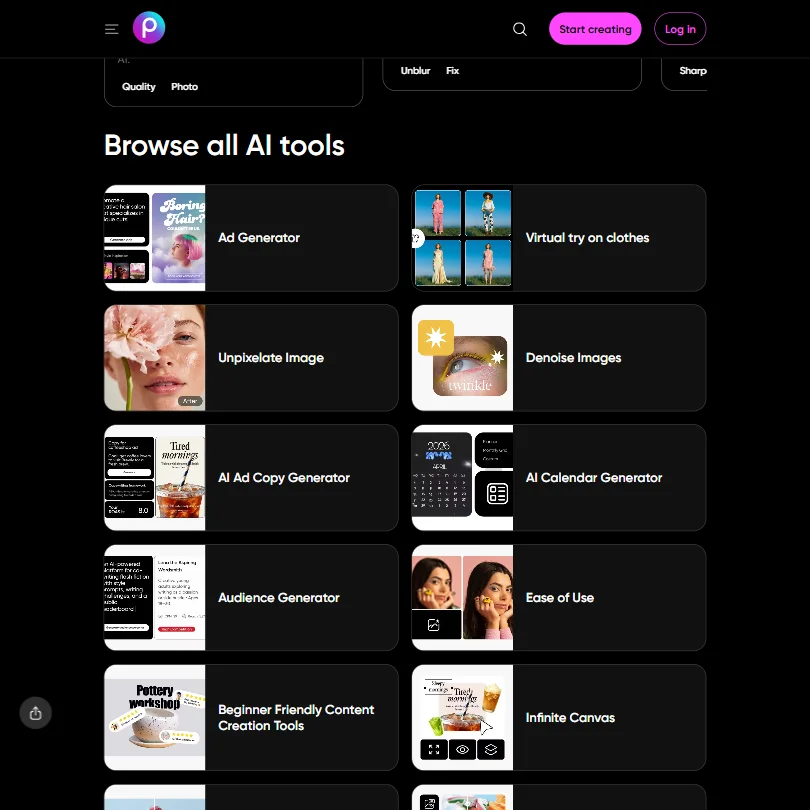
Picsart Features: Logo, Graphics, UI & Brand Design Capabilities

Picsart features screenshot
Picsart — Features

The **AI Logo Generator** is a named, dedicated tool, not a buried checkbox feature. Brand kits are supported at three on Pro and ten or more on Ultra. That's a meaningful distinction for anyone managing multiple clients simultaneously.

Social templates are plentiful. The AI Instagram Story Maker is a named feature, and ad templates get their own category. The AI Design Generator takes a brief and outputs a starting point. Good in theory. Execution quality is something we'll get to.

A few feature names worth knowing: AI Product Image Generator, AI Expand, and Smart Resizing agent. The background removal suite is one of the more developed areas. Green Screen Remover and Remove Product Background are separate tools, not one generic toggle, which suggests real investment rather than checkbox coverage.

What's notably absent: no UI wireframing tools, no Figma export, no Adobe export. Designers who live in those ecosystems won't find a bridge here. For that workflow, Figma is the obvious alternative.

The API access is worth a mention. Picsart has built out a Creative API with prepaid and pay-as-you-go options, a CLI, and MCP server integration for Claude Code and Cursor. Honestly, that surprised us. Most tools at this positioning stop at a basic REST API and call it done. Developer-grade infrastructure attached to a consumer creative product is not something we expected to find.

Picsart Design Quality: How Good Are the AI-Generated Results?

Quality in AI generation is subjective and moves fast. Pinning it down precisely from the outside is hard. What we kept seeing across G2 reviews, particularly from users in marketing roles, was general satisfaction with image generation and photo editing output.

Trustpilot tells a different story. **3.0 out of 5 across 868-plus reviews** sits in uncomfortable contrast to the more favorable G2 picture. That gap is significant. G2 skews toward people who actively chose to review a work tool. Trustpilot tends to attract people who had a problem. Both data points are real, and neither one cancels the other out.

Reddit threads surface a recurring frustration: inconsistency. Users describe output quality that varies depending on which model or workflow they hit, which makes sense given 140-plus models behind a single interface. Some users report excellent product shots. Others describe generation results that feel generic. That tracks.

The Getty Images partnership announced for 2024 to 2025 adds commercially licensed AI generation. That's a real differentiator for marketers who can't afford to be careless about image rights. We don't see that offer everywhere.

Picsart Templates & Assets: How Deep Is the Library?

Thousands of templates. Based on what their documentation describes, that figure isn't inflated. Social formats are well-covered. Presentation formats get drag-and-drop tools that will feel familiar to anyone who's spent time in Canva. Collage maker and effects round out the asset side. The depth is real. Fair.

What's harder to assess from the outside is curation quality. A library of thousands can mean everything is findable, or it can mean fifteen minutes of filtering before you land on something usable. A few G2 reviewers mention the interface for finding templates can feel cluttered, especially on mobile. Volume and discoverability are not the same thing.

The PNG Maker and HD Photo Converter cover export basics. No vector format, which means print workflows that demand true vector output will hit a ceiling. PNG and PDF cover most use cases, but knowing the limitation before committing to an annual plan matters.

Is Picsart Easy to Use for Non-Designers?

The platform's size works against it here. 150 million monthly users sounds like a usability endorsement. But most of those users came from the mobile photo editor. Design and AI generation features are layered on top of that original foundation, and the seams show.

When we cross-referenced their docs with user reports on G2, the friction point that comes up most is discoverability. The platform has a lot of tools. Finding the right one on any given visit requires either familiarity or patience. New users describe a learning curve that's longer than expected for something marketed as approachable.

The web interface is reportedly cleaner than mobile for design work. Mobile is fine for photo editing but less intuitive for anything involving templates or generation workflows. That's the opposite of how most creators expect a mobile-first tool to behave.

**For a platform at this scale, no confirmed live chat support is a gap.** Email support and a help center exist. The community section is active. We've seen worse, but it's notable.

Picsart Pricing: Is It Worth It vs Hiring a Designer?

Picsart pricing screenshot
Picsart — Pricing

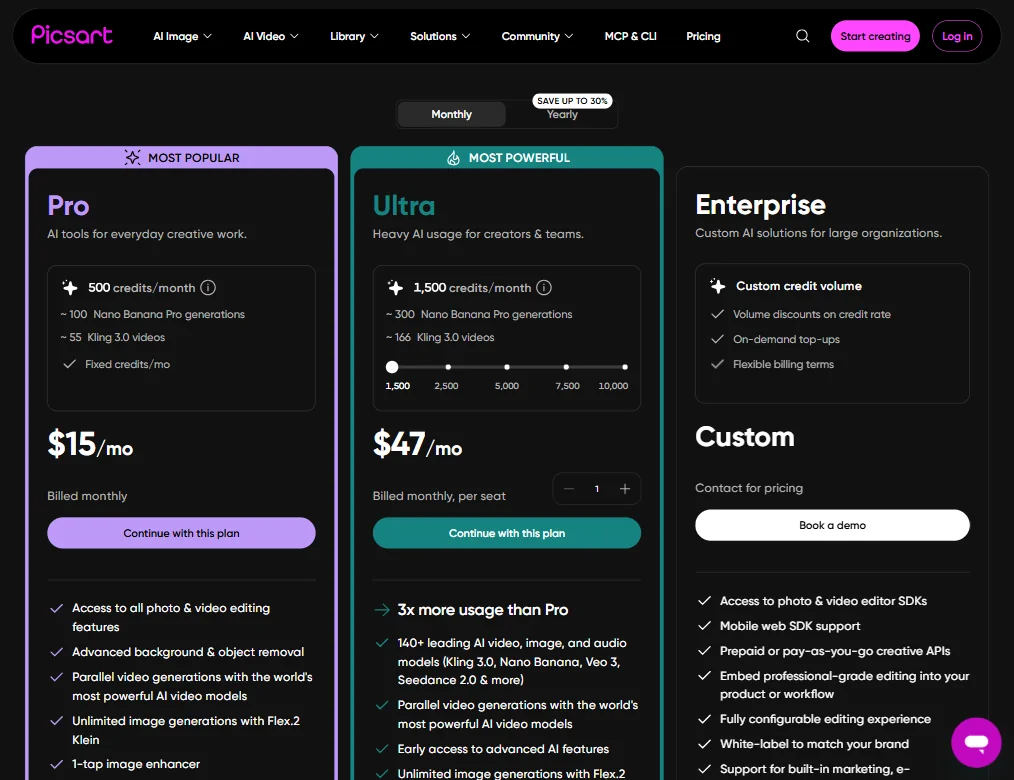
Three tiers above free. Pro starts at $10.50 per month billed yearly, meaning the customer commits to a full annual subscription at that monthly rate. Not $10.50 total for the year. Worth being precise about that, because the way some pricing pages phrase it creates confusion.

Ultra is positioned for teams and heavy AI usage. At the base seat, it currently runs $47 per month on monthly billing, and the plan scales on a credit slider from 1,500 credits per month up to 10,000, where the monthly cost reaches $200 per seat. Enterprise is contact-for-pricing territory, with volume discounts on credit rate, on-demand top-ups, and flexible billing terms advertised as the draw.

The free plan exists but carries some qualification. Free users get limited credits upfront, and the full credit balance only unlocks with a paid plan. That's a limited trial structure wearing the label of a free plan. Not exactly the same thing.

At $10.50 monthly on an annual commitment, the price is competitive. Canva Pro runs around $15 a month. Adobe Express premium lands in a similar range. **The Pro plan's per-month cost is genuinely hard to argue with** on paper for the feature set included, specifically 500 credits per month, approximately 55 Kling 3.0 video generations, and access to all photo and video editing features.

The refund policy is not publicly stated. That's a concrete problem. We dug through the pricing page and found no clear refund language. If you pay yearly and it doesn't work for you, recourse is unclear. That's the kind of detail that quietly frustrates users and shows up in those Trustpilot numbers.

Picsart vs Canva: Which AI Design Tool Wins?

This comparison comes up constantly. Both are trying to occupy the same shelf: accessible creative platform for non-designers, marketers, and small businesses.

Canva has the stronger template library reputation. Years of curation, more mature integration touchpoints, and collaboration features that are live now, not on a roadmap. Real-time collaboration is now available in Picsart Flow, including multiplayer editing and live chat with comments, following the June 2026 Multiplayer launch announcement. That's genuine progress. But Canva has had mature collaboration for longer, and that head start shows in how reliably it works across team workflows.

Picsart punches harder on AI generation depth. The model roster, video generation through Kling 3.0 and Veo 3, the API infrastructure. These aren't things Canva matches right now. For users who need video output without switching apps, that's a real advantage.

Background removal is another area where Picsart historically leads. The dedicated suite is more granular than what Canva offers by default. Not a close competition there.

The catch is consistency. Canva's narrower feature set is more predictable. Picsart's wider feature set introduces more variability. For pure image generation depth, Krea is worth comparing if AI generation is your primary concern and you don't need the broader template library.

Not a clear winner. Picsart takes AI depth and price. Canva takes polish and collaboration maturity.

Who Should Use Picsart? (And Who Shouldn't)

Solo creators and small marketing teams. That's the natural fit. The price is right, the feature breadth covers most daily needs, and the mobile apps mean work happens wherever the creator is.

Marketers running product campaigns would find genuine value in the AI Product Image Generator and the Getty-licensed generation. Commercially safe outputs matter, and not every platform offers that.

Developers building creative tooling into their own products. The MCP integration for Cursor is a real differentiator in that niche, and the prepaid API options make it accessible without enterprise commitment.

Design agencies needing Figma integration or vector-first workflows will find the missing exports frustrating. Teams that needed live collaboration before June 2026 had a real gap. Anyone uncomfortable with opacity on refund terms should be cautious before committing annually. Enterprise teams with specific compliance or brand governance requirements should talk to sales before assuming public docs cover their needs. Nothing explicit on that front publicly.

Picsart Review Verdict

Picsart is a genuinely capable platform that resists clean summary. The feature set is wide. Unusually wide. The AI generation depth is real, not marketing copy. The Pro pricing at $10.50 per month billed annually is competitive. The Getty partnership gives commercial peace of mind on image rights.

But. The Trustpilot picture at 3.0 is a signal worth respecting, not rationalizing away. The refund policy silence is a concrete problem. The Ultra plan's credit slider topping out at $200 per month per seat for 10,000 credits is meaningful context for teams modeling costs at scale.

**The platform works best for solo creators or small teams who want a wide tool set in one place** and can tolerate some interface roughness in exchange for that breadth. It works less well for design-led teams who need tight integration with professional tooling.

The model depth and API infrastructure point toward where this product is heading. More capable, more developer-accessible, more embedded in production workflows. The consumer product still shows through, though. Not a bad thing. Just context.

Worth a trial. Not worth committing to a yearly plan before stress-testing the specific workflows you actually need.

Frequently Asked Questions

Is Picsart free to use?

There's a free plan, but calling it truly free requires some qualification. Free users get limited credits upfront, and the full credit balance only unlocks with a paid plan. The Pro plan starts at $10.50 per month billed yearly, which is where most users who want consistent access to the AI generation tools will end up. That's an annual commitment, not a monthly one at that price.

How good is the Picsart AI image generator compared to standalone tools?

The **Picsart AI image generator** draws from a wide pool of models, including GPT-image added in 2025 and their proprietary Nano Banana model. For a bundled tool inside a broader creative platform, the generation quality is solid. That said, users who need highly controlled or technically precise generation will likely find dedicated tools more predictable. The convenience of having generation inside the same app as editing is real, though. We're not dismissing it.

Does Picsart work for professional video creation?

The **Picsart AI video generator** covers AI Image to Video and Text to Video workflows, with access to Kling 3.0 and Veo 3 models. For social-ready video and quick marketing clips, it's credible. For anything requiring frame-level control, color grading, or professional timeline editing, it won't replace dedicated video software. Strong starting point. Not a finishing tool.

Picsart is featured in

Alternatives to Picsart

See all Picsart alternatives →

Other AI Design Tool options we've reviewed.

User reviews

Review Picsart

Your rating

Reviews are moderated and appear once approved.