Research-based review. We analyzed vendor documentation, customer reviews on G2, Capterra, and Reddit, and live pricing — not hands-on testing yet. We update as our team puts tools through real workflows.
The verdict
Runway is a New York-based AI video generation and editing platform built around its proprietary Gen-4.5 model, targeting creators and production teams who need more than basic text-to-video output. It offers a developed editing layer with motion brush, lip sync, and camera controls that sets it apart from pure generation tools. Despite impressive technical ambition and scale, reviewer sentiment suggests customer satisfaction lags behind the marketing, making it a powerful but imperfect choice.
Pros
✓Gen-4.5 video generation outputs are consistently cited as among the best quality available in the current AI video tool market.
✓The editing suite goes beyond basic generation, with baked-in features like motion brush, multi-scene editing, lip sync, and camera controls.
✓Image-to-video capability works within the same workflow, useful for animating product photos or concept art.
✓Runway has been operating since 2018 and has real market presence, citing 50 million creators on the platform.
✓The platform interface stays relatively consistent across devices due to its web-only architecture.
✓GWM-1 (General World Models) signals serious long-term investment in foundational AI infrastructure beyond simple video generation.
✓The tool is positioned as a foundational model platform, offering more depth than typical consumer-facing AI video editors.
Cons
✕Customer satisfaction stories don't appear to match the polished homepage marketing, based on Trustpilot, G2, and Reddit feedback.
✕The platform is web-only with no desktop or mobile app, which limits it for users who need offline or native application workflows.
✕Prompt quality heavily determines output quality, meaning less experienced users may struggle to get consistent results.
✕Advanced features like GWM-1 real-time simulation and robotics integration are ambitious but not clearly ready for everyday production use.
✕The gap between the 50 million creator figure and actual paying satisfied customers is unclear and potentially misleading.
✕The tool's complexity and infrastructure-first framing may be overwhelming for casual creators looking for a simple video editor.
From $15/moFree plan YesFree trial No
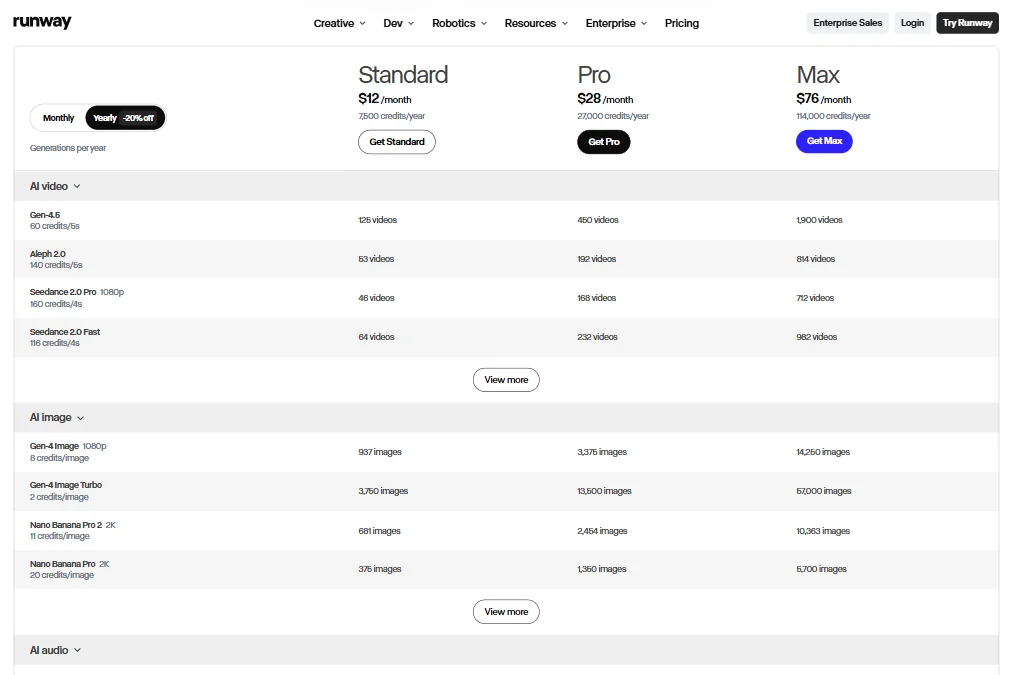
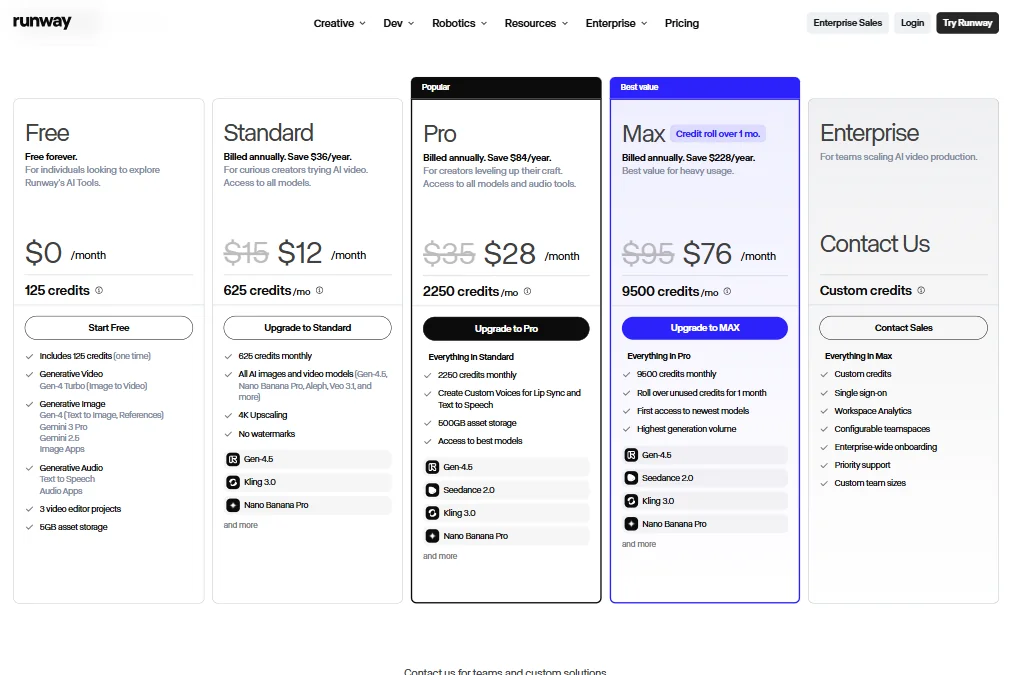
Our research on Runway pulled from vendor docs, G2 threads, a fair amount of Reddit (late 2024 through mid-2025), and the live pricing page, because we don't do hands-on testing here. What we kept seeing was a product that reads like two things at once: a generative video platform serious enough to compete with Sora and Kling AI, and an AI research outfit quietly building world simulation infrastructure on the side. That tension shows up everywhere, including the pricing. Standard runs $15 a month for 625 credits, Pro is $35 for 2,260, and Max lands at $95 for 9,500. Those credit pools sound generous until you notice that Gen-4.5 burns 60 credits per 6 seconds and Aleph 2.0 costs 140 credits for the same clip length. Do the math and a Max subscriber gets roughly 67 Aleph 2.0 videos a month. Not bad. Not unlimited either.
Runway — Homepage
Founded in 2018 out of New York, Runway has actual longevity in a space where most competitors didn't exist three years ago. The 50 million creator figure they cite is a real number. Whether those are paying users or free-tier signups is something their marketing copy doesn't clarify, and honestly, we're skeptical of that framing. Customer satisfaction threads we cross-referenced tell a more complicated story than the homepage suggests.
What is Runway?
Runway calls itself a creative AI research company. That framing is intentional. They're not pitching a simple video editor. They're pitching something closer to a foundational model platform, one that happens to have a consumer-facing tool on top.
The core product is built around Gen-4.5, their proprietary video generation model. Alongside it sits GWM-1, which stands for General World Models. That's the piece they're betting the longer-term future on. Real-time interactive simulation, robotics integration, conversational avatars. It's ambitious. Whether it's ready for everyday production work is a fair question.
On the surface, Runway does what any AI video tool does. You feed it text or an image and it generates video. But the editing layer underneath is more developed than most competitors. Motion brush, multi-scene editing, lip sync, camera controls. These aren't bolt-on features. They're baked into the workflow.
The platform is web-only. No desktop app, no mobile. That limits it for some users, but it's also why the interface stays relatively consistent across devices.
Runway Features: Video Generation, Editing & AI Capabilities
Runway — FeaturesText-to-video generation is the headline. Gen-4.5 handles most of the heavy lifting here. You write a prompt, you get a video clip. Quality depends heavily on how specific your prompt is, which is true of every model in this category, but Runway's outputs are consistently cited as among the better ones available right now.
Image-to-video works in the same workflow. Feed it a still image, describe motion, get a short clip back. Useful for animating product photos or concept art.
The video editing suite is where Runway separates itself from pure generation tools. Motion brush lets you paint motion onto specific parts of a frame. That's genuinely useful and not something Pika Labs offers with the same level of control. The lip sync feature works across uploaded footage or generated clips. Voice cloning and text-to-speech are gated behind the Pro plan at $28 a month.
Runway Characters is worth calling out separately. You upload a single image and build a conversational avatar from it. The GWM Avatar system then handles real-time video agent behavior. That's not a feature you see in most tools at this price point.
Honestly, the Workflows system is the sleeper feature here. Audio and video nodes, automation across generation steps. It reads like something enterprise teams would actually use, not a demo feature meant for the homepage.
Background removal is in there too. Auto-subtitles aren't confirmed in the docs, which is a gap worth noting if that's something you need. Screen recording is simply not part of the product.
Runway Video Quality: How Good Does the Output Actually Look?
This is where Runway earns most of its reputation. G2 reviewers consistently describe the output quality as the reason they chose it over other tools. We cross-referenced those reviews with Reddit threads from late 2024 and the consensus is similar. Gen-4.5 produces video that holds up better on motion coherence than a lot of what's available. Less flickering, more consistent object tracking across frames.
4K upscaling is available on Standard and above, starting at $12 a month. That's a reasonable ask. The free plan generates output with watermarks and runs on the same one-time 125-credit allocation they give new users.
2K image generation is also in the product. That detail doesn't get pushed loudly on the homepage, but it's there in the docs.
The gap between what Runway generates and what Sora (OpenAI) generates at its best is narrowing. Whether Gen-4.5 is ahead or behind depends on the prompt category. Runway tends to do better on stylized, cinematic-looking clips. Sora tends to produce more physically coherent motion in complex scenes. That's our read from third-party benchmark coverage, not from running them side by side ourselves.
Worth noting: the free plan's 125 credits evaporate fast. A single 10-second Gen-4.5 generation pulls a meaningful chunk of those. Users who don't upgrade will hit the wall quickly.
Runway AI Avatars & Voiceover: How Realistic Are They?
The avatar offering is newer than the core generation tools and it shows. GWM Avatars for real-time conversational video agents is a legitimate differentiator against most competitors. Building a custom avatar from a single image using Runway Characters is a compelling pitch. Whether the output looks polished enough for professional client-facing video is the honest question.
We didn't find a strong pool of detailed user reviews specifically on the avatar quality. The G2 review count for Runway sits at 16 total, which is thin for a platform with 50 million users. Capterra has two reviews. Neither digs deep into avatars. That gap in the review trail made us cautious about overstating how well this feature performs in practice.
For tools where avatar realism is the primary need, something like HeyGen has a more established track record and a much larger body of user feedback specifically on avatar quality. Runway's avatar feature looks promising on the roadmap but may not be the primary reason to pick it today.
Voice cloning and custom voice creation are available from Pro upward. Text-to-speech is in all paid plans. The $12 Standard plan covers TTS but not voice cloning. That distinction matters if you're building voiceover workflows.
Is Runway Easy to Use?
The interface is web-based and generally well-organized. First-time users consistently describe an initial learning curve, especially around the Workflows system and the more advanced editing tools like motion brush. That's not a criticism. It's an honest reflection of how complex the underlying functionality is.
Reddit threads from 2025 show users getting up to speed in a few days for basic generation tasks. The deeper editing suite takes longer to learn. The help center is described as comprehensive in our research, and the Discord community is active. Both are real resources, not just placeholder links.
The onboarding experience on the free plan is limited by the credit wall. You get 125 credits, you explore a bit, and then you're either upgrading or you're done. There's no time-based free trial to experiment properly. We think that's a real friction point for the solo creator audience they're clearly trying to reach.
The bot-only live chat is the weakest link in the support setup. Email support exists, but anyone who's run into a generation bug mid-project knows that "submit a ticket" isn't the answer you want at that moment.
Runway Pricing: Is It Worth It for Creators & Teams?
Runway — Pricing
Four tiers. Free with 125 one-time credits. Standard at $12 a month when billed annually. Pro at $28. Max at $76. Enterprise on request.
The free tier is exploratory, not functional. That's fine, but they should be clearer about it upfront. "125 free credits" sounds generous until you realize a Gen-4.5 clip might eat a significant chunk in one go.
Standard at $12 a month is the entry point for real use. It removes watermarks, adds 4K upscaling, and restores commercial rights. Most creators who plan to publish anything will need to be here at minimum. The jump to Pro at $28 adds voice cloning and custom voices. Max at $76 is hard to evaluate without knowing exactly what the generation credit ceiling looks like at each tier, and that information isn't cleanly published.
We dug through the pricing page and didn't find a clear credit breakdown by plan. That's frustrating. It's the kind of thing that makes users nervous about overages and makes comparison shopping harder than it needs to be.
The refund policy is not publicly stated. That's a concern. Trustpilot reviews surface complaints about billing disputes, cancelled credits, and unresponsive support around refunds. We're not dismissing those, but the 1.2 out of 5 rating across 273 Trustpilot reviews is a number you can't ignore. That's a lot of unhappy customers.
That said, the G2 and Capterra numbers are more positive. The populations are different, which matters. G2 skews toward professional users evaluating the tool deliberately. Trustpilot captures whoever had a bad day with billing.
Runway vs Sora (OpenAI): Which AI Video Tool Is Better?
Sora launched publicly in late 2024 and immediately drew comparisons to Runway. Understandably. Both generate video from text prompts. Both are built on proprietary models. That's roughly where the similarities end.
Sora's generation quality on photorealistic, physics-heavy scenes is strong. OpenAI's infrastructure also means it integrates into a broader ecosystem of tools more naturally. But Sora doesn't have a video editing suite. There's no motion brush, no multi-scene workflow, no lip sync layer. It generates clips. Full stop.
Runway generates clips and then lets you work with them. That's a real difference for anyone producing finished content, not just test renders. The Workflows system, the character tools, the editing suite. Those add up.
Pricing is comparable at the mid tier. Runway Standard at $12 annually is a reasonable entry. Sora's pricing structure has shifted a few times and is tied to ChatGPT Pro access in some configurations, which makes direct comparison tricky.
For pure generation quality at the top of the prompt-to-video range, Sora is competitive. For a complete video production environment, Runway is ahead right now. We don't expect that gap to stay wide for long.
Who Should Use Runway? (And Who Shouldn't)
Independent filmmakers and serious video creators. That's the core audience this product actually serves well. The editing depth assumes you want to do more than just generate a clip and post it.
Marketing teams running high-volume content pipelines would benefit from the Workflows system and the Enterprise tier. The NVIDIA architecture integration and enterprise SSO suggest they've built with that audience in mind.
Researchers and developers interested in what GWM-1 can do will find the API access meaningful. This isn't just a wrapper over someone else's model. There's real proprietary infrastructure here.
Who shouldn't bother: beginners who need a quick, affordable way to produce talking-head or training videos. The learning curve and the credit-based pricing model are friction points that simpler tools avoid. Fliki handles text-to-video for that use case with much lower complexity and a more predictable pricing structure.
Anyone primarily chasing avatar-based video at scale will find the feature promising but not yet mature enough to bet a production workflow on it.
Runway Review Verdict
Runway is a serious tool. Not a curiosity, not a demo. Actual infrastructure for video production built around a genuine research organization that's been at this since 2018.
The generation quality is real. The editing suite is real. The GWM-1 roadmap is interesting even if it's not fully baked for everyday use yet.
The problems are also real. Trustpilot tells a different story than the homepage, and the billing and refund complaints come up too consistently to dismiss. Credit transparency across pricing tiers is poor. The avatar feature needs more time and more user validation before it belongs in a finished production pipeline.
At $28 a month for Pro, Runway gives you a lot of video production infrastructure. The voice cloning, the editing tools, the generation quality. It's a fair deal if you're actually going to use the full feature set. If you're only here for text-to-video clips, you might be paying for capabilities you'll never open.
We'd recommend it for creators and small teams who are producing original video content regularly. We'd tell enterprise teams to do a proper evaluation before committing. And we'd tell anyone who had a bad billing experience to keep the support email thread, because the refund policy opacity is a real gap that Runway needs to fix.
Not a perfect tool. A genuinely capable one.
Frequently Asked Questions
Does Runway have a free plan?
Yes, but it's more of a trial than an ongoing free tier. New accounts get 125 one-time credits. Those credits don't refresh. Once they're gone, you're either upgrading or you're done. Watermarks are applied to everything generated on the free plan, which means the free output isn't usable for anything commercial.
What's the difference between Runway Standard and Pro?
Standard runs at $12 a month billed annually and covers the core generation tools, watermark-free exports, 4K upscaling, and commercial rights. Pro at $28 a month (billed anually) adds voice cloning and custom voice creation for lip sync workflows. That's the meaningful jump. If you're not building voiceover-heavy content, Standard may cover most of what you need. If you are, Pro is the minimum.
Is Runway good for beginners?
Probably not as a first AI video tool. The interface is accessible, but the credit model creates pressure early, and the deeper features like Workflows and motion brush take time to learn properly. The free credit allocation runs out fast enough that you don't get a comfortable window to explore. Beginners who just want to produce simple video content without a steep ramp would be better served starting somewhere simpler and coming back to Runway once they know what they actually need.