SAASINSPECTOR
Hailuo AI logo

Hailuo AI Review

Content creators, filmmakers, and social media producers seeking cinematic AI video generation

Visit Hailuo AIFrom $9.99/mo

Research-based review. We analyzed vendor documentation, customer reviews on G2, Capterra, and Reddit, and live pricing — not hands-on testing yet. We update as our team puts tools through real workflows.

The verdict

Hailuo AI is a web-based text-to-video and image-to-video generation tool built by Shanghai-based MiniMax, aimed at short-form content creators and developers. Its latest model, Hailuo 2.3, delivers native 1080p output with a stronger editing toolkit than expected at its price tier, including frame anchoring and relighting controls. However, the platform is web-only, high-volume use is constrained by generation speeds, and some vendor claims remain unverified.

Pros

  • Hailuo 2.3 model supports native 1080p output, with 4K export available through MiniMax Hub.
  • Video generation times run between 30 and 90 seconds, making iterative creative work practical.
  • Start/End Frame control allows users to anchor the first and last frames for better continuity across clips.
  • Output quality appears noticeably cleaner than many competitors at the same price point, based on circulating samples.
  • Light Studio and camera movement controls are included, giving creators meaningful production tools beyond basic prompting.
  • Named creative templates like CineScope and Style Switch add versatility for different use cases.
  • The broader MiniMax ecosystem includes a developer API and MiniMax Hub, extending functionality for advanced users.

Cons

  • The tool is web-only with no desktop or mobile app, limiting flexibility for users who prefer native applications.
  • Generation speeds top out around 90 seconds per clip, making high-volume batch production impractical.
  • Some vendor efficiency and performance claims, such as 2.5x gains in Hailuo 2.3, cannot be independently verified.
  • Several named templates appear to be creative novelties rather than tools suited for serious production work.
  • User-reported issues surfaced in Trustpilot complaints and Reddit threads suggest a gap between vendor claims and real-world experience.
  • 4K export and the full model roster are locked behind the MiniMax Hub rather than available in the base product.
From $9.99/moFree plan YesFree trial Yes

Hailuo AI homepage screenshot
Hailuo AI — Homepage

We pulled vendor docs, dug through Trustpilot complaints, and read more Reddit threads about AI video tools than we'd like to admit. Cross-referenced what Hailuo claims against what users actually report. The gap between those two things is sometimes significant, and this review is where that research landed.

What is Hailuo AI?

MiniMax, a Shanghai-based AI lab founded in 2021, built this under the Hailuo brand. The public-facing product at hailuoai.video launched in 2023. It sits inside a broader MiniMax ecosystem that includes a developer API and a creative hub called MiniMax Hub.

The pitch is straightforward: type a prompt, get a video. Hailuo handles text-to-video and image-to-video generation, and the most recent model, Hailuo 2.3, pushes 1080p native output. That model dropped in mid-2025. The vendor claims 2.5x efficiency gains over the previous version with better motion stability. We can't verify that from our chair. What we can say is that output samples circulating online look noticeably cleaner than a lot of competitors at the same price point.

Web-only. No desktop app, no mobile app. Just a browser.

Hailuo AI Features: Video Generation, Editing & AI Capabilities

Hailuo AI features screenshot
Hailuo AI — Features

The text-to-video generation is the core product. You write a prompt, choose a model, and the system returns a short clip. Generation times reportedly run between 30 and 90 seconds depending on resolution and complexity. Fast enough for iterative work. Not fast enough if you're trying to crank out 50 clips in an afternoon.

Beyond the basic prompt-to-video loop, Hailuo ships a collection of named templates. CineScope and Style Switch look genuinely useful for production work, and a few others lean more toward novelty territory. The editing side includes Start/End Frame control, which anchors the first and last frames of a clip for continuity purposes, and Light Studio for relighting. Camera movement control is also listed on the homepage. These are **features that serious short-form creators will actually reach for**, not decorative additions.

Honestly, that's a stronger editing toolkit than we expected at this price tier.

The MiniMax Hub extends things further, adding 4K export and the full model roster. The standalone Hailuo site caps at 1080p. Worth knowing before you sign up.

Batch processing isn't mentioned anywhere in the docs. Team collaboration either. Those gaps matter if you're running volume workflows or working with more than one person.

Hailuo AI Video Quality: How Good Does the Output Actually Look?

Video quality is where this tool has built its reputation. Reddit threads from 2025 surface a consistent pattern: users comparing Hailuo output favorably against Kling AI in cinematic texture, especially in motion scenes. We can't independently test frame quality ourselves, but the pattern across forums is consistent enough that we take it seriously.

The 1080p output is native, not upscaled. That distinction matters in a field where several competitors advertise high resolution but are delivering upscaled lower-quality frames. **1080p native at this price point is genuinely unusual**, and it shows up repeatedly as the reason users choose Hailuo over cheaper alternatives.

Camera movement control is listed as a feature. How granular that control actually is, we couldn't confirm from the docs. Reviews suggest it handles basic cinematic movements. Nobody seems to be calling it precise.

Motion stability is the most consistently praised quality across reviews. Older AI video tools, and honestly some current ones, produce the rubber-limb problem where moving subjects distort badly. Hailuo 2.3 apparently handles this better than earlier versions. We'd want to test it ourselves before calling it solved, but the review patterns are unusually consistent on this specific point.

The Hailuo 01 model is still available alongside 02 and 2.3. Why you'd choose 01 at this point is unclear. The docs don't explain the tradeoffs. Minor documentation failure, but it adds friction.

Hailuo AI AI Avatars & Voiceover: How Realistic Are They?

This section gets complicated fast. The documentation implies avatar and talking-head capability through face-focused templates. But the vendor doesn't openly advertise voice cloning or a proper text-to-speech voice library.

Avatar-adjacent features exist, including LoveFrame for face animation and a handful of persona-oriented templates. Whether any of this constitutes a true AI avatar in the sense that HeyGen uses the term, probably not. HeyGen is built around avatar video as its core use case. Hailuo is built around cinematic video generation with some avatar-flavored features on the side.

We don't buy the idea that Hailuo competes seriously with dedicated avatar platforms right now. The docs are too vague. No mention of voice cloning support, no TTS voice library count, no ASMR mode details beyond a template name.

The ASMR template is listed but unexplained. We genuinely don't know what that generates. That's a transparency problem.

Dedicated avatar platforms. That's the right fit if avatar realism and voiceover are central to what you need, not Hailuo. Not without considerably more clarity from the vendor.

Is Hailuo AI Easy to Use?

Web-only tools tend to have lower friction on first launch. No install, no configuration, just sign up and start generating.

New users get 200 free credits on the Hailuo site. On MiniMax Hub, that number jumps to 2,000. Meaningful difference. The docs don't explain clearly why the two platforms have different credit allocations, which is the kind of confusion that creates bad first impressions before someone has paid a dollar.

The **template-based workflow** lowers the barrier for people who aren't comfortable writing generative prompts. Pick a template, upload an image or enter text, and go. That's a reasonable onboarding path for non-technical creators. The flip side is that templates feel limiting when you know what you want and it doesn't fit a named category. Style Switch and CineScope give you the most room to work. The others are more prescriptive.

We read complaints about the credit system being confusing. Not about quantity, but about what different generation types actually cost. Honestly, this is a recurring issue across almost every AI video tool right now, and Hailuo isn't worse than average. But it's not solved either.

Hailuo AI Pricing: Is It Worth It for Creators & Teams?

Hailuo AI pricing screenshot
Hailuo AI — Pricing

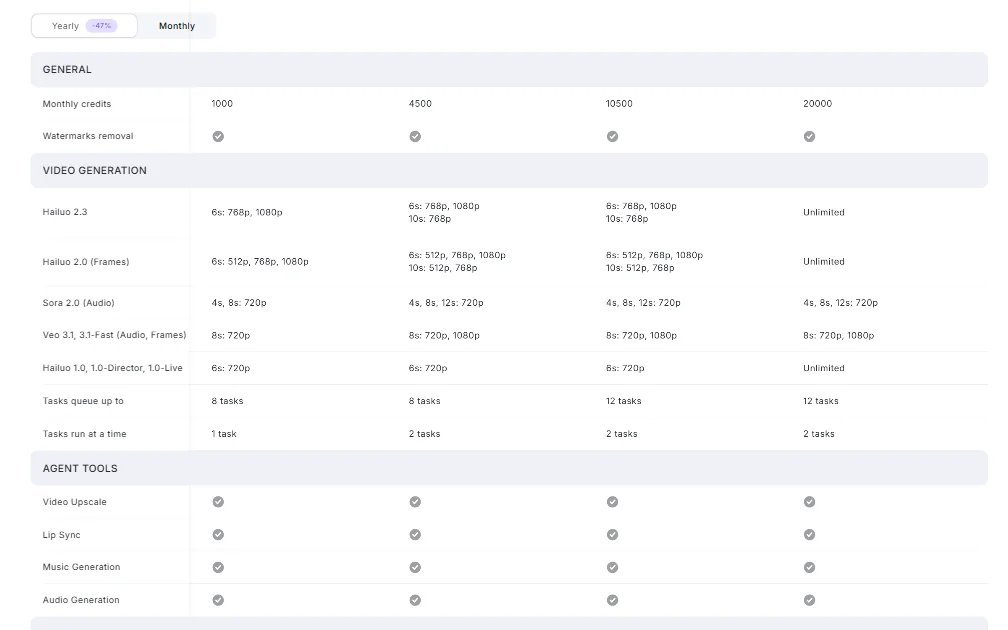
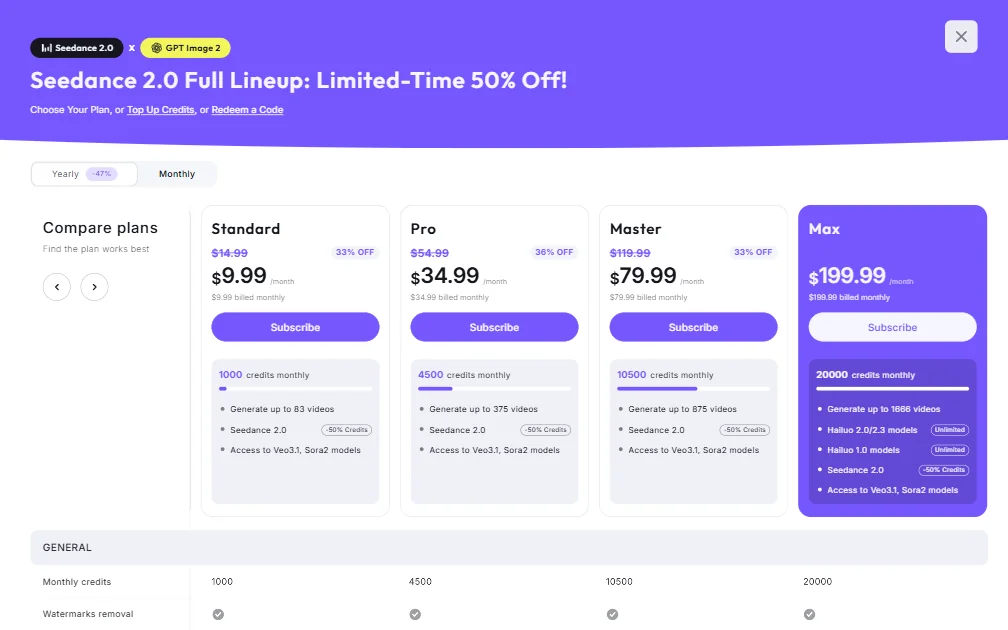
Five tiers. Free at $0, Standard at $9.99 per month, Pro at $34.99, Master at $79.99, and Max at $199.99. Those are the billed-monthly figures. The Standard plan was previously $14.99, Pro was $54.99, and Master was $119.99, so current discounts run between 33% and 36% depending on the tier.

Credit allocations scale accordingly: 1,000 credits monthly on Standard, 4,500 on Pro, 10,500 on Master, and 20,000 on Max. In practical terms, Standard gets you up to 83 videos per month, Pro up to 375, Master up to 875, and Max up to 1,666. Seedance 2.0 is available on all paid tiers at a 50% credit reduction. Access to Veo3.1 and Sora2 models is included from Standard through Master.

The Max tier is where things open up meaningfully. **Hailuo 2.0 and 2.3 model access becomes unlimited**, and Hailuo 1.0 model access is also listed as unlimited. That's the tier worth considering if volume is the actual constraint.

Runway's standard tier runs considerably higher for comparable output resolution. Pika Labs and Kling AI sit in a similar entry-level range. So Hailuo's price positioning is real.

Refund policy is unpublished. We couldn't find it anywhere in the docs. That matters if you pay for a month and the tool doesn't work the way you expected. No idea what your options are going in. Not great.

Commercial rights are confirmed through the Creator Partnership Program documentation. That's not always a given at this price, so it's worth flagging.

Enterprise pricing isn't stated publicly. Not surprising for a relatively young company expanding into Western markets. Still a gap.

Hailuo AI vs Runway: Which AI Video Tool Is Better?

Runway is the most established Western competitor in this space. Also considerably more expensive at comparable output resolutions.

Hailuo's price advantage is real. At $9.99 to start, you're getting 1080p native output with camera movement control and Start/End Frame editing. Runway's Gen-3 Alpha access at comparable quality costs more per month and burns through credits faster, based on patterns we saw across creator community threads.

Where Runway has the edge: ecosystem maturity. The documentation is better. The integration story is more developed. The user community is larger. When something breaks in Runway, there are more places to find answers. That's not a small thing.

Hailuo's Trustpilot rating sits at 1.4 out of 5. Rough number. The review volume is small enough that a cluster of negative experiences distorts the average, but the pattern of complaints leans toward billing confusion and credits burning faster than expected. Not toward output quality failure. That distinction matters and it tracks with what we found elsewhere.

For pure video quality at the lowest price, Hailuo competes. For everything around the video, Runway is more reliable. Fair.

Who Should Use Hailuo AI? (And Who Shouldn't)

Solo content creators working on short-form cinematic content. That's the obvious fit. The price is right, the output quality holds up, and the template library covers most of what a solo creator needs without requiring deep prompt engineering.

Filmmakers experimenting with AI-assisted pre-visualization. The Start/End Frame control and Light Studio relighting suggest a tool that's thought about production workflow, not just social content.

Teams, though. Harder sell. No batch processing confirmed, no team collaboration features mentioned anywhere, and no transparent pricing beyond the paid tiers for group purchasing decisions. Not great for any workflow that needs accountability or scale.

Marketing agencies need audit trails. They need billing clarity. They need to know what the next tier costs before committing. Hailuo doesn't give them that right now.

**Developers will find the MiniMax API interesting**, available through minimax.io, which suggests the underlying model is accessible for custom builds without the web interface. That's a real option for technical users who want the quality on their own infrastructure.

Hailuo AI Review Verdict

Hailuo AI is doing one thing better than almost anyone at the $9.99 price point: the video looks good. Native 1080p output with real motion stability from the 2.3 model is a meaningful differentiator. We're not going to pretend otherwise.

What surrounds the video generation is messier. Pricing structure is now visible at the tier level, which is an improvement, but the refund policy still doesn't exist publicly. Avatar and voiceover capabilities are implied more than explained. Support documentation is thin.

**The Trustpilot score of 1.4 is a flag** we can't ignore, even accounting for the small review volume. Billing complaints dominate. That's a support problem as much as a product problem, and it suggests the company hasn't caught up to its user growth on the customer service side.

The MiniMax API is the sleeper feature. If you want to build on top of a capable video generation model, that's worth exploring separately from the consumer product.

We'd recommend Hailuo cautiously for solo creators who want high-quality cinematic output and can tolerate pricing opacity and thin support. We wouldn't recommend it as a team tool yet. And we'd want to see a published refund policy before giving it a stronger endorsement.

Good video. Incomplete product. That's where it sits.

Frequently Asked Questions

Is Hailuo AI free to use?

New users get 200 free credits on the main Hailuo site. Sign up through MiniMax Hub and that number goes up to 2,000 free credits. Either way, the free allocation is enough to run a meaningful evaluation before paying anything. After that, the paid plan starts at $9.99 per month for 1,000 credits monthly, which the pricing page now makes visible.

Is Hailuo AI safe for commercial use?

Based on our reading of the Creator Partnership Program and Affiliate Program documentation, commercial use of generated video is supported. That's more than some competitors at this price point will explicitly confirm. We'd still recommend reading the current terms before committing to a commercial project, since MiniMax's terms are updated periodically and the English-language documentation doesn't always reflect the latest version immediately.

How does Hailuo AI compare to other AI video generators?

On output quality alone, Hailuo competes with tools that cost significantly more. The 1080p native resolution and motion stability from the 2.3 model put it in a serious conversation with Runway and Kling AI. Where it falls behind is in ecosystem depth: integrations are minimal, the support infrastructure is underdeveloped, and credit cost-per-generation isn't clearly documented. If cinematic video quality is the priority and you can work around thin support, it holds up well at this price.

Hailuo AI is featured in

Alternatives to Hailuo AI

See all Hailuo AI alternatives →

Other AI Video Tool options we've reviewed.

User reviews

Review Hailuo AI

Your rating

Reviews are moderated and appear once approved.