SAASINSPECTOR
Luma AI logo

Luma AI Review

As an AI video generator, Luma AI makes and extends clips with named camera moves, consistent characters and first-and-last-frame control. It offers API access, lip sync and video translation, with a free tier to start.

Visit Luma AIFrom $30/mo - Plus

Research-based review. Features and prices are checked on the vendor's own website, and the score is worked out from those facts. We haven't tested it hands-on yet.

The verdict

Worth it for filmmakers who want keyframe control and HDR on Luma's own model with outside models close at hand, though full-resolution clips use credits quickly.

Pros

  • Ray3.2 takes up to 16 keyframes per clip, giving close control over how a shot unfolds.
  • Native HDR generation in 16-bit colour with EXR export, which few video models offer.
  • Kling 3.0, Seedance, Veo 3.1 and MiniMax H3 sit in the same account for shots that need audio or 4K.
  • Modify Video restyles existing footage up to 20 seconds at 1080p.
  • Luma Agents plan and carry out multi-step jobs across several models.
  • Every paid plan removes the watermark, allows commercial use and opens every model.
  • Guest collaborators get edit access on every paid plan.

Cons

  • Plus's 10,000 monthly credits make about eight ten-second Ray3.2 clips at 1080p.
  • Ray3.2 does not generate sound; audio needs an outside model at a higher credit cost.
  • Luma's terms let it train its models on what you upload, on paid plans too, with no opt-out described.
  • There is no Android app; the app runs in the browser and on iOS.
  • The entry paid plan costs more than most video generators' first tier.
  • Free output is for personal use only and can carry a watermark.
  • The Dream Machine name is retired, so older guides and tutorials describe deprecated models.
From $30/mo - PlusFree plan YesFree trial No
8.0/10

Spec Score

Luma AI against 7 AI video generators
#6
of 7 AI video generators
+0.1
vs the average
96%
from published facts
Ahead of other AI video generators
Voice, captions and teams+1.7What it can generate+1.2Resolution and watermarks+1.0
Behind other AI video generators
Pricing-3.1
Every criterion
Tap a row for the facts
What it can generate9.8
+1.2 vs 8.6 avg34.3 of 35 points
Generates sound and speech with the videoyes2 / 2
Animates a still image you uploadyes1.5 / 1.5
Keeps a character or style the same across shotsyes1.5 / 1.5
Longest single clip20 seconds1.8 / 2
You set the first and last frameyes1 / 1
Named camera movesyes1 / 1
Continues a clip past its endyes1 / 1
Why these numbers

Generates sound and speech with the video: The 'Audio' column reads 'Yes' for Seedance 2.0/2.5, Kling Omni, Kling 3.0, Kling 3.0 Turbo, MiniMax H3, and Flux 3 (all resold third-party models).

Animates a still image you upload: Core Ray3.2 workflow.

Keeps a character or style the same across shots: FAQPage JSON-LD answer to 'How does Luma Agents handle consistency?'.

Longest single clip: Highest single-generation figure stated for Ray3.2, reached via its Modify Video (video-to-video) mode at 24fps; pure text2video/image2video native generations cap at 10 seconds ('5 seconds and 10 second native generations').

You set the first and last frame: Ray3.2's own FAQ confirms both the legacy start/end-frame capability and its Multi-Keyframe upgrade (up to 16 keyframes per clip, including for image2video).

Named camera moves: Named Ray3.2 feature; also confirmed in the dream-machine FAQ ('Can I create videos from images?' answer includes 'Add camera motion').

Continues a clip past its end: Dedicated priced action on the Ray3.14 section of the cost table; also confirmed in the dream-machine FAQ ('Extend video duration', 'Extend scenes').

Pricing5.0
-3.1 vs 8.1 avg12.5 of 25 points
Cost of a working month (20 ten-second clips)$902.8 / 7
Free planyes1.5 / 1.5
Free trialdoes not applyn/a
Why these numbers

Cost of a working month (20 ten-second clips): 20 ten-second clips x 1200 credits (Ray3.2 text/image to video, 1080p SDR, 1,200 credits per 10 s) = 24,000 credits; cheapest plan covering that is Pro.

Free plan: Terms define a free tier: outputs non-commercial, Luma may embed watermarks. No free plan card on the pricing page.

Resolution and watermarks9.0
+1.0 vs 8.0 avg18 of 20 points
Resolution the model generates4k4 / 4
Highest export resolution4k3 / 3
The cheapest paid plan exports without a watermarkyes2 / 2
The free plan adds a watermarkyes0 / 1
Why these numbers

Resolution the model generates: Highest native (non-upscale) generation resolution across any model offered in the app is 2160p/4K via Kling Omni/Kling 3.0. Luma's own Ray3.2 model natively generates only up to 1080p ('You can generate in 360p, 540p, 720p (default), and 1080p').

Highest export resolution: Kling Omni and Kling 3.0 (third-party models resold inside Dream Machine/Luma) list 2160p (4K) as a direct generation resolution tier, and Seedance 2.0 also lists a 4K tier. Luma's own Ray3.2/Ray3.14 models cap at 1080p (per lumalabs.ai/ray FAQ).

The cheapest paid plan exports without a watermark: Plus is still the cheapest paid plan.

The free plan adds a watermark: Licensing guide predates the Plus/Pro/Ultra line-up; terms also reserve the right to embed watermarks on free-tier output.

Voice, captions and teams9.2
+1.7 vs 7.5 avg13.8 of 15 points
AI voiceoveryes2 / 2
Clone your own voicenot published, half points0.8 / 1.5
Automatic captionsyes1.5 / 1.5
Lip syncyes1.5 / 1.5
Translates a finished videoyes1.5 / 1.5
Brand kityes1 / 1
Shared workspaceyes1 / 1
Why these numbers

AI voiceover: From the FAQPage JSON-LD answer to 'Can I add voiceovers and audio?'; also priced on the pricing page (ElevenLabs v3 text-to-speech, Seed Audio 1.0 text-to-speech).

Automatic captions: 'From assets to deliverables' feature bullet; also appears in the FAQ answer for adding audio ('Transcription and captions').

Lip sync: FAQPage JSON-LD answer; also priced separately on the pricing page (Sync Lipsync 2 / 2 Pro / 3 models).

Translates a finished video: Dedicated use-case listed on the product page; the lip-sync FAQ answer adds 'You can also localize content by changing the language and re-syncing the character' (dubbed audio + re-synced visuals).

Brand kit: FAQPage answer to 'How does Luma Agents handle consistency?'; also the Enterprise page offers 'brand customization'. Not a literal named 'Brand Kit' UI panel, but Master Reference Assets function as saved logos/brand elements applied across generations.

Shared workspace: Also a dedicated Team business plan: 'Manage and add team members', 'Projects, team organization, and team-wide sharing', 'Shared team credits'.

Privacy and platforms3.5
-0.5 vs 4.0 avg1.8 of 5 points
Does not train AI on your videosno0 / 4
SOC 2not published, half points0.8 / 1.5
GDPRnot published, half points0.8 / 1.5
Single sign-onyes1 / 1
Where it runswebios0.5 / 1
Ways to reach supportemailcommunity0.5 / 1
Why these numbers

Does not train AI on your videos: Applies to paid subscriptions too; free-tier licence is wider (public display, distribution). No opt-out in the terms.

Single sign-on: Also listed directly as a Team-plan (business tier) bullet on the pricing page.

Where it runs: No Android app named. Was web only (App Store link not found on the homepage).

Ways to reach support: support@lumalabs.ai found in the Terms of Service; Discord mentioned as a contact channel in the Privacy Policy. No live chat, phone, or Slack found.

yesnonot published average for AI video generators
How the Spec Score works

Scored from what Luma AI publishes on its own site. Not a hands-on test.

Compared with 7 AI video generators. Facts checked 19 Sep 2026.

A fact the vendor does not publish gets half the points, or the typical value for a number, and says so. It never counts as a no. How we score.

Dream Machine is what most people still call Luma's video app. Luma has since retired the name: the product is now the Luma app, built around Luma's own Ray3.2 video model, with Kling, Seedance, Veo and other companies' models in the same account on one pool of credits. What a plan buys depends heavily on which model and resolution you choose.

What is Luma Dream Machine?

Luma AI is a California company founded in 2021. Its app runs in the browser and on iOS and turns text, images and existing footage into video, with image and audio generation alongside. Luma Agents can plan and carry out multi-step creative work, such as a set of product shots or a short sequence, using whichever models suit each step.

Luma's own current video model is Ray3.2, released in June 2026. The older names you may see in guides, Dream Machine as a model, Ray2 and the Photon image model, are deprecated.

Luma's own models

  • Ray3.2 (latest video model): text to video and image to video in 5 or 10 second clips from draft quality up to 1080p, Modify Video for restyling footage up to 20 seconds at 1080p, up to 16 keyframes per clip, and native HDR in 16-bit colour with EXR export.
  • Ray3.14: the previous video model, cheaper per second, and the one that extends clips.
  • UNI-1.1 (latest image model): text to image with up to nine reference inputs.
  • Uni-1: the earlier image model, still available.

Other companies' models in Luma

For video, Luma offers Seedance 2.5, 2.0 and 2.0 Mini, Kling Omni, Kling 3.0 and 3.0 Turbo, Google Veo 3.1, MiniMax H3, Flux 3 and Gemini Omni Flash, plus Sync's lip sync models. For images it adds GPT Image 2 and 2.5, Nano Banana 2 and Pro, and Seedream. Audio comes from ElevenLabs (speech, sound effects, music and stem separation), Seed Audio and Whisper for transcription.

What you can make with Luma

Ray3.2 covers text to video, image to video and video to video. To control how a shot unfolds, you set a start and end frame or up to 16 keyframes along the clip, and describe camera moves in the prompt. Reframe changes a clip's aspect ratio while keeping its motion, and Ray3.14 extends a clip past its end.

Ray3.2 does not generate sound. For audio made together with the picture, Luma offers Seedance, Kling 3.0, Veo 3.1, MiniMax H3 and Flux 3, all at a higher credit cost. Speech, sound effects and music can also be generated separately with ElevenLabs, lip sync comes from Sync's models, and Whisper transcribes speech for captions.

Ray3.2 tops out at 1080p. Kling Omni, Kling 3.0 and Seedance 2.0 generate in 4K inside Luma, and any clip can be upscaled to 4K for 17 credits a second. Ray3.2 is the one model here that renders HDR.

Luma pricing: what each plan makes
Luma AI pricing screenshot
Luma AI, Pricing

Credits pay for everything. A ten-second Ray3.2 clip costs 1,200 credits at 1080p, 300 at 720p and 60 as a draft. HDR doubles the cost and HDR with EXR triples it. Ray3.14 at 1080p costs 800 credits for ten seconds, and Kling 3.0 at 1080p with audio costs 490.

New accounts get free trial credits. Free output is for personal use only and can carry a watermark.

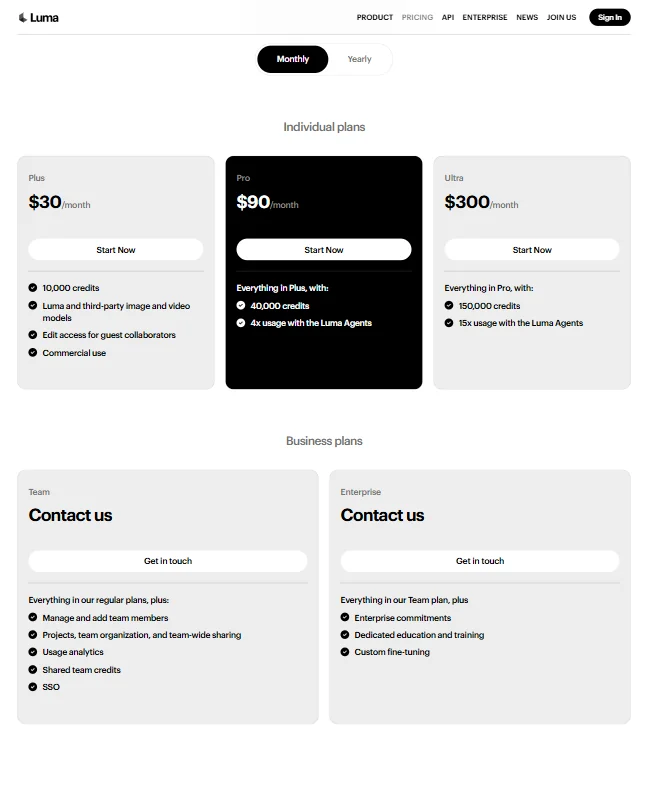
Plus costs $30 a month ($25 a month billed yearly) for 10,000 credits. That is about eight ten-second Ray3.2 clips at 1080p, 33 at 720p, or 20 Kling 3.0 clips with audio. It removes the watermark, allows commercial use and opens every model.

Pro costs $90 a month ($75 billed yearly) for 40,000 credits, about 33 Ray3.2 clips at 1080p, and four times the Luma Agents usage. Ultra costs $300 a month ($250 billed yearly) for 150,000 credits, about 125 Ray3.2 clips at 1080p, and fifteen times the agent usage. Team and Enterprise plans are sold through sales and add shared credits, team management and SSO.

Privacy and support

Luma's terms let it use what you upload to train and improve its models on paid plans as well as free ones, and they describe no opt-out. On the free tier the licence is wider still, covering public display and distribution of your inputs. Enterprise contracts are negotiated separately.

Support is by email at support@lumalabs.ai, with a learning hub of guides and a Discord community.

Who Luma suits

Luma suits filmmakers and creative teams who want Ray3.2's keyframe control and HDR output for hero shots, and who like having Kling, Seedance and Veo a click away for shots that need sound or 4K. Guest collaborators can edit on every plan, and the agents help when a job is a batch of related shots rather than one clip.

It suits less well anyone who needs a lot of 1080p footage on a small budget: Plus makes only about eight full-resolution Ray3.2 clips a month. Teams handling confidential material should read the training terms first.

How Luma AI compares

Luma AI scores 8.0 out of 10 among the AI video generators we rate. These three do the same job and are the closest to it, compared on what each vendor publishes.

8.0Luma AI
vs
8.1Runway

Runway

Both offer other companies' models next to their own. Luma AI's Ray3.2 takes first and last frames and extends clips on Luma's own model; Runway's Gen-4.5 takes text or an image and outputs 720p, reaching first and last frames, audio and 4K through Veo 3.1, Kling 3.0 and Seedance 2.0. A working month of 20 ten-second clips costs $90 on Luma AI's Pro plan against $95 on Runway's Max plan. Runway holds SOC 2 and GDPR, which Luma AI does not list.

Pick Runway if you need SOC 2 and GDPR compliance for a team.
Pick Luma AI if you want first and last frames and clip extension on the tool's own model.

Luma AI vs Runway →
8.0Luma AI
vs
8.9Kling AI

Kling AI

Luma AI's own Ray3.2 outputs up to 1080p and reaches 4K through Kling Omni and Kling 3.0, which it offers inside its app. Kling AI's VIDEO 3.0 generates 4K itself, and Kling offers only its own models. A working month of 20 ten-second clips costs $90 on Luma AI's Pro plan against $32.56 on Kling AI's Pro plan.

Pick Kling AI if you want 4K from the tool's own model for far less.
Pick Luma AI if you want Kling, Seedance, Veo and other companies' models in one account.

Luma AI vs Kling AI →
8.0Luma AI
vs
8.6Hailuo AI

Hailuo AI

Luma AI's own Ray3.2 outputs up to 1080p and reaches 4K through the Kling models it offers; Hailuo AI's MiniMax H3 tops out at 2K but generates sound and dialogue itself. A working month of 20 ten-second clips costs $38 on Hailuo AI's Pro plan against $90 on Luma AI's Pro plan. Luma AI lists a brand kit and a shared team workspace, which Hailuo AI does not.

Pick Hailuo AI if you want sound from the tool's own model at well under half the cost.
Pick Luma AI if you want a brand kit and a shared team workspace.

Luma AI vs Hailuo AI →

Frequently Asked Questions

Is Luma Dream Machine still available?

Yes, under a new name. Luma retired "Dream Machine" and the product is now the Luma app, running the Ray3.2 video model alongside other companies' models.

What is Luma's latest video model?

Ray3.2, released in June 2026. It generates up to 1080p, supports up to 16 keyframes and renders native HDR. Ray2 is deprecated.

Does Luma generate audio?

Ray3.2 itself does not. Seedance, Kling 3.0, Veo 3.1 and MiniMax H3, all available in Luma, generate sound with the video, and ElevenLabs adds speech, sound effects and music separately.

How many videos do you get on Luma's plans?

About eight ten-second Ray3.2 clips at 1080p a month on Plus, 33 on Pro and 125 on Ultra. At 720p the counts are four times higher.


Luma AI is featured in

Alternatives to Luma AI

Other AI Video Tool options we've reviewed.

HeyGen logo

HeyGen

Solo creators and advanced individuals creating AI videos at scale

8.9
Rank #1 of 7 AI avatar video tools
Best:Avatars10
Weakest:Pricing6.9
Free plan: yesFree trial: noAPI: yes
From $29Free plan
95% from published facts · checked 16 Sep
Riverside logo

Riverside

Podcast and video recording, live streaming, and webinars

8.0
Rank #2 of 5 AI video editors
Best:Recording10
Weakest:Pricing6.9
Records remote guests on separate tracks: yes
From $29No free plan
100% from published facts · checked 16 Sep
Adobe Firefly logo

Adobe Firefly

Creative professionals, marketers, and content creators in the Adobe ecosystem

Not scored yet
Free plan: yesFree trial: yesAPI: yes
From $9.99Free plan

Creatify

Creators and solopreneurs

6.4
Rank #2 of 4 AI ad video tools
Best:Making the ad7.5
Weakest:Assets and teams4.5
Free plan: yesFree trial: yesAPI: yes
From $39Free plan
91% from published facts · checked 16 Sep
Kling AI logo

Kling AI

Filmmakers, content creators, and creative professionals seeking high-quality AI video and image generation with cinematic control

8.9
Rank #1 of 7 AI video generators
Best:What it can generate9.8
Weakest:Privacy and platforms3.2
Does not train AI on your videos: no
From $8.80Free plan
94% from published facts · checked 19 Sep
Krea logo

Krea

Designers who want one of the broadest model menus, plus a node canvas, an AI agent and an API

9.0
Rank #2 of 13 multi-model AI platforms
Best:For video10
Weakest:Pricing6
SOC 2: yesOffers Veo 3.1: yesOffers Nano Banana Pro: yes
From $35Free plan
93% from published facts · checked 19 Sep

User reviews

Review Luma AI

Your rating

Reviews are moderated and appear once approved.