Spreadsheets haven't changed much in 30 years. Rows was betting they were about to. We pulled vendor docs, community threads, and what public review data exists across G2, Reddit, and Capterra, and the product is genuinely interesting. It's also a product in an awkward spot right now.
Rows was founded around 2016 or 2017, depending on which source you trust. Official company pages list 2016, with offices in Berlin and Porto. The acquisition announcement from February 2026 says "we started Rows in 2017." Those are Rows' own words, contradicting each other. We're not sure what to do with that, so we're flagging it and moving on. The Berlin headquarters is consistent across sources.
What is Rows?
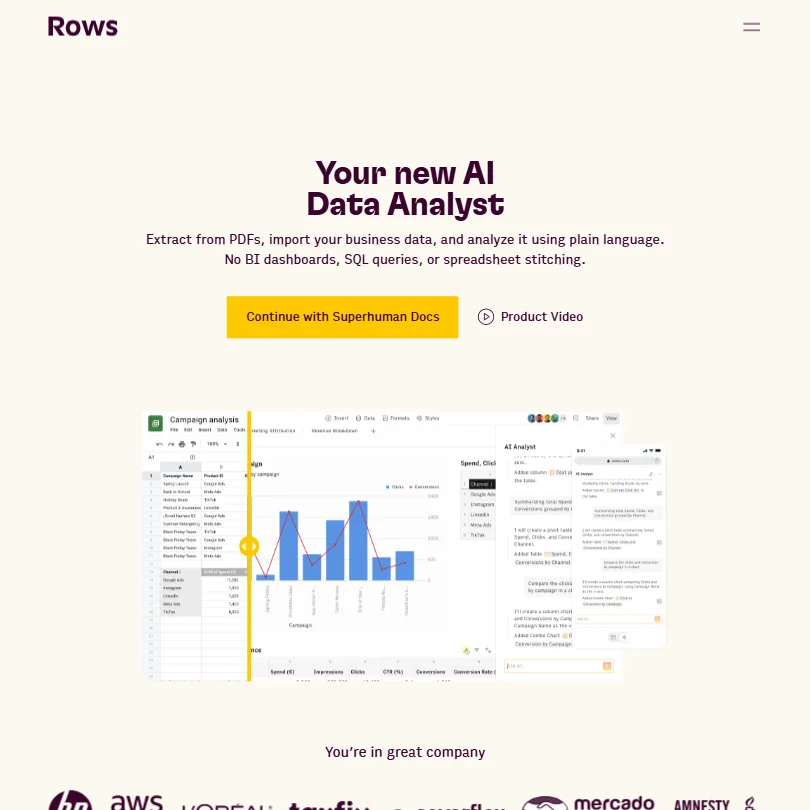
The core idea is simple enough. Take a spreadsheet, wire it to 50-plus live data sources, add an AI layer that understands plain language, and remove the need for SQL or complicated formula chains. That's the pitch, condensed.
Rows positions itself as a replacement for the whole "import data, open a BI tool, wrestle with a formula, export to a slide" routine. You pull data from Instagram or Google Search Console or a data warehouse, the AI helps you analyze it, and you share a live report. All inside one interface. No switching between apps.
The product runs on web only. No mobile app. No offline mode. There is a Chrome extension called RowsX that scrapes tables from websites and pulls them into your spreadsheet. Clever touch. Practically speaking, though, you're desktop-bound.
Rows Features: Automation, AI Assistant & Workflow Capabilities

The automation side is where Rows pulls ahead of a plain Google Sheets setup. Data refreshes can run automatically, as frequently as every minute on the Pro plan, pulling updated figures from connected sources without any manual trigger. The Plus plan automates per day, which is meaningfully weaker. For a marketing team tracking paid spend or social metrics, the Pro cadence is actually useful. The Plus cadence is less so.
Rows AI handles the analysis layer. Ask it a question in plain English, it runs the logic and surfaces the answer. You can point it at a PDF, a connected integration, or existing sheet data. It builds models, generates reports, and writes formulas on request. We kept reading accounts of people using it to replace what they'd previously needed a data analyst for. Take that with some salt. Plausible for simpler tasks. Complex modeling is another story.
Honestly, the document creation angle surprised us. The AI doesn't just analyze data. It builds live, shareable reports that embed anywhere. Notion docs, websites, blog posts. The output updates automatically as the underlying data changes.
What's missing is notable too. No project management. No meeting summaries or calendar hooks. No email tools. This is a focused product. That's a choice, not an oversight, and it's probably the right call. Adding those features would make it worse, not better.
Rows AI Quality: How Smart and Useful Is the Assistant?
The AI runs on a GPT-based backend, which Rows doesn't advertise loudly. It's proprietary in presentation, not in foundation. That's fine. Most tools are doing the same.
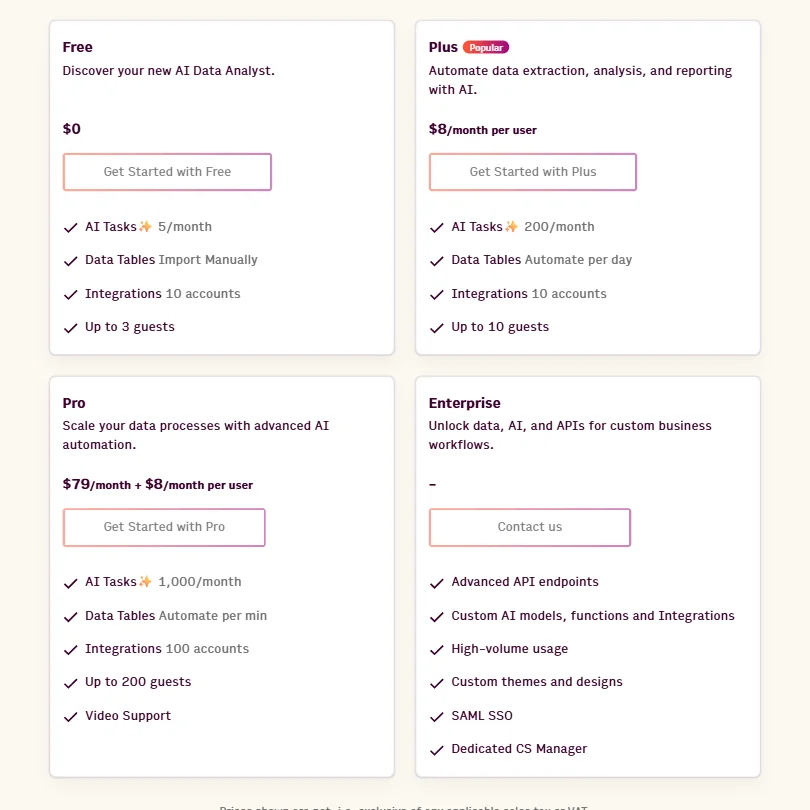
The free plan gives you five AI Tasks per month. Five. That's enough to try it, not enough to depend on it. When we cross-referenced forum discussions with what the pricing page actually shows, the free tier functions as a demonstration, not a working tool. The Plus plan bumps that to 200 per month, which is workable. Pro allows 1,000 per month, which covers a team doing daily analysis without babysitting the counter.
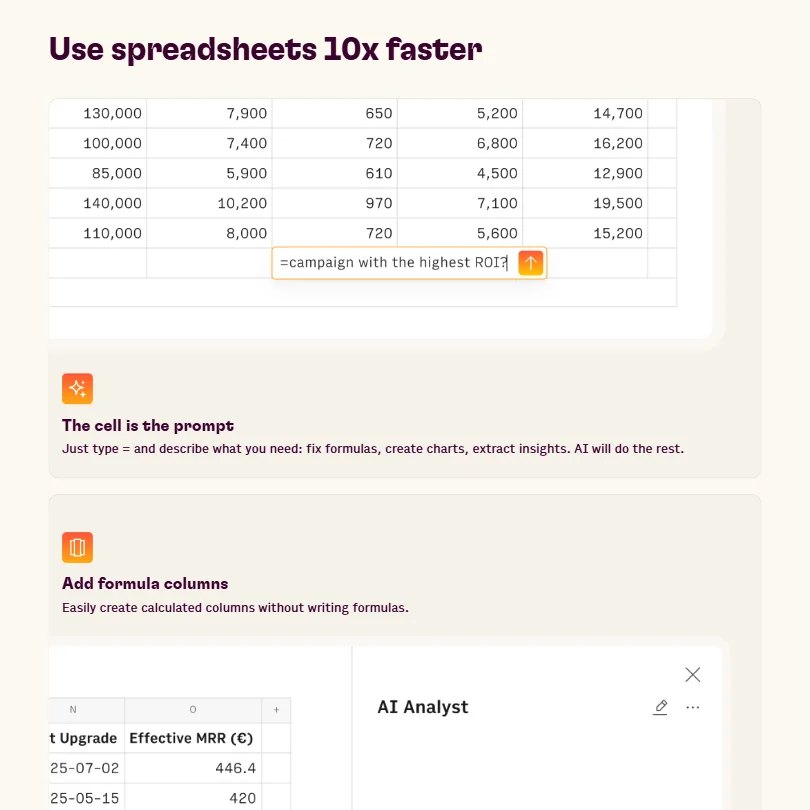
Where the AI earns its keep is in formula generation and plain-language data analysis. That tracks. Nobody likes writing VLOOKUP chains. The PDF extraction capability also comes up frequently in reviews as a genuine timesaver for people pulling structured data out of reports they'd otherwise process manually.
We're skeptical of the "10x faster analysis" claim on the homepage. We've seen worse marketing, but that phrasing doesn't survive contact with reality for most users. Some tasks, sure. All analysis, no.
Rows Integrations: What Does It Connect To?
Fifty-plus built-in integrations is the number Rows leads with. The categories are practical: social platforms, advertising tools, data warehouses, back-office software. The RowsX extension adds another layer by pulling tables from arbitrary websites. Good idea. Works well for structured data, less well for anything messy.
The confirmed integrations include Slack for sending and managing messages, and Zapier for connecting Rows to a much broader app ecosystem. Google Drive is also explicitly documented, covering imports of Google Sheets files, CSVs, images, and PDFs. Worth knowing: Microsoft 365 as a suite doesn't appear to be integrated. Rows lists Microsoft Power BI and Microsoft Translator separately, so the coverage is partial at best.
The API supports serious call volumes on higher tiers. Not a toy API. For teams building internal tooling on top of Rows, that matters.
The integration depth tilts heavily toward marketing and data workflows. That makes sense given the target audience. For a finance team expecting ERP connectors or HR tools, the list gets thin fast.
Is Rows Easy to Use?
This depends entirely on whether you're comfortable with spreadsheets already. Power users of Excel or Google Sheets will find the learning curve short. The AI handles a lot of the formula complexity, which lowers the floor for less technical users.
What we kept seeing in community discussions was a split. Data-savvy users adapted quickly and found the AI genuinely useful. Users coming in cold, expecting something closer to a no-code dashboard builder, ran into friction. The interface is still fundamentally a spreadsheet. That's not a surprise, but it catches some people off guard.
No mobile app is a real usability constraint. Reviewing reports on the go isn't possible, and we saw that come up more than once as a reason people churned. Worth knowing before you commit.
Rows Pricing: Is It Worth It vs Free Alternatives?

The free plan is permanent. Five AI Tasks per month, up to 10 integration accounts, up to 3 guests. It exists. We wouldn't call it functional for regular work.
Paid plans start at $8 per month per user for Plus. That plan allows 200 AI Tasks per month and automates data table refreshes daily. Pro runs $79 per month as a base, plus $8 per month per user on top of that. It adds 1,000 AI Tasks per month, per-minute data refresh, up to 200 guests, and video support. Enterprise is custom, contact sales, and adds things like advanced API endpoints and SAML SSO.
At $8 per month to start, Rows ranks among the cheaper entry prices we've tracked across comparable tools in this category, where the median starting price sits closer to $14. That's a real advantage at the low end.
The per-seat cost on Pro is where it gets complicated. A team of 10 on Pro is looking at $159 per month before they've done anything. Google Sheets is free. Coefficient, one of the closer competitors, has a more generous free tier. The value question isn't about entry price. It's about whether the AI and integrations justify the jump.
One thing we did find on this: Rows has a publicly documented refund policy. Users can request a refund within 7 days of the invoice date if they upgraded by mistake or under different expectations, subject to usage limits. Accidentally added members are also covered. That's a reasonable policy. Not every SaaS tool publishes it that clearly.
Rows vs Airtable: Which Productivity Tool Wins?
Different tools, different jobs. Airtable is a database with views. Rows is a spreadsheet with live data and AI. They overlap in the "team data management" space but pull in different directions.
Airtable wins on structure. If you need relational data with forms, automations, and a visual project layer, Airtable is built for that. Rows doesn't do any of it.
Rows wins on live data analysis. Pulling from 50-plus sources, running AI analysis, and publishing a live embedded report is not something Airtable does natively. For marketing analytics or performance reporting, Rows is the faster path.
The honest comparison is probably Rows versus Coefficient or Causal, not Airtable. Those tools operate closer to the same use case. Causal is stronger on financial modeling. Coefficient leans on Google Sheets as the foundation and adds integrations on top. Rows builds its own interface. Which approach you prefer is mostly taste.
Who Should Use Rows? (And Who Shouldn't)
Marketing analysts who need live data from ad platforms and social tools in a single view. That's the clearest fit we found. The integrations point directly at that audience, and the AI assistant handles the kind of repetitive analysis those teams run every week.
Solo operators building lightweight dashboards for clients or side projects also show up consistently in positive reviews. The embeddable reports are a real differentiator there.
Teams that shouldn't bother include anyone who needs mobile access, anyone expecting a fully no-code experience, and anyone whose core workflows depend on deep Microsoft 365 connectivity. Finance teams with complex modeling needs would be better served by Causal. Enterprise teams wanting AI across their knowledge base should look at Glean instead. Different problem entirely.
Rows Review Verdict
The Superhuman acquisition hangs over everything. Rows announced that the product will wind down on May 31, 2026, with the team shifting focus to strengthening Coda inside the broader Superhuman platform. That's not a rumor. That's from Rows' own announcement.
New purchases, support continuity, the roadmap. All of it is now pointing toward a sunset, not a roadmap. Signing up for an annual plan under those conditions requires a very clear-eyed assessment of what you're actually buying. The 7-day refund window exists, but it doesn't cover long-term commitment risk.
The product itself is solid for its target. Live integrations plus AI analysis in a spreadsheet interface, with Zapier and Slack connectivity, is a genuinely useful combination. The free plan is too restrictive to prove that. Pro pricing is hard to justify for small teams when free alternatives exist covering most of the same ground.
No mobile app. Partial Microsoft 365 support. A firm wind-down date. Those are real friction points. We've seen worse tools. We've also seen better timing. Worth watching. Not worth rushing into.
Frequently Asked Questions
Does Rows have a free plan?
Yes, Rows offers a permanent free plan. It includes 5 AI Tasks per month and up to 10 integration accounts, but those limits make it better for evaluating the product than for doing regular work. Most users we read about hit the AI task limit quickly and had to decide whether to upgrade. The 3-guest cap also limits any meaningful team collaboration at the free tier.
How does Rows compare to Google Sheets for AI features?
Google Sheets has added some AI features through Gemini, but it doesn't come close to what Rows does natively. Rows AI handles formula generation, plain-language data analysis, and live report building inside the same interface, with integrations that Sheets doesn't replicate without third-party tools like Coefficient. The catch is that those capabilities cost money on Rows, and Sheets is free. For teams already in the Google ecosystem, the upgrade calculus is real.
Is Rows still being developed after the Superhuman acquisition?
No. Rows has confirmed that Rows.com will fully wind down on May 31, 2026. The acquisition announcement stated the team would focus on Coda within the Superhuman platform going forward. The product remains available until that date, but active development of Rows as a standalone tool has effectively ended. We'd strongly recommend against annual commitments at this point.