SAASINSPECTOR
Superhuman logo

Superhuman Review

AI-assisted writing, inbox management, and collaborative docs

Visit SuperhumanFrom $0/mo

Research-based review. We analyzed vendor documentation, customer reviews on G2, Capterra, and Reddit, and live pricing — not hands-on testing yet. We update as our team puts tools through real workflows.

The verdict

Superhuman started as a keyboard-shortcut-driven email client promising inbox speed and built a cult following at $30 per month. It has since expanded into a full productivity suite with AI writing assistance, collaborative Docs, and an AI agent called Go that connects to hundreds of tools. The product is best suited for professionals who live in email and want deep AI integration, though the expansion has introduced tradeoffs and user skepticism.

Pros

  • The keyboard-shortcut-first email experience has been consistently praised for years, helping users get through their inbox significantly faster.
  • AI-powered writing assistance, backed by Grammarly's technology, is well-regarded for generating replies, adjusting tone, and matching user voice.
  • Auto Drafts, Auto Archive, Auto Labels, and Auto Reminders provide meaningful email automation that reduces manual workload.
  • The Go AI agent connects to Gmail, Google Drive, Jira, and hundreds of other tools to surface contextual information across browser tabs.
  • Snippets and Quick Quote features allow users to pull from past emails quickly, speeding up repetitive communication tasks.
  • Docs product includes collaborative pages with real-time editing, tables, Kanban boards, and database features for team workflows.
  • The suite positions itself as a unified productivity platform, covering mail, documents, and AI assistance in one product.

Cons

  • At $30 per month, the pricing is steep and harder to justify now that the product has shifted away from its focused email-client roots.
  • The significant expansion into a full productivity suite has generated real skepticism among users who valued the original focused email experience.
  • The Docs and broader suite features are newer and unproven compared to the long-standing reputation of the core mail product.
  • No hands-on third-party testing data exists yet, making it difficult to independently verify the AI agent Go's real-world effectiveness.
  • The product's repositioning creates uncertainty about who it's actually built for, muddying its original high-performing email user focus.
  • The expanded feature set introduces tradeoffs that may dilute the speed and simplicity that originally justified the product's cult following.
From $0/moFree plan YesFree trial No

Superhuman homepage screenshot
Superhuman — Homepage

Our research into Superhuman started the same way most of these do. Vendor docs, pricing pages, then the reviews. What we pulled from came from Reddit threads, community forums, and whatever third-party review data existed at time of writing. No hands-on testing from us. What we found is a product that's quietly grown well past the email client it started as, and that growth comes with real tradeoffs.

Founded in 2015 and headquartered in San Francisco, Superhuman built its original reputation on one promise: get through your inbox twice as fast. The keyboard-shortcut-first email client had a cult following. $30 a month felt steep but justified, for the right person. Then the product changed. Significantly.

What is Superhuman?

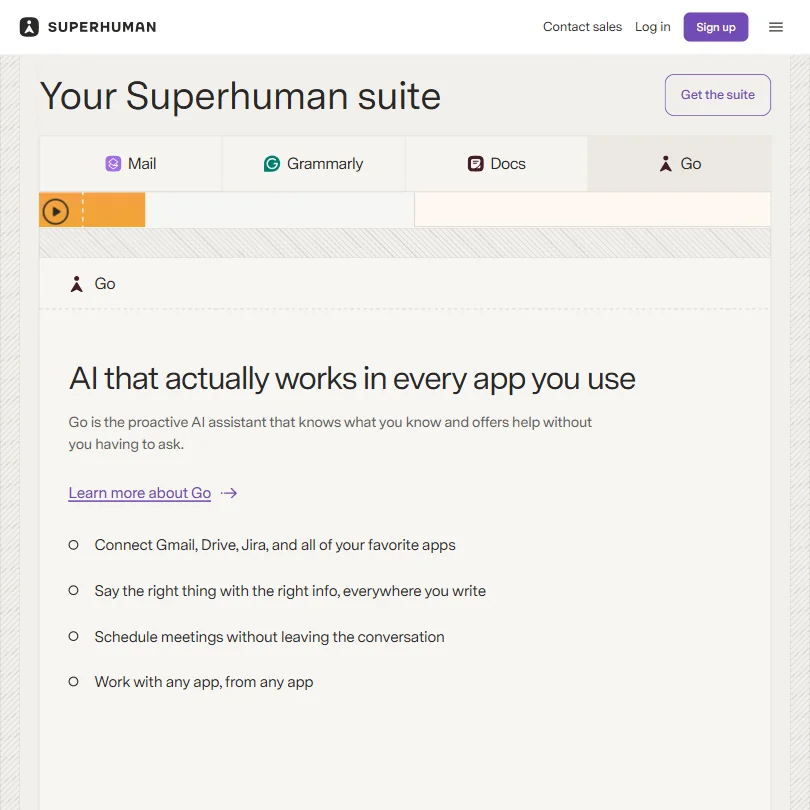
Four products now. Mail, Docs, Grammarly-powered writing assistance, and a proactive AI agent called Go. That's a lot of ground for something that used to just be an email client.

The writing intelligence layer is central to understanding where they're going. The Docs product covers collaborative pages, tables, and Kanban boards. Go, their AI agent, works across browser tabs, connecting to Gmail, Google Drive, and other tools to surface context you didn't have to manually pull. Superhuman positions this as a suite for high-performing professionals. We'd put it more plainly: it's built for people who spend a disproportionate amount of their workday in email, and who want AI woven into every piece of that workflow.

Whether the expanded suite lives up to the email product's reputation is the real question. Honestly, that expansion is also where most of the skepticism we've seen in user discussions lives.

Superhuman Features: Automation, AI Assistant & Workflow Capabilities

Superhuman features screenshot
Superhuman — Features

The feature list is genuinely long. **Auto Drafts, Auto Archive, Auto Labels, and Auto Reminders** are all part of the Mail product. The AI generates replies, adjusts tone, matches your voice, and surfaces follow-up reminders. Snippets and Quick Quote let you pull from past emails quickly. That part of the product has been consistently praised in forums for years, which isn't nothing.

Docs is newer. The product includes real-time collaborative pages, tables, and Kanban boards. A database feature is listed as currently in beta, which gives us some pause next to a core offering. MCP support is there for developers who want to build connectors. That tracks with where the market is heading.

The Go agent is the most interesting piece. It works at the browser level, not just inside the Superhuman app. It can see what you're working on, identify that you're mid-conversation with someone, and proactively offer to help. In theory. User reports are mixed, and we'll get to that more in the AI section.

Worth noting: offline support is a Mail feature, but only on the Business and Enterprise tiers. Not on Free or Pro.

Superhuman AI Quality: How Smart and Useful Is the Assistant?

The writing AI is the strongest piece here. No surprise, given the Grammarly integration. Inline suggestions, tone adjustment, rewriting in over 20 languages. The voice-matching capability, branded as "Write with AI," is one that Reddit users specifically called out as actually working, which is a more meaningful compliment than it sounds because most voice-matching claims in AI writing tools don't hold up under use.

Go is harder to evaluate. The proactive agent concept is genuinely interesting, positioning itself as something that notices context across your tabs and acts before you ask. **The gap between that promise and what users report in practice is real.** Community threads from 2024 and early 2025 surface comments about inconsistent contextual awareness. Some users found it sharp. Others said it surfaced irrelevant suggestions more than useful ones.

A clarification worth making here. Some of those threads predate the current product. Superhuman Go as an agent platform launched in October 2025. Specialized Grammarly writing agents were announced in August 2025. Threads from early 2025 or before couldn't have been discussing what Go actually does now. Those reviews likely refer to an earlier iteration, possibly a Grammarly-side writing assistant or a prior Docs feature, and not the current agent architecture.

We're skeptical of the "every app and tab" framing until more users validate it consistently. The underlying idea is sound. The execution, based on what we've read, is still maturing.

Superhuman's AI layer integrates with Claude and ChatGPT among others. Sensible approach. Not locked into one model's weaknesses, which matters more than people give it credit for.

Superhuman Integrations: What Does It Connect To?

Gmail and Google Drive are native. Jira and HubSpot connect through the Docs product, with Salesforce and Pipedrive also listed, which matters for sales teams using this primarily for email. Zoom and Google Meet work for calendar and scheduling.

The official Superhuman documentation covers a Superhuman Docs for Slack integration and a Slack Pack, and these are real, documented features. Link previews, notifications, directory access, and the ability to import Slack data or send messages from within Docs. **For teams that assumed Slack integration didn't exist, this is worth re-examining before you rule it out.** The documentation is detailed and publicly available.

On the Zapier side, Superhuman's Help Center explicitly states that Docs integrates with Zapier, and Zapier maintains its own official Superhuman Docs integration page. Access to over 1,000 apps through that connector infrastructure is the stated capability. We cross-referenced both sources and the integration is confirmed, not assumed.

API access is available through the Superhuman Platform. MCP support lives in Docs. For developer-heavy teams, that combination matters.

Is Superhuman Easy to Use?

The original email product was keyboard-shortcut-driven. Fast, with a real learning curve. That reputation follows the product today. Power users loved it. Everyone else spent a few days feeling slow before feeling fast.

The suite version complicates this. Docs adds a new interface to learn. Go adds a browser-level agent that needs configuration. Users who've been on Superhuman Mail for years seem to handle the expansion well. Users who come in new, trying to adopt the full suite from scratch, face a steeper ramp.

Community onboarding threads give a consistent read. The email product rewards the investment. Docs is still rougher around the edges, not unusable but less polished than the mail side.

Fair. A product this ambitious shouldn't be expected to be equally smooth everywhere at once.

Mobile apps cover both iOS and Android. Desktop apps exist for Mac and Windows, with web access as well. Cross-platform coverage is solid, though users occasionally flag differences between the desktop and web experiences that are worth factoring in.

Superhuman Pricing: Is It Worth It vs Free Alternatives?

Superhuman pricing screenshot
Superhuman — Pricing

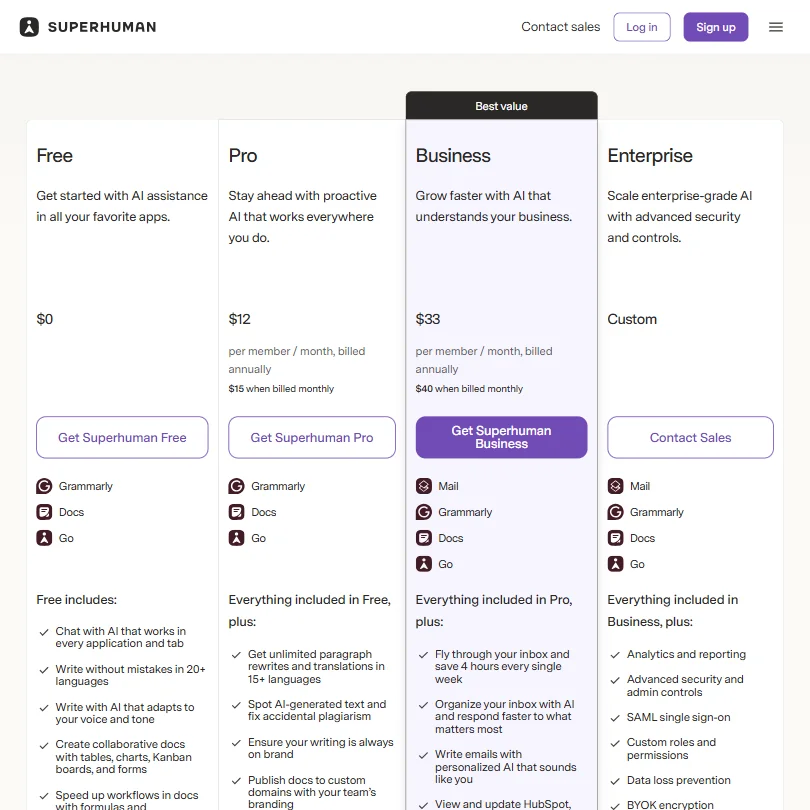
There's a free tier. It includes Go, the Grammarly writing tools, and Docs with limitations. Fine for evaluation, not enough for serious daily use.

**The Pro plan is $12 per seat per month**, billed annually, or $15 month-to-month. Business is $33 per seat per month annually, $40 month-to-month. Enterprise is custom. No free trial, just the free tier.

At $12 a month, you're in Notion territory. Notion's Plus plan sits at $10 per seat per month on annual billing, or $12 month-to-month. That comparison matters because Notion covers docs and project management without an email layer. You'd still need an email client on top. At $33 a month for Business, you're expecting a lot of the full suite to justify the price versus buying Grammarly, a decent email client, and Notion separately and coming out cheaper.

Reddit threads from 2025 surface a recurring tension here. Users who live in email, especially sales reps or founders managing heavy inbox volume, tend to say Business pays for itself. Users who adopted the tool hoping to replace Notion-style docs feel less convinced.

We dug into the refund policy and found nothing publicly stated. Small issue, but real.

Superhuman vs Notion: Which Productivity Tool Wins?

These tools aren't really competing for the same primary use case, which makes the comparison awkward. But it keeps showing up, so here it is.

Notion wins on Docs. Deeper databases, a much longer track record, and a large community of templates and resources. If your primary pain is knowledge management or project tracking, Notion's advantage is not close.

Superhuman wins on email. Not a contest. Notion doesn't have email. And the Grammarly-backed writing intelligence gives Superhuman a real edge for anyone who cares about communication quality, not just storage.

**The honest version of this comparison is that Superhuman is an email-first productivity suite, and Notion is a docs-first workspace.** They overlap in the middle on collaborative pages and project management. Neither fully covers the other's core.

For teams that need AI-powered workplace search at scale, something like Glean operates in a different tier entirely. Worth knowing that option exists.

On price, Notion's Plus plan at $10 per seat per month annually is often the more defensible choice for a team already satisfied with Gmail. The email layer is where Superhuman earns its premium, and if you don't need that layer, the math shifts fast.

Who Should Use Superhuman? (And Who Shouldn't)

High-volume email users. The core fit. Founders, sales reps, executive assistants, anyone whose productivity is measurably tied to inbox management. The automation features and AI writing tools are built specifically for people who send a lot of email and care how it reads.

Teams who want one product to cover email, docs, and writing assistance. The suite pitch works if you're willing to pay Business tier rates and invest in the learning curve. Early-stage startup teams trying to keep their tool count low show up in community threads as a recurring successful use case.

Product teams and engineering teams looking for a Jira replacement or deep project management won't find it here. Docs is improving, but it's not where ClickUp Brain² or Notion are on project management depth.

Budget-conscious teams. $33 per user per month adds up. The value argument holds for power users. Less so for teams where only a handful of people would genuinely use the full suite daily.

Superhuman Review Verdict

The email product is the best in its class. That's not a new opinion. It's been the opinion for years, and the writing AI has made it meaningfully stronger. The Go agent is genuinely interesting, even if real-world performance still trails the marketing at this stage.

The suite expansion is the more complicated story. Docs is real but still maturing. Pricing assumes you'll extract value from the full platform, not just the email side. At $33 per user per month, that's a legitimate bet for the right team. A stretch for everyone else.

**What makes Superhuman worth recommending is narrow but solid: if email is your primary productivity surface and you write a lot of it, nothing else in this category is as fast or as carefully built around that workflow.** The rest of the suite is a bonus that's getting better. The email product is the reason to be here.

The absent refund policy and the need to verify specific integration coverage against your stack before committing are both worth flagging. Not dealbreakers. Just questions to ask before you sign a team up.

We're positive on this one. Not uncritical. But positive.

Frequently Asked Questions

Does Superhuman have a free plan?

Yes. The free tier includes access to Go, the Grammarly writing tools, and Docs with some feature limitations. There's no free trial for paid plans, so the free tier is the main way to evaluate the product before spending anything. For anyone seriously considering the Business plan at $33 per month, **spending real time in the free tier first** is the obvious move before committing a team.

What is the Go AI agent in Superhuman?

Go is Superhuman's proactive AI agent, designed to work across browser tabs, not just inside the Superhuman app. It connects to tools like Gmail, Google Drive, and Jira to pull context from wherever you're working. The pitch is that it notices what you're doing and helps before you ask. Go launched in October 2025, so reviews and threads from before that date are describing something different, likely an earlier writing assistant feature, not the current agent. **User reports on the current version's consistency are still limited**, so it's better understood as a maturing capability than a finished one.

How does Superhuman compare to traditional email clients like Gmail?

The core difference is speed and AI-assisted writing. Gmail is free and deeply integrated with Google's ecosystem. Superhuman adds keyboard-driven workflows, Auto Drafts, tone-matching AI, read statuses, and a follow-up system that Gmail doesn't come close to on any of those points. For users already satisfied with Gmail and Grammarly's free tier, the upgrade isn't obvious. For high-volume email users who write dozens of messages a day and need to move fast, **the gap between the two products becomes very apparent very quickly** once you've spent real time in both.

Superhuman is featured in

Alternatives to Superhuman

See all Superhuman alternatives →

Other AI Productivity Tool options we've reviewed.

User reviews

Review Superhuman

Your rating

Reviews are moderated and appear once approved.