SAASINSPECTOR
Shortwave logo

Shortwave Review

Professionals and ambitious teams wanting AI-powered email automation and inbox management

Visit ShortwaveFrom $30/mo — Business

Research-based review. We analyzed vendor documentation, customer reviews on G2, Capterra, and Reddit, and live pricing — not hands-on testing yet. We update as our team puts tools through real workflows.

The verdict

Shortwave is an AI-native email client built on top of Gmail by ex-Google engineers, designed to automate inbox management, drafting, and team collaboration through plain-English prompts. It's best suited for Gmail users and small teams who want AI to handle the tedious parts of email rather than just assist with them. With limited review data and a newer automation product in Tasklet, it shows real promise but still needs more real-world validation.

Pros

  • Built by ex-Google engineers, resulting in a polished and technically credible product.
  • AI filters written in plain English allow natural language rules like 'label anything from my landlord as urgent,' which is meaningfully different from Gmail's rule-based system.
  • The Shortwave Agent handles organization, writing, scheduling, and search through plain-English prompts without requiring manual configuration.
  • AI learns your writing voice and style from existing emails, enabling more personalized drafting assistance.
  • Team collaboration features include shared threads, private comments, assignees, and shared labels — reducing email black-box problems.
  • Connects to Tasklet for 24/7 workflow automation across a claimed 3,000+ apps, extending its utility beyond the inbox.
  • Designed as an AI-native client from the ground up, not a plugin or add-on bolted onto an existing interface.

Cons

  • Only works with Gmail and Google accounts, making it inaccessible to users on Outlook or other email providers.
  • The 3,000+ app integration claim via Tasklet lacks strong independent verification and should be treated with skepticism.
  • Tasklet is a newer, less proven product with limited third-party reviews available to validate its performance.
  • The AI learning your writing style from sent emails raises legitimate privacy concerns for users wary of data collection.
  • The tool is still relatively young, meaning review data is scarce and long-term reliability is unproven.
  • Replaces the Gmail interface entirely, which may be disruptive for users deeply embedded in Google's native email experience.
From $30/mo — BusinessFree plan NoFree trial Yes

Shortwave homepage screenshot
Shortwave — Homepage

Our research on Shortwave started with a basic friction point: reviewers keep describing this tool as "Gmail with AI" and then praising it anyway. That contradiction was enough to pull us in. We went through their documentation, Reddit threads, Product Hunt comments, and whatever review data exists for a product this young. This Shortwave review reflects that aggregation, not hands-on testing.

The company was founded in 2021, but the email product itself launched in February 2022, a distinction their own retrospective makes. San Francisco, ex-Google engineers, real pedigree. That part checks out.

What is Shortwave?

An AI-native email client. Not a plugin, not a sidebar widget. The whole product is built around the premise that your inbox should handle most of its own tedious work.

It sits on top of Gmail. You connect your Google account, Shortwave replaces your interface entirely, and from there the Shortwave Agent handles organization, drafting, scheduling, and search through plain-English prompts. Their docs describe it as an AI that learns your writing voice from emails you've already sent. Honestly, that claim lands somewhere between impressive and unsettling depending on how you feel about handing a system your full email history.

For teams, there's a collaboration layer. Shared threads, private comments, assignees, shared labels. The pitch is that email shouldn't be a black box where one person reads something and everyone else waits.

Shortwave Features: Automation, AI Assistant & Workflow Capabilities

Shortwave features screenshot
Shortwave — Features

The automation angle is what separates Shortwave from most competitors. AI filters written in plain English let you instruct the system the way you'd instruct a person. "Label anything from my landlord as urgent, archive the rest." That's genuinely different from Gmail's rule editor, which hasn't changed much in fifteen years.

Shortwave also connects to a sister product called Tasklet, which handles 24/7 workflow automation and claims coverage across 3,000+ apps. We don't have strong independent data on Tasklet's actual performance. It's newer. We're skeptical of that 3,000-app number until more user reports surface.

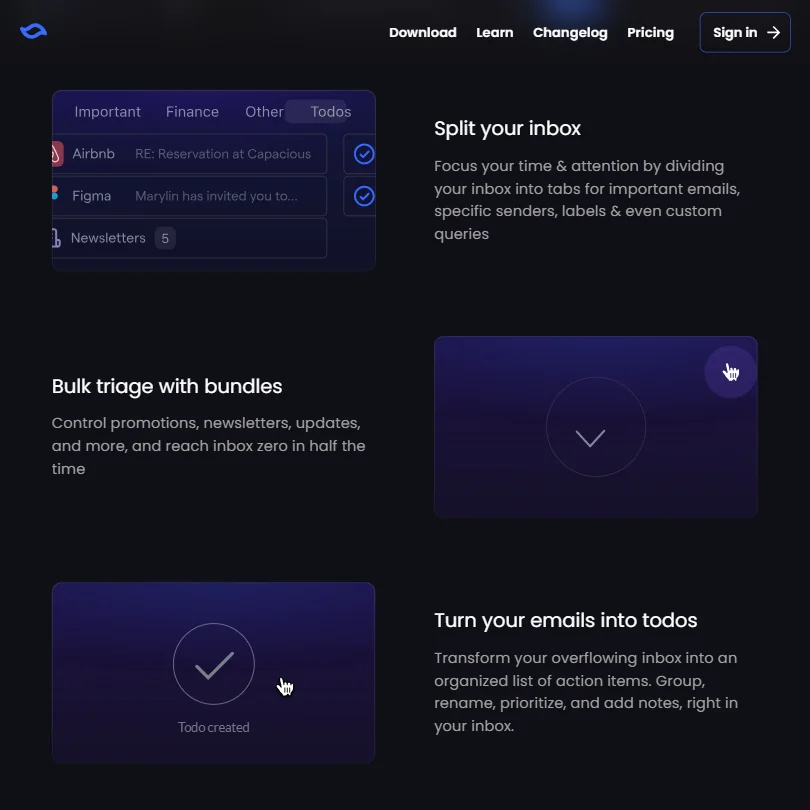
Inbox management features are solid on paper. You get bundle views, inbox splits, snooze, delivery schedules, and block and unsubscribe tools. Superhuman covers most of this too. What Shortwave layers on top is the AI, and that's the actual differentiator.

The project management angle is worth flagging. Assignees, done-status tracking, team todos. That's not standard email behavior. Whether it's useful or just feature creep depends entirely on your team's workflow.

Shortwave AI Quality: How Smart and Useful Is the Assistant?

According to their current 2026 changelog, Shortwave runs Claude 4.6 models across its intelligence tiers. OpenAI and Anthropic are both listed as subprocessors in their documentation, and a 2024 article documented GPT-4o use. Whether GPT-4 remains part of the current user-facing model mix isn't clearly confirmed by available documentation. Their own language refers to "latest AI models from the top research labs," which is deliberately vague.

The writing assistance is the feature that surfaces most consistently in positive comments on Reddit and Product Hunt. The voice-learning angle resonates with people who write a lot of email. That tracks.

AI-powered search across your emails and attachments is another genuine differentiator. Natural-language questions, answers pulled from your full email history. Marketing and ops people dealing with buried context seem to get the most out of it, based on what we read. The AI also does web browsing to pull current information relevant to whatever email you're looking at. Small feature. Useful.

Shortwave Integrations: What Does It Connect To?

Big asterisk here. Shortwave only works with Gmail and Google accounts. No Microsoft 365, no Outlook. That cuts out a significant share of the business market before anyone even looks at pricing.

Within the Google ecosystem it's reasonable. Google Calendar is built in, which matters. Slack and Notion are supported, and HubSpot connects via auto-BCC for CRM syncing.

Tasklet handles the broader app connections, including that 3,000+ app claim, but it requires setting up a separate product. That's an extra configuration step most email tools don't ask for. We'd expect some users to drop off before completing that setup.

No publicly confirmed API access. No confirmed browser extension. Not great.

Is Shortwave Easy to Use?

Onboarding is fast. Connect your Google account, you're in. The interface is cleaner than Gmail's default, and the bundle views do a lot of heavy lifting early.

The learning curve is mostly about the AI layer. Writing useful prompts takes practice. Users who get value fast are almost always the ones who already think in terms of "what do I want automated." People who just want a quick email client and aren't interested in configuring AI may find themselves paying for features they never touch.

Mobile apps exist on iOS and Android, with desktop coverage on Mac and Windows. That's solid cross-platform spread. Offline mode isn't publicly confirmed, which is worth knowing before you commit if travel is part of your workflow.

Shortwave Pricing: Is It Worth It vs Free Alternatives?

Shortwave pricing screenshot
Shortwave — Pricing

No free plan. There are Individual plans, with a free tier and a Pro option at $18 per seat per month. On the Business side, it's $30 per seat per month for Business, $45 for Premier, and $120 for Max.

The plan structure is additive. Premier includes everything in Business, plus advanced intelligence, 2x more AI usage, unlimited AI search history, max 100 threads per AI search, and 10 AI-powered filters. Max adds expert intelligence, 6x more AI usage, max 150 threads per AI search, 50 AI-powered filters, and smarter AI answers with 3x context tokens.

On refunds: Shortwave's current billing documentation clearly states customers can get a full refund within 14 days of payment by contacting the billing team. After 14 days, refunds aren't available. An older Terms of Service page used broader non-refundable language, but the current policy is more specific. Worth confirming directly before you buy.

At $30 per seat per month, Shortwave matches Superhuman's entry price. SaneBox starts around $7 per month and handles inbox filtering without replacing your entire email client. The comparison isn't apples-to-apples, but the price justification needs to be real for teams evaluating multiple seats. The Max plan at $120 per seat is aimed at power users. We don't have enough data to say whether what it unlocks over Business justifies four times the cost.

Shortwave vs Superhuman: Which Productivity Tool Wins?

Both are premium email clients. Both are Gmail-only. Both are expensive. That's where the easy comparisons stop.

Superhuman's reputation is built on speed. Keyboard shortcuts, fast load times, and an onboarding experience that's almost famous among productivity nerds. Their review trail is longer and warmer. Shortwave's advantage is the AI layer, specifically the agent, the voice learning, and the plain-English automation. Superhuman doesn't match those right now.

Team collaboration is where Shortwave clearly pulls ahead, shared live threads, private comments, assignees. Superhuman is built for individual productivity. Shortwave is trying to be a team inbox platform. Those are different products wearing similar price tags.

That said, Superhuman's integrations feel more reliable based on what we read. Shortwave's dependency on Tasklet for broader automation is an extra step Superhuman doesn't require. Fair. But the AI gap is real.

Who Should Use Shortwave? (And Who Shouldn't)

Teams who live in their inbox. Specifically smaller teams where email functions as a collaboration tool, not just a personal queue.

Founders, ops leads, marketers who write heavy email volume and want AI drafting that actually sounds like them. People comfortable doing a bit of configuration upfront to get automation working.

Microsoft 365 shops. Not an option, full stop.

Solo professionals who want basic inbox management without AI complexity should look at SaneBox first. Cheaper, and it doesn't ask you to rethink your entire email setup. If meeting intelligence matters more to you than inbox intelligence, something like Fathom AI Notetaker probably deserves attention before Shortwave does.

People who need confirmed offline access should wait until that's publicly documented before committing.

Shortwave Review Verdict

The ex-Google team built something with real ambition. The agent, the voice learning, the team collaboration layer. These feel considered, not bolted on for the sake of an AI headline.

The Gmail-only constraint is a real wall. That single limitation disqualifies Shortwave for a large portion of business users before pricing even enters the conversation. And pricing isn't cheap. $30 per seat per month is defensible if the AI actually saves meaningful time, but each team has to validate that in a 14-day window, which is tight.

Support documentation is thin relative to what the product claims. No G2 presence, no Capterra listing. That's not a dealbreaker, but it means the independent review trail is short and harder to trust. We'd want more user data before calling this a confident recommendation.

Worth trialing seriously. Worth being skeptical of before you buy.

Frequently Asked Questions

Does Shortwave work with Outlook or Microsoft 365?

No. Shortwave only connects to Gmail and Google accounts. If your team runs on Microsoft 365 or Outlook, this tool isn't an option right now. Hard stop, not a workaround situation.

Is there a free version of Shortwave?

There is a free Individual plan. On the business side, there's no permanent free tier, only a 14-day trial without a credit card requirement. After that, the cheapest business option is $30 per seat per month. The Individual Pro plan runs $18 per seat per month if you're evaluating a lighter-weight option first.

How does the Shortwave AI learn your writing voice?

According to their documentation, the AI analyzes emails you've already sent and picks up on your phrasing patterns, tone, and style. It then uses that to write drafts that sound more like you than a generic AI template. Whether it actually sounds like you in practice is something we haven't tested firsthand, and user experiences on this seem to vary.

Shortwave is featured in

Alternatives to Shortwave

See all Shortwave alternatives →

Other AI Productivity Tool options we've reviewed.

User reviews

Review Shortwave

Your rating

Reviews are moderated and appear once approved.