RunDiffusion runs Stable Diffusion and Flux tools in the cloud alongside other companies' image and video models, from Kling and Veo to Nano Banana Pro, on one account. Whether it suits you depends on whether you want its own fine-tuned Juggernaut models and LoRA training alongside the aggregator, and how far your token plan stretches against the models you actually use.

What is RunDiffusion?
RunDiffusion is a cloud platform that runs in the browser, giving access to open-source tools like ComfyUI and Auto1111 as well as its own fine-tuned models and a growing list of other companies' image and video models. A free plan gives up to 100 tokens a day, with 10 GB of storage retained for 72 hours.
RunDiffusion's own models
- Juggernaut XII (RunDiffusion's newest Juggernaut release): a fine-tune built on Flux and Stable Diffusion.
- Juggernaut XI: the previous Juggernaut release.
- Juggernaut Pro Flux and Juggernaut Base Flux: earlier fine-tunes in the same line.
- RunDiffusion Photo Flux: a photo-focused fine-tune.
- Runnit Scenes: an in-house tool that adds camera-move effects such as dolly zoom and arc to a shot.
Other companies' models on RunDiffusion
RunDiffusion runs these models from other companies.
Video
- Kling (Kuaishou): 1.6 Pro up to 3.0 Pro, O3 Standard
- Veo (Google): 3, 3.1, and their Fast versions
- Sora (OpenAI): 2
- LTX (Lightricks): 2, 2.3
- Wan (Alibaba): 2.1, 2.5
- Pixverse: v4
- MiniMax (MiniMax): Hailuo 2
- Seedance (ByteDance): 1.5 Pro
- Ray (Luma): 2
Images
- Nano Banana (Google): original, 2, Pro
- Seedream (ByteDance): v4, v4.5
- FLUX (Black Forest Labs): Pro Ultra, Dev, 2 Pro
- GPT Image (OpenAI): ChatGPT Image, ChatGPT 1.5 Image
- Qwen Image (Alibaba)
- Recraft
- Ideogram
- Bria
Not on the list: Seedance 2.0, and a model named exactly GPT Image 2.
What you can make with RunDiffusion

Kling 3.0 Pro takes a required start frame and an optional end frame for stronger control over the final shot. Magnific Upscaler and Topaz Generative Upscaler increase resolution and add detail to existing footage or stills.
For images, inpainting tools remove objects, replace backgrounds or add elements, and Nano Banana Edit and ChatGPT Image Edit handle dedicated editing. LoRA model training is included from the Hobby plan up, using RunDiffusion's own Flux Trainer to fine-tune a model on your brand.
Workflows, agents and teams
Runnit Boards let you combine image models, video models, fine-tuning and editing tools on one board. API Mode is available from the Creators Club + Pro plan up. The Team plan supports up to four people with a shared Team Library, and Enterprise adds multi-team management and SSO.
RunDiffusion pricing: what each plan gives
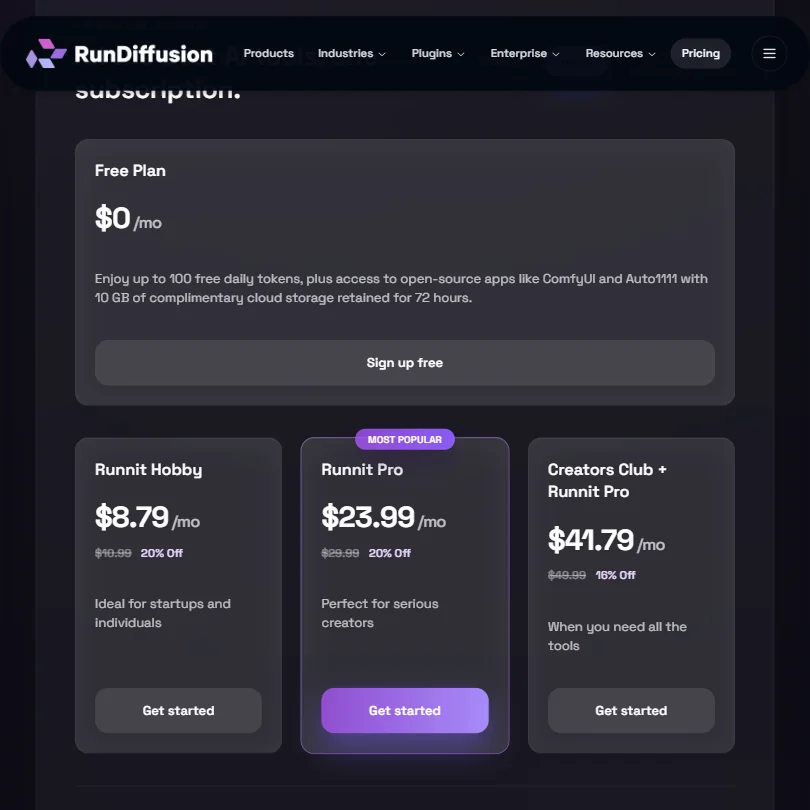
Tokens pay for generation. The free plan gives up to 100 tokens a day plus access to ComfyUI and Auto1111, but no premium image, video or editing tools and no LoRA training. Runnit Hobby costs $10.99 a month ($8.79 billed yearly) for 10,000 tokens. Runnit Pro costs $29.99 a month ($23.99 yearly) for 30,000 to 240,000 tokens depending on the add-on tier chosen, and Creators Club + Runnit Pro costs $49.99 a month ($41.79 yearly) for the same token range plus API Mode. Team costs $224.99 a month ($179.99 yearly) for 120,000 to 240,000 tokens and supports up to four people. Enterprise starts at 300,000 tokens and is priced on request.
RunDiffusion does not publish what a given token amount buys on a named model; exact token costs are shown only inside the app after signing in.
Privacy and support
RunDiffusion says it never uses customer data to train or reinforce any third-party or foundational AI model, on every plan. Its privacy policy covers GDPR, including standard contractual clauses for EEA and UK data transfers. SSO is available on the Enterprise plan, and paid plans include a commercial license.
Support runs 24/7 through chat and email ticket assistance across time zones, with priority support on Team and Enterprise.
Who RunDiffusion suits
RunDiffusion suits people who want their own fine-tuned Juggernaut and Flux models alongside a wide range of other companies' image and video models, and who want to train a LoRA on their own brand from a relatively cheap plan. Its board-based workflow suits people managing several tools and models on one job.
It suits less well anyone who specifically needs Seedance 2.0 or a model named exactly GPT Image 2, since neither is on RunDiffusion's list under that name, or anyone who wants API access without moving up to the Creators Club + Pro plan.
How RunDiffusion compares
RunDiffusion scores 8.0 out of 10 among the multi-model AI platforms we rate. These three do the same job and are the closest to it, compared on what each vendor publishes.
Tensor
Tensor's cheapest plan is $9.90 a month against RunDiffusion's $10.99. RunDiffusion offers Veo 3.1, which Tensor does not list, while Tensor offers GPT Image 2, which RunDiffusion does not. Both include LoRA training, canvas workflows and a free plan. RunDiffusion confirms GDPR compliance and single sign-on.
Pick Tensor if you specifically need GPT Image 2.
Pick RunDiffusion if you want Veo 3.1, GDPR compliance and SSO.
SeaArt AI
SeaArt AI costs $5.99 a month against RunDiffusion's $10.99, and runs on iOS and Android as well as the web. RunDiffusion lists far more models, 21 video and 21 image against SeaArt AI's 10 and 9, and adds Kling 3, Veo 3.1, Nano Banana Pro and Flux 2, none of which SeaArt AI offers. Both include LoRA training and a free plan. SeaArt AI also offers lip sync.
Pick SeaArt AI if you want a mobile app and lip sync.
Pick RunDiffusion if you want the widest model selection, including Veo 3.1.
Krea
RunDiffusion's cheapest plan is $10.99 a month, a little more than Krea's $9, and Krea lists far more models, 34 video and 27 image against RunDiffusion's 21 and 21, and adds Seedance 2 and GPT Image 2, which RunDiffusion does not offer. Both include LoRA training, canvas workflows, an API and single sign-on. RunDiffusion confirms it does not train AI on your uploads.
Pick Krea if you want the widest model selection regardless of price.
Pick RunDiffusion if you want a lower price and no AI training on your uploads.
Frequently Asked Questions
Does RunDiffusion have a free plan?
Yes. It gives up to 100 tokens a day and access to ComfyUI and Auto1111, with 10 GB of storage retained for 72 hours, but no premium image, video or editing tools and no LoRA training.
Which models does RunDiffusion offer?
Alongside its own Juggernaut and Photo Flux fine-tunes, RunDiffusion lists other companies' models including Kling 3.0 Pro, Veo 3.1, Nano Banana Pro and Flux 2 Pro. Seedance 2.0 and a model named exactly GPT Image 2 are not among them.
What do RunDiffusion's plans cost?
Runnit Hobby is $10.99 a month for 10,000 tokens. Runnit Pro is $29.99 and Creators Club + Runnit Pro is $49.99, both for 30,000 to 240,000 tokens depending on the tier chosen. Team is $224.99 a month, and Enterprise is priced on request.
Can I train my own model on RunDiffusion?
Yes. LoRA model training is included from the Hobby plan up, using RunDiffusion's own Flux Trainer.