Vendor docs first, as always. Reclaim's homepage leads with 7.6 more focus hours per week and 49% less time waste. Self-reported figures. We filed them accordingly. What kept pulling us back was the consistency across Reddit threads, G2 write-ups, and Capterra submissions: people describing a tool that actually does what it says it does. That doesn't happen often enough to ignore.
What is Reclaim?
Founded in 2019 and based in San Francisco, Reclaim is an AI-powered calendar tool with a specific mandate: fight for your time automatically, without waiting to be asked. The product runs what it calls AI Agents in the background, continuously reshuffling tasks, habits, meetings, and focus blocks as the week moves underneath them.
Different posture than most calendar tools. Most show you your schedule. Reclaim tries to protect it.
Over 600,000 users across 70,000 companies, per the company's own figures. Real numbers for a niche product. The tool lives primarily on web, with a Chrome extension and add-ons for Google Calendar and Gmail. Slack integration, a Raycast extension, and newer MCP connections to ChatGPT and Claude round out the surface area. No confirmed mobile app from public docs. That comes up again later.
Reclaim Features: Automation, AI Assistant & Workflow Capabilities

Most AI calendar tools pile up functions without a clear idea of why. Reclaim has an organizing principle: protect time first, then schedule everything else around that protection.
AI Focus Time is where that principle lives. You set a weekly hour target, and Reclaim finds and defends blocks automatically. Those blocks flex when meetings shift around them. The user reports we cross-referenced mostly confirmed it holds.
AI Habits work on the same logic. Define a recurring activity, say a daily standup or a real lunch break, and Reclaim finds time for it intelligently rather than pinning it to a fixed slot. Knowledge workers called this one out repeatedly as the feature that actually changed their week.
AI Tasks is where the team story gets interesting. The tool connects to Asana and Jira, as well as Linear and a few others, then drops those tasks onto your calendar as actual time blocks ordered by priority. Not reminders. Scheduled work. Reception was largely positive in the threads we read, though a few Reddit posts from late 2024 flagged that the priority logic gets harder to follow as the task list grows.
On the meeting side, Reclaim offers AI Scheduling Links as a direct Calendly alternative, claiming 524% more availability surfaced compared to standard booking pages. We're skeptical of that specific number. The underlying logic, offering flexible slots rather than rigid fixed windows, does track with how calendar availability actually works.
Buffer Time, meeting prep notes, follow-up email generation, and AI agenda creation fill out the meeting feature set. A lot of surface area. Not all of it is equally polished.
Reclaim AI Quality: How Smart and Useful Is the Assistant?
Reclaim's scheduling engine runs on a proprietary model. They've added an AI Assistant chat layer on top for things like resolving conflicts, finding meeting windows, and reading your day back to you. AI Memories are included, meaning the assistant retains context about your preferences across sessions.
Honestly, that surprised us. Most tools at this price point treat the AI layer as a label, not a feature. Persistent memory is unusual and genuinely useful if it works as documented.
Meeting intelligence is real too. Pre-meeting agendas, post-meeting follow-up drafts, transcript sync into buffer-time notes. That's a coherent workflow for people who live in back-to-back calls.
Where we'd push back: the conversational depth isn't the same as a purpose-built meeting intelligence tool. If AI meeting notes are your primary need, something like Fathom AI Notetaker is built specifically for that job. Reclaim's meeting features exist to serve calendar optimization. They're secondary to the scheduling engine, and they read that way.
The scheduling engine itself is where Reclaim earns its reputation. Not flashy. Just keeps reshuffling until the week makes sense.
Reclaim Integrations: What Does It Connect To?
Google Calendar support is native and deep, including a dedicated Calendar and Gmail add-on. Outlook Calendar gets full support too, with Reclaim's current documentation confirming that Focus Time, Tasks, Habits, Calendar Sync, Scheduling Links, Smart Meetings, and Buffer Time all work the same way across both platforms. Microsoft Teams is covered. The Outlook integration is not a reduced version of the Google experience.
Slack gets a proper integration with Status Sync, which updates your availability automatically based on calendar state. Small feature. Users mentioned it more than we expected.
On the task side, Asana and Jira connect directly, as do Linear and a few others. The MCP connections to ChatGPT and Claude are newer and add useful surface area for power users.
Webhooks land on Business and Enterprise plans, and Reclaim has a documented Zapier integration, including a dedicated setup guide in the help centre. That covers a wide range of custom automation flows that would otherwise require developer work.
Is Reclaim Easy to Use?
Solo users setting up Focus Time blocks and habits report a reasonably smooth experience. The mental model is clear once you accept that the AI is managing your calendar, not you. That's the adjustment.
Teams are slower. Shared Focus Time policies and Team OOO calendars require setup and actual buy-in from the group. Delegated Access for admins adds another layer of configuration. Reddit threads from 2024 showed a consistent pattern: individuals got value fast, team rollouts took two to four weeks before people trusted the automation enough to stop second-guessing it.
The learning curve is real but finite. It's not complex software. It asks you to hand over control, and that's a psychological shift more than a technical one. Some people don't make it through.
No confirmed mobile app is a genuine friction point. Not a minor one.
Reclaim Pricing: Is It Worth It vs Free Alternatives?

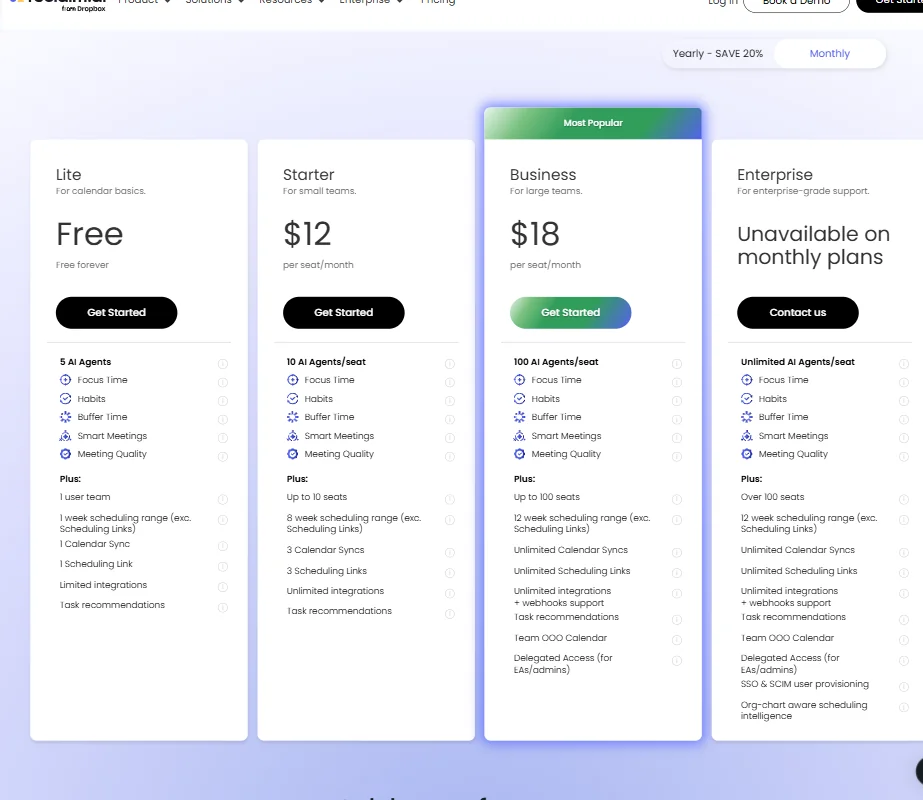
The Lite plan is free forever. Five AI Agents, one user, one Calendar Sync, one Scheduling Link, and a one-week scheduling range. Enough to test the concept. Not enough to run a real workflow.
Starter sits at $10 per seat per month on monthly billing, with ten AI Agents per seat, up to ten seats, and an eight-week scheduling range. Business runs $15 per seat per month with 100 AI Agents, up to 100 seats, and twelve weeks of scheduling range. Enterprise is annual billing only at $22 per seat per month, and it requires a sales conversation to get there.
Clockwise is the most direct pricing comparison. Similar structure, similar range. Motion starts higher and angles toward project management rather than calendar defense.
We looked for a refund policy and found nothing publicly stated. Annoying. Not a dealbreaker, but it adds friction at evaluation time when it shouldn't.
The value case is strongest at Business. Webhooks, unlimited Calendar Syncs, and Unlimited Scheduling Links all come in at that tier. Live chat support with a stated sub-20-minute response time also starts at Business. Lite users get community support only. That gap matters if something breaks at 4pm on a Tuesday.
Reclaim vs Clockwise: Which Productivity Tool Wins?
Clockwise comes up in nearly every forum comparison. Both tools do AI-powered focus time protection and sit in overlapping price ranges.
Clockwise tends to get the nod on team-level meeting optimization and UI cleanliness, based on the reviews we read. Reclaim wins on task scheduling depth. The direct sync from Jira or Linear onto the calendar is more developed than anything Clockwise offers in that direction.
Reclaim's habit scheduling has no real equivalent in Clockwise. That feature alone is why people stay.
Motion is a different calculation. It's a project management tool with calendar features. Reclaim is a calendar tool with task features. The orientation matters, and you should pick based on which direction you're already coming from.
Who Should Use Reclaim? (And Who Shouldn't)
Knowledge workers with packed, unpredictable calendars. That's the sweet spot. Developers, product managers, and ops leads show up most in the reviews we found. People who have meetings that move constantly and need something that responds without being asked.
Teams with EA workflows. Delegated Access is not a common feature at this price point. Fair.
People who need a mobile-first experience should look elsewhere. The absence of a confirmed mobile app is a real constraint, not a minor one. People who want deep meeting transcription as a primary feature should pair Reclaim with a dedicated tool or skip it for that use case entirely.
English-only is also a hard limit. Non-English-speaking teams won't get full utility out of the product.
Reclaim Review Verdict
Reclaim does the hard thing well. Automatic, proactive calendar defense is genuinely difficult to build. Most competitors don't do it as completely. The task-to-calendar sync with project management tools is strong. Habit scheduling is sticky. The AI assistant layer is more capable than we expected at these price points.
No confirmed mobile app remains a legitimate constraint depending on your workflow, and the invisible refund policy is a small friction point that shouldn't exist in 2025. Team rollout timelines are real. Worth knowing before you pitch it internally.
We'd recommend Reclaim without much hesitation for individual knowledge workers and small teams willing to invest a week or two in setup. The free Lite tier is genuinely useful for evaluation. Not many tools can say that honestly.
Frequently Asked Questions
Does Reclaim work with Outlook and Microsoft tools?
Yes. Reclaim supports Outlook Calendar and Microsoft Teams natively. The current documentation confirms that the major features, including Focus Time, Tasks, Habits, Calendar Sync, Scheduling Links, Smart Meetings, and Buffer Time, work the same way on Outlook as they do on Google Calendar. Google does have a dedicated Calendar and Gmail add-on that Outlook doesn't, but the core scheduling experience is not a reduced version on the Microsoft side.
Is Reclaim's free plan actually usable?
More than most. The Lite plan gives you five AI Agents, one Calendar Sync, and a one-week scheduling range at no cost. You'll feel the limits if you're managing a complex schedule or need more than a week of forward planning. As an evaluation mechanism it works. As a permanent setup for a busy calendar, probably not.
How does Reclaim compare to using a manual calendar system?
The difference is responsiveness. A manual system requires you to go back in and reschedule every time a meeting moves or a task gets reprioritized. Reclaim handles that reshuffling automatically. For people with five or more meetings a week and an active task backlog, that automation compounds quickly and the time savings become real rather than theoretical.