What is Motion?
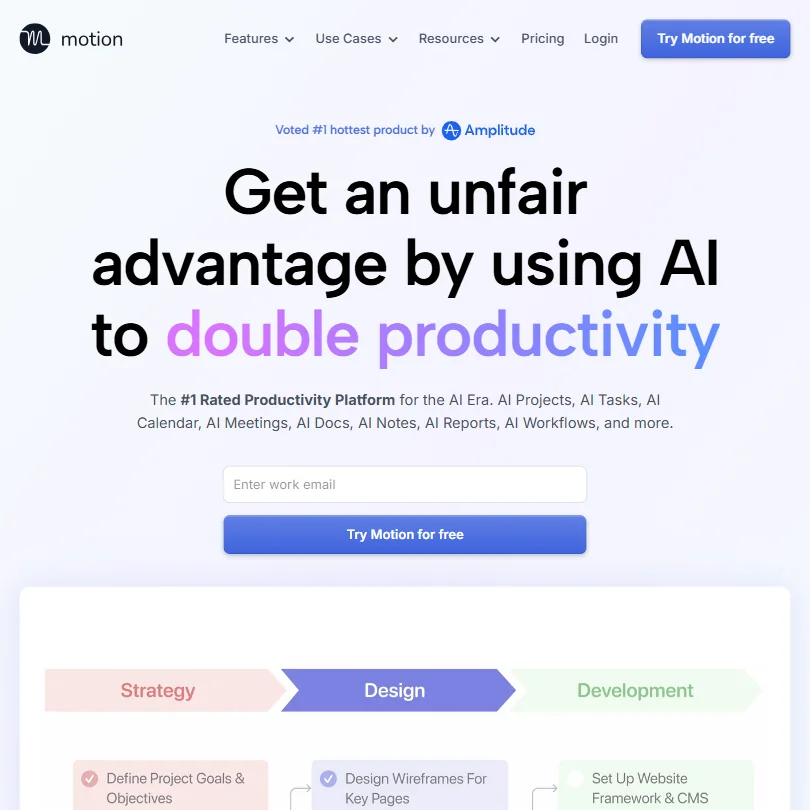
Motion's core idea is that you shouldn't have to manually arrange your own day. You drop tasks and deadlines in, and the AI figures out when they happen. It time-blocks your calendar automatically, reshuffles when priorities shift, and warns you when you're overcommitted. That's the loop.

Beyond scheduling, it's grown into something closer to a full work operating system. There's an AI Task Planner, a project manager, meeting notes, docs, and search, all under one roof. The pitch has expanded pretty aggressively since the early days. In 2019, this was basically a smart calendar. Now they're competing with tools like ClickUp and Asana on breadth.
Honestly, that's a wide net to cast. Not all of it holds up equally.
Motion Features: Automation, AI Assistant & Workflow Capabilities

The auto-scheduling is the thing most people actually buy Motion for. You assign a task a deadline and a time estimate, and the AI slips it into your calendar in a slot where you're free. If something urgent drops in, it reshuffles. If a meeting eats into your afternoon, the tasks move.
Worth noting, though: Motion isn't alone here. SkedPal documents an auto-scheduler that builds time-blocked schedules and automatically replans tasks. Sunsama covers automatic rescheduling when work finishes early or runs long. Motion's AI Task Planner is genuinely well-executed, but "only Motion does this" isn't quite accurate anymore.
The project management side came later. The AI Project Manager can generate an entire project structure from a prompt, pulling together tasks, assignees, and deadlines in one pass. On Business AI at $69 per month, you also get Gantt-style timeline views and ETA predictions. For a small team coordinating client work, that's meaningful.
Meeting notes are baked in. The AI Meeting Notetaker records, transcribes, labels speakers, and produces action items and a follow-up email draft. It comes up a lot in positive reviews. People like not switching to a separate tool. That tracks. If you want standalone meeting AI without the full Motion ecosystem, Fathom AI Notetaker is narrower but sharper at that specific job.
Docs and notes are included. The AI Docs Assistant drafts and proofreads. There's a search layer that pulls across tasks, notes, projects, and meeting content. On paper, it's a lot. In practice, Reddit threads from 2024 surface a recurring complaint: the product tries to do everything, and some of it feels half-baked compared to dedicated tools.
Not a dealbreaker. But worth knowing before you cancel Notion.
Motion AI Quality: How Smart and Useful Is the Assistant?
Motion runs on a proprietary AI model. They don't say which foundation it's built on or how it works under the hood. Most users don't care. What they care about is whether the scheduling actually holds up when their week gets messy.
In the reviews we aggregated, the scheduler gets consistent credit. The complaints are usually about edge cases: tasks reshuffled too aggressively, or priorities the AI reads wrong when context is thin.
Where the AI quality drops off is in the newer features. Docs, search, and the workflow assistant feel less mature than the calendar brain. A few Product Hunt comments from 2024 describe the docs feature as "fine but basic." The meeting notes work well structurally but lack the depth of tools built specifically for that job.
The AI assistant handles scheduling follow-ups and repetitive calendar management. Useful for the boring stuff. Less useful as a general-purpose AI brain. Don't come here expecting a reasoning layer.
We're skeptical of the "AI personal assistant" framing on the homepage. That's doing more work than the product actually delivers.
Motion Integrations: What Does It Connect To?
Soft spot. The pricing page confirms integrations as a feature on both Pro AI and Business AI, but the vendor docs don't publish a full list anywhere we could find. Google Calendar is the main confirmed connection. Slack, Zapier, and Google Drive are unconfirmed from the documentation we cross-referenced. API access isn't mentioned publicly.
For a tool asking $49 per month on the Pro AI plan, that's a real concern. Asana and ClickUp Brain² both publish full integration libraries. Motion's integration story is conspicuously vague for a product positioned at this price point. What we kept seeing in Reddit threads was users routing things through Google Calendar as a workaround bridge. It works, but it's not the same as native connectivity.
No browser extension confirmed either. That limits the surface area considerably.
Honestly, if your work lives in Slack or requires Zapier automations, verify before you commit. We'd say the same about any tool. Here it feels especially necessary.
Is Motion Easy to Use?
Complicated is the honest answer. Not broken. Complicated.
The onboarding asks you to set up task priorities, define working hours, and configure how aggressively the AI should schedule. All necessary. But it's a lot to get right on day one, and if your settings are off, the AI will confidently misfill your calendar with the wrong priorities.
User reviews are split here. Solo professionals and consultants tend to praise the setup process once they've gotten through it. First-time users on Reddit describe a rough first week. One common thread: most users find the desktop or web app essential for initial configuration, even though iOS and Android apps are included on both plans. Running the whole system from your phone isn't realistic. Checking tasks on the go, sure.
The learning curve is real. That's not a knock on the AI. It's just what happens when a tool does this much.
Motion Pricing: Is It Worth It vs Free Alternatives?

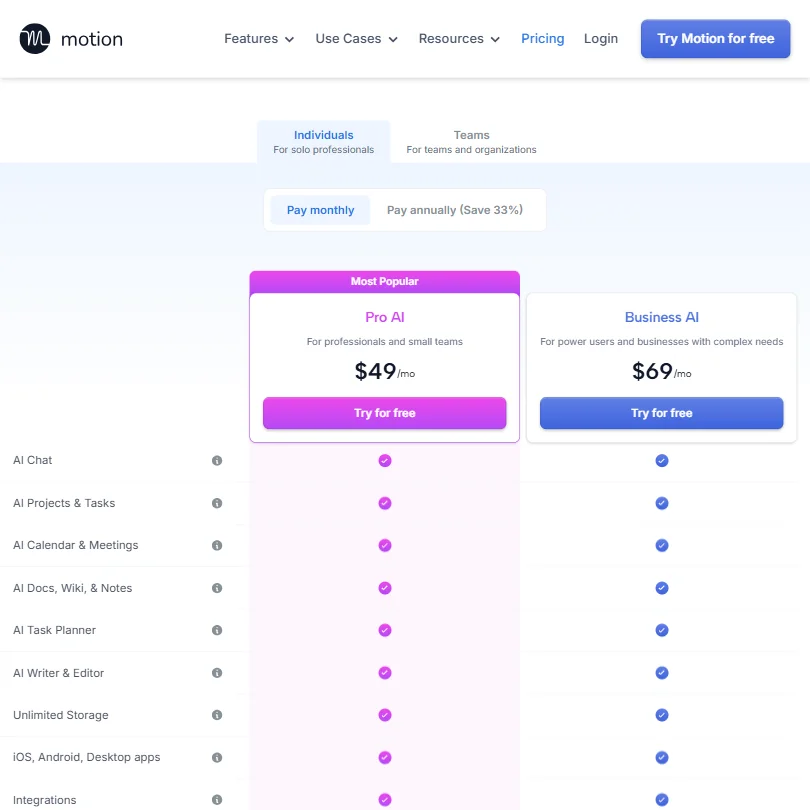
Two plans on the current pricing page. Pro AI at $49 per month, described as for professionals and small teams. Business AI at $69 per month, aimed at power users and businesses with complex needs. Both offer a free trial. No ongoing free tier.
Both plans include AI Chat, AI Projects and Tasks, AI Calendar and Meetings, AI Docs, Wiki and Notes, the AI Task Planner, AI Writer and Editor, unlimited storage, iOS and Android and desktop apps, and integrations. On monthly billing those are the stated rates. Paying annually saves 33%, which brings the effective per-month cost down considerably if you're committing.
The refund policy is buried in the Terms of Service. Purchases are described as non-refundable, though Motion may grant a refund at its sole discretion. Users who believe they were improperly charged are directed to contact support, which is fine as a policy but not something that's surfaced clearly at signup. We found community posts from users who didn't realize the trial had auto-converted until they saw the charge. That's a UX choice, not an accident.
Compare that to Asana, which has a free tier, or Notion, which is free up to a point. Motion asks you to pay from day one and gives you a trial window to decide. If the tool clicks fast, fine. If you need more time to feel confident, you're paying before you're sure. And if you want a refund, you're at their discretion.
We don't buy the enterprise positioning without enterprise-grade connectivity.
Motion vs Asana: Which Productivity Tool Wins?
Apples and oranges, mostly. But worth sorting out.
Asana is a project management tool built for teams coordinating workflows across departments. Motion is built around an individual's calendar, then extended outward to teams. The scheduling intelligence is Motion's whole identity. Asana doesn't time-block your day automatically. That's not what it's for.
Teams that need shared project views, dependency tracking, and deep integrations with existing org tools will find Asana's integration library makes the case on its own. Motion's team features are newer and less proven at scale.
Where Motion wins is the personal productivity layer. No version of Asana looks at your calendar and reshuffles your afternoon because a meeting ran long. That's the genuine differentiator. For a solo operator or a small team where everyone actually uses the AI scheduling, Motion does something Asana doesn't attempt.
They're not really competing for the same buyer. The overlap is smaller than either marketing team would admit.
Who Should Use Motion? (And Who Shouldn't)
Solo professionals with packed calendars. That's the core fit. Consultants, agency owners, anyone who over-commits their weeks regularly. The tool was clearly built with that person in mind first.
Small teams under twenty people can get value from the shared project views and meeting notes on the Business AI plan at $69 per month. But you'll need to accept the shallow integration situation.
People who shouldn't bother: anyone who lives in Slack and expects deep two-way sync. Teams with complex existing tool stacks. Anyone who needs more than the trial period to evaluate before paying, given the refund policy.
English-only is also worth flagging. No other language support is listed. Hard stop for non-English-speaking teams.
Motion Review Verdict
Motion does one thing better than most: it looks at your workload and your calendar together and builds a schedule that's actually achievable. That core function is well-executed. The reviews consistently support it. It's also not the only tool doing this anymore, with SkedPal and Sunsama both documenting similar auto-scheduling behavior, so the moat is narrower than the homepage implies.
The product has outgrown its original focus, and not all of it has grown evenly. Docs and search feel like features added to justify the price, not because the team nailed them. The integration gaps are real. The refund policy is opaque in a way that shouldn't be acceptable at $49 or $69 per month.
What keeps us cautiously positive is that the central promise holds up. Users who commit to it, configure it properly, and live inside it daily report meaningful reductions in scheduling chaos. Most productivity tools get abandoned because they don't change behavior. Motion's auto-scheduling is sticky in a way that pure task managers aren't.
If the integration story improves and the refund policy gets clearer upfront, this gets easier to recommend broadly. As it stands, it's a strong tool for a specific user, priced fairly for what it actually delivers, with some real rough edges around the edges.
Frequently Asked Questions
Does Motion have a free plan?
No. There's a free trial, but no ongoing free tier. After the trial, you're on Pro AI at $49 per month or Business AI at $69 per month on monthly billing, with annual billing saving 33%. The refund policy in Motion's Terms of Service describes purchases as non-refundable, with refunds granted only at Motion's sole discretion. Pay attention when your trial ends.
How is Motion different from a regular calendar or task manager?
The scheduling engine is what separates it from a standard task manager, which just holds your list. Motion looks at your calendar availability, your deadlines, and your task priorities, then builds your day for you. When something changes, it rebuilds. That said, SkedPal and Sunsama both document automatic time-blocking and rescheduling, so Motion isn't the only tool working this way.
Is Motion good for teams or just individuals?
It works for both, but it was clearly designed with individual users in mind first. The solo scheduling features are more refined than the team collaboration layer. Small teams get value from shared project views and meeting notes on Business AI, but larger teams will likely miss deeper integrations and more granular permission controls that tools like Asana handle better at scale.