LanguageTool is an AI writing tool for grammar and style across 30+ languages, built around privacy and GDPR compliance.

What is LanguageTool?
Founded in 2003 and headquartered in Hamburg, Germany, LanguageTool predates most of its competitors by years. Grammarly didn't launch until 2009. Ginger came later still. That history matters, not as a badge, but because the grammar engine reflects two-plus decades of iteration rather than a quick AI pivot. The core product is a grammar, style, and spelling checker spanning 30+ languages, including regional dialects. Six English variants alone. American, British, Australian, and a few others. That breadth is the actual product differentiator, not a marketing add-on. No direct competitor comes close on language count at this price. It runs across more surfaces than most people expect. Browser extensions for Chrome, Firefox, Edge, and Opera. Desktop apps for macOS and Windows. Integrations for Google Docs, Microsoft Word, and LibreOffice. Email client support covers Gmail, Outlook, and Thunderbird, among a few others. Wide net. Honestly, the coverage is impressive. Whether the depth justifies it depends entirely on what you're writing, and in what language.LanguageTool Features: What You Actually Get

LanguageTool AI Output Quality: Is It Good Enough?
The grammar engine holds up well across review sources. Non-native English speakers appear repeatedly in positive reviews. Not as an edge case. As a core user group. The paraphrasing tool is where we get more cautious. It produces clean output, though the suggestions can occasionally flatten tone. Formal mode is the main offender. Useful for dry professional documents, less useful for anything that needs personality. The more ambitious AI claims on the homepage deserve skepticism. The grammar checking, though? Hard to argue with. The proprietary AI model has no disclosed benchmark data, no model card, nothing. The grammar engine is the mature product. The AI additions feel newer, less proven. That tracks. A tool founded in 2003 doesn't suddenly have two decades of AI experience.Is LanguageTool Easy to Use?
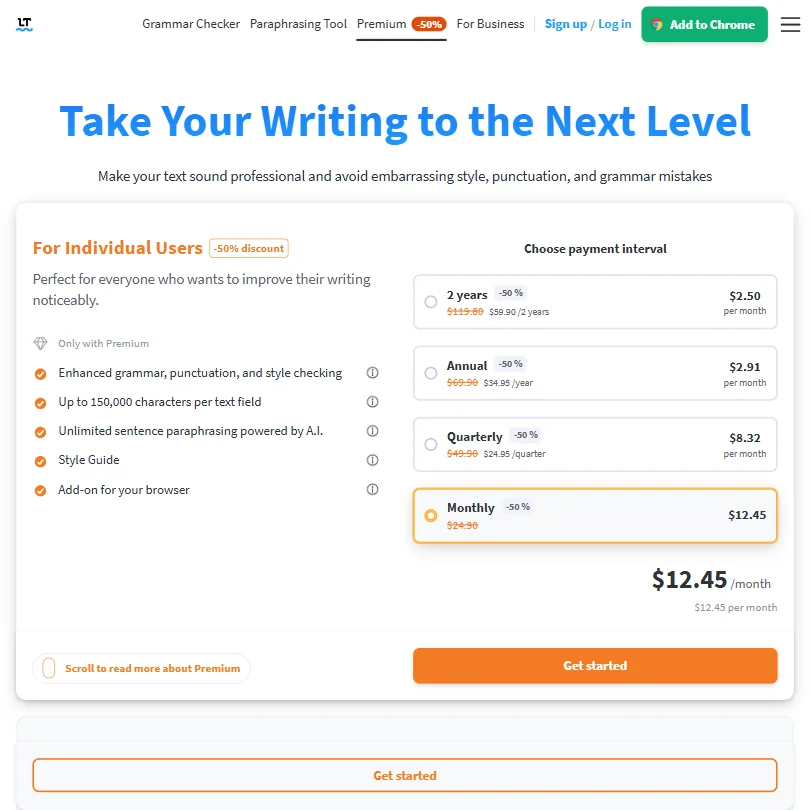
Setup is fast. Install the browser extension, and it's active almost immediately across whatever you're typing into. The Chrome Web Store currently shows two million users for the extension, though LanguageTool's own marketing pages still reference "over three million." That discrepancy appears to reflect outdated copy rather than current numbers. The web editor is clean. Minimal. Word count, basic document stats, nothing cluttered. Most professional users seem to land in the Google Docs or Microsoft Word integrations. Both work without much friction. The learning curve is genuinely low, which counts for something on a tool operating across this many platforms and user types. Fair. Passable. Not great.LanguageTool Pricing: Is It Worth the Cost?
LanguageTool vs Grammarly: Which Is Better?
Direct take. Grammarly is better at English. Specifically American English. The suggestions are more nuanced, tone detection is more developed, and the plagiarism checker adds a layer LanguageTool doesn't offer at any tier. LanguageTool is better at most everything else. Thirty-plus languages, GDPR compliance, a lower price point, and integrations covering LibreOffice and Thunderbird. Grammarly touches neither. A monolingual English writer working in Google Docs who wants deep style feedback should pick Grammarly. A team writing in German or French, or any European business with data privacy requirements, has a stronger case for LanguageTool. ProWritingAid is worth naming as a third option. It goes deeper on style analysis for long-form writing than either of these two. Different tool, different use case.Who Should Use LanguageTool? (And Who Shouldn't)
Non-native English speakers. Clearest fit. The tool catches L2 writing errors that other checkers miss. Multilingual professionals and teams operating under GDPR are the other strong fit. The data handling is cleaner than most American competitors, and that matters in regulated environments. Not a minor consideration for European businesses. Academic writers are a strong match for the tool. The tool handles long documents and dissertations without falling apart, which is more than can be said for tools built primarily around short-form or marketing content. Our review of Paperpal covers a tool built specifically for academic manuscript preparation, which goes further on citation formatting if that's the primary need. Solo English bloggers chasing SEO. Not the fit. Marketers needing bulk content generation, also not the fit. No SEO layer, no generation features, no templates.LanguageTool Review Verdict
Competent, focused, and self-aware about what it is. LanguageTool doesn't try to generate full articles or manage content calendars. It checks writing. In 30-plus languages. At a price that undercuts the category leader. The multilingual support is the real differentiator and it isn't close, no other major grammar checker approaches that language count at this price point. That's not a minor edge. For the right user, it's the whole reason to be here. The weaknesses are real. The AI paraphrasing is thin compared to dedicated rewriting tools. Support is email and help center only, no live chat. For English-only, SEO-heavy, or content-generation-focused workflows, it's probably not enough. For everyone else, it deserves a serious look.How LanguageTool compares
LanguageTool scores 5.5 out of 10 among the AI writing assistants we rate. These three do the same job and are the closest to it, compared on what each vendor publishes.
Grammarly
LanguageTool focuses on grammar and style checking, with no text generation, AI detection or humanizing feature; Grammarly offers all three. LanguageTool's Premium plan is $25.48 a month against Grammarly Pro's $30. LanguageTool states it does not train its AI on your writing at all, while Grammarly lets individual users opt out but defaults training on. Grammarly holds SOC 2 Type II and ISO 27001 certification; LanguageTool's business and privacy pages mention neither.
Pick Grammarly if you want AI text generation, detection and humanizing tools.
Pick LanguageTool if you want a cheaper plan with no AI training on your writing.
ProWritingAid
LanguageTool's Premium plan is $25.48 a month, cheaper than ProWritingAid Premium's $30. LanguageTool includes a team plan with a shared style guide, an API and a personal dictionary; ProWritingAid's pricing page lists none of those four. ProWritingAid checks for plagiarism through separate credits, which LanguageTool does not offer at all. Both tools say they do not train their AI on your writing.
Pick ProWritingAid if you want plagiarism checking and don't need an API.
Pick LanguageTool if you want a team plan, API and lower monthly price.
Wordtune
Wordtune writes new text from a prompt and offers a phone keyboard on iOS; LanguageTool does neither, focused instead on checking text you already have. LanguageTool includes an API and a personal dictionary, both missing from Wordtune's known facts. Wordtune's Advanced plan is $13.99 a month, well under LanguageTool Premium's $25.48. LanguageTool states it does not train its AI on your writing at all, while Wordtune lets users opt out but defaults training on.
Pick Wordtune if you want text generation and a phone keyboard at a lower price.
Pick LanguageTool if you want an API, personal dictionary and no AI training.