SAASINSPECTOR
ProWritingAid logo

ProWritingAid Review

ProWritingAid, an AI writing assistant, checks grammar and style as you type in Word and Google Docs. Plagiarism checks are sold separately as add-on credits rather than included in paid plans. It suits novelists and long-form writers working alone.

Visit ProWritingAidFrom $30/mo

Research-based review. Features and prices are checked on the vendor's own website, and the score is worked out from those facts. We haven't tested it hands-on yet.

The verdict

Worth paying for if you write long fiction and want deep style analysis, but plagiarism checks cost extra and there is no team plan for collaborators.

Pros

  • Offers 25+ writing reports including pacing analysis, dialogue tag tracking, and repeated phrase detection that go far beyond surface-level grammar checks.
  • Integrates with Scrivener, a major differentiator over Grammarly that fiction writers in long-form workflows genuinely value.
  • Works across multiple environments including a web editor, desktop app, Chrome extension, Microsoft Word, and Google Docs.
  • The Chapter Critique feature provides AI-driven feedback on entire chapters at once, approximating developmental editing rather than simple grammar correction.
  • The Virtual Beta Reader simulates reader response feedback on manuscripts, offering fiction writers access to a resource they may not otherwise have.
  • Sparks feature helps writers push through creative blocks by offering AI-powered inspiration and continuation mid-chapter.
  • In development since 2012, giving it a long track record in writing software.
  • Manuscript-level depth of analysis is available at a comparable price point to competitors that offer far less specialized feedback.

Cons

  • Runs on a proprietary AI model with no recognizable third-party AI partnership, which may raise questions about model quality and transparency.
  • The tool is heavily specialized for long-form fiction writers, making it potentially overkill or poorly suited for casual or business writers.
  • The large number of reports (25+) can feel overwhelming and may require significant time investment to use effectively.
  • Does not offer GPT-4 or similarly branded AI integrations that some competing tools use to establish credibility.
  • Users coming from Grammarly may face a learning curve given the depth and complexity of ProWritingAid's feature set.
From $30/moFree plan YesFree trial No
3.9/10

Spec Score

ProWritingAid against 6 AI writing assistants
#5
of 6 AI writing assistants
-1.8
vs the average
100%
from published facts
Ahead of other AI writing assistants
Nothing clearly above the average
Behind other AI writing assistants
Teams and control-4.7What it helps with-1.8Pricing-1.8Where it works-0.7
Every criterion
Tap a row for the facts
What it helps with4.0
-1.8 vs 5.8 avg12 of 30 points
Fixes spelling and grammaryes2 / 2
Checks for plagiarismyes2 / 2
Writes new text from a promptno0 / 1.5
Writes in a saved voice or styleno0 / 1.5
Builds citationsno0 / 1
Detects AI-written textno0 / 1
Rewrites AI text to read as humanno0 / 1
Why these numbers

Checks for plagiarism: Sold as separate Plagiarism Check credits, not included in Free/Premium/Premium Pro plans.

Writes new text from a prompt: Checked features, paraphrasing-tool and pricing pages. Sparks/Rephrase rewrite the user's own text, and Creative Nudges only generate prompts/ideas; no blank-page 'write this for me' generation found.

Writes in a saved voice or style: Checked features and pricing pages; no saved voice/style-guide feature found.

Builds citations: Checked features and grammar-checker pages for APA/MLA/citation; none found.

Detects AI-written text: Checked features and pricing pages; no AI-detection feature found.

Rewrites AI text to read as human: Checked features and pricing pages; no humanize/bypass/undetectable feature found.

Pricing4.0
-1.8 vs 5.8 avg10 of 25 points
Monthly price, cheapest paid plan$30/mo4 / 10
Why these numbers

Monthly price, cheapest paid plan: Plan: Premium. Read: helper (raw HTML); page has Monthly / Yearly / Lifetime tabs, all three present in the HTML. Monthly taken..

Where it works6.5
-0.7 vs 7.2 avg13 of 20 points
Works as you type in other appsyes2 / 2
Browsers it has an extension forchromeedgefirefox2.5 / 3
Word, Google Docs, Outlook, Gmail and Slack add-inswordgoogle_docs2 / 3
Phone keyboard that checks as you typeno0 / 2
Why these numbers

Browsers it has an extension for: No Safari extension found.

Word, Google Docs, Outlook, Gmail and Slack add-ins: Scrivener/Vellum/Atticus/Wattpad are also supported via the desktop app and browser extension but aren't in the checklist's office_integrations vocabulary. No Outlook, Gmail, Overleaf or Slack found.

Phone keyboard that checks as you type: No iOS/Android app at all, so no mobile keyboard.

Teams and control0.0
-4.7 vs 4.7 avg0 of 15 points
Your own style guide and termsno0 / 2.5
Team plan with shared settingsno0 / 2
APIno0 / 2
Single sign-onno0 / 2
Personal dictionaryno0 / 1.5
Why these numbers

Your own style guide and terms: Checked features and pricing pages; no team style guide or custom-rules feature found.

Team plan with shared settings: Pricing page lists only Free, Premium and Premium Pro individual plans; no team/business/seats tier.

API: Checked features, pricing and integrations pages; no public API mentioned.

Single sign-on: No SAML/OIDC/SSO mention found; there is no team plan to attach it to.

Personal dictionary: Checked features (grammar checker) and pricing pages for 'dictionary'; only 'Word Explorer & Thesaurus' is named, no add-word/ignore-word dictionary feature described.

Privacy and security4.0
+0.3 vs 3.7 avg4 of 10 points
Does not train AI on your writingyes4 / 4
SOC 2no0 / 3
ISO 27001no0 / 3
Why these numbers

SOC 2: Checked Privacy Policy and the Help Center's Trust and Safety category; only general TLS/encryption/access-control language, no SOC 2 report stated.

ISO 27001: Checked Privacy Policy and Trust and Safety help articles; no ISO 27001 mention found.

yesnonot published average for AI writing assistants
How the Spec Score works

Scored from what ProWritingAid publishes on its own site. Not a hands-on test.

Compared with 6 AI writing assistants. Facts checked 15 Sep 2026.

A fact the vendor does not publish gets half the points, or the typical value for a number, and says so. It never counts as a no. How we score.

ProWritingAid is a tool that knows exactly who it's for and mostly delivers. Mostly. Founded in 2013 and headquartered in London, ProWritingAid has been around long enough to feel like furniture in the writing software space.

What is ProWritingAid?

It's a writing editor built around manuscript-level analysis. Not just grammar. Not just spell-check. The pitch for ProWritingAid has always been depth, specifically depth for writers working in long form. Novelists, memoirists, people churning through 80,000-word drafts. The tool lives in a few places at once. There's a web editor, a desktop app, a Chrome extension. It also plugs into Microsoft Word, Google Docs, and Scrivener, which matters a lot if you're already embedded in one of those environments. That Scrivener integration in particular is something Grammarly doesn't offer, and we kept seeing that come up in community threads as a genuine differentiator. It runs on a proprietary AI model. No GPT-4 branding, no Anthropic partnership they're leaning on for credibility. Make of that what you will.

ProWritingAid Features: What You Actually Get
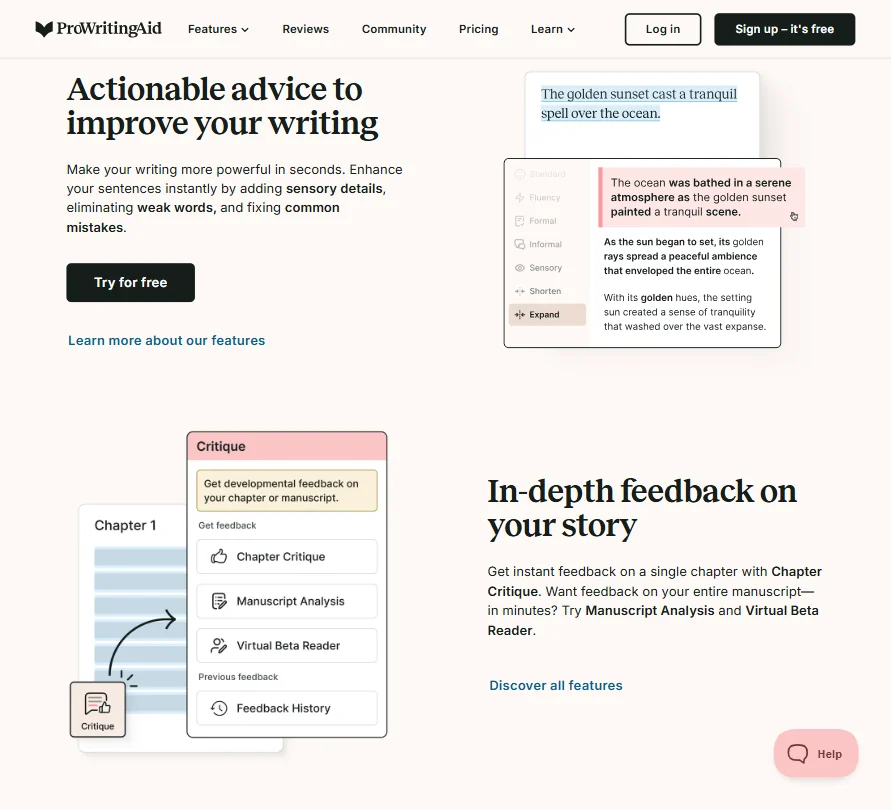
ProWritingAid features screenshot
ProWritingAid, Features
The headline number is 25+ writing reports. That sounds like marketing padding until you actually read what those reports cover. There's a pacing report for fiction. A dialogue tag analysis. A repeated phrase tracker. The depth of manuscript analysis here goes well beyond anything Grammarly offers at a comparable price. These aren't surface-level readability scores dressed up as reports. On the AI side, there are two features worth knowing about. Sparks handles writing inspiration and continuation, so you can push through a block in the middle of a chapter. Chapter Critique gives you AI-driven feedback on an entire chapter at once, which is closer to what a developmental editor does than what a grammar checker does. The Virtual Beta Reader is the interesting one. You upload a manuscript or section, and it returns feedback styled like a reader response. That's not a small thing for fiction writers who don't have access to a writing group. We're skeptical about how deep the feedback actually runs, but it appears to catch more than you'd expect. Rephrasing is unlimited on paid plans. Plagiarism checking exists but costs extra. It's sold as an add-on through Plagiarism Check credits, which is a mildly annoying way to handle it but not unusual. What's missing: no SEO optimization, no bulk content generation, no image tools. This isn't built for content marketers. If that's your job, you want something else entirely.

ProWritingAid AI Output Quality: Is It Good Enough?

The grammar and style checking is solid. Not perfect. The tool can flag stylistic choices as errors, particularly in dialogue-heavy fiction. That's a known issue with grammar tools applied to creative writing, and ProWritingAid handles it better than most, but it still happens. The Chapter Critique feature is where the AI output stands out. That's a meaningful step up from what a basic grammar checker does. Useful for getting unstuck, less useful if you want something that sounds like your voice and not like a writing prompt generator.

Is ProWritingAid Easy to Use?

This is where things get more complicated. The tool is not difficult to learn. The web editor is clean enough. But the sheer volume of reports creates a real decision problem for new users. Where do you start? What do you run first? The onboarding doesn't answer that question particularly well. Experienced writers get past it. Newer writers sometimes don't. The integrations generally work. The Word and Google Docs add-ins behave as advertised, though the Google Docs extension can have occasional sync lag. Not dealbreaking. Just annoying. The Scrivener integration is the smoothest path for serious fiction writers and probably the strongest argument for picking ProWritingAid over a browser-based alternative. We don't buy the idea that any other major grammar tool handles Scrivener as cleanly.

ProWritingAid Pricing: Is It Worth the Cost?
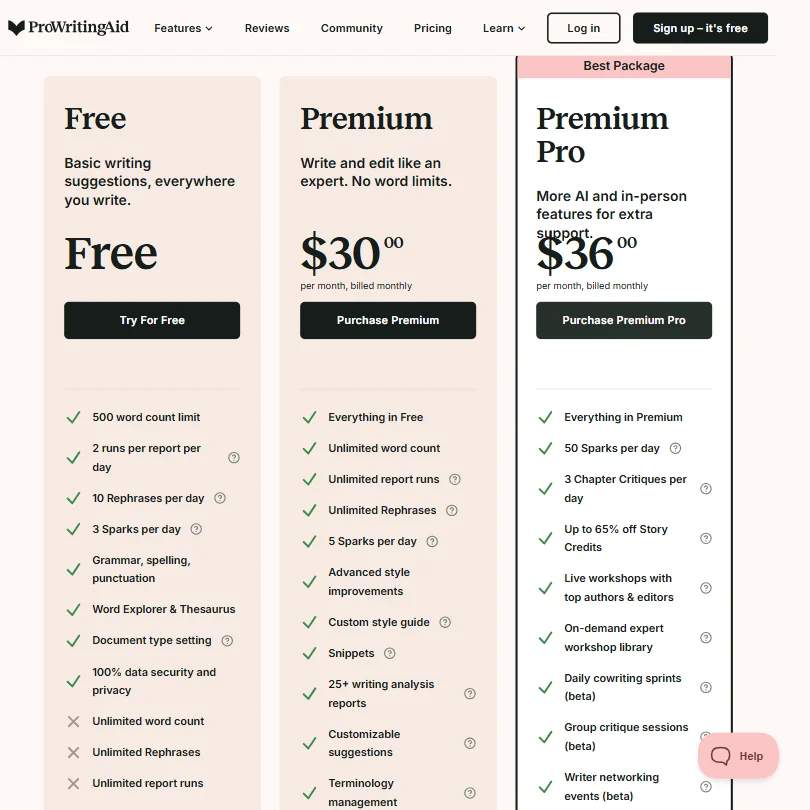
ProWritingAid pricing screenshot
ProWritingAid, Pricing

Ten dollars a month, billed annually. That's $120 a year for Premium, and $144 for Premium Pro, which adds live workshops and community cowriting sprints for another $24 a year. Honestly, that delta is small enough that working fiction writers should probably just start with Pro and skip the comparison entirely.

ProWritingAid homepage screenshot
ProWritingAid, Homepage

The lifetime plans are real and currently listed on the pricing page. Premium Lifetime sits at $399, Premium Pro Lifetime at $699. Whether that math works depends entirely on how long you plan to use the tool, but for a novelist mid-series, amortizing $399 over five or six years beats the annual fee without much effort.

The free plan is essentially a product demo dressed as a tier. 500-word check limits and two report runs per day don't get you anywhere near a chapter, let alone a manuscript. Three Sparks and ten Rephrases daily round out the picture. We're not surprised, but we are a little tired of free tiers structured specifically to frustrate rather than inform.

The refund policy deserves a close read before anyone clicks buy. Annual and lifetime plans get three days. Monthly plans get nothing. That's a short window on the annual side and a hard stop on monthly, which cuts against the casual user who wants to try it for a month and bail. Worth knowing.

No enterprise pricing exists, at least not publicly. Teams looking for seat-based contracts or admin dashboards will dead-end here fast. That's not a knock so much as a plain fact about who this product is built for.

Fiction writers and long-form solo creators. That's the target. The pricing reflects it.

ProWritingAid vs Grammarly: Which Is Better?

Depends entirely on what you're writing. That's not a dodge. Grammarly is broader. It works across more contexts, handles more languages, integrates with more apps, and has a stronger business-writing focus. Its tone suggestions are sharper for professional email and workplace communication. If you write at work and occasionally write other things, Grammarly is probably the right default. ProWritingAid is narrower and deeper. The fiction-specific reports don't exist in Grammarly. The Scrivener integration doesn't exist in Grammarly. The Chapter Critique and Virtual Beta Reader have no real equivalent over there. For novelists and long-form writers, ProWritingAid consistently outperforms Grammarly in the areas that actually matter to them. The price comparison is notable. Grammarly Pro runs $12 a month billed annually. ProWritingAid Premium is $10. You're getting more fiction-specific depth for less money. That's a real argument.

Who Should Use ProWritingAid? (And Who Shouldn't)

Novelists and fiction writers. That's the fit. People working in Scrivener, people revising 60,000-word manuscripts, people who want something closer to developmental feedback than grammar correction. Long-form nonfiction writers are a reasonable secondary audience. The pacing and style reports translate reasonably well to memoir or narrative journalism. Content marketers and SEO writers should look elsewhere. There's no keyword optimization here, no template library, no bulk generation. If SEO content is your day job, something like Koala AI is built for that workflow and ProWritingAid isn't. Business writers who just want clean, correct professional copy will likely find Grammarly more intuitive and better integrated with the tools they already use.

ProWritingAid Review Verdict

ProWritingAid is a genuinely good tool for a specific kind of writer. It's not trying to be everything. The 25+ reports, the Chapter Critique, the Scrivener integration, and the Virtual Beta Reader are real features that serve real needs, and the price is fair. The weaknesses are real too. The free plan is nearly unusable for actual work. The learning curve on the report system is steeper than the marketing suggests. The three-day refund window on annual plans is tight. No enterprise option means teams are out. For working fiction writers, ProWritingAid at $10 a month is probably the most useful writing tool at that price. For everyone else, it depends on whether the manuscript-analysis features are relevant to what you actually write. If they're not, this isn't the tool. We wouldn't call it a must-buy. But we wouldn't talk someone out of it either.

How ProWritingAid compares

ProWritingAid scores 3.9 out of 10 among the AI writing assistants we rate. These three do the same job and are the closest to it, compared on what each vendor publishes.

3.9ProWritingAid
vs
8.3Grammarly

Grammarly

ProWritingAid Premium and Grammarly Pro both cost $30 a month for their cheapest plan. Grammarly adds three things ProWritingAid's known facts do not have: text generation from a prompt, AI-text detection and AI-humanizing rewrites. Grammarly also ships a phone keyboard and a team plan with Slack, Outlook and Gmail add-ins; ProWritingAid has none of those. ProWritingAid states flatly that it does not train its AI on your writing, while Grammarly lets individual users opt out but defaults training on.

Pick Grammarly if you want AI writing, detection and humanizing in one tool.
Pick ProWritingAid if you only need grammar and plagiarism checks, not AI generation.

ProWritingAid vs Grammarly →
3.9ProWritingAid
vs
5.8Wordtune

Wordtune

Wordtune's Advanced plan is $13.99 a month, under half of ProWritingAid Premium's $30. Wordtune writes new text from a prompt; ProWritingAid only rewrites and checks text you already have, with no blank-page generation found. ProWritingAid checks for plagiarism through separate credits, a feature not present in Wordtune's known facts. ProWritingAid says it does not train its AI on your writing at all, while Wordtune lets users opt out but defaults training on.

Pick Wordtune if you want cheaper text generation and don't need plagiarism checks.
Pick ProWritingAid if you want plagiarism checking without opt-out AI training.

ProWritingAid vs Wordtune →
3.9ProWritingAid
vs
5.2LanguageTool

LanguageTool

ProWritingAid checks for plagiarism through separate credits; LanguageTool does not offer plagiarism checking at all. LanguageTool includes a team plan, an API and a personal dictionary, none of which appear in ProWritingAid's known facts. LanguageTool's Premium plan is $25.48 a month, cheaper than ProWritingAid Premium's $30. Both tools say they do not train their AI on your writing.

Pick LanguageTool if you want a team plan, an API and cheaper pricing.
Pick ProWritingAid if you want plagiarism checking and don't need an API.

ProWritingAid vs LanguageTool →

Frequently Asked Questions

Is ProWritingAid free?

There is a free plan, but it's limited in a way that makes it hard to use as an actual writing tool. You get 500 words per session and only 2 report runs a day. It's enough to get a sense of how the software works, but not enough to run it on a real manuscript. Most serious users will need the $10/month Premium plan within the first week.

Does ProWritingAid work with Scrivener?

Yes, and it's one of the better reasons to pick it over competitors. The integration connects directly to Scrivener projects so you can analyze your manuscript without copy-pasting it into a separate editor. Grammarly doesn't offer this. For writers already working in Scrivener, that's a meaningful difference in actual day-to-day workflow.

Is ProWritingAid good for academic writing?

It's usable for academic writing, but it wasn't designed for it. The grammar and style checking are solid enough for essays or reports. But if you're preparing a manuscript for journal submission, you'd get more targeted support from a tool like Paperpal, which is built specifically for academic and scientific writing contexts. ProWritingAid's strengths are in narrative and long-form creative work, not citation formatting or discipline-specific style conventions.
ProWritingAid is featured in

Alternatives to ProWritingAid

Other AI Writing Tool options we've reviewed.

Claude logo

Claude

Individuals, developers, teams, and enterprises needing advanced AI assistance for writing, coding, research, and complex reasoning

Not scored yet
Free plan: yesFree trial: noAPI: yes
From $0Free plan
Gemini logo

Gemini

Everyday productivity, creative work, and AI assistance at work, school, or home

Not scored yet
Free plan: yesFree trial: noAPI: yes
From $4.99Free plan
neuroflash logo

neuroflash

Marketing teams, content creators, and enterprise brands seeking AI content generation combined with predictive audience validation

6.1
Rank #3 of 6 AI copywriting tools
Best:Brand and content10
Weakest:Where the copy goes0
Does not train AI on your content: yesSOC 2: no
From $45 (€42)No free plan
100% from published facts · checked 15 Sep
Anyword logo

Anyword

GTM marketing teams, enterprise marketers, and performance-focused content creators

7.0
Rank #2 of 6 AI copywriting tools
Best:Teams and control10
Weakest:Pricing4
SOC 2: yes
From $49No free plan
94% from published facts · checked 15 Sep
Jasper AI logo

Jasper AI

Marketing teams, content marketers, and enterprise brands needing scalable, on-brand content creation

7.2
Rank #1 of 6 AI copywriting tools
Best:Where the copy goes10
Weakest:Pricing2.5
Does not train AI on your content: yesSOC 2: yes
From $69No free plan
100% from published facts · checked 15 Sep
WRITER logo

WRITER

Large organizations scaling agentic workflows with control and compliance

7.8
Rank #2 of 7 go-to-market platforms
Best:Building workflows10
Weakest:Support2.5
Test environments: yesSelf-hosted: yesBring your own key: yesAgent testing: no
Price not publishedNo free plan
70% from published facts · checked 13 Sep

User reviews

Review ProWritingAid

Your rating

Reviews are moderated and appear once approved.