Every score is worked out from the vendor's own pages · How we score →Disclosure
SAASINSPECTOR
Hemingway Editor logo

Hemingway Editor Review

Hemingway Editor is a readability editor that highlights long, hard-to-read sentences, passive voice and adverbs so your writing reads more clearly. The free web version gives the readability check, while Editor Plus adds AI rewrites, tone changes and grammar fixes inside its own editor.

Visit Hemingway Editor →From $25/mo

Research-based review. Features and prices are checked on the vendor's own website, and the score is worked out from those facts. We haven't tested it hands-on yet.

The verdict

Editor Plus is worth paying for if you edit your own drafts and want AI rewrites with a no-training promise, but it will not write new content for you.

Pros

  • The free web editor scores readability and highlights wordy sentences, passive voice and adverbs.
  • Advanced grammar fixes are unlimited on every Editor Plus plan and do not use AI credits.
  • Hemingway and its AI providers do not use your content to train, fine-tune or improve AI models.
  • Editor Plus has a 14-day free trial with no credit card required.

Cons

  • There is no browser extension, Word or Google Docs add-in, or mobile app.
  • The desktop app, Hemingway Editor 3, does not include the AI features.
  • It does not draft new content from a prompt or brief, and there is no plagiarism checker.
From $25/moFree plan YesFree trial Yes
3.3/10

Spec Score

Hemingway Editor against 7 AI writing assistants
#7
of 7 AI writing assistants
-2.2
vs the average
94%
from published facts
Ahead of other AI writing assistants
Privacy and security+2.9
Behind other AI writing assistants
Where it works-6.4What it helps with-3.2Teams and control-1.1
Every criterion
Tap a row for the facts
What it helps with2.0
-3.2 vs 5.2 avg6 of 30 points
Fixes spelling and grammaryes2 / 2
Checks for plagiarismno0 / 2
Writes new text from a promptno0 / 1.5
Writes in a saved voice or styleno0 / 1.5
Builds citationsno0 / 1
Detects AI-written textno0 / 1
Rewrites AI text to read as humanno0 / 1
Why these numbers

Fixes spelling and grammar: Advanced grammar fixes are unlimited on every Editor Plus plan.

Checks for plagiarism: Hemingway's tools are a grammar checker, paraphrasing tool, AI proofreader and readability checker; there is no plagiarism checker.

Writes new text from a prompt: Hemingway rewrites, shortens, expands and restyles text you have written, including on custom instructions. It does not draft new pieces from a prompt or brief.

Writes in a saved voice or style: No saved voice from writing samples. The AI matches the tone of the text being edited, and a style guide picks which issues are checked.

Builds citations: No citation tool is offered.

Detects AI-written text: No AI detector among Hemingway's products or tools.

Rewrites AI text to read as human: No humanizer is offered. Hemingway's AI rewrites aim to match your own tone and word choice.

Pricing5.5
-0.2 vs 5.7 avg13.8 of 25 points
Monthly price, cheapest paid plan$25/mo5.5 / 10
Why these numbers

Monthly price, cheapest paid plan: Hemingway Editor Plus Individual 5K, $25 a month billed monthly or $8.33 a month billed annually ($100 a year). The Hemingway Editor 3 desktop app is a separate $19.99 purchase without the AI features.

Where it works0.0
-6.4 vs 6.4 avg0 of 20 points
Works as you type in other appsno0 / 2
Browsers it has an extension fornone0 / 3
Word, Google Docs, Outlook, Gmail and Slack add-insnone0 / 3
Phone keyboard that checks as you typeno0 / 2
Why these numbers

Works as you type in other apps: Hemingway works only inside its own web and desktop editors; there is no extension, add-in or keyboard.

Browsers it has an extension for: Hemingway publishes no browser extension; it works in its own web and desktop editors.

Word, Google Docs, Outlook, Gmail and Slack add-ins: No Word, Google Docs or email add-ins. The desktop app imports and exports Word files and publishes straight to WordPress.

Phone keyboard that checks as you type: No mobile app or keyboard; Hemingway runs in the browser and on Mac and Windows.

Teams and control4.0
-1.1 vs 5.1 avg6 of 15 points
Your own style guide and termsno0 / 2.5
Team plan with shared settingsyes2 / 2
APIno0 / 2
Single sign-onyes2 / 2
Personal dictionaryno0 / 1.5
Why these numbers

Your own style guide and terms: The style guide switches Hemingway's own checks on or off; it does not take your own rules or terms.

Team plan with shared settings: Team 10K (up to 50 users) and Enterprise.

API: No public API is offered on the pricing, product or help pages.

Single sign-on: Enterprise plan.

Personal dictionary: Individual highlights can be hidden, but there is no personal dictionary of words to skip.

Privacy and security7.0
+2.9 vs 4.1 avg7 of 10 points
Does not train AI on your writingyes4 / 4
SOC 2not published, half points1.5 / 3
ISO 27001not published, half points1.5 / 3
Why these numbers

Does not train AI on your writing: Hemingway also says it does not store documents on its servers.

yesnonot published average for AI writing assistants
How the Spec Score works

Scored from what Hemingway Editor publishes on its own site. Not a hands-on test.

Compared with 7 AI writing assistants. Facts checked 29 Oct 2026.

A fact the vendor does not publish gets half the points, or the typical value for a number, and says so. It never counts as a no. How we score.

Hemingway Editor is a readability editor that marks long sentences, passive voice and adverbs so you can make your writing clearer, with a paid tier that adds AI rewrites and grammar fixes. What decides it is whether a free readability check is enough for you, or whether you want AI help that is metered by the sentence.
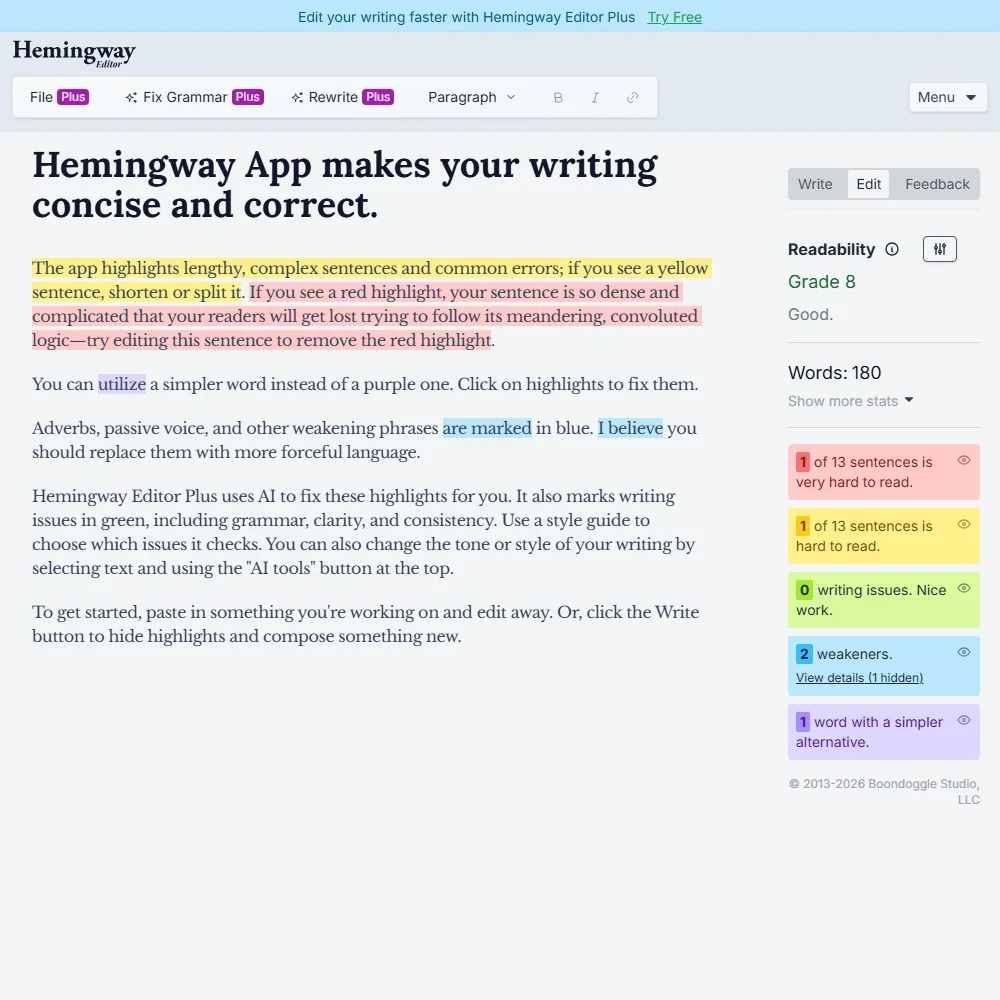
Hemingway Editor homepage screenshot
Hemingway Editor, Homepage

What is Hemingway Editor?

Hemingway Editor is made by Boondoggle Studio, LLC, based in Durham, North Carolina, in the United States. It comes in three forms: a free web editor, a subscription called Hemingway Editor Plus that runs in the browser, and Hemingway Editor 3, a desktop app for Mac and Windows sold as a one-time purchase.

The desktop app works offline but does not include the AI features. Hemingway works only inside its own web and desktop editors: there is no browser extension, no Word or Google Docs add-in, and no mobile app or keyboard.

Its AI works in English, with support for US, British, Canadian, Indian, Australian, Irish, South African and New Zealand English, so spelling and grammar follow the dialect you pick.

How Hemingway Editor edits your writing

The free version scores the readability of your text and highlights what makes it harder to read: wordy and complex sentences, passive voice, adverbs and words with simpler alternatives. A yellow sentence is one to shorten or split. A style guide lets you switch Hemingway's own checks on or off, though it does not take your own rules or terms.

Individual highlights can be hidden, but there is no personal dictionary of words to skip. These readability checks are on the free version as well as the paid one.

Hemingway Editor Plus adds the AI. It rewrites a sentence you pick, follows your own instructions for a rewrite, and applies one of eight styles, such as more confident, formal or friendly. It can also adjust the tone of a passage to sound more professional or friendly. The AI matches the tone of the text you are editing; there is no saved brand voice built from writing samples.

Advanced grammar fixes go beyond spelling and are unlimited on every Editor Plus plan. Editor Plus also imports Word documents (.docx), Markdown (.md) and HTML files.

Hemingway edits what you have written: it rewrites, shortens, expands and restyles your text, but it does not draft new pieces from a prompt or brief. There is no plagiarism checker, AI detector, humanizer or citation tool. A free online paraphrasing tool is offered separately.

The desktop app imports and exports Word files and publishes straight to WordPress.

Working with other people

Team 10K is built for groups of up to 50 users, with licenses managed on a single bill, admin roles and a larger AI allowance per person. Enterprise adds single sign-on, more AI sentences per user and an unlimited number of users. There is no public API.

Hemingway Editor pricing: what each plan gives
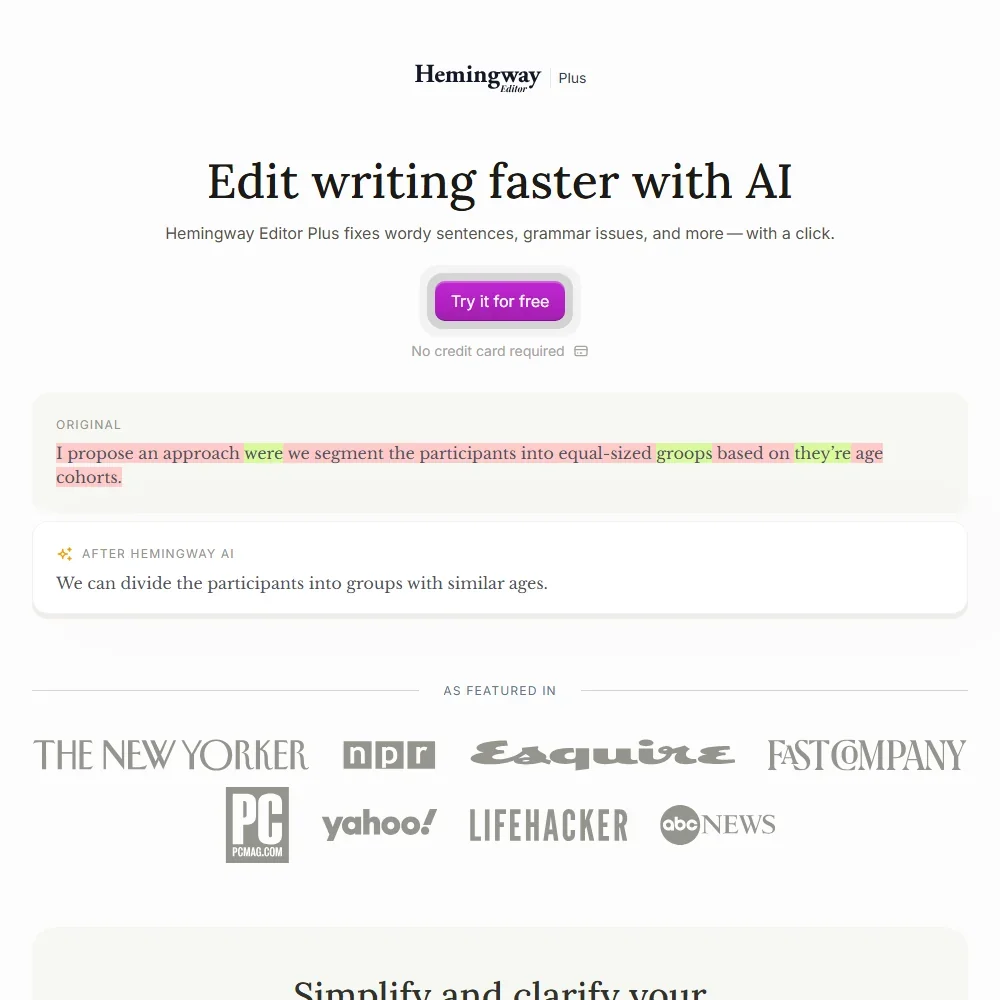
Hemingway Editor pricing screenshot
Hemingway Editor, Pricing

The free web editor gives you the readability score and highlights, with no AI rewrites or advanced grammar fixes. Hemingway Editor Plus is metered in AI sentences: each time the AI rewrites one of your sentences, it uses one credit. Grammar fixes do not use credits.

  • Individual 5K: $25 a month, or $100 a year ($8.33 a month) billed yearly, for 5,000 AI sentences a month and 1 user.
  • Individual 10K: $30 a month, or $150 a year ($12.50 a month) billed yearly, for 10,000 AI sentences a month and 1 user.
  • Team 10K: $30 per user a month, or $150 per user a year ($12.50 a month), for 10,000 AI sentences per user a month and up to 50 users.
  • Enterprise: custom pricing, with 20,000 AI sentences per user a month, single sign-on and unlimited users.

Editor Plus has a 14-day free trial with no credit card required, and the trial ends on its own without charging you. Hemingway Editor 3, the desktop app, is a separate $19.99 one-time purchase per license and does not include the AI features.

Privacy and security

Hemingway is clear on training: "We and our AI providers do not use this content to train, fine-tune, or improve AI models." It also does not store your documents on its servers.

A Data Processing Addendum covers qualifying business use, including self-service plans, and transfers from the EEA and the UK use the EU Standard Contractual Clauses and the UK addendum. Single sign-on is on the Enterprise plan.

Who Hemingway Editor suits

Hemingway Editor suits writers who want a plain readability check, and the free web version does that at no cost. Editor Plus suits people who edit their own drafts and want sentence-level rewrites, tone changes and unlimited grammar fixes, with a firm promise that their text is not used for training. Small teams of up to 50 get admin roles and one bill.

It suits less well anyone who wants an AI to draft new content from a brief, since Hemingway only edits what you have written. Writers who work mainly in Google Docs, Word or email will find no add-in or extension, and there is no plagiarism checker, AI detector or support for languages other than English.

Frequently Asked Questions

How much does Hemingway Editor cost?

The web editor is free. Hemingway Editor Plus starts at $25 a month, or $100 a year, for 5,000 AI sentences a month, and the 10K plans cost $30 a month or $150 a year per user. The Hemingway Editor 3 desktop app is a one-time $19.99 purchase without AI.

Does the Hemingway desktop app include the AI features?

No. Hemingway Editor 3 for Mac and Windows works offline and imports and exports Word files, but the AI rewrites and grammar fixes are part of the Editor Plus subscription.

Can Hemingway Editor write content for me?

No. Hemingway rewrites, shortens, expands and restyles text you have written, including on your own instructions, but it does not draft new pieces from a prompt or brief.

Does Hemingway train AI on my writing?

No. Hemingway and its AI providers do not use your content to train, fine-tune or improve AI models, and Hemingway does not store your documents on its servers.

Hemingway Editor is featured in

Alternatives to Hemingway Editor

See all Hemingway Editor alternatives →

Other AI Writing Tool options we've reviewed.

Claude logo

Claude

Writers, researchers and developers who want voice, memory, projects and code execution free, with deep research on paid plans

7.8
Rank #12 of 20 AI assistants
Best:Where it works10
Weakest:Pricing6
Free plan: yesFree trial: noAPI: yes
From $20Free plan
100% from published facts · checked 16 Oct
→
Gemini logo

Gemini

Google users who want an assistant that reads their Gmail, Calendar and Drive, with images and voice on the phone

7.9
Rank #9 of 20 AI assistants
Best:What it can do10
Weakest:Privacy and trust5.5
Free plan: yesFree trial: noAPI: yes
From $4.99Free plan
97% from published facts · checked 14 Oct
→
neuroflash logo

neuroflash

Marketing teams, content creators, and enterprise brands seeking AI content generation combined with predictive audience validation

6.1
Rank #3 of 6 AI copywriting tools
Best:Brand and content10
Weakest:Where the copy goes0
SOC 2: noISO 27001: yes
From $45 (€42)No free plan
100% from published facts · checked 15 Sep
→
Anyword logo

Anyword

GTM marketing teams, enterprise marketers, and performance-focused content creators

7.0
Rank #2 of 6 AI copywriting tools
Best:Teams and control10
Weakest:Pricing4
SOC 2: yesISO 27001: yes
From $49No free plan
94% from published facts · checked 15 Sep
→
Jasper AI logo

Jasper AI

Marketing teams, content marketers, and enterprise brands needing scalable, on-brand content creation

7.2
Rank #1 of 6 AI copywriting tools
Best:Where the copy goes10
Weakest:Pricing2.5
SOC 2: yesISO 27001: no
From $69No free plan
100% from published facts · checked 15 Sep
→
WRITER logo

WRITER

Large organizations scaling agentic workflows with control and compliance

7.6
Rank #2 of 7 go-to-market platforms
Best:Building workflows10
Weakest:Support2.5
Test environments: yesSelf-hosted: yesBring your own key: yesAgent testing: no
Price not publishedNo free plan
70% from published facts · checked 13 Sep
→

User reviews

Review Hemingway Editor

Your rating

Reviews are moderated and appear once approved.