What is Wordtune?
Tel Aviv, 2020. That's where Wordtune came out of, built by the team at AI21 Labs. That matters because AI21 isn't a wrapper shop. They built their own proprietary models, which means Wordtune's output doesn't run on the same engine as half the other AI writing tools we cover.

The core product is a rewriting assistant. Paste text in, get suggestions back. Rephrase it formally, make it casual, shorten it, expand it. Those are the basic moves. But the fact-verified AI suggestions are what actually separate it from QuillBot in our reading of the reviews. Wordtune claims to cross-check generated content against five or more sources before surfacing a fact. We're cautiously skeptical of that in practice, but it shows up consistently in their documentation.
It works on the web, through a Chrome extension, on iOS, and inside Google Docs. No WordPress integration. No publicly confirmed API access. The user base sits somewhere past 10 million, which for a tool this focused is genuinely impressive.
Wordtune Features: What You Actually Get

The rewriting and paraphrasing tools are the main event. You highlight a sentence, Wordtune gives you a set of rewrite options, each adjusted for tone or length or both. That's the loop most users are living in.
Beyond that, grammar checking and proofreading are built in. Not as deep as Grammarly on the style analysis side, but functional. The AI handles spelling corrections, clarity improvements, and basic sentence structure.
The summarization feature is underrated. Paste a long document or article and Wordtune condenses it. It's a strong enough reason on its own to stick around after the trial period. Worth the attention.
There's also a long-form writing mode that supports essay structure and includes source citations for generated facts. Honestly, this surprised us. Wordtune positions itself quietly enough that you wouldn't expect that depth. The "continue writing" feature sits alongside it for when you run out of momentum mid-draft.
What's missing: no SEO tooling. No bulk generation, no templates. There's no plagiarism checker. The brand voice feature is thin. Casual or formal, those are roughly your two settings.
Wordtune AI Output Quality: Is It Good Enough?
The rewrites feel context-aware, especially for content and marketing writing. Wordtune doesn't just swap words. It reshapes the sentence around what the original was trying to do, which is harder than it sounds, and it's where cheaper paraphrasing tools tend to fall apart.
The rewrites tend to preserve intended meaning while cleaning up phrasing, which is a different skill from flagging grammar errors.
The fact-verification angle is harder to evaluate. The docs describe it, and that's about all. Either it's working quietly in the background, or it's not the differentiator they want it to be. Treat the marketing framing with caution.
Is Wordtune Easy to Use?
Pretty straightforward. The Chrome extension is where most people seem to start, and from there it overlays on most text fields in the browser. Google Docs integration works. The mobile apps exist.
The web editor is clean. You paste, you highlight, you click. Minor.
The onboarding is light, which cuts both ways. You're not blocked by tutorials, but you might miss features that exist. The summarization tool in particular seems to be something users discover late.
No steep learning curve. Fine.
Wordtune Pricing: Is It Worth the Cost?
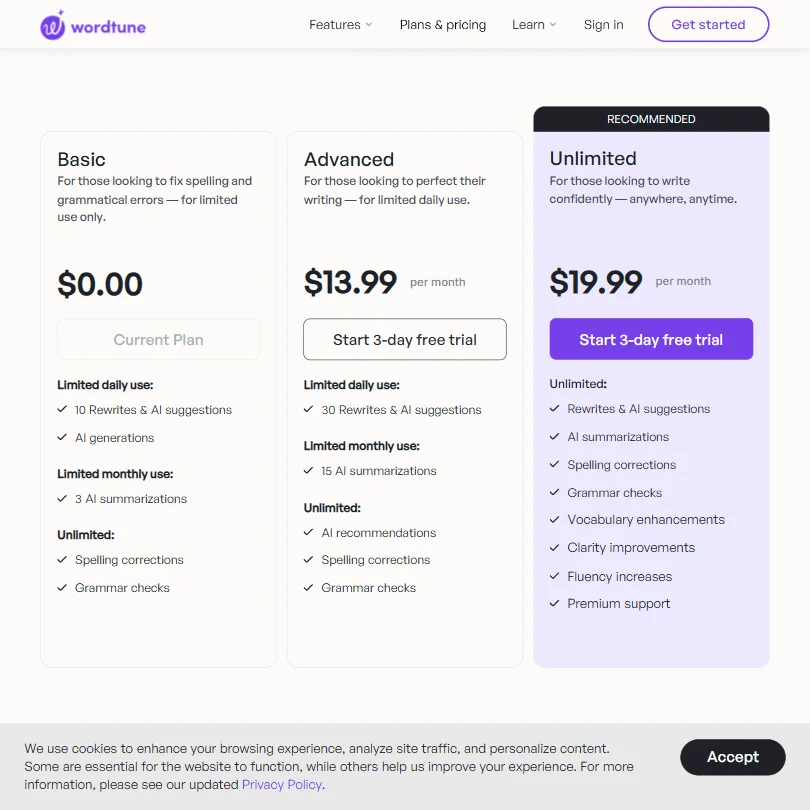
Three tiers. The free Basic plan is real, not a bait-and-switch. You get 10 rewrites and AI suggestions per day, AI generations, and 3 AI summarizations per month. Spelling corrections and grammar checks are unlimited. Functional enough to evaluate the product honestly before spending anything.
The Advanced plan runs $13.99 per month. That gets you 30 rewrites and AI suggestions daily, 15 AI summarizations monthly, and unlimited AI recommendations alongside spelling corrections and grammar checks. A 3-day free trial is available before committing. The Unlimited plan sits at $19.99 per month, and the jump to fully unrestricted access covers rewrites, AI summarizations, spelling corrections, grammar checks, vocabulary enhancements, clarity improvements, fluency increases, and premium support. Also has a 3-day free trial.
Honestly, the gap between Advanced and Unlimited is meaningful if summarizations matter to your workflow. Fifteen per month gets tight fast.
The enterprise situation is murky. No prices appear anywhere, which is a pattern we've seen before and it's always annoying. Sales call required, presumably.
The refund policy isn't publicly stated either. That's a gap that should matter to anyone buying a subscription without testing first, even at $13.99.
At those prices, the value is solid for individual users. Missing features, no SEO tooling, no bulk generation, mean it won't carry teams doing high-volume content work. For what it does do, the cost is reasonable.
Wordtune vs Grammarly: Which Is Better?
They're solving adjacent problems. Grammarly is primarily a grammar and style checker that's gotten more generative over time. Wordtune started as a rewriter and has gotten better at grammar along the way. The overlap is real but the emphasis is different.
Grammarly has broader integration coverage, a fuller style-analysis suite, and a more developed plagiarism checker. Wordtune has better paraphrasing. The AI21 models seem to handle sentence-level restructuring differently than Grammarly's approach. Not better in every case, but the rewrites feel less mechanical.
Price-wise, Wordtune is cheaper. Grammarly's Premium runs higher than $19.99 per month. If your main need is rewriting and paraphrasing, Wordtune earns the comparison. If grammar feedback is the core workflow, the tools aren't identical and Grammarly still has more depth there.
Who Should Use Wordtune? (And Who Shouldn't)
Non-native English speakers. Clearest fit in the data.
Students writing under time pressure are a strong secondary match. The summarization feature and the essay writing support are both genuinely useful in that context. Professionals polishing emails and short messages are the third group, with the Chrome extension making that frictionless.
Content teams chasing SEO output or needing bulk article generation should look elsewhere. Wordtune won't help with keyword placement or structured content briefs. It's not trying to. Anyone needing deep brand voice control should also look elsewhere, because casual and formal are not brand voices.
Wordtune Review Verdict
Wordtune does a focused thing well. It rewrites. It summarizes. It cleans up your English without making you feel lectured. For the price, especially at $13.99 a month or free with limits, that's a defensible value.
The gaps are real, though. No SEO tools. No plagiarism checker. Enterprise pricing is invisible. The refund policy being unstated is a small thing that shouldn't be a small thing.
We wouldn't use it as a primary content creation tool. We'd use it alongside one.
Not the most exciting tool we've reviewed. But it works, it's priced sensibly, and it's built on actual research infrastructure instead of an OpenAI wrapper with a coat of paint.
How Wordtune compares
Wordtune scores 5.8 out of 10 among the AI writing assistants we rate. These two do the same job and are the closest to it, compared on what each vendor publishes.
QuillBot
Wordtune's known facts show no plagiarism check, no citation builder and no AI-text detector, all three of which QuillBot has. QuillBot's Premium plan is $19.95 a month against Wordtune's Advanced at $13.99. Wordtune's add-ins cover Google Docs, Outlook, Gmail and Slack; QuillBot's add-in list is Word alone. Both offer a rewriting core and a team plan, though Wordtune's phone keyboard works on iOS only while QuillBot's carries no such limit stated.
Pick QuillBot if you want plagiarism checks, citations and AI text detection.
Pick Wordtune if you want cheaper rewriting with Outlook and Slack add-ins.
ProWritingAid
ProWritingAid has no text-generation feature; Wordtune writes new text from a prompt. ProWritingAid Premium costs $30 a month, more than double Wordtune Advanced's $13.99. ProWritingAid checks for plagiarism through separate credits, which Wordtune's known facts do not offer. Wordtune lets users opt out of AI training but defaults it on; ProWritingAid says it does not train its AI on your writing at all.
Pick ProWritingAid if you want plagiarism checking without opt-out AI training.
Pick Wordtune if you want cheaper text generation and don't need plagiarism checks.
Frequently Asked Questions
Is Wordtune free to use?
Yes, there's a real free plan with usage limits. You get 10 rewrites and AI suggestions per day, plus 3 AI summarizations per month. No credit card required to start. The 3-day free trial on paid plans gives you a short window to test the Unlimited tier before committing to $19.99 per month.
Is Wordtune good for non-native English speakers?
This is one of the clearest use cases. The rewrites preserve intended meaning while cleaning up the phrasing, which is a different skill from a grammar checker flagging errors. Wordtune also accepts input in 10 languages, including Spanish, Arabic, and Mandarin, before outputting in English.
How does Wordtune compare to QuillBot?
Both tools focus on paraphrasing, but Wordtune goes deeper into tone adjustment and document summarization. QuillBot is cheaper at the entry level and has a built-in plagiarism checker. Wordtune lacks that entirely. If plagiarism detection matters, QuillBot has the edge. For rewriting quality and summarization, Wordtune tends to have the edge.