Paperpal is not a general-purpose AI writing tool wearing a lab coat, and it doesn't pretend to be. It was built for one thing, helping researchers and academics get manuscripts ready for journal submission, and that focus is either exactly what you need or it isn't.

Founded in 2022 and headquartered in Singapore, Paperpal is a product of Cactus Communications, a company with 24 years in scholarly publishing. That background shows up in the product in ways that matter. The AI isn't trained on blog posts and marketing copy. It reflects decades of academic literature, peer review feedback, and journal submission standards. That's a meaningful difference from most of what competes in this space.
What is Paperpal?
Part grammar checker, part research assistant, part manuscript coach. Paperpal runs on a proprietary AI model built from that scholarly publishing dataset, and it covers things most writing tools don't touch. Pre-submission journal checks. Consistency scanning. Reference validation. Over 30 journal-specific readiness checks running inside a single workflow.
The user base has crossed five million. That's not a small number for an academic niche product. It's available where researchers actually work, MS Word via add-in, Google Docs, and Overleaf for LaTeX users. That last one matters. Few tools bother with Overleaf, and the researchers who use it notice.
The platform also launched an AI Review feature recently, which they describe as a virtual research coach. Manuscript-level feedback, not just sentence-level edits. Newer territory for them, and too early to call definitively.
Paperpal Features: What You Actually Get
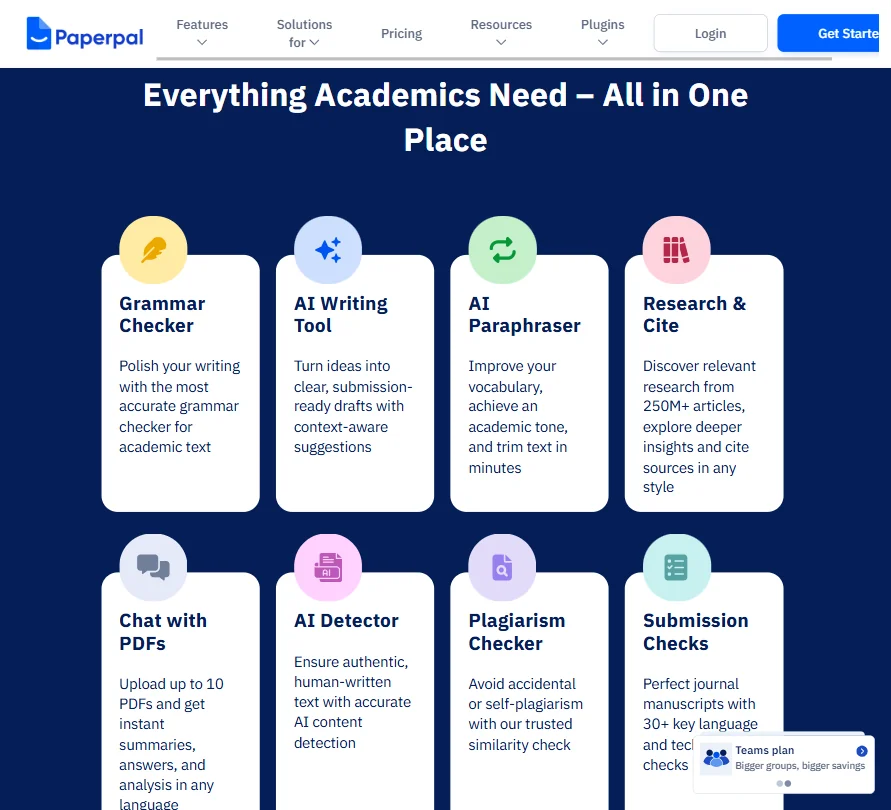
The feature set breaks into two areas. Writing assistance on one side, research tools on the other.
On the writing side, there's an AI grammar checker trained on scholarly conventions and a paraphraser with Trim and Rewrite modes. The draft generation tool is designed to take notes or guidelines and produce submission-ready text. That's the claim, anyway.
On the research side, Paperpal connects to a database of over 250 million articles. The AI Reference Finder is one of the features we kept seeing flagged positively in review threads. Citation generation covers 10,000+ styles. The paraphrasing tool handles 50+ languages, which matters for non-native English researchers, and that's a large chunk of the academic world.
On plagiarism limits, the documentation is actually clear once you find it. The free plan's 7,000-word allowance resets every calendar month. Prime users get 10,000 words monthly, and additional word packs come in three sizes, 10,000, 25,000, or 50,000 words, all valid for 365 days from purchase. Honest. But researchers working with long manuscripts are still going to feel those monthly ceilings.
No image generation. No SEO tools. No bulk content. All deliberate.
Paperpal AI Output Quality: Is It Good Enough?
This is where the origin story earns its keep. The training data isn't scraped from the general web, which means the model has an actual shot at understanding what journal editors look for.
Not generic rewrites. Suggestions that respected discipline-specific structure and vocabulary. That's harder than it sounds, and it's the core thing separating Paperpal from general AI writing tools like Grammarly or QuillBot.
We're more skeptical of the long-form draft generation. The AI Writing Assistant is positioned as turning notes into submission-ready drafts. "Submission-ready" is doing heavy lifting in that sentence, and that overselling is true of basically every AI draft tool on the market, so we're not docking points for it specifically.
The AI Review feature is too new to call.
Is Paperpal Easy to Use?
Depends who you ask. There's a lot of capability packed into the interface, and it doesn't all surface obviously.
The help center is comprehensive, with FAQs, a blog, and a "What's New" section. Email support is available. Live chat support is not confirmed anywhere in the public documentation. For a tool aimed at academics who often need quick clarification before a submission deadline, that's worth flagging.
Honestly, the platform feels built by people who understand the domain more than the UX. Not a dealbreaker. But it's a pattern we see often in vertical tools, and it's fair to say it here.
Paperpal Pricing: Is It Worth the Cost?

Two tiers. Free and Prime.
The free plan is genuinely useful. Plagiarism checking up to 7,000 words per month, paraphrasing, grammar suggestions, and some research features. The limits exist, but it's not a crippled trial. Prime runs $25 per month on a monthly billing cycle, $55 per quarter if you pay quarterly (which works out to $18.33 per month), and $139 per year if you go annual, which breaks down to about $11.50 per month. The annual rate is the one vendors lead with in promotional copy, so factor in the full $139 outlay before you compare sticker prices.
For what Prime includes, the annual rate is hard to argue with. 20,000 monthly grammar edits, 10,000 monthly plagiarism words, full AI writing features, and all the research tools. There's also a 100% money-back guarantee. For a PhD student not on institutional funding, that price is accessible in a way most SaaS tools aren't.
Enterprise and university solutions exist under the Paperpal Preflight product. No public pricing. Typical for the segment.
One thing we'd push back on: the plagiarism word limits across both plans feel low for researchers working on dissertations or long manuscripts. That's a real constraint. The add-on packs help, but they're an extra cost on top of an already-paid subscription.
Paperpal vs Grammarly: Which Is Better?
The obvious comparison. And it's not a clean fight.
Grammarly is better for general professional writing. Better platform integrations, a larger user base, more polished UX. Emails, reports, and marketing copy, Grammarly is probably the right call for all of that.
Paperpal is better for academic writing. Not marginally. Significantly. The citation tools alone do things Grammarly doesn't touch, and the journal submission checks are a different category entirely. The two tools are solving different problems, and anyone comparing them should be honest about which problem they actually have. We don't buy the framing that they're direct competitors. They share a market segment, not a use case.
Where Grammarly wins is general-purpose flexibility. Paperpal doesn't try to compete there. That's the right call.
Who Should Use Paperpal? (And Who Shouldn't)
PhD students preparing their first journal submission. That's the obvious core user. The pre-submission checks and citation tools are designed exactly for that stage.
Researchers who publish regularly and need a faster editing loop. Academics writing in their second or third language, given the 50+ language paraphrasing support. University administrators looking for an institutional solution should go directly to the Preflight product.
Content marketers and SEO writers. Not the audience. The tool has no SEO layer and it's not building one, so something like Koala AI fits that use case better.
Also, researchers who need to run plagiarism checks on very long documents every month are going to hit the word limits hard. Not a hypothetical edge case. Dissertation work specifically.
Paperpal Review Verdict
The academic AI writing space is messier than it looks, full of general tools claiming to work for researchers. Paperpal is one of the few that actually built for the domain. The Cactus Communications background is real, and it shows up in the product in ways that matter.
The annual plan at $139 makes Prime accessible. The free plan is functional, not just a teaser. The research features, particularly the AI Reference Finder and the journal readiness checks, are genuinely useful in ways that matter to the target user, not just features on a marketing page.
Two things could improve: live chat support, and a clearer UI for users who aren't already familiar with the academic workflow the tool assumes. The plagiarism add-on pack structure is fine, but the base monthly limits still feel tight for heavy manuscript work.
Not perfect. Strong enough to recommend for its intended audience.
Frequently Asked Questions
Is Paperpal free to use?
Yes. The free plan includes real functionality, not just a timed demo. You get plagiarism checking up to 7,000 words per month, grammar suggestions, and access to the paraphrasing tools. That 7,000-word limit resets every calendar month, which is worth knowing before you burn through it on a long chapter. Researchers doing lighter work can stay on the free tier indefinitely.
How does Paperpal handle plagiarism checking?
The plagiarism checker is built directly into the platform, no third-party redirect. Free users get 7,000 words per month, Prime users get 10,000, both resetting on a calendar month cycle. If that's not enough, Paperpal sells additional word packs in three sizes, 10,000, 25,000, or 50,000 words, each valid for 365 days. For short papers that monthly allowance is workable. For dissertation-length work, you'll be buying packs. Plan accordingly.
Is Paperpal good for non-native English speakers?
Probably its strongest use case alongside journal submission prep. The paraphrasing tools cover 50+ languages, and the grammar suggestions are calibrated to academic writing rather than general professional English. The academic phrasing suggestions in particular get called out as more appropriate than what general tools like QuillBot or Grammarly offer. That tracks with what we'd expect given the training data.