
Every score is worked out from the vendor's own pages · How we score →Disclosure
SAASINSPECTOR
Grok logo

Grok Review

Grok is an AI assistant whose free plan already includes image generation, voice conversation and projects, with paid tiers adding video generation and more usage. It is SOC 2 certified, and it trains on your chats unless you opt out.

Visit Grok →From $10/mo

Research-based review. Features and prices are checked on the vendor's own website, and the score is worked out from those facts. We haven't tested it hands-on yet.

The verdict

Grok is worth trying free for images and voice; pay only for video generation or higher limits, and switch off training if your chats are sensitive.

Pros

  • The free plan already includes image generation, voice mode and the Grok Build coding agent.
  • Grok is SOC 2 Type I and Type II compliant on every plan, including Free.
  • Grok Build includes a plan mode and subagents that run in parallel for testing and research.
  • The Business plan adds team seat management and consolidated billing.

Cons

  • Real-time web and X search is limited on the free plan.
  • No training on your content is the default only on Business and Enterprise; other plans must opt out.
  • Single sign-on is available only on the Enterprise plan.
From $10/moFree plan YesFree trial No
8.0/10

Spec Score

Grok against 8 AI assistants
#4
of 8 AI assistants
+0.2
vs the average
82%
from published facts
Ahead of other AI assistants
Pricing+1.2Privacy and trust+1.0
Behind other AI assistants
What it can do-0.7
Every criterion
Tap a row for the facts
What it can do7.8
-0.7 vs 8.5 avg31.2 of 40 points
Deep research reportsnot published, half points1.3 / 2.5
Voice conversationyes2 / 2
Remembers you across chatsnot published, half points1 / 2
Projects that keep files and chats togetheryes2 / 2
Makes imagesyes1.5 / 1.5
Why these numbers

Voice conversation: Listed as a Free plan feature on the Free plan card.

Projects that keep files and chats together: Implies Projects is a standard grok.com feature that is sometimes missing only on alternate hosts/browsers.

Makes images: Included even on the Free plan per the full comparison table; video generation (also under Imagine) starts at SuperGrok Lite.

Where it works8.0
-0.2 vs 8.2 avg16 of 20 points
Where it runs3 platforms4 / 6
Team workspaceyes4 / 4
Why these numbers

Where it runs: Counted from platforms. Grok Build is also installable on Windows/Mac/Linux via a PowerShell/WSL CLI script, but that is a separate coding-agent product, not a native Grok chat desktop app, so it isn't counted under windows/mac here.

Pricing8.5
+1.2 vs 7.3 avg18.7 of 22 points
Cheapest paid plan, monthly$105.5 / 7
Full use on the cheapest paid planincluded3 / 3
Why these numbers

Cheapest paid plan, monthly: Cheapest paid plan on the monthly term.

Full use on the cheapest paid plan: Core Grok chat, image generation and Grok Build are already included on the Free plan per the comparison table; SuperGrok Lite and up mainly raise usage limits and add video generation rather than gating the AI itself behind payment.

Privacy and trust7.8
+1.0 vs 6.8 avg14 of 18 points
Does not train AI on your dataunless you opt out2.3 / 4.5
SOC 2yes1.5 / 1.5
GDPRyes1.5 / 1.5
Ways to reach support3 support channels2.5 / 2.5
Why these numbers

Does not train AI on your data: Business plan answer is true: the x.ai/pricing comparison table shows 'No training' as included (checkmark) only on Business and Enterprise, not on Free/Lite/SuperGrok/Plus/Heavy. Unauthenticated (not logged in) use has no opt-out in most regions outside the EU/UK per the same FAQ.

SOC 2: Listed as a feature on every plan including Free in both the plan card and the full comparison table; the separate x.ai/security page (checked) did not repeat a SOC 2 claim in the section read.

GDPR: The main Privacy Policy and its Europe Privacy Policy Addendum (x.ai/legal/privacy-policy, x.ai/legal/europe-privacy-policy-addendum) were also checked and do not use the word GDPR themselves.

Ways to reach support: Counted from support_channels. docs.x.ai sidebar also links Discord (community) and 'Email support' as resources. No live chat or phone support found.

yesnonot published average for AI assistants
How the Spec Score works

Scored from what Grok publishes on its own site. Not a hands-on test.

Compared with 9 AI assistants. Facts checked 21 Sep 2026.

A fact the vendor does not publish gets half the points, or the typical value for a number, and says so. It never counts as a no. How we score.

Grok is xAI's AI assistant, free to use on the web and in its iOS and Android apps, and upgraded through several SuperGrok tiers and a Business plan. What decides whether it suits you is whether you need the higher usage limits on SuperGrok and SuperGrok Plus, since core chat, image generation and the Grok Build coding agent are already included on the free plan.
Grok homepage screenshot
Grok, Homepage

What is Grok?

Grok is made by xAI, a US company that has joined SpaceX and whose website now brands itself SpaceXAI. Grok runs on the web at grok.com and in mobile apps for iOS and Android, and one account keeps your conversations, settings and subscription in sync across them.

What you can do with Grok

Grok's app runs on the Grok 4.6 model. Only xAI's own models are offered inside the chat app.

Real-time web and X search is included, at a limited level on the free plan and in full on paid plans.

Grok accepts uploaded files including PDFs, images, spreadsheets, code and audio for analysis and summarization. Image generation, part of Grok's Imagine feature, is included even on the free plan, and video generation under Imagine starts at SuperGrok Lite. Voice mode is also included on the free plan.

Grok Build is a coding agent with a plan mode, for proposing a structured approach before writing code, and subagents that run in parallel for testing and research; sandboxed and terminal execution run the code it writes. Grok Build is available even on the free plan. SuperGrok and above add Grok Bot, which runs AI teammates on a persistent cloud computer.

Through its connectors, Grok can read from Google Drive, Gmail, Google Calendar, Outlook Mail, Outlook Calendar, SharePoint, OneDrive, Microsoft Teams and Salesforce, and it supports custom MCP tunneling for connecting other tools. Projects are available on grok.com.

Working with other people

The Business plan adds team seat management and consolidated billing. xAI also sells a developer API as a separate product with its own console. The app itself runs on the web and in the iOS and Android apps.

Grok pricing: what each plan gives
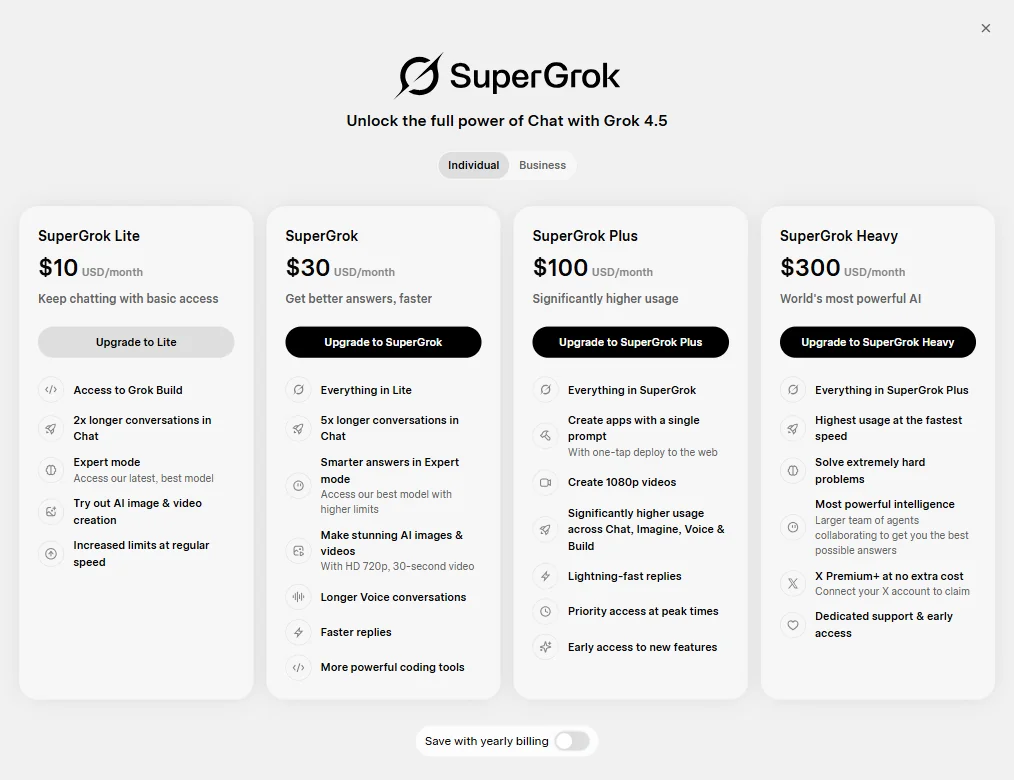
Grok pricing screenshot
Grok, Pricing

The Free plan costs nothing and already includes core chat, image generation through Imagine, voice mode and the Grok Build coding agent. Web and X search is limited on Free, and paid tiers raise the usage limits.

SuperGrok Lite costs $10 a month and SuperGrok costs $30 a month; SuperGrok Plus costs $100 a month and SuperGrok Heavy costs $300 a month. Video generation starts at SuperGrok Lite, and Grok Bot at SuperGrok.

Business costs $30 a month per user and adds team seat management and consolidated billing. Single sign-on is only on Enterprise, which is priced on request.

Privacy and security

On grok.com, you can choose whether your content is used to train Grok, in Settings, Data, and Improve the Model. Business and Enterprise plans include no training as their standard setting, rather than requiring you to opt out.

Grok is SOC 2 Type I and Type II compliant on every plan, including Free. It includes privacy tools meant to help organizations comply with regulations including HIPAA, the GDPR and the CCPA. Single sign-on is available on the Enterprise plan.

Support runs through the in-product issue report, email and a Discord community.

Who Grok suits

Grok suits people who want a free AI assistant that already includes image generation, voice mode and a coding agent rather than holding them back for a paid tier. It also suits small and medium teams that want seat management and consolidated billing on the Business plan.

It suits less well anyone who wants no training on their content without opting out on a consumer plan, since the default no-training setting is limited to Business and Enterprise. It also suits less well companies that need single sign-on, which is only on Enterprise.

How Grok compares

Grok scores 8.0 out of 10 among the AI assistants we rate. These three do the same job and are the closest to it, compared on what each vendor publishes.

8.0Grok
vs
8.8ChatGPT

ChatGPT

Grok includes SOC 2 on every plan, even Free; ChatGPT reserves SOC 2 for Business and Enterprise only. Grok's cheapest paid plan is $10 a month with full access already included, core chat, images and Grok Build are already free, and the paid tier mainly raises usage limits and adds video generation. ChatGPT's $8 a month Go plan is cheaper, though it mainly raises usage limits rather than unlocking its top models. Both give teams a shared workspace and hold GDPR compliance.

Pick ChatGPT if you want the cheaper monthly price of the two.
Pick Grok if you want SOC 2 on every plan and full access already included.

Grok vs ChatGPT →
8.0Grok
vs
8.7Perplexity

Perplexity

Grok's cheapest paid plan is $10 a month, half what Perplexity charges at $20, and Grok already includes chat, images and its Build agent on the free tier, with the paid plan mainly raising limits and adding video. Perplexity reserves team collaboration for Enterprise, while Grok includes a team workspace without an enterprise plan. Grok also holds SOC 2 on every plan, including Free.

Pick Perplexity if you want desktop apps as well as web and phone.
Pick Grok if you want the cheaper plan and a team workspace without enterprise.

Grok vs Perplexity →
8.0Grok
vs
7.8Claude

Claude

Grok generates images already on its free plan; Claude cannot generate images at all. Grok includes SOC 2 on every plan, including Free; Claude also holds SOC 2. Grok's cheapest paid plan is $10 a month with full access already included; Claude's is $20 a month, also open in full once you're on it. Both give teams a shared workspace.

Pick Claude if you want desktop apps as well as web and phone.
Pick Grok if you want image generation and SOC 2 from the free plan.

Grok vs Claude →

Frequently Asked Questions

How much does Grok cost?

Grok has a free plan. Paid tiers run from SuperGrok Lite at $10 a month and SuperGrok at $30 a month, up to SuperGrok Plus at $100 a month and SuperGrok Heavy at $300 a month, with Business at $30 a month per user.

Which model does Grok use, and is web search included?

Grok's app runs on the Grok 4.6 model, with no other companies' models offered inside the chat. Real-time web and X search is included on every plan, limited on Free and in full on the paid tiers.

What does Grok Build do?

Grok Build is a coding agent included even on the free plan. It offers a plan mode that proposes a structured approach before writing code, subagents that run in parallel for testing and research, and sandboxed and terminal execution for running the code it writes.

Does Grok train on my conversations?

On grok.com you can turn off training on your content in Settings, Data, and Improve the Model. Business and Enterprise plans include no training as their standard setting rather than requiring an opt-out.

Grok is featured in
Grok in the news

Alternatives to Grok

Other AI Productivity Tool options we've reviewed.

Anara logo

Anara

Researchers, PhD candidates, biopharma teams, clinical practitioners, and R&D engineers who need accurate, cited AI answers across large document libraries

7.3
Rank #1 of 8 paper readers
Best:Reading and analysing papers10
Weakest:Systematic reviews0
Institution licence: noPaper search: yesScreening: noResearch answers: yes
From $12Free plan
100% from published facts · checked 14 Sep
→
Glean logo

Glean

Large companies that want AI search and agents across their own apps, bought through a sales team

Not scored yet
Free plan: noFree trial: yesAPI: yes
Price not publishedNo free plan
→
Asana logo

Asana

Teams that plan across many projects with goals, portfolios, timelines and intake forms

7.2
Rank #6 of 7 AI work management tools
Best:Privacy and trust8
Weakest:Working with others7
Free plan: yesFree trial: noAPI: yes
From $13.49Free plan
73% from published facts · checked 26 Sep
→
ChatGPT logo

ChatGPT

People who want images, voice, memory and deep research in one assistant, starting on a free plan

8.8
Rank #1 of 8 AI assistants
Best:What it can do10
Weakest:Privacy and trust6.2
Free plan: yesFree trial: noAPI: yes
From $8Free plan
100% from published facts · checked 22 Sep
→
Jamie logo

Jamie

Professionals who want private meeting notes with no recording kept, and storage and processing in Europe

6.8
Rank #11 of 17 AI meeting assistants
Best:Where it works10
Weakest:What it captures4.5
Keeps the meeting video: noCuts and shares clips: noTalk time and coaching insights: no
From $27 (€25)Free plan
87% from published facts · checked 21 Sep
→
Read AI logo

Read AI

Anyone who wants a personal meeting coach on the free plan, plus in-person meetings captured through the phone app

8.2
Rank #3 of 17 AI meeting assistants
Best:Where it works10
Weakest:Privacy and trust7.5
Keeps the meeting video: yesCuts and shares clips: yesTalk time and coaching insights: yes
From $19.75Free plan
98% from published facts · checked 21 Sep
→

User reviews

Review Grok

Your rating

Reviews are moderated and appear once approved.






