Claap is a bot-free conversation-intelligence platform built for revenue teams: it captures video meetings, phone calls and in-person conversations, then turns them into CRM updates, coaching scorecards and deal insights. A free Basic plan gets you started, but how many AI credits and how much recording time you need each month is what decides whether Pro or Business fits.
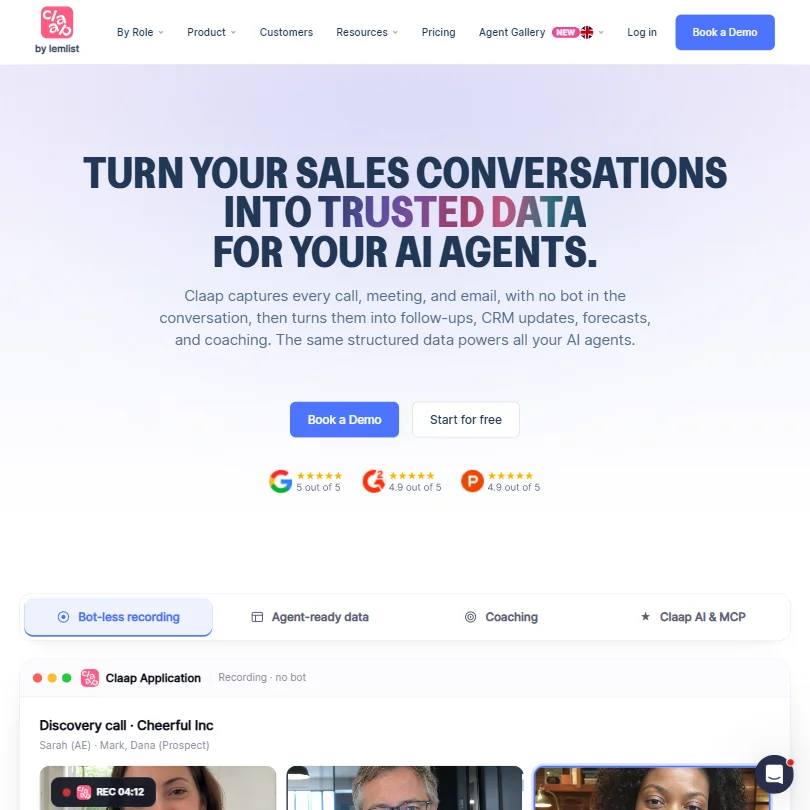
What is Claap?
Claap is owned by lemlist and is branded Claap by lemlist. It is incorporated in France and stores data in an AWS EU region. Claap runs as a web app, native apps for Windows, Mac, iOS and Android, and a Chrome recorder extension.
What Claap captures from a meeting
Claap records without a bot joining the call by default, across Zoom, Google Meet, Microsoft Teams, phone calls and in-person conversations; a bot can still be invited to a meeting per call, and its name and image can be customized. In-person meetings are also captured through the mobile app.
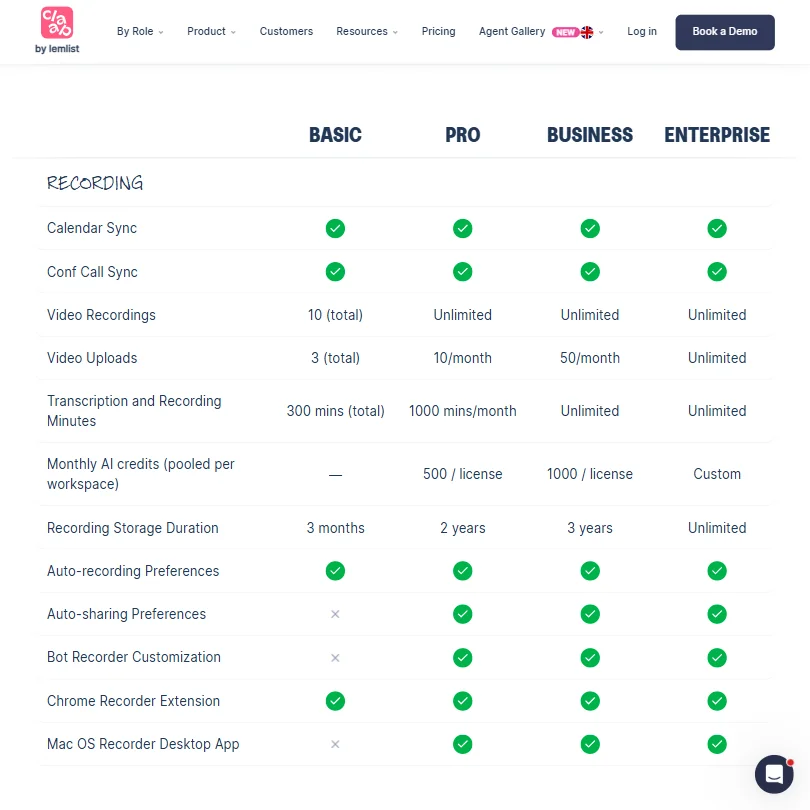
The free Basic plan includes a 99-language transcript and a basic AI summary, with video capped at 10 recordings in total; video becomes unlimited on paid plans. AI summary templates are available, with custom templates and prompts as part of an Advanced AI Summary feature from Pro up. Short highlight clips, called Magic Clips, can be pulled from any recording.
Claap AI can answer questions about a single meeting on any plan, and answering questions across every meeting at once is a Business-plan feature. Meeting notes can update CRM records, including HubSpot, Salesforce, Attio and Pipedrive, and score deals against a sales methodology, with CRM Auto-Complete as a Business-plan feature. Scorecards, AI coaching and deal insights for reviewing call and rep performance are also on Business, while speaker and video insights are included from Pro.
Working with other people
Claap also connects to Google Calendar, Outlook Calendar, Notion, Slack, Aircall, Ringover, Zapier, Make and n8n, plus webhooks. An API with unlimited usage is included even on the free Basic plan, and a Claap MCP connector lets external AI agents query meeting data from Basic up. Teams are limited to 1 on Basic and unlimited from Pro up. Single sign-on and SCIM user provisioning are Enterprise-only.
Claap pricing: what each plan gives
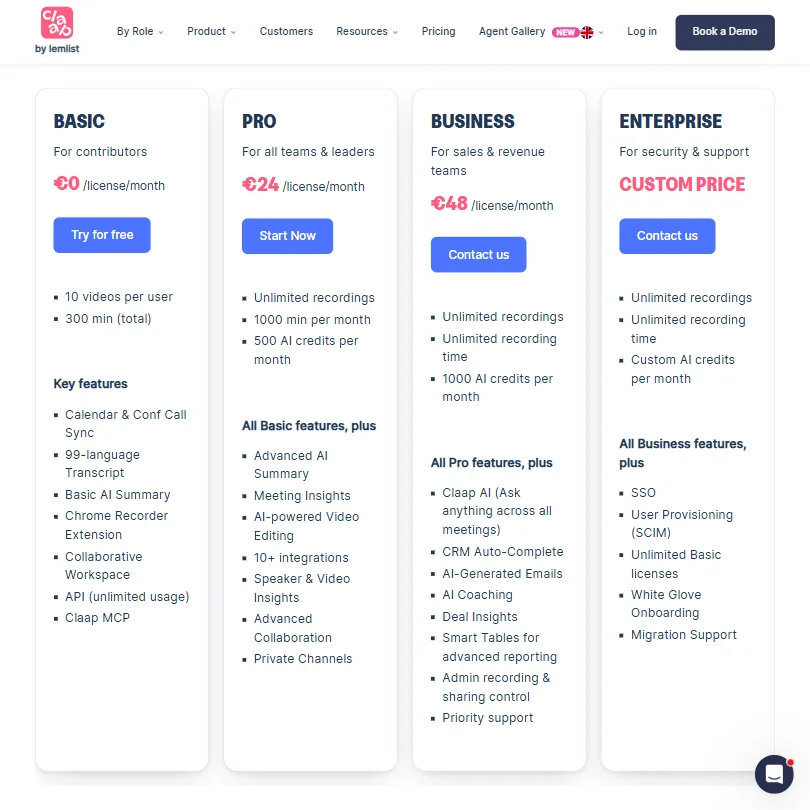
The free Basic plan costs €0 a license a month and gives 10 videos per user, 300 minutes of recording in total, 3 months of recording storage and 1 team, along with calendar and conference-call sync, the 99-language transcript, a basic AI summary and the Chrome recorder extension.
Pro costs €30 a license a month (€24 a license a month billed yearly) and gives unlimited recordings, 1,000 minutes a month and 500 AI credits a license a month. Business costs €60 a license a month (€48 a license a month billed yearly), doubles the AI credits to 1,000 a license a month and removes the recording-time cap. Enterprise pricing is custom.
Licenses can be mixed within one workspace, so not every seat needs the same plan.
Privacy and security
Claap does not use your data to train models. Meeting audio is analyzed through OpenAI's Enterprise API, which does not use data submitted through it to train or improve its models. Claap is SOC 2 Type 2 certified and GDPR compliant, and data is stored in an AWS EU region. There is no recording-consent notification to meeting participants; Claap is built so that nothing joins the call and the people on it do not see a recorder.
Support runs through email and chat, with priority support on Pro and Business and a dedicated account manager on Enterprise.
Who Claap suits
Claap suits revenue teams that want calls, phone conversations and in-person meetings turned automatically into CRM updates, coaching scorecards and deal insights, with SOC 2 and GDPR compliance and EU-hosted data.
It suits less well anyone who wants meeting participants notified that a call is being recorded, since Claap has no consent notification. It also suits less well anyone with a high AI-usage need on a budget, since Pro, the cheapest paid plan, caps AI credits at 500 a license a month, or anyone who needs more than 300 minutes of total recording on the free plan.
Screenshots
How Claap compares
Claap scores 8.0 out of 10 among the AI meeting assistants we rate. These three do the same job and are the closest to it, compared on what each vendor publishes.
Otter.ai
Claap includes API access on its free Basic plan, while Otter only unlocks the API on its Enterprise tier. Both track talk time, but Claap meters its AI at 500 credits per license a month on the Pro plan, while Otter includes its AI in full on its cheapest paid plan. Claap can keep your data in the EU and does not notify meeting participants that it is recording.
Pick Otter.ai if you want AI in full on the cheapest paid plan.
Pick Claap if you want API on the free plan and EU data residency.
Avoma
Claap has a free plan, while Avoma offers only a trial before its $29 a month starting price. Claap runs on 5 platforms against Avoma's 3, and includes API access on its free Basic plan. Avoma notifies meeting participants that it is recording and adds coaching insights on its Organization plan, while Claap does not notify participants at all.
Pick Avoma if you want participants notified and coaching insights included.
Pick Claap if you want a free plan with API included.
MeetGeek
Claap records in-person meetings, something MeetGeek cannot do yet since its hardware recorder is still unreleased. MeetGeek notifies meeting participants that it is recording from its Business plan up, while Claap does not notify participants at all. Both can keep your data in the EU, and both cap AI usage on their cheapest paid plan rather than leaving it unlimited.
Pick MeetGeek if you want recording notifications built into a paid plan.
Pick Claap if you need to capture in person meetings too.
Frequently Asked Questions
How much does Claap cost?
The free Basic plan gives 10 videos per user and 300 minutes of recording in total. Paid plans start at Pro for €30 a license a month (€24 billed yearly) and rise to Business at €60 a license a month (€48 billed yearly), with Enterprise priced on request.
Does Claap need a bot to join my calls?
Not by default. Claap captures meetings, phone calls and in-person conversations natively, so nothing joins the call, though a bot can still be invited to a specific meeting if a visible recorder is wanted.
Does Claap tell people they are being recorded?
No. Claap has no feature that notifies or asks meeting participants for recording consent; it is built so that nothing joins the call and the people on it do not see a recorder.
Does Claap train on my meetings?
No. Meeting audio is analyzed through OpenAI's Enterprise API, which does not use data submitted through it to train or improve its models, and Claap stores data in an AWS EU region.











