SAASINSPECTOR
Anima logo

Anima Review

Designers, product teams, and developers converting Figma designs to production-ready code

Visit AnimaFrom $0 (Free plan)

Research-based review. We analyzed vendor documentation, customer reviews on G2, Capterra, and Reddit, and live pricing — not hands-on testing yet. We update as our team puts tools through real workflows.

The verdict

Anima is a Figma-to-code platform aimed at designers and product teams who want to convert designs into React, HTML, Vue, or Tailwind without a full developer handoff. With 1.8 million users and features like AI prototyping, website cloning, and bidirectional sync, it makes a credible case in a crowded category. Scored with real rough edges noted, particularly around sync reliability and pricing transparency for teams evaluating at the $500/month tier.

Pros

  • Converts Figma designs into working code across multiple frameworks including React, HTML, Vue, and Tailwind, covering a range of developer stacks.
  • Bidirectional sync on paid plans allows changes in Figma to push to code and code edits to push back, reducing manual reconciliation work.
  • AI Playground enables chat-driven prototyping, letting users generate UI from natural language descriptions without starting from scratch.
  • Website cloning feature pulls a live URL and converts it into editable Figma layers, making it easy to work from existing web assets.
  • The Buddy tool imports images or raw HTML back into Figma as design layers, closing the loop between code and design environments.
  • Integration with Claude and ChatGPT powers AI generation flows, lending credibility to its AI-assisted design capabilities.
  • Over 1.8 million users on record suggests the product has found a genuine audience and achieved meaningful product-market fit.

Cons

  • Bidirectional sync, the most praised feature, is also frequently cited in G2 reviews as buggy and unreliable in practice.
  • Pricing reaches up to $500 a month, which is a significant investment for a tool with a relatively thin public review trail.
  • The review count on G2 and Capterra is unexpectedly low given the 1.8 million user claim, making it harder to assess reliability at scale.
  • No hands-on testing was conducted for this review, meaning assessments rely on vendor docs and aggregated user feedback rather than direct experience.
  • The tool is narrowly focused on design-to-code workflows and offers no general-purpose design features like logo generation or social templates.
  • The 'no developer required' claim, while more credible than most competitors, still warrants skepticism given the complexity of real-world production code.
From $0 (Free plan)Free plan YesFree trial Yes

Anima's review trail is thinner than we'd expect for a product at this price point. We pulled vendor docs, G2 reviews, Capterra feedback, and a handful of Reddit threads. No hands-on testing. What we kept seeing was a tool that does a specific job well, one a lot of competitors fumble, but with genuine rough edges that the review volume doesn't fully illuminate.

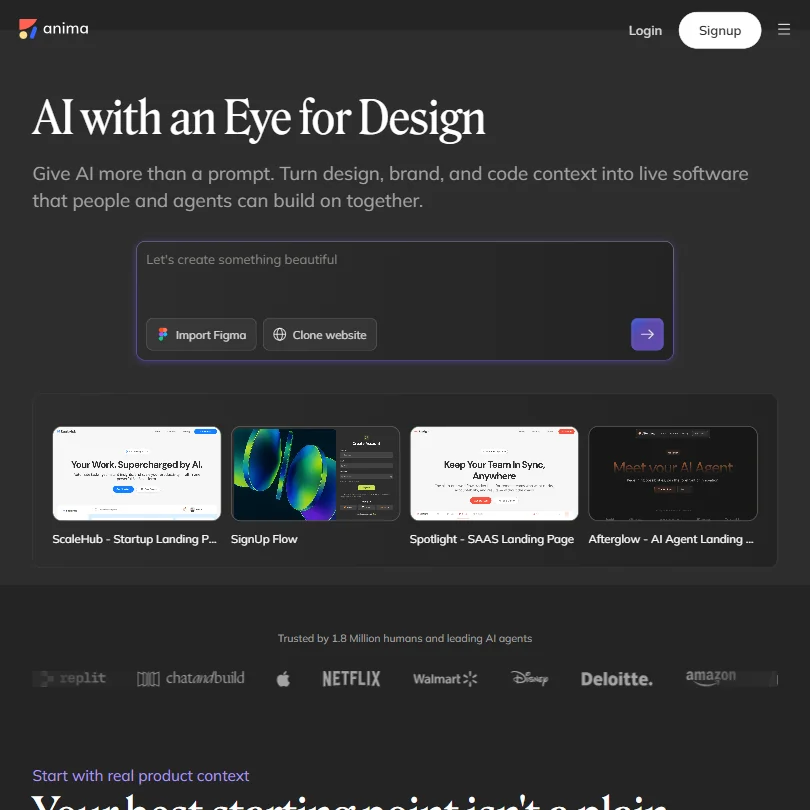
Anima homepage screenshot
Anima — Homepage

The company has been around since 2017, Tel Aviv origins with a New York presence added since. Their homepage currently claims 1.5 million users. A separate article about their Buddy feature cites 1.7 million plugin installs, which isn't the same figure. We're going with the 1.5 million number the official site actually states, and noting the discrepancy rather than papering over it.

What is Anima?

Figma-to-code. That's the core transaction. A designer builds in Figma, Anima exports working React, HTML, Vue, or Tailwind. Pick the stack you're already using.

That's where it started. The product has since pushed into adjacent territory. There's an AI Playground for chat-driven prototyping. A UX Design agent that generates wireframes from a prompt. A website cloning feature that takes a live URL and converts it to editable Figma layers. And Buddy, a tool Anima officially introduced on April 27, 2026, that imports images, raw HTML, and existing websites back into Figma as design layers. A separate capability for importing Claude designs and HTML was documented later, on June 18, 2026. The Claude and ChatGPT integrations power parts of the AI generation flow throughout.

The pitch is a closed loop. Design it, prototype it, convert it, deploy it. No developer handoff, at least in theory. We're mildly skeptical of "no developer required" as a category claim, but Anima makes a more credible case for it than most tools we've aggregated research on.

Anima Features: Logo, Graphics, UI & Brand Design Capabilities

Anima features screenshot
Anima — Features

Not a general design tool. No logo generation, no social templates, no print files. Anima doesn't reach for that, and its actual audience is better served by the narrowness.

The bidirectional Figma-to-code sync is the headline feature on paid plans. Changes in Figma push to code. Code edits can push back. When we cross-referenced the documentation with G2 reviews, this piece came up repeatedly, either as the thing people loved or as the thing they found unreliable on complex files. We'll get into that.

The UX Design agent handles AI wireframing. Describe what you need, the agent builds a prototype, you iterate through the AI Playground. That flow also connects to an Anima API and MCP server for teams running automated code generation at scale. Brand kit import exists so the AI stays on-brand during prototyping. Useful, not flashy.

Animations from Figma carry through on export, which matters more than people expect when handoff time comes. On Adobe XD: older Anima pages and third-party listings still mention it, but Anima's current support documentation states that XD workflows are no longer supported or maintained. Worth knowing before you build a workflow around it.

Team roles and permissions are locked behind the Business tier, which starts at $180 a month per the current pricing page. That's a meaningful gate for any team larger than one.

Anima Design Quality: How Good Are the AI-Generated Results?

G2 reviewers are broadly positive about output quality when the source Figma file is clean and well-organized. That pattern held consistently across what we read. Structured files produce code reviewers describe as close to production-ready. Messy files produce messier output. Not a surprise, but it's the kind of thing that doesn't show up in marketing copy.

The AI Playground is harder to assess from the outside. Chat-to-prototype is a crowded space right now. Bolt.new, Lovable, and others all do versions of this. Anima's angle is that the workflow stays anchored to the design-to-code loop rather than starting from a blank AI canvas. That's a real distinction. Whether the output quality holds against tools built purely for AI-first generation, we can't say without testing.

Website cloning generates the most chatter in the reviews we aggregated. Paste a URL, get an editable Figma file. Reviewers say it works reasonably well for simpler pages. Complex animations and dynamic content are where it tends to fall short, which tracks with how hard that problem is generally.

Honestly, the quality story is decent. Not exceptional. But for a tool automating one of the more painful parts of a design workflow, "decent and faster" clears the bar.

Anima Templates & Assets: How Deep Is the Library?

Shallow. That's the answer.

Anima doesn't position itself as a template library, and the depth reflects that. No social template collection. No stock image library we could surface. Brand kit import helps if you're already working with existing assets, but this isn't the place to go for a starting-point marketing page template.

The UX wireframing agent fills some of this gap. Prompt your way to a starting layout. But that's AI generation, not a curated library. Different experience entirely. Teams that rely on pre-built UI kits will still be pulling those from Figma's community files, not from Anima.

We've seen worse at this price point. But it's a real limitation, not a nitpick.

Is Anima Easy to Use for Non-Designers?

The Figma plugin workflow assumes you're already inside Figma. Non-designers who've never opened it aren't going to find Anima approachable. That audience isn't who this is for.

Designers who know Figma but avoid code are the actual sweet spot, and for them, the learning curve is reported as reasonable across G2 reviews. A few reviewers flagged setup friction, specifically around getting the plugin configured correctly on the first pass. Capterra feedback echoes that. The first export takes trial and error.

The AI Playground and chat prototyping lower the floor somewhat. You can get somewhere without touching Figma at all, on the prototyping side. But the production code export, the thing most people are paying for, still requires a Figma-first workflow. No path around that.

The Free plan includes 5 monthly chat messages and 5 code generations. That's enough to feel out whether the tool fits before committing to $25 a seat per month on Starter. Fair, actually. Better than a time-boxed trial designed to pressure a decision.

Anima Pricing: Is It Worth It vs Hiring a Designer?

Anima pricing screenshot
Anima — Pricing

The Free plan is real. Five code generations and five chat messages a month let you actually evaluate the core output, which is more than most tools in this category offer at zero cost.

Starter runs $25 per seat per month and includes 100 monthly chat messages, 50 code generations, bidirectional Figma sync, and custom domains. Pro is $50 per seat per month. That unlocks 200 monthly chat messages, 200 code generations, the same Figma sync and custom domains, plus priority support. Business starts at $180 per month and adds 600 chat messages, 600 code generations, team roles and permissions, premium support, and SSO on annual billing. Additional seats on Business run $49 per month each.

The Business tier's collaboration gates are the sticking point for growing teams. Team roles and permissions only appearing at $180 a month is a meaningful jump from $50 per seat, especially when the per-seat math gets complicated as headcount grows.

No public refund policy we could find. That matters at $180 a month. We'd want clarity before committing.

Against hiring a developer for handoff work, $50 a month wins easily. Against Locofy or Framer, the comparison is tighter and depends on your workflow specifically.

Anima vs Locofy: Which AI Design Tool Wins?

Locofy is the most direct competitor. Both convert Figma designs to code. Both target the designer-to-developer handoff. Where they diverge is in what each tool does beyond that core transaction.

Locofy leans harder into developer-friendly output and component-level control. Anima bets on the full design loop, including AI prototyping, website cloning, and the chat interface in the AI Playground. Different theories of what the user actually needs after the export.

The website cloning feature is something Locofy doesn't offer in the same way, and that alone tips the balance for specific workflows. For teams that only care about clean code output from a well-organized Figma file, Locofy has a credible case.

Framer comes up in the same conversations when the goal is a published site rather than a code handoff. Anima is for getting code out. Framer is for getting a live site out without touching code. Worth knowing where that line is before you pick one.

We wouldn't call Anima the outright winner in all scenarios. For the specific combination of prototyping and code export in one workflow, it's the better fit.

Who Should Use Anima? (And Who Shouldn't)

Product designers who hand off to developers. That's the core audience. If you're spending hours in Figma and losing more hours translating designs into something a developer can implement, Anima is worth a real look.

Solo founders doing their own front-end. The Free plan and the AI Playground together give you a path from idea to working prototype without writing much code. The ceiling is low, but it's enough to validate a concept before spending anything.

Teams that need deep template libraries or broad asset collections. Not the fit. Anima doesn't go there, and trying to use it as a general design tool will frustrate.

Anyone starting from zero design experience. Also not the fit. The Figma dependency is real. There's no path around it for the core export workflow, and the onboarding friction for someone who's never used Figma will be significant.

Anima Review Verdict

Anima does something real. The Figma-to-production-code loop is genuinely useful, and the AI Playground additions make it more than a glorified export plugin. The website cloning feature is the kind of thing that earns a permanent browser tab once you've used it a few times.

The weaknesses are also real. The asset library is thin. Collaboration features are locked at $180 a month. The review volume on G2 and Capterra is low relative to a claimed 1.5 million users, which means we're operating with limited signal on reliability at scale. The Trustpilot presence is negligible. We're noting it because sparse public review coverage at this user count is a mild flag, not a damning one.

Pricing logic holds at Pro. It gets murkier at Business when the per-seat math compounds. That's our main concern with the commercial side.

For a Figma-heavy design process where developer handoff is the bottleneck, Anima earns a genuine recommendation. Outside that workflow, the alternatives make more sense. Webflow serves teams that want a published site without a handoff at all, and it's worth a direct comparison if publishing is the goal rather than exporting code.

We'd revisit this after hands-on testing. The research picture is positive enough to warrant it.

Frequently Asked Questions

Does Anima work without a Figma subscription?

The AI Playground and chat prototyping are accessible through Anima's web interface without a paid Figma plan. The core design-to-code export runs through the Figma plugin and requires an existing Figma file. Figma has a free tier, so a paid Figma account isn't strictly necessary to start, but you do need to be working inside Figma for the export workflow to function.

What coding frameworks does Anima support?

React and HTML are the headline outputs. Vue, Tailwind, and Shadcn are also documented as supported. We cross-referenced this with G2 reviews and framework support came up as a consistent positive, particularly for React-standardized teams. How clean the Tailwind output is in practice is something we'd want to test before making stronger claims about it.

Is Anima a vibe coding platform?

It overlaps with that category but isn't a pure play. Bolt.new and Lovable are built from the ground up around AI-first code generation from natural language prompts. Anima starts with Figma as the design source and uses AI to automate the path to code. The AI Playground adds a chat-driven prototyping layer that moves it closer to the vibe coding platform space, but the Figma-first identity is still the product's center of gravity.

Anima is featured in

Alternatives to Anima

See all Anima alternatives →

Other AI Design Tool options we've reviewed.

User reviews

Review Anima

Your rating

Reviews are moderated and appear once approved.