
What is bolt.new?
Bolt.new was launched by StackBlitz in October 2024. StackBlitz itself has been around since 2017, headquartered in San Francisco, so this isn't a scrappy new company operating on nothing but runway. That context matters, because the infrastructure underneath Bolt is more serious than most browser-based tools in this category.

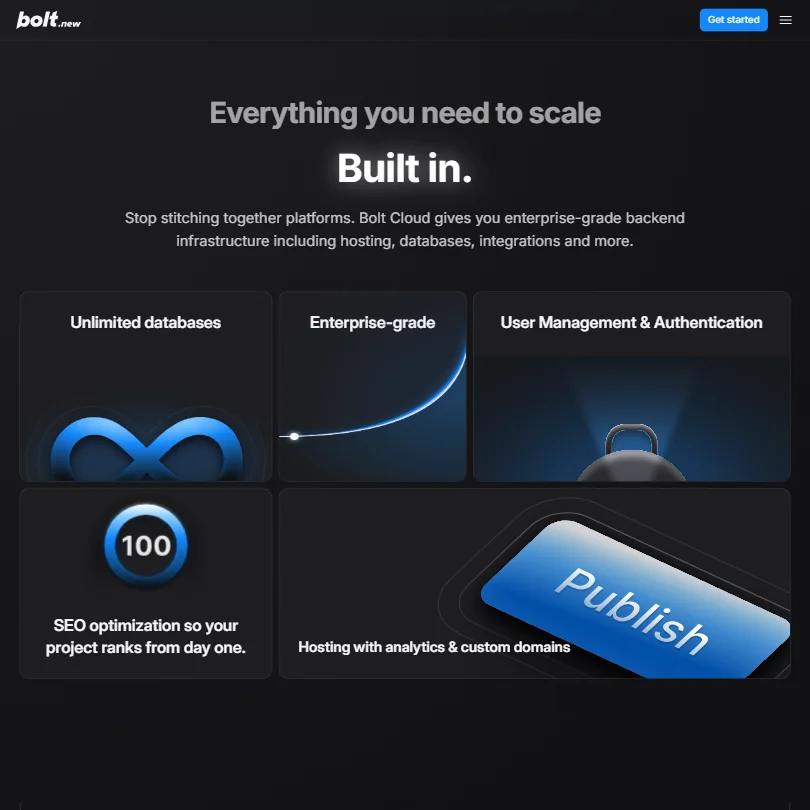
The pitch is simple enough. You describe what you want to build. Bolt builds it. A full-stack web app, a landing page, a dashboard with auth, none of it requires a terminal or a local environment. The whole Node.js runtime runs in your browser tab through WebContainers, which is the core piece of engineering that makes this feel different from competitors. No installs. No separate accounts for hosting, databases, or auth. Those ship bundled through Bolt Cloud.
GitHub import works, so you're not trapped starting from scratch. Export to Netlify or Vercel is supported when you're ready to move. Most tools in this space still make you wire up external services manually. Bolt doesn't. That's a real difference, not a marketing one.
The audience is obvious from the interface. Product managers, entrepreneurs, marketers, people who have an idea and no engineer available. Not professional developers building production infrastructure. That distinction matters a lot when you're evaluating what "good" means here.
bolt.new Features: Code Generation, Review & Developer Workflow
The core loop is simple. Describe an app in natural language, get a full codebase, preview it live in the same window, iterate by chatting. That's it.
What sits underneath is more interesting. Bolt uses an internal routing layer to direct each task to the most appropriate model. Heavier lifting goes to Claude Opus 4.6, added in 2026. Lighter tasks go elsewhere. You don't pick the model. The system decides. Honestly, that's a reasonable call for the audience they're targeting, but developers who want manual model control will find it frustrating.
Code generation covers full-stack apps in a single generation pass, not just snippets. JavaScript, TypeScript, React, Vue, Node.js are all supported, and a handful of other web frameworks besides. The Figma integration is worth naming specifically: import a design, get working code back. Material UI and Shadcn UI are in the mix. Enterprise tier gets access to design systems including the Porsche Design System and the Washington Post Design System, which is a specific and odd thing to support, but it's real and documented.
Automatic refactoring is built into the agent workflow. When generated code breaks something, the system is supposed to catch and fix it without prompting. Bolt's documentation claims 98% fewer errors compared to previous versions. That's a vendor number with no methodology attached, so don't plan around it.
Test generation isn't documented publicly. That's a gap worth flagging. Debugging, on the other hand, is something they lead with, and user reports are more positive there than we expected going in.
bolt.new Code Quality: How Accurate and Reliable Is It?
This is where things get uncomfortable. Trustpilot sits at 1.4 out of 5 across more than 135 reviews. G2 isn't much better, though the sample there is small enough to take lightly on its own. When a tiny G2 sample and a large Trustpilot pool both skew negative, that's not noise.
It's plausible-looking code that breaks in specific conditions, followed by a debugging loop that spirals. One r/webdev thread described a cycle where fixing one bug introduced two more, and the model kept proposing solutions that circled back to the same broken state. That failure mode isn't unique to Bolt. It's a known problem with agentic coding tools broadly. But the 98% fewer errors claim sits uncomfortably next to that pattern, and we're not repeating that number without flagging it.
To be fair, the Bolt v2 context management improvements got positive mentions from users working on larger projects. Something improved there, according to people who used both versions. The "1,000x larger projects" phrasing in the docs reads like copy, but the underlying improvement appears to be real.
The model auto-routing probably lifts average output quality relative to a single-model approach. That tracks. Whether it's enough to close the gap between impressive demo and reliable production tool is a different question, and the review record doesn't resolve it in Bolt's favor.
bolt.new IDE & Workflow Integration: Where Does It Work?
Browser only. That's the whole answer.
No VS Code extension. No JetBrains plugin. No CLI. This is a deliberate product decision, not an oversight. Bolt is designed to be the entire environment, not a layer on top of an existing one. If your workflow lives in a local IDE, Bolt doesn't fit into it.
For the target audience, that's fine. A marketer building a prototype doesn't have a local IDE workflow to protect. But developers who want to use Bolt for generation tasks and then bring code into Cursor or their own setup will find the handoff awkward. GitHub export works, so the code isn't trapped. It's a step, though. Not a flow.
GitHub integration runs both directions, which is better than some competitors manage. Import and export are both supported, meaning you can bring an existing project in and work on it. Supabase is the database integration of choice, which is a popular and reasonable pick. Worth noting that Bolt's documentation describes automatic security vulnerability checks whenever a project is published, plus a Security Audit area for database-level issues. That's not nothing, especially for a browser-based tool, though it's a long way from compliance-grade security review.
The WebContainers environment is the genuinely clever part. Running a full Node.js runtime in a browser tab with live preview and zero configuration is the kind of thing that would have sounded implausible five years ago. For someone coming in cold, it's significantly smoother than firing up Replit or configuring a local stack from scratch.
Is bolt.new Easy to Set Up and Use?
Yes. Full stop. That's probably the strongest unqualified thing we can say about it.
You hit bolt.new, type a prompt, and generation starts. No onboarding wizard. No API key entry. No billing form before you see anything. The zero-friction entry point is real, and it earns Bolt its reputation in the no-code and vibe-coding communities honestly.
The free plan exists and functions as the actual on-ramp. No separate trial period. How far the free tier gets you depends entirely on what you're building. Token consumption is the constraint. The interface doesn't warn you clearly when you're about to hit the edge of that. We saw that UX gap come up in reviews repeatedly. Users felt blindsided by token limits or by builds that started strong and degraded mid-project.
Simple projects go smoothly. Describe a to-do app, get a to-do app. Describe a SaaS dashboard with auth and a database, and you start running into edge cases that the interface doesn't prepare you for. That gap between simple and complex is wider than the onboarding experience suggests.
The Teams plan at $30 per month per member adds centralized billing, granular admin controls, and private NPM registry access. Nothing exotic, but it covers the basics a small product team or agency would actually need.
bolt.new Pricing: Is It Worth It for Solo Devs and Teams?
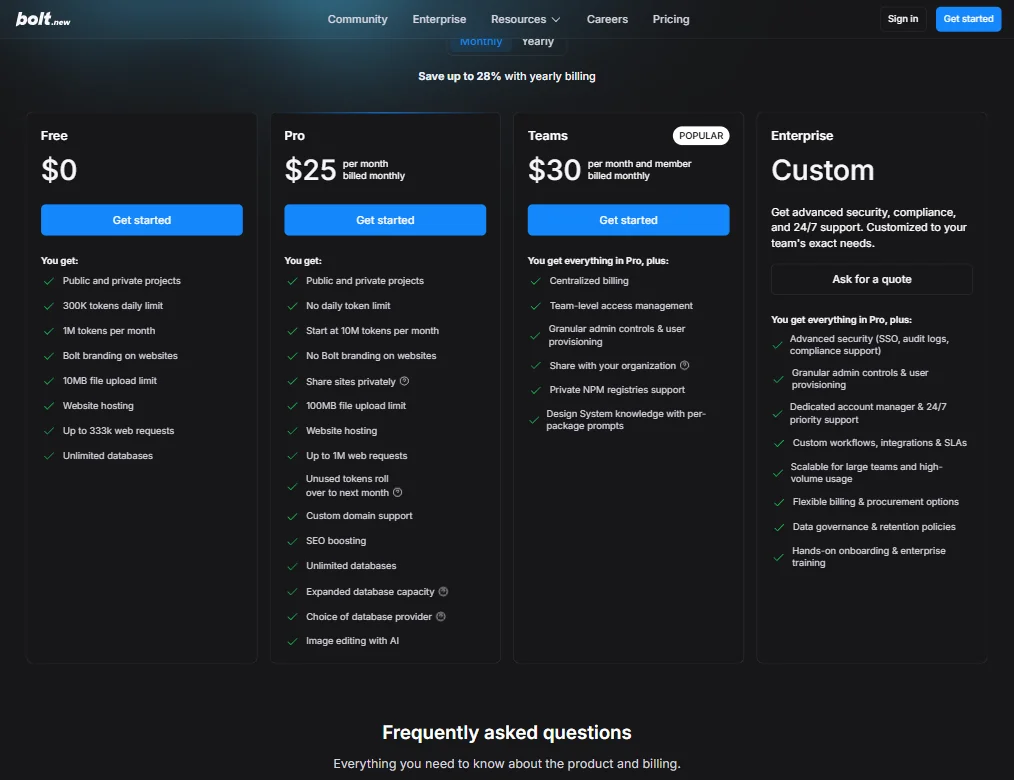
The pricing structure has four tiers. Free at $0, Pro at $25 per month billed monthly, Teams at $30 per month per member billed monthly, and Enterprise at custom pricing with no number published.
That's the surface. The complication is the token model underneath. Bolt runs on token consumption, which means your $25 per month buys a certain amount of usage, not unlimited access. The Pro plan starts at 10M tokens per month, no daily token limit, and unused tokens roll over to the next month. That rollover feature is real and worth crediting. The free plan runs 1M tokens per month with a 300K daily limit, which is a meaningful ceiling on anything ambitious.
Ask how token counts translate to real project complexity, because no conversion is published. That makes it hard to budget a project before you start.
Bolt's billing documentation confirms subscriptions are non-refundable under their Terms of Service. For a $25 monthly subscription, that's not unusual. For a tool where a failed build can burn through tokens without producing anything useful, it matters more than it typically would.
Users who upgraded to Pro expecting relief found complex builds eating through the allocation faster than anticipated. Whether that's a pricing transparency problem or a mismatch between user expectations and token reality depends on how complex your builds are.
Lovable, the main direct competitor here, uses a credit model too. Neither tool has earned praise for pricing transparency. Fair. But Bolt's Trustpilot record suggests the frustration cuts deeper for Bolt users than for Lovable's.
The 100MB file upload limit on Pro and 10MB on Free are documented clearly. That specificity is appreciated. More of that on the token side would help.
bolt.new vs Lovable: Which AI Coding Tool Is Better?
These two come up together constantly in the communities we tracked. Both target non-developers who want to build real web apps from prompts. Both use consumption-based models. Both have generated significant buzz and significant frustration in roughly equal measure.
The difference we kept finding is environmental depth. Bolt ships with more infrastructure baked in. WebContainers, Bolt Cloud's database and auth, and the model routing layer give Bolt a more self-contained feel. Lovable leans more heavily on external services for similar functionality.
Lovable's review scores are meaningfully better on Trustpilot. That's hard to ignore. Whether the product is genuinely more reliable, or the user base has lower expectations, or the community is simply more forgiving, is impossible to determine cleanly from review data alone. But the gap is notable and consistent.
Bolt's enterprise design system support, including the Washington Post and Porsche integrations, is unusual. No equivalent appears in Lovable's public feature documentation. For agencies working with clients who have established design systems, that's a concrete differentiator, not a theoretical one.
Developers who want AI assistance inside an existing toolchain rather than a replacement environment should look at Cursor instead. Neither Bolt nor Lovable is built for that workflow, and Cursor's professional developer review record is in a different class.
Who Should Use bolt.new? (And Who Shouldn't)
Non-technical founders. That's the clearest fit. Someone with a product idea, no engineering budget, and a deadline can move faster with Bolt than with almost anything else in this category right now.
Agencies doing rapid prototyping, especially with clients who have design systems Bolt supports, are a reasonable fit too. The Figma integration makes that workflow more credible than it sounds on paper.
Students learning how apps are structured get something useful here. Seeing generated code in a live environment and iterating on it is a decent learning path, better than staring at a blank IDE with no output.
Professional developers building production systems should look elsewhere. Browser-only environment, no IDE integration, token consumption model, and the code quality concerns we documented don't disappear because the demo looks clean.
Regulated industries. Non-starter. Bolt documents automatic security checks on publish and a Security Audit area for database issues, which is a start. But there's nothing in public documentation that approaches compliance-grade security review, audit logging outside of Enterprise, or data governance controls below the Enterprise tier.
bolt.new Review Verdict
Bolt does what it says it does. Mostly. The prompt-to-app generation works. The in-browser environment is a genuine piece of engineering. The v2 update moved things forward on debugging and context handling, and the Opus 4.6 integration gives the model routing more capacity for complex tasks.
The public review record is the problem. A 1.4 on Trustpilot across more than 135 reviews isn't a statistical anomaly. That's a signal, and it's consistent enough across platforms that we can't explain it away. The gap between the demo experience and the sustained usage experience is real Token limits bite harder than the pricing page prepares you for. Ambitious projects hit reliability walls. Support, when things go sideways, appears to be a Discord community and an email queue. That's thin.
The 98% fewer errors claim lives in vendor documentation with no third-party corroboration. We're not building a case against Bolt on that alone. We're just not repeating it as fact.
For the right person, Bolt is useful right now. The free plan is a real on-ramp, not a stripped-down teaser. The $25 Pro tier is accessible. The WebContainers environment and bundled infrastructure remove friction that genuinely matters to non-technical builders.
For everyone else, the gaps are too specific to ignore. No IDE integration. Opaque token economics. A support layer that's thin by any standard. A review trail that skews negative in a way that's hard to explain away.
Bolt is building something real. It just isn't finished being reliable yet.
Frequently Asked Questions
Is bolt.new free to use?
Yes, there's a free plan. No separate trial period is offered because the free tier functions as the on-ramp. It includes 1M tokens per month with a 300K daily cap, public and private projects, website hosting, and up to 333K web requests. Complex builds will run through that allocation faster than the pricing page makes obvious. If you're building anything beyond a simple prototype, budget for the $25 Pro plan before you start, not after you hit the wall.
Does bolt.new require coding knowledge?
No. The interface is built for people who want to describe what they need and get working code back. You can see and edit the generated code if you want to. You don't have to. That said, the more complex your project, the more useful it becomes to understand what the output actually says, especially once the debugging loop starts suggesting fixes that don't quite land. Complete code blindness works for simple projects. It becomes a liability on complicated ones.
How does bolt.new compare to other AI app builders?
The closest comparison is Lovable, which targets roughly the same audience and uses a similar consumption-based model. Bolt's main edge is the self-contained WebContainers environment and the bundled Bolt Cloud infrastructure. Lovable has better public review scores right now. For developers who want AI coding assistance inside their own IDE rather than a browser-based replacement, neither is the right fit. Something with deeper IDE integration, Cursor being the obvious name, would serve that use case better.







