SAASINSPECTOR
Webflow logo

Webflow Review

Content-rich sites with robust CMS and traffic needs

Visit WebflowFrom $25/mo

Research-based review. We analyzed vendor documentation, customer reviews on G2, Capterra, and Reddit, and live pricing — not hands-on testing yet. We update as our team puts tools through real workflows.

The verdict

Webflow is a visual website builder with a built-in CMS, hosting, and an expanding AI toolset, aimed at design professionals and marketing teams who need production-quality web output. Originally a designer's tool, it is now repositioning as an AI-native platform for whole teams, though its complexity still makes it a poor fit for non-technical users. It scores well for design power and brand consistency features, but falls short for broader creative or marketing asset needs.

Pros

  • The visual designer supports full UI/UX layout work including wireframe-level composition and breakpoint controls for responsive design, making it powerful for design professionals.
  • Shared design system libraries allow teams to lock in brand colors and fonts, reducing back-and-forth with stakeholders and keeping assets consistent.
  • Native GSAP animation support is built in, offering motion control that few no-code tools can match without third-party plugins.
  • Webflow includes a built-in CMS and hosting, consolidating key website infrastructure into a single platform.
  • AI credits are now available across all workspace tiers following the May 2026 restructure, expanding AI capabilities to more users.
  • The platform serves over 300,000 brands, indicating a mature and battle-tested product with broad real-world adoption.
  • New bandwidth add-ons up to 2.5TB and updated Team and Enterprise plans make it more viable for larger organizations.

Cons

  • Marketers have historically bounced off the platform due to its steep learning curve compared to simpler drag-and-drop builders like Wix.
  • No logo generation, social media templates, or print-ready output, making it unsuitable as a Canva replacement for broader creative needs.
  • The May 2026 restructuring into new plan tiers represents significant structural change that may confuse or disrupt existing customers.
  • The platform's complexity means it is better suited to designers and developers than to non-technical marketing team members.
  • The AI-native marketing team pitch is still unproven, and whether it holds up depends heavily on the specific users involved.
  • Positioning between a drag-and-drop builder and a developer framework means it may feel like neither extreme is fully satisfied.
From $25/moFree plan YesFree trial Yes

Webflow started as a designer's tool. Something marketers bounced off, admired from a distance, and handed back to agencies. That's changed, or at least Webflow is trying to change it. We cross-referenced vendor documentation, G2 and Capterra reviews from marketing and design professionals, Trustpilot submissions, and a significant volume of Reddit threads from 2025 and 2026. What we kept seeing was a platform mid-repositioning, not settled, not finished, but pointed somewhere specific.

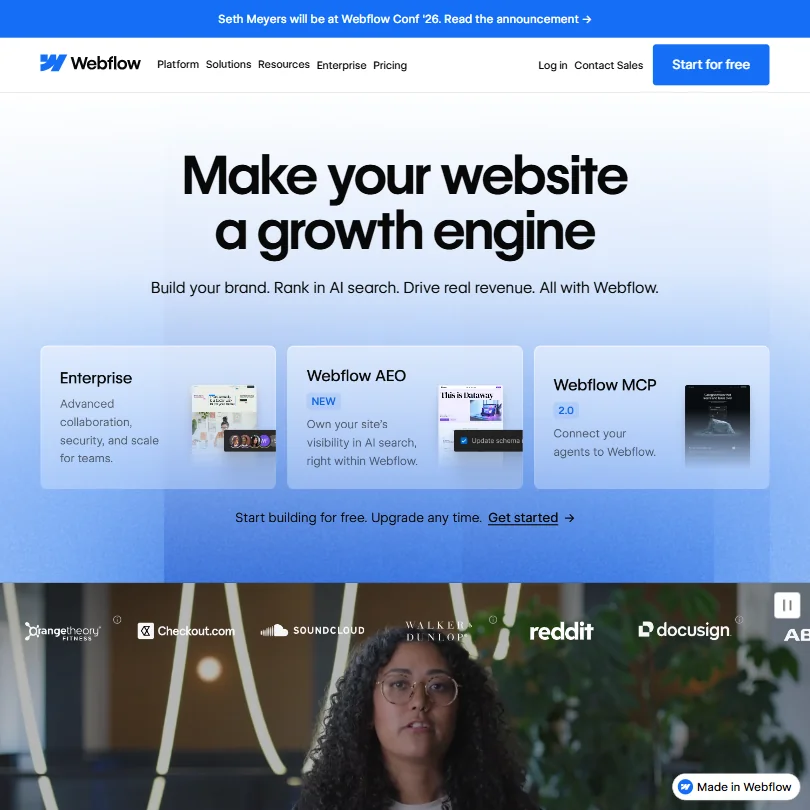
Webflow homepage screenshot
Webflow — Homepage

What is Webflow?

San Francisco-based. Claims over 300,000 brand customers. Positions itself somewhere between a drag-and-drop builder like Wix and a developer framework, closer to a design tool that also ships production code than either of those comparisons fully captures.

The structural changes in mid-2026 were significant enough to flag upfront. Webflow consolidated its site plans into three tiers, Starter, Basic, and Premium, and added separate platform plans for larger organizations. AI credits now appear across all workspaces. Bandwidth add-ons scale up to 2.5TB. That's a lot of architecture to shift in one cycle. Webflow is repositioning, not just patching.

What it doesn't do is worth saying plainly. No logo generation, no social media templates, no print-ready output. This isn't Canva. It's a website platform getting smarter about building and iterating on web pages, and it's not pretending otherwise.

Webflow Features: Logo, Graphics, UI & Brand Design Capabilities

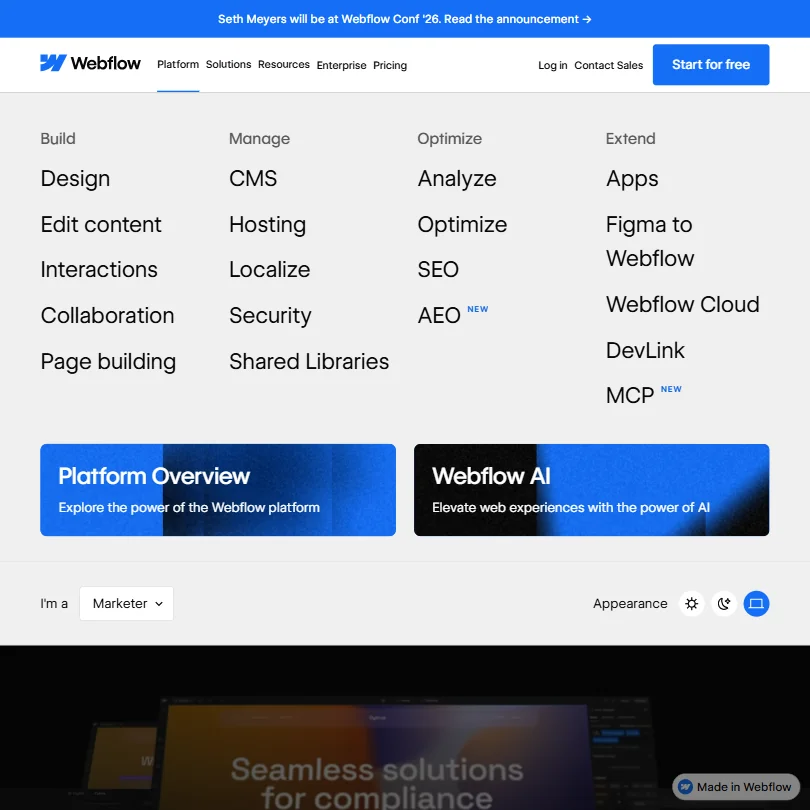
Webflow features screenshot
Webflow — Features

Everything points in one direction. Websites. The visual designer handles full UI/UX layout work, breakpoint controls for responsive design, and a shared design system that teams use to keep brand assets consistent. Webflow calls these shared libraries, and G2 reviewers in design roles flag them consistently as a genuine strength. Less stakeholder back-and-forth when the brand colors and fonts are locked into the system.

Animation support is real. Interactions are built in, and GSAP animations are available natively. Not many no-code tools offer that level of motion control without a third-party plugin.

The AI assistant handles content generation and page-building tasks, though reviewers are split on how far it actually gets you. We kept seeing comments along the lines of "useful for rough drafts but not production-ready." Fair. That's where most AI content tools land in 2026.

The Figma to Webflow integration is a LABS feature. LABS means experimental. It works, but fidelity isn't always there. Developers in Reddit threads from 2025 noted gaps between what exports from Figma and what Webflow actually renders. Not a dealbreaker, but worth knowing before you build a handoff workflow around it.

API access exists on Team and Enterprise plans. The MCP server is listed as an included feature across Starter, Basic, and Premium tiers, which is actually more generous than it sounds for a base-level offering. DevLink and deeper technical hooks require Team or Enterprise. If you're on Basic at $25 per month billed monthly, you won't see those.

What's missing matters too. No built-in background removal. Webflow documents SVG import workflows, editable SVG layers, and SVG animation integrations, but there's no native AI tool in the platform promising to generate vectors or SVG output directly. No confirmed Adobe integration. For teams that live in those workflows, Webflow isn't where that work happens.

Webflow Design Quality: How Good Are the AI-Generated Results?

Honestly, the strongest argument for Webflow isn't the AI. It's the overall visual output.

Pages built in Webflow look good. That finding is consistent across G2 reviews and backed up by the volume of polished agency sites built on the platform. The design system, the animation controls, and the custom CSS access all push quality up. Most no-code tools trade quality for accessibility. Webflow trades accessibility for quality. That tradeoff is explicit, and we think it's the right one for the audience they're actually targeting.

AI-generated pages are a different story. We dug through user posts from early 2026 and the pattern is clear. The AI gets you a usable starting point, not a finished page. Sections generate quickly. Brand consistency holds if you've set up your shared libraries correctly. But the results need human editing, multiple rounds of it in most cases.

That's not unique to Webflow. It's where AI-assisted design sits right now. What Webflow does better than most is give you capable-enough editing tools that the cleanup doesn't feel punishing. The floor is low. The ceiling is high. The distance between them is the learning curve, which we'll get into.

Webflow Templates & Assets: How Deep Is the Library?

Decent. Not exceptional.

Webflow's marketplace carries community-built templates ranging from sharp to bloated. Paid and free options both exist. You'll spend time sorting. Webflow doesn't advertise a precise template count prominently, which is a gap. Squarespace publishes theirs. Webflow's number shifts with community contributions, which makes direct comparison harder and a little inconvenient for buyers doing pre-purchase research.

The depth of customization on any template is the actual value. You're not locked into the layout the template ships with. G2 reviewers in agency roles mention this regularly as the reason they chose Webflow over Squarespace. Templates are starting points, not ceilings. That framing tracks with what the platform can actually do.

The brand kit functionality runs through the shared libraries system, and it's solid. Design tokens, shared color palettes, and typography settings propagate across a site. For teams managing multiple client sites, this matters more than the template count does.

What's not there: social templates, presentation assets, or anything outside the web context. Webflow's asset library is web-specific. Full stop.

Is Webflow Easy to Use for Non-Designers?

No. Not really.

Webflow has a learning curve the company acknowledges and tries to address with Webflow University, a video-based learning library. It helps. It doesn't fix the fundamental problem, which is that the tool exposes a lot of web design concepts, box model thinking, flexbox controls, breakpoint logic, that most non-designers haven't considered and don't want to.

Reddit is consistent on this. Threads from 2024 and 2025 are full of users who picked up Webflow, hit a wall, and went looking for help. Some stuck with it. A lot switched back to Wix or Squarespace. We don't buy the idea that the learning curve is just a perception problem. It's structural.

The AI layer is making this easier, incrementally. The AI Assistant can scaffold a page structure from a prompt, which gives new users a frame to work inside instead of a blank canvas. Not a magic fix. It does lower the floor somewhat.

The help center is comprehensive and the community forum is active, but live chat support is limited, which is genuinely annoying for new users who hit a block mid-build. Email support exists. Response times vary based on user posts we found, and not always favorably.

Teams with at least one person who knows their way around web design. That's the sweet spot. The complexity becomes a feature when someone in the room can actually use it. Fully non-technical teams should look at Wix first and graduate to Webflow if they hit the ceiling.

Webflow Pricing: Is It Worth It vs Hiring a Designer?

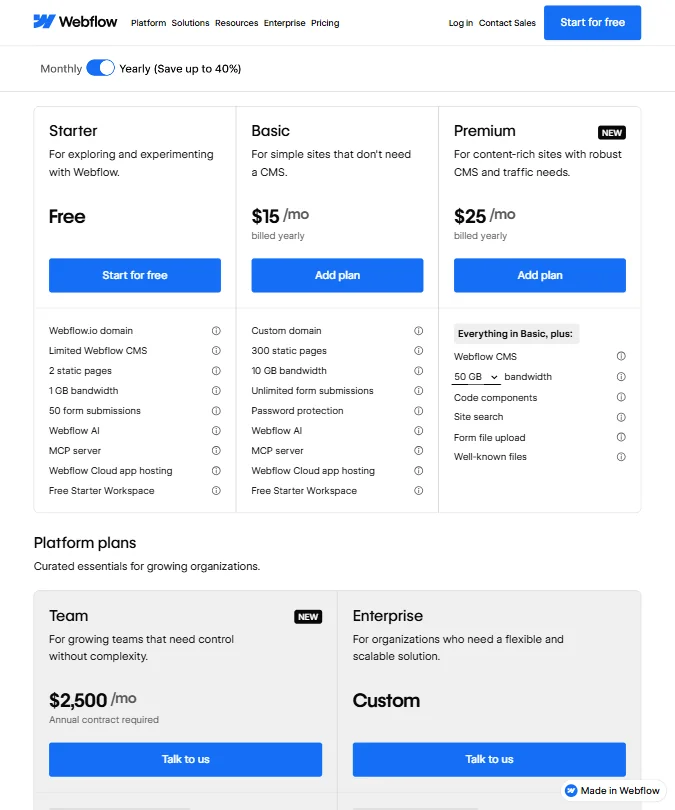
Webflow pricing screenshot
Webflow — Pricing

Three site plan tiers currently: Starter, which is free with no stated time limit per Webflow's own documentation, Basic at $25 per month billed monthly, and Premium at $39 per month billed monthly. Webflow's Help Center identifies the free tier specifically as the "free Starter Site plan" and places it directly under the Site plans heading, so it's a real free tier, not a trial. Basic includes a custom domain, 300 static pages, 10 GB bandwidth, and unlimited form submissions. Premium adds Webflow CMS, 50 GB bandwidth, code components, site search, and form file upload.

Then comes the gap.

Team plans start at $2,500 per month on an annual contract, and Enterprise is custom pricing. We're skeptical of that jump. Going from $39 per month to $2,500 per month with nothing in between is a hard structure for a growing agency or mid-size marketing team to absorb, and user posts reflect that confusion. It's not subtle. Several Reddit threads from 2025 specifically called out the missing middle tier as the reason users didn't upgrade.

API access, the activity log, and advanced collaboration hooks require Team or Enterprise. So if those integrations matter to your workflow, you're looking at $2,500 per month minimum. That's going to push mid-tier users toward workarounds or toward competitors.

Against hiring a designer, the math can work in Webflow's favor. A site built by a designer who then hands you a Squarespace or WordPress login gives you limited future flexibility. A Webflow site gives you full in-house editing capability once someone learns the tool. Factor in that learning investment, though. It's real and it's not free.

Webflow doesn't publicly state a refund policy in any documentation we found. That's frustrating for a platform at this price point. Most tools have something written down.

Webflow vs Squarespace: Which AI Design Tool Wins?

Different tools. Different finish lines.

Squarespace's onboarding is forgiving. Templates are polished and consistent. The AI features are newer and more limited, but the average user can ship a site in a day without any design knowledge. That's real value and Squarespace shouldn't be dismissed for it.

Webflow's output ceiling is higher. The animation control, the custom CSS access, the design system features. None of those exist in Squarespace at comparable depth. G2 reviewers who've used both tend to land in the same place: Squarespace for simplicity, Webflow for control. That tracks.

Webflow's CMS is genuinely capable for marketing content, with collection lists, dynamic pages, and editor roles that let non-technical team members update content without touching the designer. Squarespace's CMS is fine for blogs. It doesn't scale the same way for a content-heavy marketing site.

SEO tools tilt toward Webflow. Granular control over meta fields, canonical tags, and page-level settings that Squarespace buries or handles automatically. Webflow's AEO features are newer, and we couldn't verify independent performance data on them, so we're cautious about treating those as proven differentiators yet.

Framer is also worth a mention here. It sits closer to Webflow than to Squarespace, with a design-forward approach and a growing following among startup marketing teams. Worth a look before committing to either.

Who Should Use Webflow? (And Who Shouldn't)

Marketing teams at mid-size companies with at least one person who has design sensibility. That's the primary fit. Teams that want to iterate on web content without filing tickets to engineering every time.

Agencies managing multiple client sites. The shared libraries, CMS editor roles, and collaboration workspace are built for that workflow. Agency sentiment in G2 reviews is consistently positive on this point.

Freelance designers who want to deliver production-ready sites without handing off a WordPress install. Webflow gives them control over the final output, and clients get an editor they can actually use.

Not a fit for pure beginners with no design background and no learning budget. The tool will frustrate them before it helps them. Not a fit for e-commerce-heavy businesses either. Webflow has e-commerce plans, but the functionality doesn't compete with Shopify in depth or ecosystem size.

Teams looking primarily for AI image generation or graphic design output. That's not what this tool does.

Webflow Review Verdict

A genuinely capable platform in a narrow lane. It's trying to be the best tool for building and managing brand websites without heavy developer dependency, and in that lane, it's among the stronger options we've aggregated data on.

The learning curve is the most honest criticism. It's not optional. You invest in it or you don't get full value from the platform. The pricing gap between Premium at $39 per month and Team at $2,500 per month is a structural problem, not a positioning quirk. There's no middle ground between those two numbers, and growing teams feel that acutely.

The AI features are real but uneven. Useful at the draft stage. Not production-ready on their own. The shared libraries and design system features are where the platform shows discipline. The animation controls are legitimately strong and not matched at this price point by most competitors.

Webflow rewards people who meet it halfway. It doesn't come to you. For teams ready to do that, there's a lot here worth having.

Frequently Asked Questions

Does Webflow have a free plan?

Yes. Webflow's Help Center refers to it specifically as the "free Starter Site plan," and it sits under the Site plans heading on the pricing page. No stated time limit. Limited on CMS items, bandwidth, and AI credits, but it's a real free tier, not a 14-day trial. Worth using to get a feel for the interface before committing to Basic at $25 per month billed monthly.

Is Webflow good for SEO?

Better than most no-code builders. Webflow gives you control over meta titles, descriptions, canonical tags, and alt text at the page and collection level. That's more than Squarespace offers by default. The platform added AEO tools recently, though independent data on how those perform in practice is thin. Solid foundation. Newer additions still proving themselves.

How does Webflow's CMS compare to WordPress?

Cleaner and more predictable for marketing content. Collection-based structure, editor roles for non-technical team members, and no plugin dependency for basic content management. WordPress has a deeper plugin ecosystem and more flexibility at the extreme end. For a marketing team managing a blog and landing pages without a developer on call, Webflow's CMS is genuinely competitive and arguably less maintenance-heavy in practice. The tradeoff is that WordPress scales further if you eventually need it to.

Webflow is featured in

Alternatives to Webflow

See all Webflow alternatives →

Other AI Design Tool options we've reviewed.

User reviews

Review Webflow

Your rating

Reviews are moderated and appear once approved.