SAASINSPECTOR
Builder.io logo

Builder.io Review

Engineering, design, product, and marketing teams who want to build, edit, and publish production-ready web apps and content visually without handoffs

Visit Builder.ioFrom $24/user/month (Pro)

Research-based review. We analyzed vendor documentation, customer reviews on G2, Capterra, and Reddit, and live pricing — not hands-on testing yet. We update as our team puts tools through real workflows.

The verdict

Builder.io is a headless CMS with a visual editing layer designed for teams that want designers, marketers, and developers working directly in the same production codebase. It's best suited for mid-to-large product teams using modern JavaScript frameworks like React or Next.js who need design system enforcement alongside no-code content editing. With over 100,000 users and a strong update cadence, it scores well for its category, though it's not the right fit for simple websites or brand asset creation.

Pros

  • Builder.io integrates directly into existing React, Next.js, Vue, and Angular codebases, eliminating the traditional design-to-development handoff queue.
  • The brand kit system locks editors to actual design tokens, preventing non-technical users from accidentally breaking visual consistency.
  • Real-time multiplayer editing, commenting, and peer review workflows are available for up to 20 users on the Team plan.
  • The Figma plugin converts designs into deployable production code, reducing manual front-end implementation work.
  • The Builder Agent AI handles design-to-code conversion, prototype generation, and content creation directly inside the editor.
  • Updates ship every two to four weeks, indicating an actively developed and non-stagnating product.
  • Builder 2.0 added parallel AI agents and real-time collaboration, pushing the platform beyond a basic landing page editor.
  • The gap between marketing claims and real-world user experience is narrower than typical for tools in this category.

Cons

  • Builder.io does not support logo generation or print-ready file exports, making it unsuitable for brand identity design work.
  • The platform occupies a complex niche as a headless CMS with a visual layer, which may be overkill or confusing for simpler use cases.
  • The product is more technically involved than traditional no-code builders like Squarespace or Webflow, requiring developer setup to wire in components.
  • Some gaps exist between the marketing pitch and the actual product experience, which the review flags as worth investigating before purchasing.
  • Real-time collaboration and advanced AI features are gated behind paid plans, limiting accessibility for smaller teams or individuals.
  • The Builder Agent AI's real-world performance on design-to-code conversion requires closer scrutiny beyond vendor marketing claims.
From $24/user/month (Pro)Free plan YesFree trial Yes

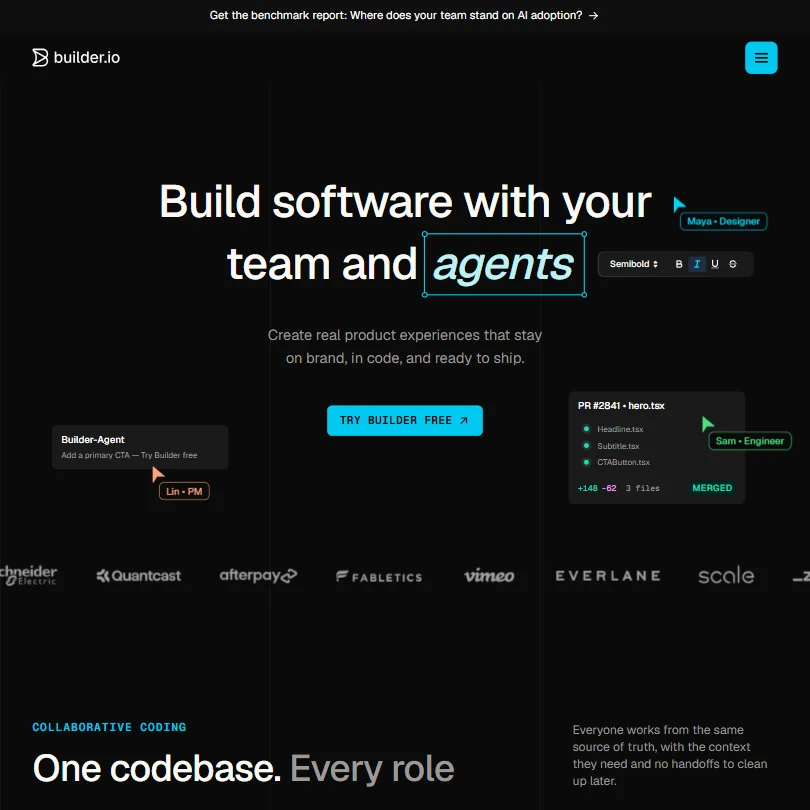
Builder.io homepage screenshot
Builder.io — Homepage

What is Builder.io?

Most visual editors sit between your design team and your production codebase. Builder.io tries to be both. The idea is that you wire it directly into your existing React, Next.js, Vue, or Angular app, then let designers, marketers, and developers all touch the same thing without routing work through a handoff queue.

Specific category matters here. Builder.io is closer to a headless CMS with a visual layer wired into your real codebase, which puts it in a genuinely different bucket from something like Squarespace or even Webflow. It's not a website builder. That distinction confuses a lot of people who end up in the wrong place.

The Builder Agent is their AI component. It handles design-to-code conversion from Figma, generates working prototypes, and can produce images and content inside the editor. How well that actually works is a separate question we get to below.

Our research started with the homepage pitch, then moved into G2 reviews, Reddit threads, and vendor documentation. The gap between the marketing and what users actually report is smaller than we expected. But there are gaps worth knowing about before you spend anything.

Builder.io Features: Logo, Graphics, UI & Brand Design Capabilities

Builder.io features screenshot
Builder.io — Features

No logo generation. No print-ready files. Worth flagging early.

What it does: visual drag-and-drop editing wired into production components, a Figma plugin that converts designs into deployable code, AI-generated prototypes through the Builder Agent, and a brand kit system that maps design tokens directly into the editor. That last part is the one that actually matters in production environments. Most visual editors let editors override styles freely. Builder.io can lock editors to your actual design system, which is the thing that stops a marketing manager from accidentally publishing the wrong button color.

Collaboration is real. The Team plan supports up to 20 users with real-time multiplayer editing, commenting, and peer review workflows. That's not just "share a link." It's closer to what you'd expect from a product like Figma, applied to a live content environment.

Integrations include GitHub, GitLab, Bitbucket, and a few others on the lower tiers. VS Code and Figma are there too. Azure DevOps shows up at the Enterprise tier, and so does GitLab Enterprise. Honestly, that's a solid integration surface for a company under ten years old.

The VS Code extension is a notable detail. Developers stay in their environment while content editors work visually. That's where the no-handoffs argument starts to feel credible, at least on paper.

Builder.io Design Quality: How Good Are the AI-Generated Results?

Production-oriented, not portfolio-oriented. That's the distinction that matters here.

When we cross-referenced the documentation with G2 reviews, the pattern that came up repeatedly was that Builder.io's AI doesn't generate polished visual comps you'd show a client. What it generates is working code components that match your existing design system. For engineering teams, that's genuinely useful. For designers shopping for pixel-perfect AI mockups, it's a tool mismatch.

The Figma-to-code workflow gets positive mentions from reviewers in developer and product roles. The general report is that it speeds up conversion significantly compared to manual implementation. Reviewers who struggled tended to be on smaller teams without an established design system to anchor the output. That tracks. The AI's quality scales with the sophistication of what you feed it.

We're skeptical of some of the "AI generates production-ready pages instantly" framing in the vendor docs. Reviews suggest it's more like "AI generates a solid first pass that still needs developer review." Still valuable. Just not magic.

Builder.io Templates & Assets: How Deep Is the Library?

Thinner than competitors. That's the short version.

The platform isn't built around a rich template library. There's no catalog of marketing-ready page designs or social layouts you'd find in Canva or Webflow. What exists is component-level. Building blocks that snap into your existing pages, not pre-built pages you can swap in and launch by end of day.

For teams with mature design systems, that's fine. They don't want someone else's templates. For a startup moving fast without dedicated designers, the shallow asset library adds real friction. Webflow has a substantially deeper marketplace ecosystem. Framer does too.

Fair. Builder.io never claimed to be a template marketplace. But it's a real gap if you're evaluating it against either of those alternatives and template depth is part of your decision.

Is Builder.io Easy to Use for Non-Designers?

Depends entirely on the role.

For content editors and marketers making changes inside pre-built pages, the visual editor is genuinely accessible. No code required. You can swap content, adjust layouts within defined constraints, and publish without opening a terminal. That part works as described.

For someone setting up Builder.io from scratch and wiring it to a codebase? Not a non-technical task. Our research across G2 surfaces a consistent pattern: marketing users find the editor intuitive, and developers find the initial setup unexpectedly fiddly. The documentation is comprehensive, but "comprehensive" sometimes means "a lot to get through before anything works."

Reddit threads from 2024 specifically mention a learning curve around the component registration system that's steeper than the homepage implies. First-time codebase integration can take a developer several days to complete correctly. Not a dealbreaker. Something to budget for, though.

The VS Code extension reduces friction after setup. It's the initial configuration that bites people.

Builder.io Pricing: Is It Worth It vs Hiring a Designer?

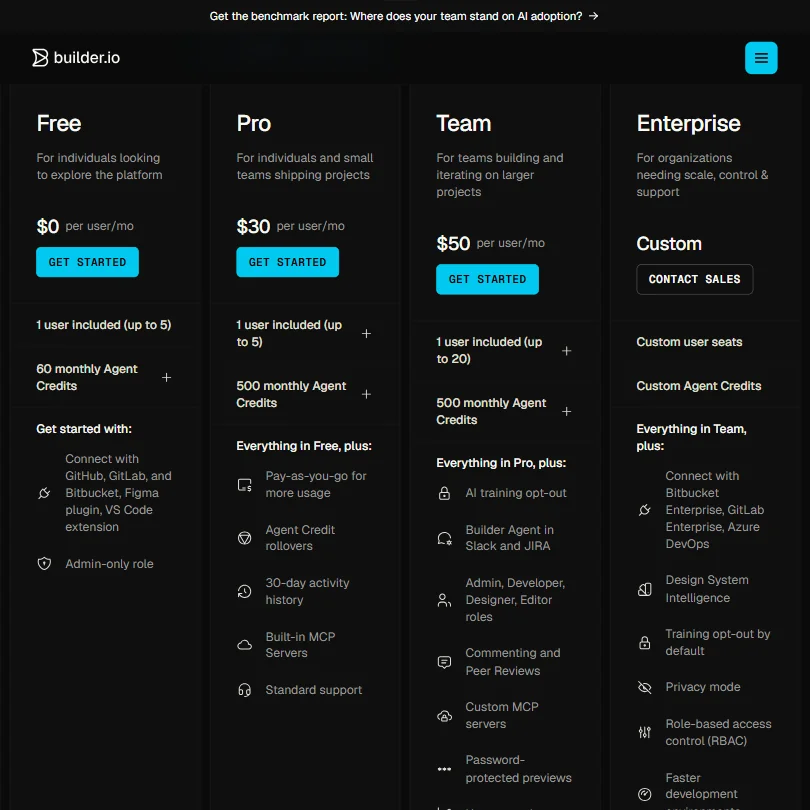
Builder.io pricing screenshot
Builder.io — Pricing

The free tier exists and doesn't expire. That immediately puts it ahead of tools with hard trial cutoffs. Sixty monthly Agent Credits on the free plan is enough to evaluate whether the tool fits before committing to anything.

After that, the Pro plan runs $30 per user per month, with up to five users and 500 monthly Agent Credits. Agent Credit rollovers and 30-day activity history come in at that tier too. The Team plan is $50 per user per month, also capped at 20 users, with AI training opt-out and Builder Agent in Slack and Jira added on top of what Pro includes. Enterprise is custom pricing, custom user seats, custom Agent Credits, with dedicated Bitbucket Enterprise, GitLab Enterprise, and Azure DevOps integrations, plus Design System Intelligence. No public number.

Pay-as-you-go for additional usage is available on Pro and up. That's a sensible safety valve for teams with unpredictable workloads.

Refund policy isn't publicly stated anywhere we found. Yellow flag. Not unusual for SaaS, but worth asking sales before committing at the Team tier or above.

Compared to hiring a designer: Builder.io doesn't replace one. It reduces what designers need to do manually and lets non-developers publish changes independently. The ROI math works better for mid-sized teams than for solo operators. A solo founder paying $30 a month for a tool that requires developer setup to function fully is going to have a harder time closing that value equation.

Builder.io vs Webflow: Which AI Design Tool Wins?

These tools are less similar than they appear from a distance.

Webflow is design-first. You build pages visually, publish them, and the CMS lives inside that visual environment. The template ecosystem is deep. The learning curve is real but contained. You're building a website. Builder.io is integrating into an existing web application. That's a fundamentally different starting condition, and the teams who get confused about it are the ones writing the most frustrated reviews.

Webflow wins on standalone site building. It wins on template depth. It wins on accessibility for non-developers starting from zero.

Builder.io wins when you have a development team, an existing app, and a content or marketing team that needs to make changes without filing tickets. The no-handoffs argument only holds once those specific conditions are met. Before that, Webflow is the more practical choice for most teams.

On A/B testing: Webflow recently shipped Webflow Optimize, their built-in A/B testing and personalization product, which supports traditional A/B tests, multivariate variations, and AI-driven optimization. Builder.io also has native A/B testing and personalization built in. So that gap, which used to favor Builder.io clearly, is narrower now. Teams evaluating both tools on experimentation capabilities specifically should dig into both implementations before deciding.

Who Should Use Builder.io? (And Who Shouldn't)

Engineering-led product teams. That's the core fit. Teams with existing React or Next.js apps who want to hand off content editing to marketers without writing custom CMS infrastructure from scratch.

Headless commerce teams are another strong match. The Shopify integration and component-based architecture fit well with a headless storefront model. G2 reviewers in e-commerce roles mentioned faster page iteration without waiting on developer sprints. That's the use case working as designed.

Solo founders without a developer on staff. Look elsewhere first. The setup requires technical knowledge and the value proposition doesn't land until the codebase integration is live. Framer or Webflow will get you to published faster.

Design agencies doing client work should be cautious. Per-client infrastructure setup adds overhead that more self-contained tools don't. Not impossible. Just not what the product is optimized for.

Builder.io Review Verdict

Legitimate product, real problem, specific fit. The problem isn't "I need a website." It's closer to: "I have a production web application and I need design, marketing, and engineering to stop blocking each other." If that's the actual pain, Builder.io is one of the few tools genuinely architected for it.

What works: the Figma-to-code workflow, the design token integration, and the real-time collaboration on the Team plan. For the right team, those things together are hard to replicate with a stack of separate tools.

What doesn't: the template library is thin, the initial setup is heavier than the marketing implies, and the community presence is smaller than competitors like Webflow or Contentful. The public review sample on G2 is still relatively small, and we'd want more longitudinal data before calling the reliability picture settled.

The pricing is fair for mid-sized teams. Less compelling for individuals. The free tier gives you room to find that out before committing.

Not a tool to evaluate casually. It rewards teams that do the setup work and frustrates teams that don't.

Frequently Asked Questions

Does Builder.io require a developer to set up?

For the visual editor and basic CMS features, you can get started without deep development knowledge. To integrate Builder.io into an existing production codebase and wire up a design system, you'll need a developer. Based on community threads and G2 reviews, budget at least a few days for the initial setup to go smoothly, particularly around the component registration system.

How does Builder.io compare to a headless CMS like Contentful?

Contentful is a content repository. You store structured content and pull it wherever you need it. Builder.io does that too, but adds a visual editing layer on top of your production app so non-developers can make page-level changes without touching a content API directly. The two tools aren't mutually exclusive, but if visual editing and component-level control are priorities, Builder.io does more out of the box than Contentful alone.

Is the Builder.io free plan actually usable?

It doesn't expire, which helps. The free plan includes 60 monthly Agent Credits and support for up to five users, which is enough to evaluate the editor and build initial pages. It becomes limiting once you need Agent Credit rollovers, 30-day activity history, or deeper Git integrations. At that point you're looking at the Pro plan at $30 per user per month, or the Team plan at $50 per user per month if you need up to 20 users and features like the Builder Agent in Slack and Jira.

Builder.io is featured in

Alternatives to Builder.io

See all Builder.io alternatives →

Other AI Design Tool options we've reviewed.

User reviews

Review Builder.io

Your rating

Reviews are moderated and appear once approved.