SAASINSPECTOR
Typecast logo

Typecast Review

Content creators, YouTubers, podcasters, and businesses needing expressive AI voiceovers with emotional control

Visit TypecastFrom $8.99/mo (Basic)

Research-based review. We analyzed vendor documentation, customer reviews on G2, Capterra, and Reddit, and live pricing — not hands-on testing yet. We update as our team puts tools through real workflows.

The verdict

Typecast is a browser-based AI voice and video platform targeting content creators, YouTubers, and businesses that need voiceovers without hiring talent. It offers 710 voices, talking avatars, a built-in video editor, and an emotion-capable REST API at a surprisingly low price point. While the feature breadth is impressive on paper, the review notes real gaps beyond the headline features and was not based on hands-on testing.

Pros

  • Offers 710 genuine voices with an unusually wide range including anime, cartoon, rapper, and elderly speaker styles.
  • Built-in video editor and talking avatar tool are included even at the $8.99/month entry price, which is rare in this tier.
  • Proprietary SSFM (Speech Synthesis Foundation Model) claims more natural vocal variation than basic neural or concatenative models.
  • Granular emotional control lets users adjust tone, pace, and mood rather than just selecting a preset voice.
  • REST API includes emotion control parameters baked in, which is not standard among API-tier voice tools.
  • Available as both iOS and Android apps, which most competitors in this space do not offer.
  • All-in-one platform covering voiceover, voice cloning, and short video content in a single browser-based tool.

Cons

  • The review was not hands-on tested, so real-world performance claims around the API and SSFM model remain unverified at scale.
  • Operates in a crowded market where many competitors offer similar text-to-speech and avatar features, making differentiation uncertain.
  • Headline features like emotional control and avatar video may not hold up as well in practice as they appear in vendor documentation.
  • No confirmation from user reviews that the granular emotional control delivers consistently usable results across voice types.
  • Being browser-based may limit performance or workflow integration for users who need desktop-native tools.
  • The broad feature set at a low price point raises questions about depth and quality versus specialized single-purpose tools.
From $8.99/mo (Basic)Free plan YesFree trial Yes

What is Typecast?

Browser-based, no downloads, founded in 2020 out of San Mateo. Typecast pitches itself as an all-in-one voice and video platform, which is a bigger claim than most tools in this category bother making. The core is text-to-speech built on their proprietary SSFM (Speech Synthesis Foundation Model), which they say handles natural vocal variation better than older concatenative or basic neural approaches. They also ship iOS and Android apps, which is more than most competitors bother with.

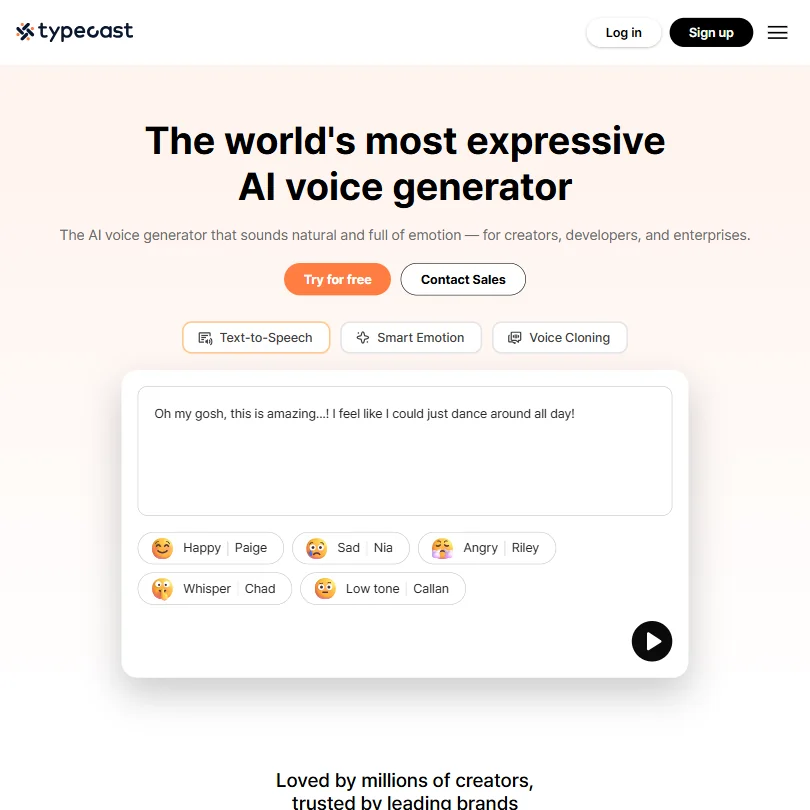
Typecast homepage screenshot
Typecast — Homepage

The platform is aimed at content creators, YouTubers, and businesses that need voiceovers without hiring talent. Crowded space. What Typecast is betting on is emotional control, the idea that you can adjust tone, pace, and mood at a granular level rather than picking a voice and hoping it sounds right. We were curious whether that actually played out beyond the marketing copy.

Typecast Features: Voice, Music & Audio Capabilities

Typecast features screenshot
Typecast — Features

Seven hundred and ten voices. That's the number Typecast leads with, and from what we cross-referenced across their docs and user reports, it's a real count, not padded. The library covers narrators and news presenters, sure, but it also goes to stranger places. Anime voices. Rappers. Cartoon characters. Elderly speakers. The range is genuinely wider than most competitors keep available.

On the content creation side, Typecast includes a built-in video editor and a talking avatar tool. Those aren't features you'd expect at $8.99 a month. Honestly, that surprised us. Most tools at this tier make you pay separately for video, or don't offer it at all.

The REST API carries emotion control baked in, which is the detail that matters for developers. That's not standard. Most API-tier voice tools expose basic parameters and stop there. We cross-referenced this against their current API documentation and found the claim holds up, at least on paper. Whether it performs at scale is something users would have to verify themselves.

Music generation isn't here. Transcription isn't publicly documented. No noise removal, no audio enhancement, nothing along those lines. The tool is focused on voice output and basic video. That focus is either a feature or a flaw depending on what you need.

Typecast AI Audio Quality: How Natural Does It Sound?

G2 reviewers generally land somewhere between "good enough for YouTube" and "noticeably better than I expected." Not audiophile territory. Functional for the use case. The emotional expressiveness is what comes up most in positive reviews, specifically the ability to dial in a more anxious read or a warmer one without manually editing pitch curves in post.

The flip side is real. Some G2 reviewers flagged that the emotional controls don't always produce predictable results, where you ask for something sad and get something that just sounds tired. That's a genuine UX problem for anyone running a high-volume workflow. We saw this pattern across multiple reviews, not an isolated complaint.

We're skeptical of the "professional-grade" framing on the homepage. The output is solid, not broadcast-ready. That's fine, most creators don't need broadcast-ready. They need something that doesn't sound robotic, and by that bar, Typecast clears it.

Typecast Voice Cloning & Customization: How Deep Does It Go?

The voice cloning feature uses a 30-second audio sample. That's on the shorter end of what you'd want for a convincing clone. Some tools ask for five minutes or more. Typecast is going for accessibility here, lower barrier to entry, faster results. The trade-off is usually fidelity. Fair.

Voice cloning is gated behind paid plans. The Basic tier at $8.99 a month doesn't include it. You need Pro at $32.99 to get one clone slot, or Business at $89.99 for two. We dug through the pricing page and found no clarity on whether higher-tier users can purchase additional slots. That's a gap worth knowing about before you commit.

The customization controls beyond cloning cover pace, pitch, and tone adjustments per sentence. You can also layer style adjustments on top of any voice in the 710-plus library. Compared to ElevenLabs, which gives you more granular control over speaking style at the generation stage, Typecast's approach feels more structured. Less open-ended. That's not necessarily worse for non-technical users who don't want to fiddle with sliders.

Is Typecast Easy to Use?

The browser-based editor is the main environment. No downloads, no installation. That's the right call for a product targeting content creators rather than audio engineers.

What we kept seeing in G2 reviews from marketing and creative users was that the learning curve stayed low for basic voiceover work, but got steeper once they tried the video editing or avatar features. Those tools feel newer, less polished. One reviewer described the avatar output as "still catching up" to the voice quality. That tracks with what you'd expect from a product adding features quickly on a relatively short timeline.

The mobile apps exist. We didn't find much specific user feedback on the mobile experience, so we can't call it either way.

The free plan gives you five minutes of download credits per month. Tight. Tight enough that anyone seriously evaluating the tool will hit the ceiling fast and have to decide on a paid tier before they're ready to commit.

Typecast Pricing: Is It Worth It for Creators & Businesses?

Typecast pricing screenshot
Typecast — Pricing

Three tiers plus enterprise. Basic at $8.99, Pro at $32.99, Business at $89.99, enterprise through sales. The refund policy isn't publicly stated anywhere we found. Paying $32.99 a month with no clear exit terms is a real ask, and not a good look.

The Basic plan includes commercial rights. That's the right call. Plenty of competitors lock commercial use behind higher tiers, and at least here the entry-level subscription covers you on licensing.

The Pro plan is where most creators will land. One voice clone slot, more download credits, commercial rights. For $32.99 that's reasonable if you're producing content regularly. The jump to $89.99 for Business feels steep, specifically because the main upgrade is two clone slots instead of one. We've seen worse value gaps, but we've also seen better ones.

The API pricing is usage-based, listed separately. Fine for developers, but cost gets unpredictable at scale. Worth checking before you build a pipeline on it.

Typecast vs ElevenLabs: Which AI Audio Tool Wins?

ElevenLabs is the obvious comparison. Both do text-to-speech with emotional expressiveness. Both offer voice cloning and API access.

ElevenLabs wins on voice quality at the top end. It's the current benchmark for realistic AI voice output, and most of the audio community knows it. Where Typecast pushes back is breadth. The avatar feature, the video editor, the wider voice style library including anime and cartoon registers. ElevenLabs doesn't do video or avatars. It's a voice tool. Typecast is trying to be a content production tool. Those are different bets.

The pricing diverges too. ElevenLabs's free plan is more generous on characters per month. Typecast's five-minute limit hits faster. But Typecast's Basic tier at $8.99 undercuts ElevenLabs's entry paid plan on monthly cost.

Solo creators who only need clean, realistic voiceover output will probably find ElevenLabs the cleaner choice. Those building out a full YouTube or social content workflow in one place, Typecast makes a reasonable case.

Who Should Use Typecast? (And Who Shouldn't)

Content creators running YouTube channels or social video. That's the sweet spot. Voice generation, avatar tools, and video editing in one browser-based product saves a lot of app-switching.

Podcast producers looking for a simpler workflow could find it useful. The audio editing side covers the basics.

Developers needing emotionally expressive API access. Not many tools offer that without custom integrations.

Who shouldn't use it? Teams that need deep DAW integration, because Adobe Audition and GarageBand aren't here, and if your workflow lives inside a DAW, Typecast doesn't plug in. Anyone needing more than two voice clone slots will find the Business tier limiting fast.

Heavy localization work is also a stretch. Typecast's voice library spans 35-plus languages, with their current API documentation listing 37 supported languages for their latest model. That's a genuinely wide offering, and describing it as a "short list" would be inaccurate. That said, if multilingual volume at scale is the actual need, Murf AI still warrants a side-by-side look, since Murf's own pricing page lists 30-plus languages and accents with localization features built more centrally into its pitch.

Typecast Review Verdict

Not a wrapper, not a reskin. The SSFM technology does seem to produce more expressive output than older models, the all-in-one positioning is more coherent than most competitors manage, and the 710-plus voice library is genuinely deep. The API has real developer value. The entry price is fair.

The problems are specific. The invisible refund policy is a trust issue. The emotional controls being inconsistent in practice is a UX issue. The voice cloning tier structure, capped at two slots on the highest self-serve plan, limits anyone trying to build a production pipeline around the tool. And the lack of DAW integration keeps this firmly in standalone territory, not something that fits into a professional studio setup.

For solo creators and small teams producing regular content, Typecast earns its place. Enterprise audio production or heavy localization workflows, probably not the right fit.

Frequently Asked Questions

Is Typecast free to use?

There is a free plan. Five minutes of download credits per month, which sounds like enough until you actually try to produce something. You'll hit the limit quickly if you're testing voices or iterating on a script. The free plan is more useful as a demo than a production tool. Not great.

How does Typecast's voice cloning work?

You upload a 30-second audio sample and the model builds a clone from it. Thirty seconds is a short sample by the standards of this space, so expect the clone to capture general tone more than fine-grained vocal texture. Cloning is available on Pro and Business plans only. Basic subscribers don't get access, which is worth knowing before you sign up.

Does Typecast offer commercial rights?

Yes, on all paid plans starting at Basic, which is $8.99 a month. The free plan doesn't cover commercial use. If you're producing content for clients or monetized channels, you'll need at least the Basic tier. That's a reasonable line to draw, and the $8.99 entry point makes it accessible enough that it's not a real barrier for most creators.

Typecast is featured in

Alternatives to Typecast

See all Typecast alternatives →

Other AI Audio Tool options we've reviewed.

User reviews

Review Typecast

Your rating

Reviews are moderated and appear once approved.