Playform is a modular AI art suite of five own tools, covering text-to-image generation, sketch conversion, style transfer, face-consistent portraits and custom model training, with a free daily allowance and three paid tiers priced in US dollars. What decides whether it suits you is whether unlimited watermarked experimentation, with credits spent only on clean downloads, matches how you want to work.

What is Playform?
Playform runs entirely as a web app. It builds its own tools rather than reselling other companies' models: no other company's model is offered inside it.
What you can make with Playform

Playform offers five pre-trained tools of its own, including Text-to-Image, Sketch AI, Stylize and Face Swap. The free plan gives 100 generations a day, each carrying a watermark until 2 credits are spent to download it clean.
Editing includes masking an area to inpaint, and upscaling up to 4x is free and unlimited on every plan, including Free. A style reference lets a saved or uploaded style, including an artist's, be applied to a new image, Sketch turns a drawing into a finished artwork, and FaceCraft keeps a face consistent across generations guided by a text prompt. Video clip generation, including FaceMorph video, is available from the Plus plan and above. Train Your Own Model is available from the free tier, letting a custom model be trained on a user's own images.
Playform has no public gallery or feed of other users' generations, does not support remixing another user's upload, and runs no challenges or contests.
Working with other people
Playform has no API for developers to build on, and it has no desktop or mobile app; it runs on the web only.
Playform pricing: what each plan gives
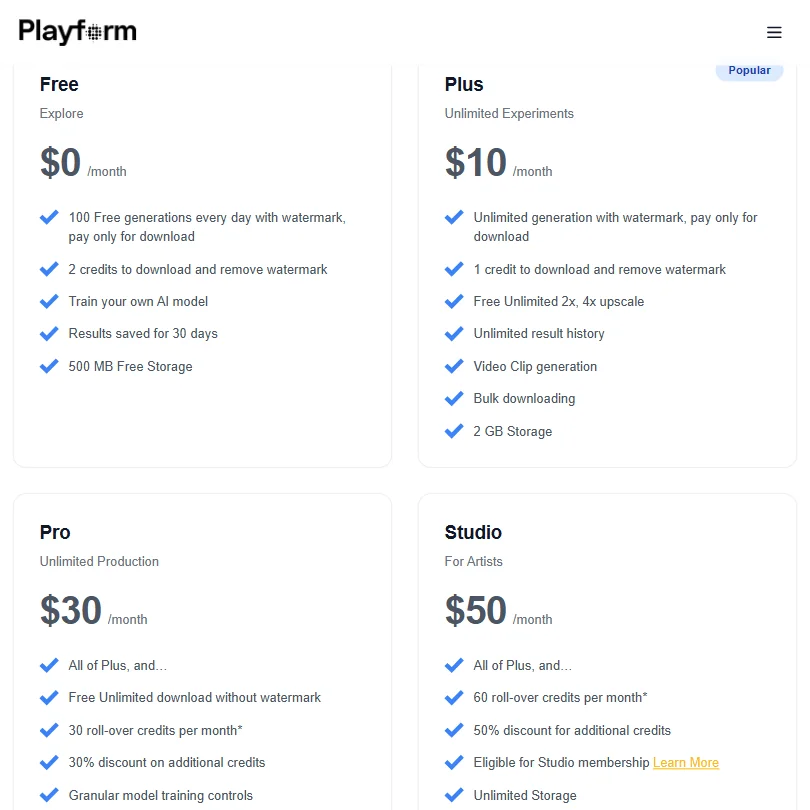
Free costs $0 a month and gives 100 generations a day with a watermark; removing the watermark and downloading costs 2 credits per image. Results are saved for 30 days and 500 MB of storage is included free. There is no time-limited trial of a paid plan.
Plus costs $10 a month ($8.33 a month billed yearly) and gives unlimited watermarked generation, with 1 credit to download and remove the watermark, plus free unlimited 2x and 4x upscaling. Pro costs $30 a month ($25 a month billed yearly). Studio costs $50 a month ($41.67 a month billed yearly).
Rights and privacy
You retain full commercial rights to the images you generate, and you own all intellectual property in that content. Playform's own indemnification clause runs from the user to Playform, not the other way. Your uploaded images and creations are private by default, for every user, not only paid plans. Playform does not use content you submit or generate to train or fine-tune its general-purpose image models; the one exception is a model you explicitly request and control, through the Train Your Own Model feature. Playform processes personal data under GDPR legal bases where GDPR applies.
Support runs through email, with Documentation and an FAQ serving as a self-serve help center.
Who Playform suits
Playform suits people who want a suite of separate art tools, sketch conversion, style transfer, face-consistent portraits and model training, under one account, and who are comfortable generating freely on the watermarked free tier before spending credits on the images worth keeping. Its exclusion of general-model training from what you upload also suits anyone who wants that guarantee in writing.
It suits less well anyone who wants a public gallery or community feed to browse or remix, since neither exists, or anyone who needs an API to build on, since Playform does not offer one.
How Playform compares
Playform scores 7.3 out of 10 among the AI art platforms we rate. These three do the same job and are the closest to it, compared on what each vendor publishes.
Artbreeder
Playform costs $10 a month against Artbreeder's $8.99, and both let you keep generations private and own what you make. Playform trains a private model on your own images, upscales, and keeps a character consistent across generations, none of which Artbreeder offers. Artbreeder instead runs a public gallery with challenges and remixing that Playform's curated Studio exhibition does not replace.
Pick Artbreeder if you want a public gallery, challenges and remixing built in.
Pick Playform if you need to train a private model or keep characters consistent.
Dream
Playform costs $10 a month against Dream's $19.99, and both generate video, though Dream needs its Standard plan for that. Playform trains a private model on your images, upscales and keeps a character consistent across generations, none of which Dream offers. Dream's advantage is a native iOS and Android app; Playform has no phone app at all.
Pick Dream if you want a native phone app for iOS or Android.
Pick Playform if you need to train a private model or keep characters consistent.
NightCafe Creator
Playform costs $10 a month against NightCafe's $12.49, and both train models on your own images, upscale, and keep a character consistent across generations. NightCafe runs a public gallery with daily challenges and lists 50 built-in models against Playform's 5. Playform keeps every generation private by default, while NightCafe's free tier posts to its public feed.
Pick NightCafe Creator if you want a public gallery, daily challenges and more models.
Pick Playform if you want every generation private by default.
Frequently Asked Questions
How much does Playform cost?
Free costs $0 a month for 100 watermarked generations a day, with 2 credits needed to download and remove the watermark. Paid plans start at Plus for $10 a month ($8.33 a month billed yearly), then Pro at $30 a month ($25 a month billed yearly) and Studio at $50 a month ($41.67 a month billed yearly).
Does Playform have a public gallery or community feed?
No. Playform has no public gallery or feed of other users' generations, and it does not support remixing another user's upload.
Can I train my own model in Playform?
Yes. Train Your Own Model is available from the free tier, letting a custom model be trained on your own images, with granular training controls on paid plans.
Does Playform train its models on what I upload?
No. Playform does not use content you submit or generate to train or fine-tune its general-purpose image models. The one exception is a model you explicitly request and control, through the Train Your Own Model feature.