Every score is worked out from the vendor's own pages · How we score →Disclosure
SAASINSPECTOR
Mistral logo

Mistral Review

Mistral Vibe, formerly Le Chat, is an AI assistant with deep research, voice conversation, project folders and memory you can tell to save or forget details, plus image generation on the free plan. It is SOC 2 certified and trains on your chats unless you opt out.

Visit Mistral →From $14.99/mo

Research-based review. Features and prices are checked on the vendor's own website, and the score is worked out from those facts. We haven't tested it hands-on yet.

The verdict

Mistral suits anyone who wants research, voice, images and editable memory from one assistant with full use on its first paid plan; switch off training, which is on by default.

Pros

  • The Free plan includes image generation, web search and limited coding sessions at no cost.
  • Mistral is SOC 2 Type II certified, and also holds ISO 27001 and ISO 27701 certification.
  • Vibe connects to more than 100 tools, including email, calendar, Slack, GitHub and Jira, with full MCP compatibility.
  • Mistral also publishes open-weight models, such as Mistral 7B, under an Apache 2.0 license for research and individual use.

Cons

  • Vibe trains on your input and output by default across the Free, Pro and Team plans, subject to an opt-out.
  • Agent tasks and long-horizon coding are reserved for the Pro plan and up.
  • Chat and email support require the Pro plan; the Free plan only has the help center.
From $14.99/moFree plan YesFree trial No
8.5/10

Spec Score

Mistral against 8 AI assistants
#3
of 8 AI assistants
+0.7
vs the average
100%
from published facts
Ahead of other AI assistants
What it can do+1.5Privacy and trust+1.0
Behind other AI assistants
Nothing clearly below the average
Every criterion
Tap a row for the facts
What it can do10.0
+1.5 vs 8.5 avg40 of 40 points
Deep research reportsyes2.5 / 2.5
Voice conversationyes2 / 2
Remembers you across chatsyes2 / 2
Projects that keep files and chats togetheryes2 / 2
Makes imagesyes1.5 / 1.5
Why these numbers

Remembers you across chats: Users can also explicitly ask Vibe to save or forget specific details per the same article.

Projects that keep files and chats together: Listed as a named feature row in the plan comparison table.

Makes images: Listed as a Free plan feature; Pro gets 'more image generations' (up to 40x the Free allowance per the comparison table).

Where it works8.0
-0.2 vs 8.2 avg16 of 20 points
Where it runs3 platforms4 / 6
Team workspaceyes4 / 4
Why these numbers

Where it runs: Counted from platforms. Also has a Vibe CLI and IDE extensions (VS Code, JetBrains, Zed) per the pricing-page FAQ, but no native Windows or Mac desktop app was found, so those aren't counted in this platforms enum.

Pricing7.0
-0.3 vs 7.3 avg15.4 of 22 points
Cheapest paid plan, monthly$14.994 / 7
Full use on the cheapest paid planincluded3 / 3
Why these numbers

Cheapest paid plan, monthly: Cheapest paid plan on the monthly term. No Monthly/Annual toggle found on the rendered pricing page (only a USD/EUR currency toggle); Enterprise is quote-only and excluded. Verified students get Pro for $5.99/mo per the page FAQ.

Full use on the cheapest paid plan: Vibe (the AI assistant) is the product itself on Pro, not an add-on; usage ceilings scale up from the Free plan.

Privacy and trust7.8
+1.0 vs 6.8 avg14 of 18 points
Does not train AI on your dataunless you opt out2.3 / 4.5
SOC 2yes1.5 / 1.5
GDPRyes1.5 / 1.5
Ways to reach support3 support channels2.5 / 2.5
Why these numbers

Does not train AI on your data: Shown across Free, Pro and Team columns on the plan comparison table. The privacy policy separately says 'Your Input and Output, subject to your opt-out' is used as a legitimate-interest basis for model development.

SOC 2: Trust Center also lists ISO 27001 and ISO 27701 certificates and a HIPAA compliance document.

Ways to reach support: Counted from support_channels. Chat and email support are Pro-and-up plan features; Help center (help.mistral.ai) is available to everyone.

yesnonot published average for AI assistants
How the Spec Score works

Scored from what Mistral publishes on its own site. Not a hands-on test.

Compared with 9 AI assistants. Facts checked 21 Sep 2026.

A fact the vendor does not publish gets half the points, or the typical value for a number, and says so. It never counts as a no. How we score.

Mistral Vibe is a chat, coding, research and image assistant from Mistral AI, sold on a Free plan plus paid Pro and Team tiers, with a contact-only Enterprise tier above them. What decides whether it suits you is how much of its agent and long-horizon coding work you need, since that arrives only from the Pro plan up, while the Free plan's messages, web searches and coding sessions are all limited.
Mistral homepage screenshot
Mistral, Homepage

What is Mistral Vibe?

Mistral Vibe was previously called Le Chat. It is made by Mistral AI, a French company incorporated in Paris. Vibe runs on the web, on iOS and Android, and also ships a CLI and IDE extensions for VS Code, JetBrains and Zed.

What you can do with Mistral Vibe
Mistral features screenshot
Mistral, Features

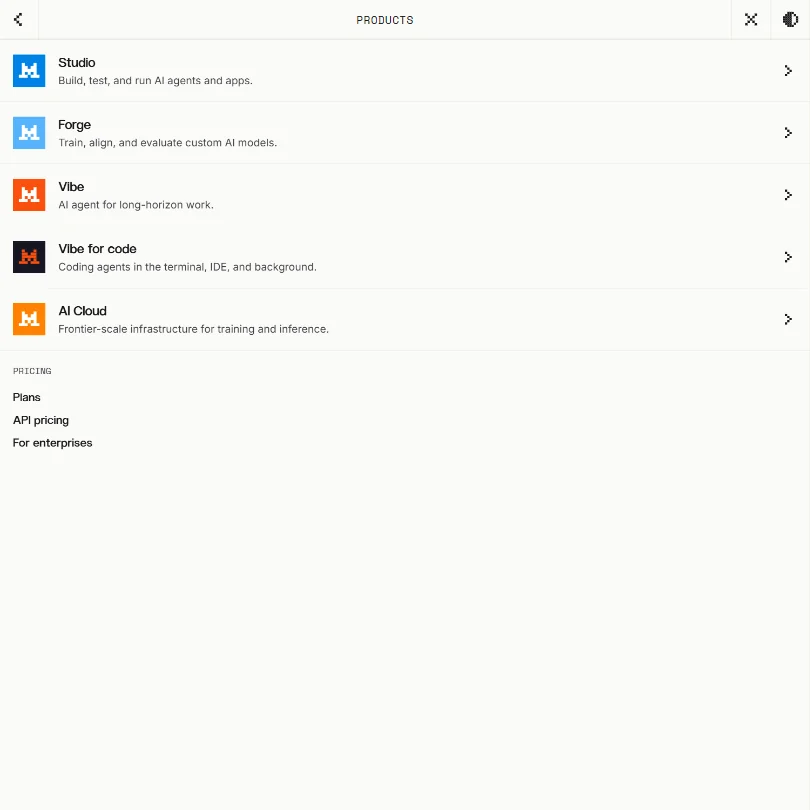
The models behind Vibe are Mistral's own, with none from other companies: Mistral Medium for most tasks and coding, Mistral Small for cost-sensitive work, OCR for documents, and Voxtral for audio and speech.

Web search and image generation are both available from the Free plan, though usage is limited there; the Free plan also includes $10 a month in Studio API credits. Deep research searches the web, internal documents and connected tools to compile a sourced analysis on a topic.

Voice input is powered by Voxtral. Vibe can also generate and run tests matched to your existing code patterns and frameworks, though the Free plan's coding sessions are limited. Agents and long-horizon tasks, including all-day coding, are reserved for the Pro plan and up.

An optional Memories feature lets Vibe remember details about you from past conversations, and you can ask it directly to save or forget something. Work is organized into project folders, with up to 1,000 available.

Vibe connects to more than 100 tools in total, including email, calendar, Slack, GitHub and Jira, with full MCP compatibility for custom connectors.

Working with other people

The Team plan adds a secure, collaborative workspace for teams building with Vibe. Mistral also sells a developer API as a separate product. SAML single sign-on is available on the Enterprise plan.

Mistral Vibe pricing: what each plan gives
Mistral pricing screenshot
Mistral, Pricing

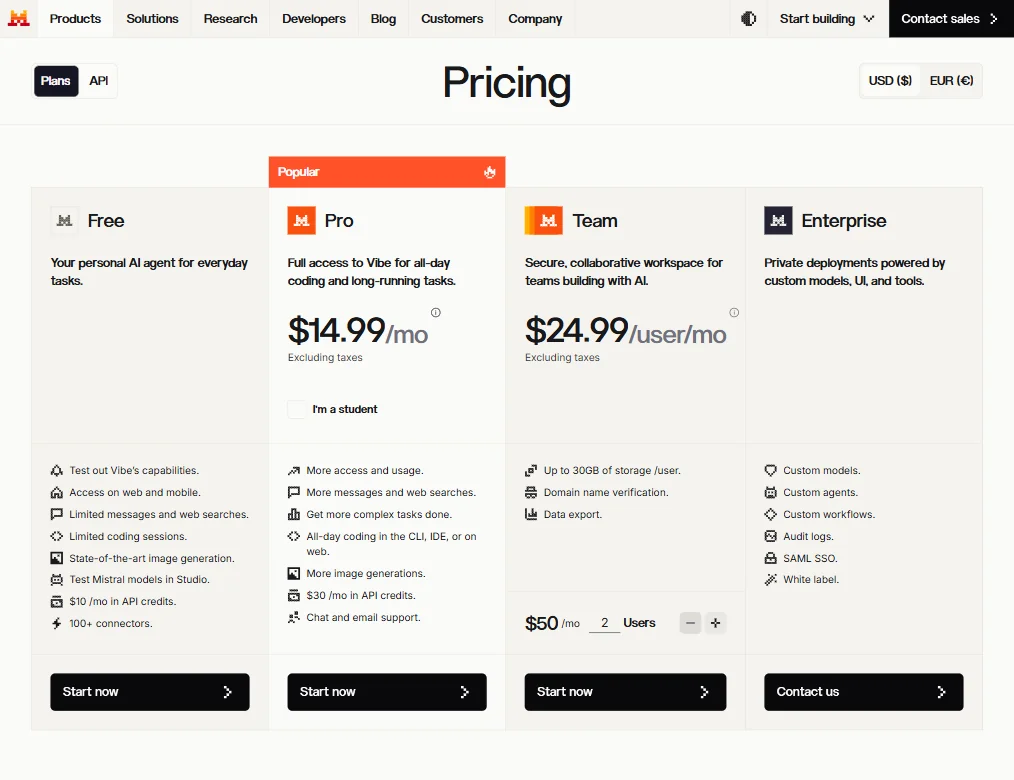
The Free plan costs nothing and gives limited messages, web searches and coding sessions, along with image generation, 100+ connectors and $10 a month in Studio API credits.

Pro costs $14.99 a month and gives full access to Vibe for all-day coding and long-running agent tasks, with up to 6 times the Free plan's messages, up to 5 times its web searches, and up to 40 times its image generations. Verified students can get Pro for $5.99 a month. Team costs $24.99 a month per user and adds the secure collaborative workspace. Enterprise is sold by contact only and adds custom models, custom agents, custom workflows, audit logs, SAML single sign-on and white labeling.

Privacy and security

Mistral uses your input and output to train its models by default on the Free, Pro and Team plans, subject to an opt-out. Mistral is SOC 2 Type II certified, and also holds ISO 27001 and ISO 27701 certification. It prioritises service providers within the EU that adhere to the GDPR.

Chat and email support are available from the Pro plan up; a help center is open to everyone.

Who Mistral Vibe suits

Mistral Vibe suits people who want a European AI assistant for chat, coding, research and image generation, and who are willing to pay for agent tasks and long-horizon coding once the Free plan's limits are reached.

It suits less well anyone who wants agent tasks or all-day coding without upgrading, or anyone uncomfortable with their input and output training the model by default, since that requires an active opt-out.

How Mistral compares

Mistral scores 8.5 out of 10 among the AI assistants we rate. These three do the same job and are the closest to it, compared on what each vendor publishes.

8.5Mistral
vs
8.7Perplexity

Perplexity

Mistral's Pro plan multiplies your image generation allowance up to 40 times over Free; Perplexity makes images too. Mistral's cheapest paid plan is $14.99 a month against Perplexity's $20, and Mistral includes a team workspace without needing an enterprise plan, while Perplexity keeps Pro and Max for individual use only. Both hold GDPR compliance and let you opt out of training on your data.

Pick Perplexity if you want desktop apps as well as web and phone.
Pick Mistral if you want a lower price and a team workspace without enterprise.

Mistral vs Perplexity →
8.5Mistral
vs
8.8ChatGPT

ChatGPT

ChatGPT runs on 5 platforms against Mistral's 3, though Mistral also ships a CLI and IDE extensions for VS Code, JetBrains and Zed outside that count. Mistral's cheapest paid plan is $14.99 a month with full access already included; ChatGPT's $8 a month Go plan costs less but mainly raises usage limits instead of unlocking its top models. Mistral holds SOC 2; ChatGPT reserves SOC 2 for Business and Enterprise only. Both give teams a shared workspace.

Pick ChatGPT if you want more platforms covered and a cheaper entry price.
Pick Mistral if you want full access included on the cheapest paid plan.

Mistral vs ChatGPT →
8.5Mistral
vs
8.0Grok

Grok

Grok's cheapest paid plan is $10 a month against Mistral's $14.99, and Grok already includes chat, images and its Build agent on the free tier. Grok holds SOC 2 on every plan, including Free; Mistral also holds SOC 2, alongside ISO 27001 and ISO 27701. Both run on 3 platforms and give teams a shared workspace, with opt-out training on both sides.

Pick Grok if you want the cheaper plan with full access already included.
Pick Mistral if you want ISO 27001 and ISO 27701 alongside SOC 2.

Mistral vs Grok →

Frequently Asked Questions

How much does Mistral Vibe cost?

The Free plan costs nothing but limits messages, web searches and coding sessions. Pro costs $14.99 a month, and Team costs $24.99 a month per user; Enterprise is sold by contact only.

Which models does Mistral Vibe use?

Mistral's own models, with none from other companies: Mistral Medium for most tasks and coding, Mistral Small for cost-sensitive work, OCR for documents, and Voxtral for audio.

Does Mistral Vibe include agent tasks?

Agents and long-horizon tasks, including all-day coding, are reserved for the Pro plan and up; the Free plan's coding sessions are limited.

Does Mistral Vibe train on my data?

Yes, by default, across the Free, Pro and Team plans, subject to an opt-out.

Mistral is featured in
Mistral in the news

Alternatives to Mistral

Other AI Productivity Tool options we've reviewed.

Glean logo

Glean

Large companies that want AI search and agents across their own apps, bought through a sales team

Not scored yet
Free plan: noFree trial: yesAPI: yes
Price not publishedNo free plan
→
Asana logo

Asana

Teams that plan across many projects with goals, portfolios, timelines and intake forms

7.2
Rank #6 of 7 AI work management tools
Best:Privacy and trust8
Weakest:Working with others7
Free plan: yesFree trial: noAPI: yes
From $13.49Free plan
73% from published facts · checked 26 Sep
→
ChatGPT logo

ChatGPT

People who want images, voice, memory and deep research in one assistant, starting on a free plan

8.8
Rank #1 of 8 AI assistants
Best:What it can do10
Weakest:Privacy and trust6.2
Free plan: yesFree trial: noAPI: yes
From $8Free plan
100% from published facts · checked 22 Sep
→
Jamie logo

Jamie

Professionals who want private meeting notes with no recording kept, and storage and processing in Europe

6.8
Rank #11 of 17 AI meeting assistants
Best:Where it works10
Weakest:What it captures4.5
Keeps the meeting video: noCuts and shares clips: noTalk time and coaching insights: no
From $27 (€25)Free plan
87% from published facts · checked 21 Sep
→
Read AI logo

Read AI

Anyone who wants a personal meeting coach on the free plan, plus in-person meetings captured through the phone app

8.2
Rank #3 of 17 AI meeting assistants
Best:Where it works10
Weakest:Privacy and trust7.5
Keeps the meeting video: yesCuts and shares clips: yesTalk time and coaching insights: yes
From $19.75Free plan
98% from published facts · checked 21 Sep
→
monday logo

monday

Teams who want board-based projects with AI meeting notes and answers about their whole workspace built in

8.1
Rank #4 of 7 AI work management tools
Best:Privacy and trust10
Weakest:Working with others4
Free plan: yesFree trial: noAPI: yes
From $12Free plan
96% from published facts · checked 22 Sep
→

User reviews

Review Mistral

Your rating

Reviews are moderated and appear once approved.







