
What is Lindy?
Founded in 2023, Lindy is a San Francisco-based AI executive assistant that works through your email, calendar, and phone. Not a workflow builder. Not a visual automation tool. You text it. It handles things.

The pitch is simpler than most tools in this category. You connect Gmail or Outlook, hook up your Google Calendar, and Lindy starts doing the boring stuff. Triaging your inbox. Prepping you for meetings. Scheduling calls. You can reach it via iMessage on iPhone or SMS on Android. No dashboard to live in, no flow canvas to maintain. That's the actual differentiator, and it's a meaningful one.
Honestly, that's a good instinct. Most people don't want another app.
Where it gets complicated is positioning. Lindy sits in an odd space between consumer AI assistant apps and serious business automation tools. It competes with Motion and Reclaim.ai on scheduling, and loosely with Zapier on workflow execution, but it isn't really trying to do what any of them do. That's both the appeal and the risk.
Lindy Features: Workflows, AI Agents & Automation Capabilities
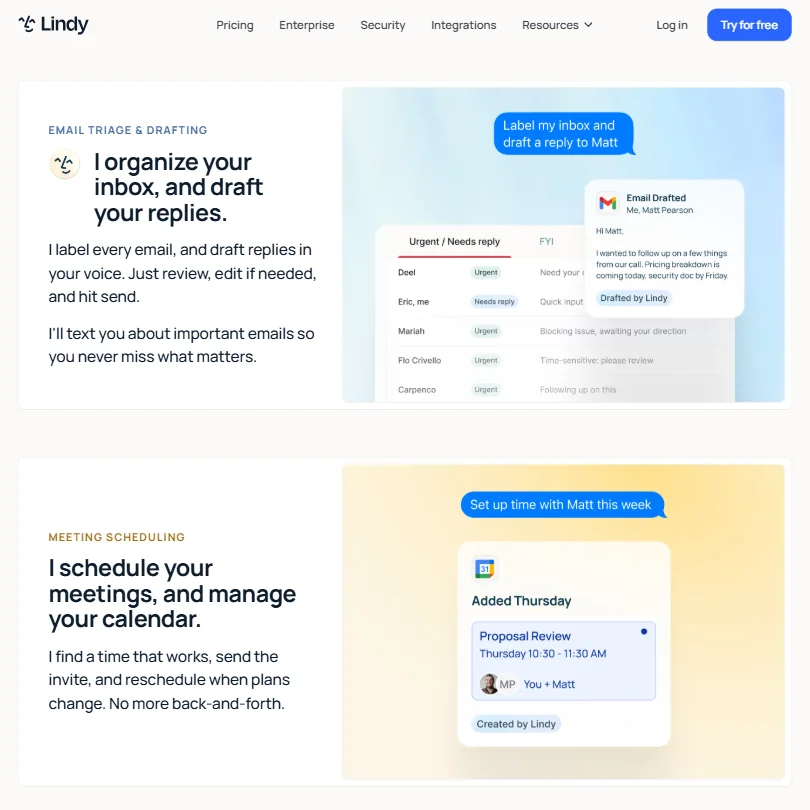
The core feature set is focused. Lindy handles email drafting, meeting scheduling, calendar updates, and meeting note taking. It does them through natural language. You don't configure triggers in a UI. You just ask.
Human-in-the-loop is built in. Lindy drafts, you approve before anything goes out. That's a deliberate design choice. The draft-then-approve model is the right call for anyone worried about an AI firing off emails in their name, and it behaves consistently this way in practice.
Lindy also does some lightweight data work. Summarizing email threads, extracting info from messages, briefing you before a meeting based on what's in your calendar and inbox. That part appeared consistently across Product Hunt comments from 2023 through 2024.
Integrations include Gmail, Outlook, Google Calendar, and Slack. Slack support covers incoming message triggers alongside outgoing actions, so Lindy can send messages to channels, send direct messages, route tickets, and post notifications. That covers the core stack for most knowledge workers.
No visual workflow builder. Not available, not planned as far as we can tell.
Lindy Automation Power: How Complex Can Your Workflows Get?
This is where we got skeptical. Lindy supports email triggers, calendar event triggers, scheduled runs, and SMS triggers. Reasonable for an executive assistant tool.
The conditional logic is harder to pin down. Lindy claims context-aware prioritization and routing, and the documentation describes it in broad terms without going deep on what that means in practice. Ask for specifics before trusting it with anything genuinely complex.
There is a dedicated Run Code feature. Per Lindy's own documentation, users can execute custom Python or JavaScript inside workflows for API calls, data processing, and conditional logic. That's more than we expected, and it does push the ceiling higher for technical users who find it. Worth knowing about.
Ask how error handling and execution logs work before you rely on it. If something goes wrong, you want to know what happened. Ask what information Lindy surfaces when a task fails.
Reddit threads from 2024 and early 2025 don't surface many horror stories on this front, but they also don't surface many power users pushing Lindy hard. The user base appears early, and the use cases tend to be lighter.
Lindy AI Agent Capabilities: What Can It Actually Do Autonomously?
The agent angle is the thing Lindy leans on hardest. And to be fair, it's more agentic than most tools in this price range.
Lindy's autonomous behavior covers meeting prep, proactive follow-ups, and inbox triage without you manually kicking anything off. Product Hunt comments from launch through 2024 were mostly enthusiastic about this. "Finally, something that just runs in the background" was the general energy. That tracks.
The AI model situation is genuinely interesting. On Plus at $29.99 per month, you're using whatever Lindy has configured by default. On Pro at $99.99 per month, users can select from multiple models, which is a meaningful feature since not every task needs the same model. The docs name GPT-4 and Claude as examples. Gemini Flash and Claude Sonnet appear in documentation specifically covering phone agents. What Lindy does not publish is one clear, exhaustive list of every model available in the Pro picker. That's a frustrating gap.
Slack integration supports both incoming and outgoing actions, so it's not read-only as some earlier documentation implied. Lindy can trigger on Slack messages and write back to channels or direct messages.
Is Lindy Easy to Set Up Without Code?
Genuinely easy. That's the most consistent signal across early user accounts. You connect your email and calendar, exchange a few messages with Lindy, and you're running.
You give up flexibility in exchange for a setup time measured in minutes, not hours, and for most people in the target audience that's probably the right trade.
Custom code execution is available through the Run Code feature mentioned above, supporting Python and JavaScript. That said, the docs don't describe a full API surface or webhook framework in any public-facing form. Developers wanting to build against Lindy as a platform will hit a ceiling quickly.
There's a 7-day free trial. No free plan. Seven days is tight for evaluating whether an AI assistant has actually learned your preferences and communication style. Two weeks would be better. That's a real concern, not a minor one.
Lindy pricing: what each plan gives

Three paid tiers. Plus at $29.99 per month, Pro at $99.99 per month, and Max at $199.99 per month. Enterprise is custom and listed separately at the bottom of the pricing page.
Plus includes standard usage, up to two inboxes, chat via iMessage and SMS, email drafting, meeting scheduling, meeting note taking, meeting prep and follow-up, and 1,000-plus integrations. Pro adds 3x more usage than Plus, up to three inboxes, computer use, and the ability to pick the model Lindy runs on. Max pushes to 7x more usage than Plus and up to five inboxes.
No explicit refund policy is published on the site. You can cancel and keep access through the billing period. Standard. But if the product doesn't work for you on day two of a paid month, ask whether you can get that money back.
$29.99 per month is aggressive for what is essentially an AI email and calendar assistant. Motion's Pro AI plan currently sits at $19 per seat per month on annual billing. Reclaim.ai has a free plan, a Starter tier at $10 per month annually, and a Business tier at $15 per month annually. Lindy costs more than both of those, by a meaningful margin.
Where Lindy makes more sense is the Pro tier upward, where model selection comes in. But $99.99 per month is a serious ask for a tool with limited public documentation around error handling and a 7-day trial window.
We're not saying it's bad value. We're saying it's not obviously good value yet.
Lindy vs Zapier: Which Automation Platform Wins?
Different tools, honestly. Not a clean comparison.
Zapier is a workflow automation platform. You build flows, connect apps, manage triggers and actions in a visual canvas. It scales. It has thousands of app integrations and years of documentation behind it. Zapier wins on breadth.
Lindy wins on interface. You don't build anything. For an executive who doesn't want to think about automation infrastructure, Lindy is a more natural fit. Those are genuinely different products serving genuinely different needs.
The real competition for Lindy isn't Zapier, it's the broader category of AI scheduling and email tools. Motion, Reclaim.ai, and Superhuman are closer comparisons for the core use case. All three have longer track records and more transparent pricing relative to features.
If you need complex multi-step workflows connecting dozens of apps, Lindy isn't trying to do that. If you want your email and calendar handled conversationally, Zapier isn't trying to do that either. Fair.
Who Should Use Lindy? (And Who Shouldn't)
Busy professionals managing a heavy calendar and overflowing inbox. That's the fit.
Executives, consultants, or founders who live in Gmail and Google Calendar and whose job involves a lot of scheduling back-and-forth will get the most out of Lindy quickly. The iMessage and SMS interface matters here. It genuinely reduces friction in a way that most automation tools don't.
Developers and operations teams who need to build complex multi-system workflows should look elsewhere. The Run Code feature adds more depth than we expected, but the lack of published API documentation and the absence of any public workflow engine documentation make this a poor fit for technical build-outs.
Small teams on a budget should think carefully, because $29.99 per month per seat adds up fast, and the value math only works if Lindy is genuinely replacing meaningful time or a meaningful cost. The human assistant comparison on the pricing page, showing a crossed-out $8,000 per month, makes that case visually. Whether it holds in practice depends entirely on the quality of the assistant experience, which a 7-day trial doesn't give you enough time to properly evaluate.
Lindy Review Verdict
Lindy is doing something real. The conversational AI assistant model, delivered through iMessage and SMS, with human-in-the-loop approval before anything sends, is a thoughtful product for a specific kind of user. Founded in 2023, it's still early. That shows.
G2 has approximately 171 reviews with positive sentiment, and Trustpilot and Capterra both have listings now. That's more review coverage than existed six months ago. Still not enough for confident independent validation, particularly on edge cases and failure modes.
The documentation gaps are the biggest issue right now, covering error handling, execution logs, and a clear model list for the Pro picker. For a product at this price point, those aren't minor omissions.
The pricing is hard to justify without more transparency. The 7-day trial is too short. And the lack of a published refund policy adds friction for anyone considering a paid commitment.
That doesn't make it a bad product. It makes it a bet. If the core assistant experience works as advertised, there's a real case for it, particularly for the user who finds every other tool too complicated to set up. But right now, the ask is high and the evidence is limited.
Longer trial access, published execution documentation, and a clearer refund policy would make this an easier recommendation.
Frequently Asked Questions
Does Lindy have a free plan?
No. There's a 7-day free trial, but no ongoing free tier. After the trial, you're looking at $29.99 per month minimum. That's a steeper entry point than Motion at $19 per month annually or Reclaim.ai with its free plan and $10 per month Starter tier.
What AI models does Lindy use?
On Plus, the model isn't user-selectable. Pro and Max plans let users choose from multiple models. Lindy's documentation names GPT-4 and Claude as examples, and references Gemini Flash and Claude Sonnet specifically for phone agents. What the docs don't publish is a single clear list of every model available in the Pro picker. That's a frustrating gap for anyone who cares about that decision.
Can Lindy send emails automatically without my approval?
Based on published documentation, Lindy drafts emails and waits for your approval before sending. The human-in-the-loop design is intentional. Whether that behavior can be toggled off for fully autonomous sending isn't clearly documented anywhere we looked. We'd assume not, but we can't confirm it.







