
Tray.ai is an AI automation tool for enterprises, pairing agents and integration with centralised access controls and audit trails.

Founded in 2012 and now headquartered in San Francisco, Tray.io rebranded as Tray.ai in July 2024, building its agent and MCP products on top of an iPaaS platform developed over more than a decade. It's a platform that has made a considered bet on the AI agent moment, not a rushed one. Whether that bet pays off at scale is the actual question worth examining.
What is Tray.ai?
Tray.ai positions itself as an enterprise orchestration platform covering data, integration, AI agents, and governed MCP management. Wide claim. In practice it occupies similar territory to Workato or MuleSoft, but has moved faster on the agent layer than either has managed recently.
Three main surfaces define the product. The Merlin Agent Builder handles conversational and autonomous agents. The Agent Gateway manages MCP tool calls at an enterprise governance level. Underneath both sits the original iPaaS, with 700+ connectors and a workflow engine that's been in production since 2012.
That foundation matters more than the homepage signals. The AI agent features aren't floating on a thin substrate. They sit on top of something hardened through years of real enterprise deployments, which is genuinely uncommon in a market crowded with agent products that have no integration history behind them at all. Honestly, the depth is the credible part. The agent pitch is the newer, less proven part.
The platform connects to Claude and Codex in addition to its proprietary Merlin model. Plugins for Claude Code and Codex let developers scaffold workflows from inside an AI IDE. That detail points to where the product roadmap is heading, engineering teams, not just ops teams clicking through a canvas.
Tray.ai Features: Workflows, AI Agents & Automation Capabilities

The visual builder is called Tray Build. Drag-and-drop, low-code, pre-built templates. At first glance it doesn't look dramatically different from Make or Zapier. The difference is underneath: branching logic, multi-step orchestration, and a Headless mode for teams that want to drive the platform from an AI IDE rather than a canvas.
Trigger types cover webhooks and scheduled runs. Events from connected apps, like a Salesforce closed-won opportunity, and direct API calls also work. MCP tool calls now function as triggers too, which matters for agentic pipelines where the AI model decides what to invoke next.
Data handling is more mature than expected. VectorTables and Data Tables both appear in the feature set, meaning teams can store and query structured data without leaving the platform. We kept seeing this flagged in community threads as a real differentiator for AI workflows that pass data between agents. Fair. Zapier doesn't do that well.
Execution-log retention starts at seven days on Pro and Team, with a 30-day expandable add-on available on Team. Enterprise reaches 30 days of execution logs. Enterprise separately includes 180 days of Insights visibility, which is a different thing from log retention, a distinction the pricing page doesn't make especially obvious. Guardian Log Masking, which redacts sensitive data in logs, appears at Team tier. Not great that the distinction is buried, but the graduated structure itself is sensible for compliance buyers.
On governance: RBAC applies across agent actions, tool calls, and workflow runs. Workspaces run from 3 on Pro to 20 on Team to unlimited on Enterprise. SSO is included with Enterprise and available as a paid add-on on Team. Log streaming is included with Enterprise and also appears among purchasable add-ons for Team. The Dynamic Authentication feature handles per-user permissions when agents are calling enterprise systems at scale. That's a genuinely hard operational problem. Tray has a documented answer to it.
Tray.ai Automation Power: How Complex Can Your Workflows Get?
Very complex. The short answer stands.
The longer answer is that a decade of iPaaS development gives Tray an advantage on multi-step, multi-system workflows that newer platforms haven't had time to build. The quote-to-cash example from the docs is instructive: a closed-won Salesforce opportunity triggers billing account creation, license tier assignment, and a Marketo onboarding sequence. Three systems, one chain, scaffolded through a developer chat interface via Tray Headless. That's not a demo trick. That's the product working as designed.
Conditional logic runs throughout, including inside agent guardrails that define what an AI agent can do before a human needs to approve the next step. The human-in-the-loop controls aren't optional for enterprise teams with compliance requirements. A lot of competitors treat them as an afterthought. Tray built them into the agent layer.
We cross-referenced the docs with user feedback across review platforms. The recurring pattern: Tray handles complexity well, but that complexity also means real setup time. Teams new to the platform shouldn't expect a 20-step workflow in an afternoon. That tracks with any serious iPaaS. Not a knock. A calibration.
Full API access is available on all plans. Connector development is supported. The Headless layer opens the platform to any AI IDE. No hard limit on what you can build is documented. That's the right call for an enterprise product.
Tray.ai AI Agent Capabilities: What Can It Actually Do Autonomously?
The Merlin Agent Builder is Tray's biggest current bet. Conversational and autonomous agents both live there, with knowledge ingestion built in so agents can pull from a body of documentation when acting. Table stakes in 2025, but execution quality varies wildly across platforms.
Multi-channel deployment covers Slack and Microsoft Teams directly. For ops teams, that's the practical path to surfacing agents without building a custom front end.
The Agent Gateway for MCP is the more interesting structural piece. MCP, Model Context Protocol, is the emerging standard for how AI models communicate with external tools. Tray's pitch is a governed layer sitting between the model and every system it wants to call. Every tool call routes through the Gateway, with RBAC, audit trails, and dynamic authentication applied centrally. For enterprise teams running multiple AI systems, that's a real operational need. Most platforms don't address it. Tray built it into the architecture.
Worth noting here that Tray.ai and Workato both now compete in governed enterprise automation with MCP and agent-governance capabilities, though their architecture and implementation differ. Tray is no longer the only player with a governed MCP story. We're watching that gap narrow.
The governance angle is a pleasant surprise. Expect architecture-level thinking, not checkbox compliance.
Ask about agent reliability in production. Review platforms don't carry much specific agent-workflow feedback yet. The product is newer in this form, and twelve months of production signal would tell a clearer story. The structural decisions are right. Whether execution holds under real load is a question to put to current customers.
Is Tray.ai Easy to Set Up Without Code?
Easier than MuleSoft. Harder than Zapier. That's the range.
Tray Build is genuinely low-code. Pre-built templates exist. Someone in a marketing ops or revenue ops role with no engineering background can get a standard automation running. That's the accessible tier of the product.
The platform's depth is also its friction. The more complex the use case, the faster a team hits configuration that requires someone comfortable with APIs or data transformation logic. User feedback shows a consistent pattern: teams without a dedicated ops engineer reported a slower initial ramp than expected. Not broken. Just slower.
The Tray Academy and developer docs are genuinely thorough, with a knowledge base, live workshops, and community forums available. That ecosystem shortens the learning curve for teams willing to invest time. It doesn't eliminate the curve. We've seen worse documentation at much higher price points, for what that's worth.
The Claude Code and Codex plugins offer a different setup path entirely. Developers living in AI IDEs can scaffold workflows through natural language, which is actually faster than any visual builder for technical users. Clever solution to the friction problem. Aimed at roughly half the likely user base.
Tray.ai pricing: what each plan gives
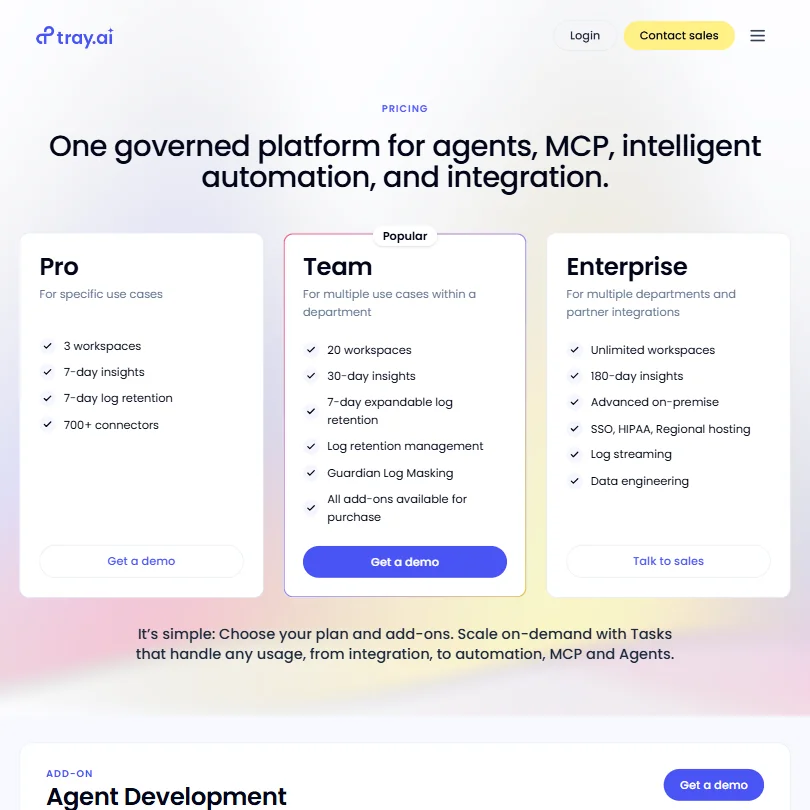
No public pricing. None at all. Pro, Team, and Enterprise all require a sales conversation, and the pricing page contains exactly zero dollar figures. Deliberate choice. It narrows the audience immediately.
That's a real concern. Not because contact-for-pricing is unusual at enterprise tier. It isn't. But the Pro plan looks aimed at specific-use-case buyers who aren't necessarily running enterprise procurement processes, and hiding the entry price creates friction for exactly the teams that might grow into the larger plans over time.
For comparison, Zapier publishes pricing starting around $20 a month and scales visibly into team plans before anyone talks to a salesperson. Make does the same. Both give you enough to make a budget decision without a call. Teams running a software evaluation on a deadline will feel that difference.
From the plan structure, we can infer the positioning. Pro is the entry point, three workspaces and seven-day log retention. Team adds Guardian Log Masking, 20 workspaces, and 30-day insights with an expandable log retention add-on. Enterprise unlocks unlimited workspaces and 180-day Insights visibility, with SSO and log streaming included, though both also appear as purchasable add-ons on Team. The full governance story costs the most, which is standard positioning for this class of tool.
No free tier. No self-serve trial. A demo is available. For a platform at this complexity, that's defensible. For smaller teams considering Tray as a step up from simpler tools, the inability to explore without committing to a sales conversation is a genuine barrier.
Tray.ai vs MuleSoft: Which Automation Platform Wins?
Depends entirely on what you mean by "wins."
MuleSoft is Salesforce-owned, enterprise-grade, and priced to match. It requires significant implementation effort and tends to live inside IT-led projects with dedicated integration teams. Known quantity. Mature ecosystem. Vendor going nowhere.
Tray is lighter to operate. Not light, but lighter. The visual builder is more accessible. The agent layer is further ahead than anything MuleSoft has shipped on AI orchestration. And the governed MCP architecture addresses something MuleSoft hasn't directly matched. That gap on the AI agent side is currently material.
The honest version: if your evaluation is purely about integration breadth and enterprise track record, MuleSoft is hard to beat. If your evaluation includes what AI workflows look like 18 months from now, Tray is the more interesting answer. The 700+ connector library covers the common enterprise stack, Salesforce and Marketo, Slack and Microsoft Teams, and a few others. Not as wide as MuleSoft's ecosystem. Wide enough for most teams.
Workato is the closer comparison. Both sit in governed enterprise automation. Both are now building on agent and MCP capabilities, with different architectural approaches. Worth watching how that gap evolves over the next year.
Who Should Use Tray.ai? (And Who Shouldn't)
Enterprise teams managing AI at scale. Clear fit. Specifically, organizations that need to govern what AI agents are allowed to call, under whose permissions, with a full audit trail. The governed MCP layer isn't something most platforms offer in any developed form.
Revenue operations teams building multi-system workflows. Also well served. The Salesforce-to-Marketo-to-billing chain is a documented use case for a reason. Tray handles cross-system orchestration without requiring a developer to maintain it indefinitely.
Five-person startups. Not the fit.
No free tier, contact-for-pricing, and a learning curve that rewards teams with at least one person comfortable with APIs. Small teams should stay on Zapier or Make until they've genuinely outgrown them. Solo builders might find Tray interesting via the Headless layer, but the pricing structure isn't aimed at individuals and the call with sales will confirm that quickly.
Mid-market technical teams evaluating a step up from simpler automation tools are in genuinely interesting territory. Tray can serve them. Whether the price point clears budget is a question the website won't answer.
Tray.ai Review Verdict
A decade of integration infrastructure sits underneath the agent pitch. That's not nothing. Most platforms launching agent products right now have the story and no substrate. Tray has the opposite starting position, which is the more defensible one.
The governance story is the strongest part. RBAC down to individual tool calls, audit trails on every agent action, dynamic authentication at the user level. For enterprise teams that have tried to scale AI tooling and hit the wall of "who authorized this call," Tray has the most architecturally considered answer we've found. We don't say that casually.
The weak spots are real. Pricing opacity is the single biggest friction point for teams evaluating without an existing vendor relationship. No self-serve trial means no low-stakes exploration. The platform's depth, genuine strength for teams that invest in it, is also a barrier for teams that don't have the internal resources to ramp properly.
The AI agent features are early enough that they need more production feedback before they're fully proven. Twelve months of scale data would change the picture. The structural decisions are right. The production track record is still accumulating. That's an honest read on where the evidence sits, not a criticism of the product direction.
Strong recommendation for enterprise teams with real governance requirements and multi-system AI workflows on the roadmap. Everyone else, take the demo call before committing to the evaluation process.
Frequently Asked Questions
Does Tray.ai have a free plan or free trial?
No free plan and no self-serve trial appear on the pricing page. A demo is available, which means the first real look at the platform goes through a sales conversation. Enterprise buyers used to that process won't blink. Teams that prefer to evaluate before talking to anyone will find it a genuine barrier.
How does Tray.ai compare to Zapier for enterprise use?
Different tier, different use case. Zapier is accessible, transparent on pricing, and fast to get running for standard automations. Tray is more complex to set up, requires a sales conversation before you know what it costs, and offers governance capabilities, agent orchestration, and MCP management that Zapier simply doesn't have. If you're asking whether to switch from Zapier to Tray, the real question is whether your workflows have outgrown Zapier's model. If they have, Tray is worth the evaluation. If they haven't, the added complexity won't pay off yet.







