
Every score is worked out from the vendor's own pages · How we score →Disclosure
SAASINSPECTOR
Sunsama logo

Sunsama Review

Sunsama is an AI daily planner that brings your tasks and calendar onto one screen and guides you through planning each day. It is best at timeboxing work pulled in from project tools and email, with an AI assistant that can review what you have finished.

Visit Sunsama →From $22/mo

Research-based review. Features and prices are checked on the vendor's own website, and the score is worked out from those facts. We haven't tested it hands-on yet.

The verdict

Sunsama is worth paying for if you want a guided daily routine across many task apps and calendars, but there is no free plan to stay on.

Pros

  • Tasks can be imported from Asana, Jira, Linear, GitHub, Trello, Notion, Todoist, ClickUp and more, and emails from Gmail and Outlook become tasks.
  • It connects to Google, Outlook, Apple (iCloud) and CalDAV calendars for timeboxing.
  • The Pro plan includes the Sunny AI assistant, an MCP server and Zapier with unlimited integrations.
  • Your tasks, calendar information and notes are never used to train AI models, Sunsama's own or third-party ones.

Cons

  • There is no free plan, only a 14-day free trial.
  • All customer data is processed and stored in US-based data centers.
  • It does not record or transcribe meetings and has no booking links.
From $22/moFree plan NoFree trial Yes
6.7/10

Spec Score

Sunsama against 6 AI calendar, email and memory apps
#1
of 6 AI calendar, email and memory apps
+0.7
vs the average
96%
from published facts
Ahead of other AI calendar, email and memory apps
Where it works+2.0Privacy and trust+1.7What it runs for you+0.5
Behind other AI calendar, email and memory apps
Pricing-1.0
Every criterion
Tap a row for the facts
What it runs for you5.0
+0.5 vs 4.5 avg20 of 40 points
Plans your calendar for youyes1.5 / 1.5
Calendars it connects3 calendars1.5 / 1.5
Booking linksno0 / 1
Task listyes1 / 1
Email accounts it works with2 email providers1 / 1
Drafts email repliesno0 / 1
Sorts your inboxno0 / 1
Meeting notesno0 / 1
Keeps your data on your computerno0 / 1
Why these numbers

Plans your calendar for you: Auto-schedules a task into free time on key press and reschedules when plans change; it is user-triggered, not fully automatic.

Calendars it connects: Counted from calendars_supported. CalDAV (Fastmail, Nextcloud) also supported.

Booking links: Sunsama has no booking links; it imports meetings from your calendars and timeboxes tasks.

Email accounts it works with: Counted from email_providers. Outlook email is also supported; emails become tasks, Sunsama is not an email client.

Drafts email replies: Sunsama imports emails as tasks; its AI assistant Sunny manages tasks and planning and does not write email replies.

Sorts your inbox: Emails are browsed by label or folder and imported by hand as tasks; no automatic sorting is described.

Meeting notes: Sunsama imports calendar meetings as tasks and keeps notes on them; it does not record or transcribe meetings.

Keeps your data on your computer: Cloud service; data lives in US data centers.

Where it works9.0
+2.0 vs 7.0 avg18 of 20 points
Where it runs5 platforms4 / 4
APInot published, half points1 / 2
Other AI tools can reach your data in ityes2 / 2
Apps it connects to15 integrations2 / 2
Why these numbers

Where it runs: Counted from platforms. A Linux desktop app is also offered; the allowed platform list has no Linux value.

Other AI tools can reach your data in it: Hosted at api.sunsama.com/mcp; works with ChatGPT and Claude.

Apps it connects to: Counted from integrations. Also Monday.com, Toggl, Google Tasks, Microsoft To-Do and Microsoft Planner.

Pricing5.0
-1.0 vs 6.0 avg11 of 22 points
Cheapest paid plan, monthly$222 / 5
Free planno0 / 2
AI on the cheapest paid planincluded3 / 3
Why these numbers

Cheapest paid plan, monthly: Cheapest paid plan on the monthly term. One paid plan plus a contact-sales Enterprise tier. The pricing FAQ still quotes older figures ($25 monthly, $20 yearly); the plan card shows $22 and $17.

Free plan: 14-day free trial, no credit card required.

AI on the cheapest paid plan: The single Pro plan includes AI, MCP and Zapier.

Privacy and trust10.0
+1.7 vs 8.3 avg18 of 18 points
Does not train AI on your datayes3.5 / 3.5
SOC 2yes2 / 2
GDPRyes1.5 / 1.5
Single sign-onyes1 / 1
Ways to reach support4 support channels2 / 2
Why these numbers

Does not train AI on your data: Stated in the privacy policy AI section.

SOC 2: Report available on request.

Single sign-on: Enterprise tier; SSO/SAML runs through WorkOS.

Ways to reach support: Counted from support_channels.

yesnonot published average for AI calendar, email and memory apps
How the Spec Score works

Scored from what Sunsama publishes on its own site. Not a hands-on test.

Compared with 6 AI calendar, email and memory apps. Facts checked 22 Oct 2026.

A fact the vendor does not publish gets half the points, or the typical value for a number, and says so. It never counts as a no. How we score.

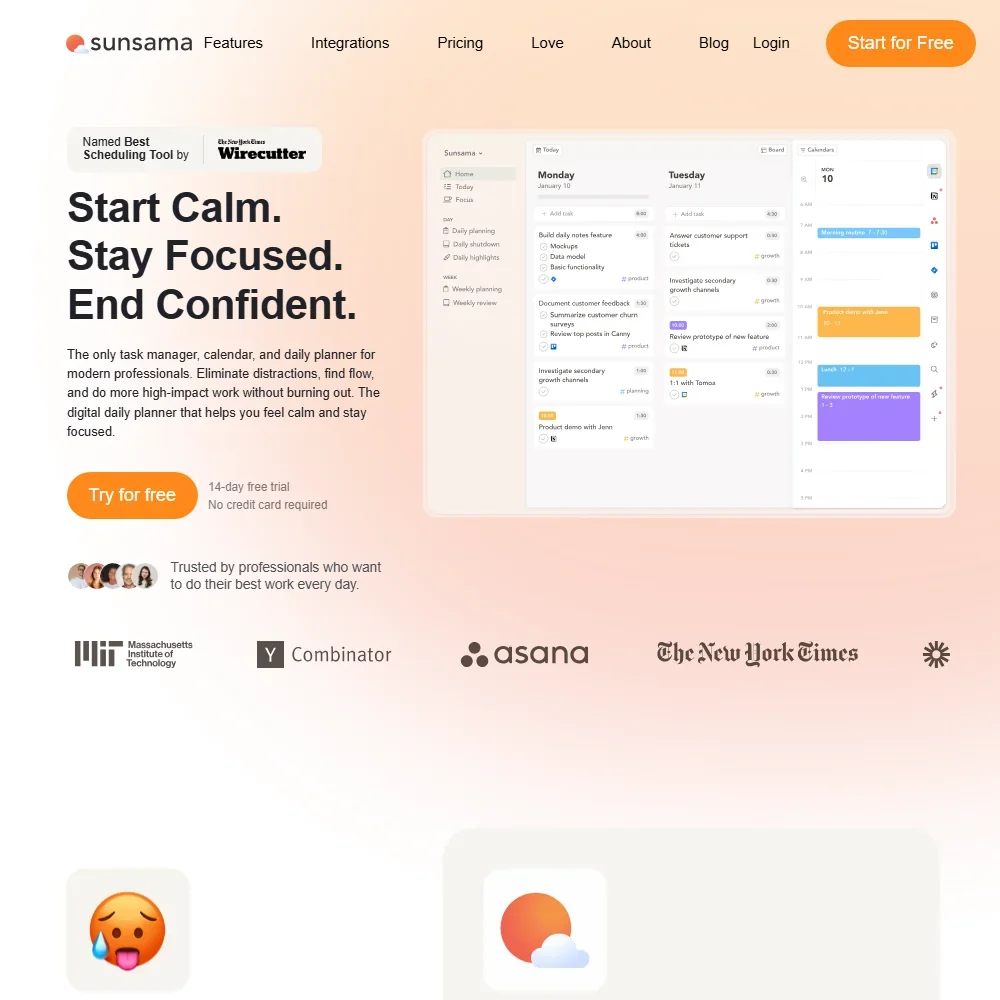
Sunsama is a daily planner that puts your tasks and your calendar on one screen and walks you through planning each day and closing it out. It sells one paid plan with a free trial and no free tier. What decides whether it suits you is whether you want a guided daily routine built on timeboxing, fed by tasks pulled in from the apps you already use.
Sunsama homepage screenshot
Sunsama, Homepage

What is Sunsama?

Sunsama is a task manager, calendar and daily planner in one, made by Summay, Inc., a company registered in the United States that operates as a fully remote team. It runs on the web, with desktop apps for macOS, Windows and Linux and mobile apps for iOS, iPadOS and Android.

Every version needs a Sunsama account and syncs with Sunsama's servers. It is a cloud service, not an app that keeps your data on your device.

Planning your day with Sunsama

Sunsama is built around a guided routine: a daily plan in the morning and a shutdown ritual at the end of the day. You pull the day's tasks together, then timebox them by placing each one on your calendar next to your meetings. Meetings are imported from your calendars as tasks, and you can keep notes on them inside Sunsama, though it does not record or transcribe meetings. There are no booking links.

Scheduling stays under your control. A key press auto-schedules a task into free time on your calendar, and auto-rescheduling adjusts the rest of your day when a task takes longer or shorter than planned. You trigger both yourself; neither runs fully automatically.

It connects to Google, Outlook, Apple (iCloud) and CalDAV calendars, which covers services such as Fastmail and Nextcloud. Tasks can be imported from Asana, Jira, Linear, GitHub, Trello, Notion, Todoist, ClickUp, Monday.com, Google Tasks, Microsoft To-Do and Microsoft Planner. From Gmail and Outlook, you can import emails as tasks, take actions on them and keep your inbox in sync with your plan. Sunsama is not an email client, and its AI does not write email replies or sort your inbox for you.

Sunny is Sunsama's AI assistant. It manages tasks and planning, and it can see your tasks, calendar, backlog and objectives, though not your email. You can ask Sunny to summarize your completed work over any period, such as last week, last month or a specific date range.

Sunsama also runs an MCP server, which lets AI assistants such as ChatGPT and Claude connect directly to your Sunsama data. It is included on the Pro plan along with the AI and Zapier.

Working with other people

Sunsama offers shared workspaces, where owners and admins see all members, and each teammate added to a workspace is billed. Beyond the task and calendar apps, it connects to Slack, Microsoft Teams, Toggl and Zapier. Pro comes with unlimited integrations.

Sunsama pricing: what each plan gives
Sunsama pricing screenshot
Sunsama, Pricing

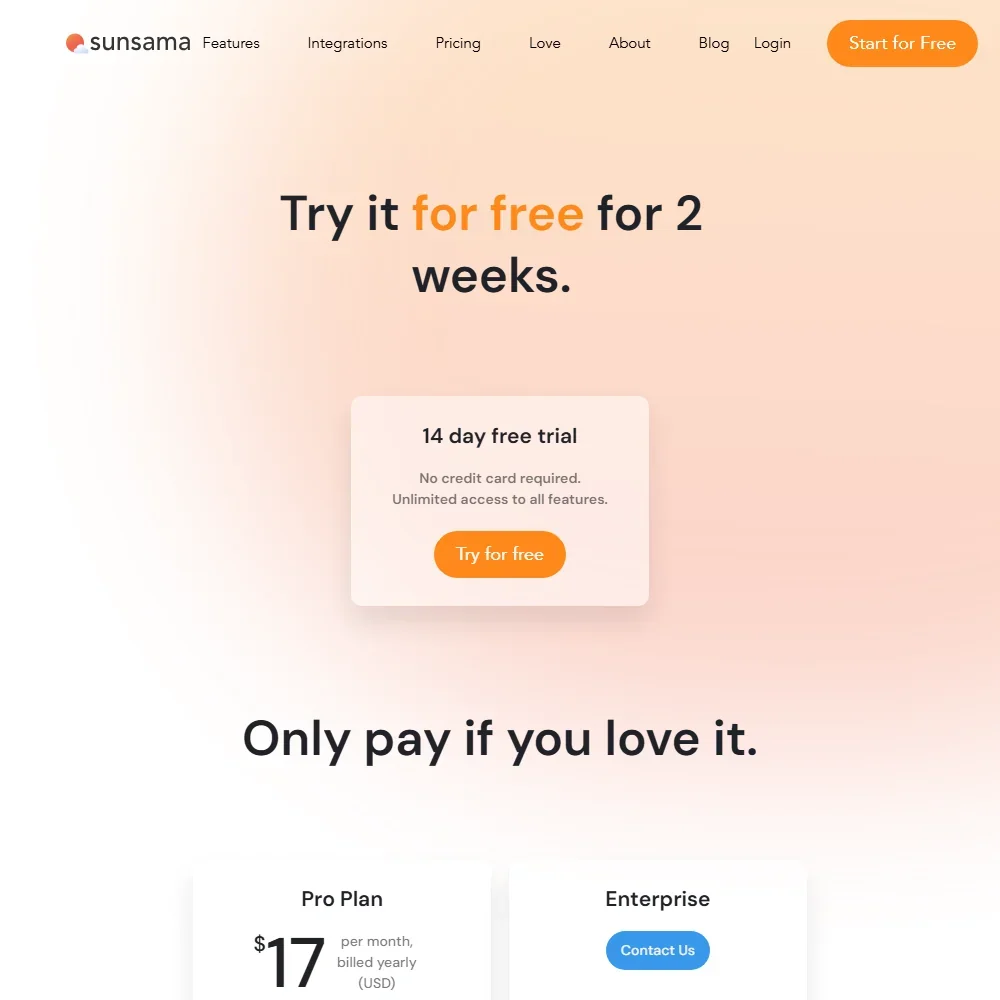
Sunsama has no free plan. A 14-day free trial gives unlimited access to all features and needs no credit card.

Pro costs $22 per person a month, or $17 per person a month billed yearly. It includes unlimited usage, unlimited integrations, the Sunny AI assistant, the MCP server and Zapier. Enterprise is sold through Sunsama's sales team and adds single sign-on with SAML, SCIM provisioning and audit logs.

Privacy and security

Sunsama's privacy policy is clear on training: your tasks, calendar information, notes and usage patterns "are never used to train AI models", neither Sunsama's own nor those of third-party providers. All customer data is processed and stored in US-based data centers.

Sunsama complies with the EU and UK GDPR, and a SOC 2 Type II report is available on request. Single sign-on with SAML runs through WorkOS on the Enterprise tier. Support runs through email, in-app messaging, a help center and a Sunsama community on Slack.

Who Sunsama suits

Sunsama suits people who want to plan each day on purpose: pull tasks in from project tools and email, set them against real calendar time, and end the day with a shutdown ritual. It fits professionals whose work is spread across several task apps and calendars, and who want an AI assistant that can look back over what they finished and a way to reach their plan from ChatGPT or Claude.

It suits less well anyone who wants a free plan to stay on, since the trial is the only free option. It is also not the tool for booking meetings with others or taking meeting notes automatically, and teams that need their data stored outside the United States should know it is kept in US data centers.

Frequently Asked Questions

How much does Sunsama cost?

Pro costs $22 per person a month, or $17 per person a month billed yearly. There is no free plan, but a 14-day free trial with no credit card gives access to every feature. Enterprise is sold through Sunsama's sales team.

What can Sunny, Sunsama's AI assistant, see?

Sunny can see your tasks, calendar, backlog and objectives, and it can summarize your completed work over any period you choose. It does not cover your email.

Can I use Sunsama with ChatGPT or Claude?

Yes. Sunsama's MCP server lets AI assistants such as ChatGPT and Claude connect directly to your Sunsama data, and it is included on the Pro plan.

Does Sunsama train AI on my data?

No. Your tasks, calendar information, notes and usage patterns are never used to train AI models, whether Sunsama's own or those of third-party providers.


Sunsama is featured in

Alternatives to Sunsama

See all Sunsama alternatives →

Other AI Productivity Tool options we've reviewed.

Glean logo

Glean

Large companies that want AI search and agents across their own apps, bought through a sales team

Unranked: no like-for-like peers
Free plan: noFree trial: yesAPI: yes
Price not publishedNo free plan
→
Asana logo

Asana

Teams that plan across many projects with goals, portfolios, timelines and intake forms

7.2
Rank #7 of 8 AI work management tools
Best:Privacy and trust8
Weakest:Working with others7
Free plan: yesFree trial: noAPI: yes
From $13.49Free plan
73% from published facts · checked 26 Sep
→
ChatGPT logo

ChatGPT

People who want images, voice, memory and deep research in one assistant, starting on a free plan

8.8
Rank #1 of 11 AI assistants
Best:What it can do10
Weakest:Privacy and trust6.2
Free plan: yesFree trial: noAPI: yes
From $8Free plan
100% from published facts · checked 16 Oct
→
Jamie logo

Jamie

Professionals who want private meeting notes with no recording kept, and storage and processing in Europe

6.8
Rank #15 of 20 AI meeting assistants
Best:Where it works10
Weakest:What it captures4.5
Keeps the meeting video: no
From $27 (€25)Free plan
87% from published facts · checked 21 Sep
→
Read AI logo

Read AI

Anyone who wants a personal meeting coach on the free plan, plus in-person meetings captured through the phone app

8.2
Rank #5 of 20 AI meeting assistants
Best:Where it works10
Weakest:Privacy and trust7.5
Keeps the meeting video: yes
From $19.75Free plan
98% from published facts · checked 21 Sep
→
monday logo

monday

Teams who want board-based projects with AI meeting notes and answers about their whole workspace built in

8.1
Rank #4 of 8 AI work management tools
Best:Privacy and trust10
Weakest:Working with others4
Free plan: yesFree trial: noAPI: yes
From $12Free plan
96% from published facts · checked 22 Sep
→

User reviews

Review Sunsama

Your rating

Reviews are moderated and appear once approved.






