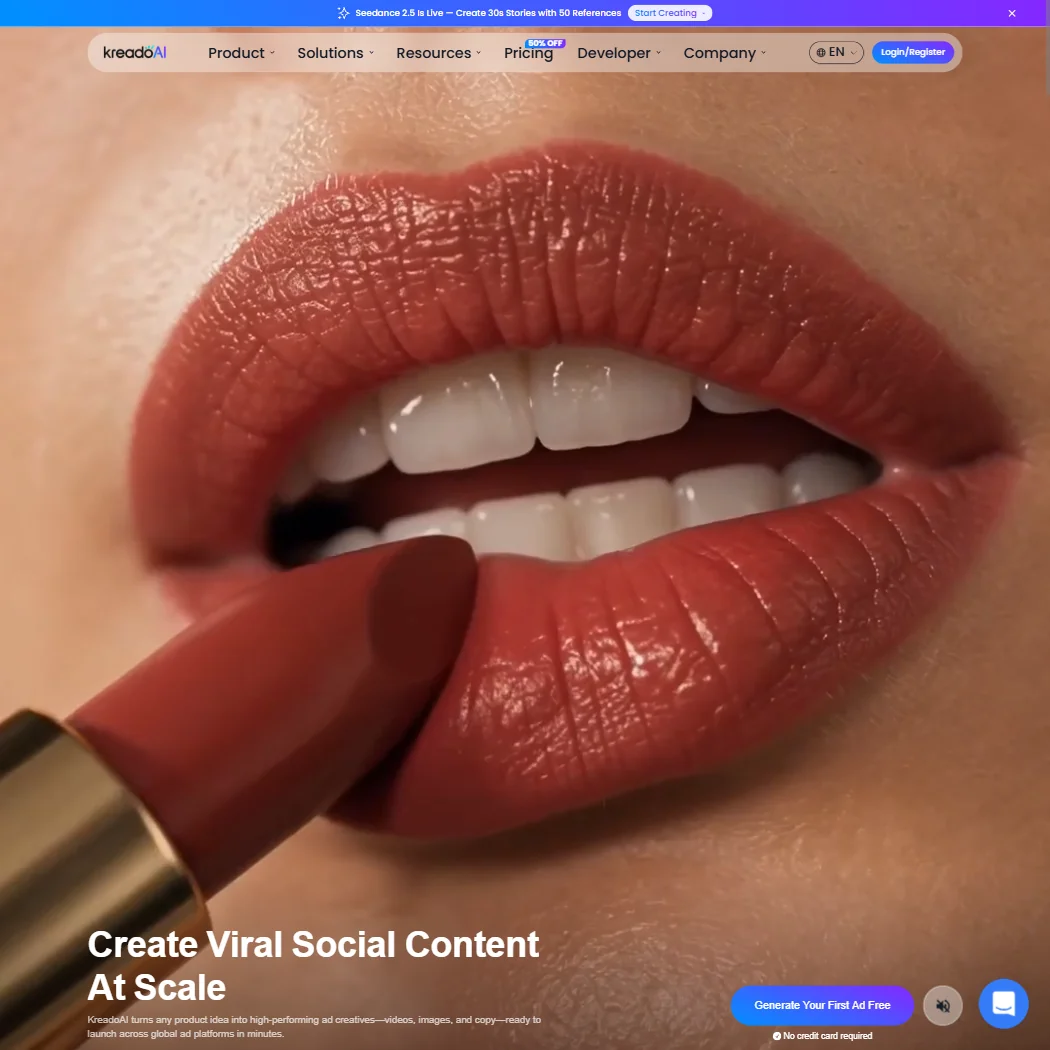
KreadoAI's homepage cites $1 billion in real ad spend informing the AI.
What is KreadoAI?
KreadoAI launched in 2022 and is headquartered in Singapore. The pitch is ad creative production at speed, specifically for e-commerce brands and performance advertisers who need to ship video content across multiple markets without building a production team.
The core idea is that you hand it a product URL. It pulls the page, figures out a hook and a call to action, and hands you back a launch-ready video in minutes. That URL-to-video workflow is the thing they talk about most. There's also a text-to-video path, image-to-video, and a PowerPoint-to-video converter for anyone who still lives in slides. Not a narrow tool. But the ad-specific positioning is where it's most distinct from generic video generators.
Their claim about training on real ad spend data is worth pausing on. As a technical differentiator it's hard to judge, but the output format does seem oriented toward conversion content rather than storytelling or long-form. That tracks with what their target user actually needs.
KreadoAI Features: Video Generation, Editing & AI Capabilities

The feature surface is genuinely wide. The URL-to-video conversion is the flagship, and it works by scraping product pages and generating copy, avatar presentation, and voiceover from a single input. From there, you can edit in the browser. No desktop software required.
On the editing side, they've built in background removal for images and video. Watermark stripping, subtitle burning, and logo removal are all in there. Face swap exists. So does multi-size resizing, which matters for anyone running ads across TikTok and Meta simultaneously.
Batch processing shows up in a few places. You can submit up to five TikTok videos at once. There's a multi-size ad image generator running in parallel. That's not nothing for a team trying to ship volume.
The screen recorder is a feature we almost missed, tucked into the plan comparison table. It's listed, but documentation around it is thin. Hard to know how much real use it gets.
The 40,000+ AI voices across 140+ languages is a genuinely unusual number. Most competitors are operating at a few thousand, maybe. That range matters if you're running localized campaigns in markets where a robotic-sounding voice will kill conversions. Whether the quality scales across all 140 languages is a different question. More on that below.
KreadoAI Video Quality: How Good Does the Output Actually Look?
Export resolution sits at 1080p as standard, which is fine for social ads. Anything above that requires Enterprise pricing.
The AI-generated scripts do seem to follow a hook-body-CTA structure that at least resembles what actual media buyers use. Whether that's training on real ad data or just prompt design, the result is more conversion-shaped than what you'd get from a general-purpose tool. Honestly, that surprised us.
KreadoAI AI Avatars & Voiceover: How Realistic Are They?
Over 1,000 avatars are available depending on your plan. The free tier gives you five. The gap between five and a thousand is a lot of ladder to climb before you hit anything useful for brand work.
The instant avatar clone feature is what catches attention. You record a short clip, and it maps your likeness onto the system. That's available on paid plans. A higher-tier custom studio avatar with more control is an Enterprise add-on, which is predictable.
Voice cloning shows up on Pro and above. The free tier gives you 120+ voices across 31 languages. That's reasonable for testing. Professional voice clone as a standalone add-on costs extra. Ask for the exact figure.
Is KreadoAI Easy to Use?
The web-only platform keeps things simple by design. No installation. No exports into a separate editor. You work inside the browser.
The URL-to-video workflow genuinely reduces friction. Paste a product link, make a few choices, and you're closer to a finished asset than you'd get with most tools at this price point.
Where it gets murkier is the account interface. The K-coins credit system adds a layer of mental math. You're not buying minutes or videos. You're converting money into coins and then spending coins at rates that aren't always visible before you start. That's a friction point that shouldn't exist.
The community support structure is missing. Bot chat is the first line of defense. That's not a setup that helps new users get unstuck quickly.
KreadoAI Pricing: Is It Worth It for Creators & Teams?
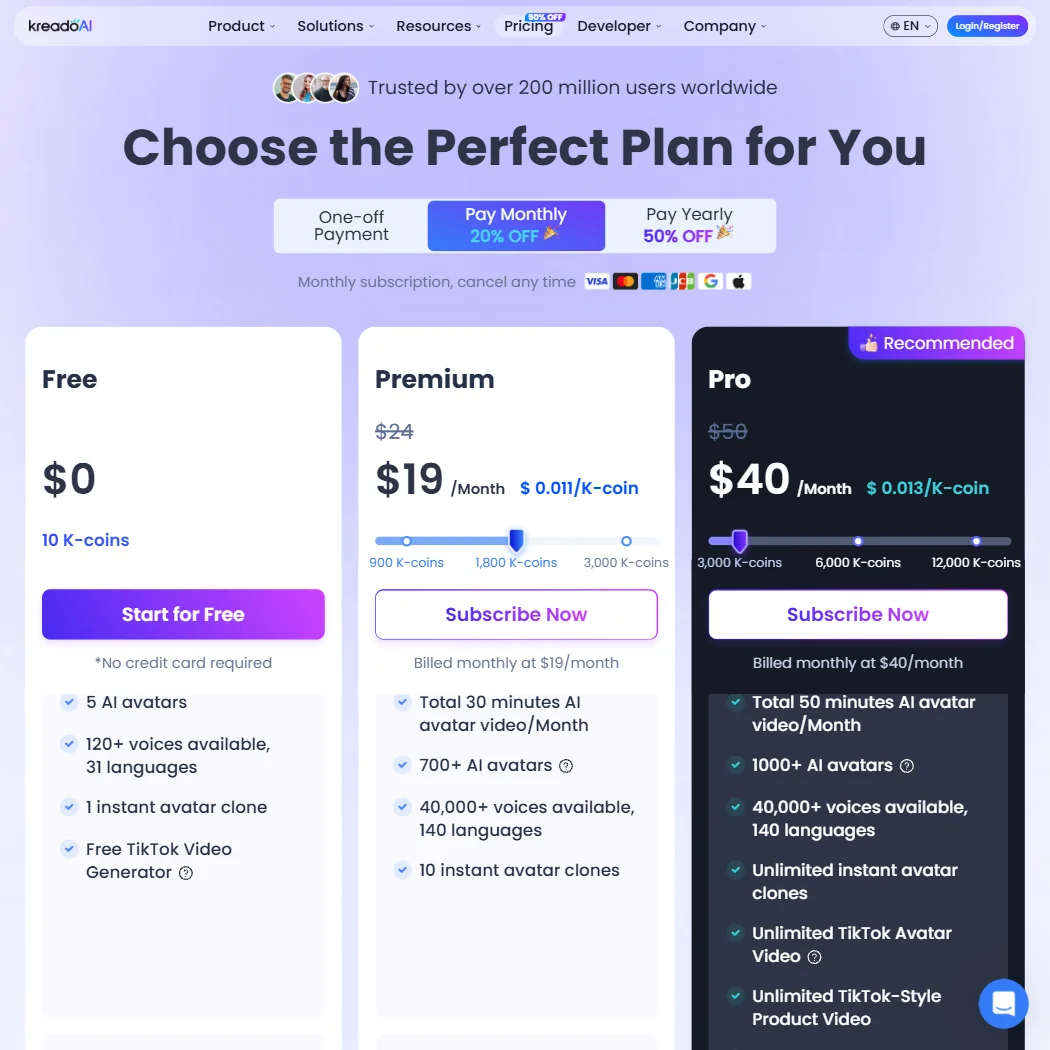
Premium is $19 a month on the monthly term, down from a listed $24, with 1,800 K-coins a month and watermark-free exports. Pro is $40 a month, down from a listed $50. Paying yearly cuts the price further, and a one-off K-coin purchase is sold for anyone who doesn't want a subscription.
The free tier is real: 10 K-coins, 3 minutes of total video, five avatars. No credit card required. That's a fair way to test the tool.
No refund policy is publicly stated.
KreadoAI vs HeyGen: Which AI Video Tool Is Better?
HeyGen is the comparison that comes up most often, and it's fair. Both tools center on AI avatar videos. Both target multilingual ad production. Both offer voice cloning.
Where they diverge: KreadoAI leans harder into the e-commerce and performance advertising use case. The URL-to-video workflow has no direct equivalent in HeyGen's standard offering. KreadoAI also fields a wider raw avatar count.
HeyGen has more mature support infrastructure, which matters in practice.
For enterprise L&D and training video production, Synthesia sits in a different lane entirely. Not the right comparison for ad creative work. But worth knowing the boundary.
Who Should Use KreadoAI? (And Who Shouldn't)
E-commerce brands running paid social at volume. That's the fit. Specifically teams that need multilingual ad creative without a production budget. The URL-to-video flow plus 140+ language support is genuinely built for that workflow.
Solo creators or content teams making long-form or editorial video. The tool isn't built for them, and the free tier makes that clear fast.
Agencies that need to show clients finished creative, not prototypes. Maybe. The avatar quality is good enough for some clients and not others. Test on the free tier first. Seriously.
KreadoAI Review Verdict
KreadoAI does real things. The URL-to-video pipeline is genuinely useful for performance advertisers. The language breadth is hard to match. The avatar and voice cloning features are functional, not decorative.
But The K-coins system adds friction where there should be none. Support is thin.
The tool is young and moving fast. A recent update added PPT text recognition and the photo-to-talking-avatar feature. That update pace is encouraging. The product is not finished.
For a brand that needs fast ad creative across multiple languages and wants to test the workflow before committing, the free tier is worth an afternoon.