
Invideo was founded in 2019. Agent One is their current flagship bet. It's a significant departure from what they were building before.

What is Invideo Agent One?
Not one AI. A network of them. Each agent carries a specific creative role, scriptwriter, cinematographer, colorist, and a few others. The pitch is that these agents hold context across sessions, which is genuinely different from how most text-to-video tools operate.
Close the tab on Runway ML or Pika Labs, and your session context is gone. You explain your brand again next time. And the time after that. Invideo Agent One's persistent memory across that agent network is the core product claim, and if it performs as described, it's a meaningful one, not just positioning language.
The platform pulls from over 200 AI models. Google Veo 3.1 is the named headliner. Kling AI and Wan AI sit alongside it. ElevenLabs handles audio. The agent layer decides which model gets applied to which shot, rather than putting that decision on you. It runs web-based, with iOS and Android apps available.
Invideo Agent One Features: Video Generation, Editing & AI Capabilities

Text prompt in. The agent network breaks it into a shot-by-shot plan, assigns models to segments, and builds out a multi-scene video. The scriptwriting agent handles narrative structure. The cinematographer agent handles visual framing. That's what the documentation describes, at least.
The editing layer is internally described as "Premiere Pro with full AI." Bold claim. What it appears to mean practically is a timeline editor where you can select multiple shots and apply adjustments across all of them in a single instruction. Batch editing across shots without repeating yourself per clip is the capability that working editors will actually care about, and we've seen too many AI video tools treat the edit stage as an afterthought.
Talking head and avatar support is built in. The Plus plan gives you 4 AI avatars. Elite goes to 200. Voice clones follow the same structure, 4 at the entry tier, scaling to 200 at the top. ElevenLabs and Minimax handle text-to-speech. Storyboarding templates come with all plans.
There's a multiplayer mode. Real-time collaboration with live cursors and comments. Custom agent roles can be assigned to different team members. That combination is uncommon in tools at this price tier.
What's harder to find in the public docs: export resolution specs, whether auto-subtitles are included, screen recording support. Those gaps are a mild annoyance at best, a signal about documentation maturity at worst.
Invideo Agent One Video Quality: How Good Does the Output Actually Look?
The inclusion of Veo 3.1 isn't decorative. It's currently among the stronger video generation models available from any vendor. Running it under an agent-managed interface, rather than juggling separate tools manually, is a practical advantage with a real workflow cost attached to it.
Invideo Agent One AI Avatars & Voiceover: How Realistic Are They?
Four avatars on Plus. Two hundred on Elite. That's a large gap, and it's clearly structured to pull team-scale buyers toward higher tiers. Whether 4 is enough for a solo creator is entirely use-case dependent.
Voice clones follow the same ladder. ElevenLabs is doing the quality work there, which is a known quantity at this point. ElevenLabs voices are generally good. That's not a controversial take.
AI avatar quality as a primary concern? HeyGen is probably the more targeted comparison.
Is Invideo Agent One Easy to Use?
Complicated question. The agent setup is genuinely different from what most video tools ask of you, and there's a real learning curve to understanding what each agent does before you've configured anything.
Not a criticism, necessarily. Just not a one-click experience.
The support layer looks reasonable on paper. Help center, YouTube channel, Academy, community forum. Email support is listed in the footer. Live chat is not publicly confirmed.
The multiplayer mode deserves a specific callout for anyone evaluating this as a team tool. Real-time cursors, comments, custom agent role assignments per team member. That combination suggests someone at Invideo thought about collaborative production workflows, not just individual creator convenience. That's a reasonable design decision that most competitors haven't made.
Casual users wanting to paste a URL and get a video in 60 seconds. Not the fit. This tool asks more of you than that upfront, and it's not shy about it.
Invideo Agent One Pricing: Is It Worth It for Creators & Teams?
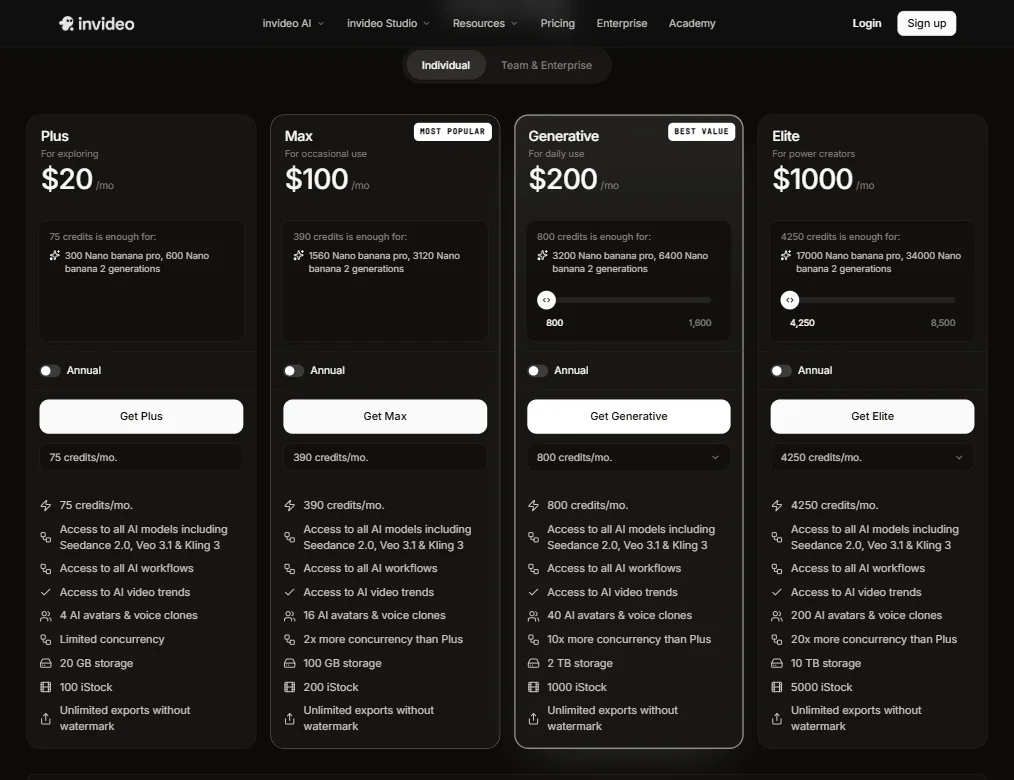
No free plan. No free trial. That's the starting point.
Starter is $20 per seat per month with 400 credits, about 160 Nano Banana Pro generations or around 15 fast Seedance 2 videos, per the pricing page. It includes only the Lite tier of the Agent Two video agent. Plus is $60 per seat per month, or $36 billed yearly, with 2,000 credits and all three Agent Two tiers. Max is $150 per seat per month, or $75 billed yearly, with 5,000 credits. Team and business plans are sold separately.
The jump from $20 to $60 is where the product opens up. Starter is limited to Agent Two Lite, so anyone who wants the full agent is paying three times the entry price.
The refund policy isn't publicly stated anywhere obvious. That's a problem when you're committing before you've used the tool.
For context: Runway ML charges by the credit and Pika Labs has a free tier. Invideo Agent One offers no free entry. You're committing before you've seen what the tool does with your actual content. That's a hard ask for a product this new.
Invideo Agent One vs Runway ML: Which AI Video Tool Is Better?
Different products. The comparison isn't clean, but it's worth walking through.
Runway ML is credit-based and has been around longer. If you want to test a generation tool with minimal financial commitment, Runway's model is friendlier by design.
Agent One's argument against Runway is the persistent memory layer. Runway doesn't hold creative context across sessions the way Agent One claims to. You rebuild your brief every time. For a team running a consistent branded content operation, that repetition has a real time cost. That's where the value calculation starts to shift.
On video generation quality specifically, both tools have access to strong models, so that's probably not where the decision gets made. Where they split is workflow structure and financial commitment. Runway is more flexible and lower stakes. Agent One is more opinionated about how production should work and significantly more expensive at every tier above entry.
Occasional one-off video needs. Runway is the easier call. Recurring production pipeline with brand consistency requirements across a team. Agent One's architecture starts making more practical sense.
Who Should Use Invideo Agent One? (And Who Shouldn't)
Solo filmmakers and advertisers running recurring campaigns. Real fit. The persistent memory means less repetitive setup. The model breadth means fewer tool switches.
Teams doing high-volume branded content. Also a reasonable fit. The multiplayer mode and custom agent role assignments suggest Invideo built with that use case actively in mind, not as an afterthought.
Casual creators. Not the fit. No free tier, no trial, $20 minimum before you've seen anything.
L&D teams building training content at scale might hit the avatar and voice clone ceiling on lower plans fast. Fliki is worth looking at there, particularly if text-to-video for training is the primary goal and the full agent workflow feels like overkill for the use case.
Budget-constrained solo creators looking to experiment. Look elsewhere. The gap between Plus and Generative is too wide to bridge casually, and there's no trial ramp to close that gap.
Invideo Agent One Review Verdict
The concept is solid. Persistent agent memory across a structured creative network is a real architectural idea, not a marketing phrase with nothing behind it. The model access is broad and includes names that carry actual weight. The team collaboration layer is more thoughtfully built than most competitors bother with.
But a few things give us pause. No trial. No free tier. No visible refund policy. That's three friction points stacked before the product has had any chance to demonstrate value. For something this new and this expensive, that combination is a lot to absorb.
The documentation gaps matter too. Export resolutions, subtitle support, screen recording. These aren't obscure requests. Missing them from public docs is either a product gap or a site maintenance issue. Neither reading is reassuring.
We'd be more enthusiastic if the pricing had a lower-risk entry point and the trial gap were closed. As it stands, this is a compelling product aimed at a narrower audience than the homepage implies. The ambition is there. The execution is mostly there. The onboarding risk is real, and the pricing asks you to absorb that risk entirely upfront.
Frequently Asked Questions
Does Invideo Agent One have a free trial?
No. No free trial, no free plan. The pricing page lists three paid tiers starting at $20 per seat per month for Starter. You're committing to a paid plan before you've tested the tool against your own content. For a product at this price point, that's a notable gap in the onboarding experience.
What AI models does Invideo Agent One use?
The platform draws on over 200 models. Google Veo 3.1 is the headliner on the video generation side. Kling AI and Wan AI are also in the mix. ElevenLabs and Minimax handle voice and audio. The agent layer selects which model gets used for which shot rather than requiring you to pick manually.
How does Invideo Agent One compare to other AI video tools?
The main structural difference is the persistent agent memory system. Most tools start fresh every session. Agent One claims to retain your creative context so you're not re-explaining your brand, style, and tone repeatedly. That's a meaningful workflow advantage for teams running recurring production. On raw generation quality, Runway ML is competitive. Where Agent One pushes ahead is in the structured multi-agent workflow and model breadth, not necessarily in any single output metric. The tradeoff is financial commitment and a real learning curve upfront.











