Botpress was founded in 2015 out of Montreal and has been building AI infrastructure longer than most of its current competitors have existed. That history shapes what the product is now.

The current pitch leans hard on one idea: most support AI tools answer questions, Botpress resolves them. That distinction, between answering and actually doing things, is where they're trying to win.
What is Botpress?
Botpress is an AI-native platform for building customer support agents. Not a chatbot builder with a thin AI layer bolted on top. The whole thing was designed around autonomous agents that can take action, not just respond.
The product has two main sides. Botpress Studio is where you build agents, define workflows, and connect knowledge bases. Botpress Desk is the helpdesk layer: ticket management, routing, human handoff, and agent queues. You get both on every plan, including the free tier. That's genuinely unusual in this category.
The underlying AI isn't locked to one model. Botpress runs on GPT-4, Claude, Gemini, and others available through what they call the Hub. Agents can draw on multiple models depending on the task. Whether that flexibility matters in practice depends a lot on how complex your workflows are.
They cite 750,000 AI agents built on the platform. We can't verify that number independently, but the product has been live long enough that it's plausible. Ten years of AI infrastructure is real, not marketing fluff.
Botpress Features: Chatbot, Helpdesk & Support Automation Breakdown
The agent-building layer is the core. You describe what you want the agent to do in natural language, connect it to knowledge sources, and define how it handles situations it can't resolve on its own. The Agent Development Kit (ADK) is available on every plan, including free. That's a meaningful decision. Most platforms gate API access behind paid tiers.
Knowledge bases are vector-based, which means the agent searches by meaning rather than keyword matching. Custom domain support for knowledge bases arrives on Plus and above. Not available on the free plan, which matters if you're running a branded support experience from day one.
Ticket management through Botpress Desk includes routing and assignment. Role-based access controls are gated to the Team plan at $939 a month, which matters for any team with more than one or two agents needing different permission levels.
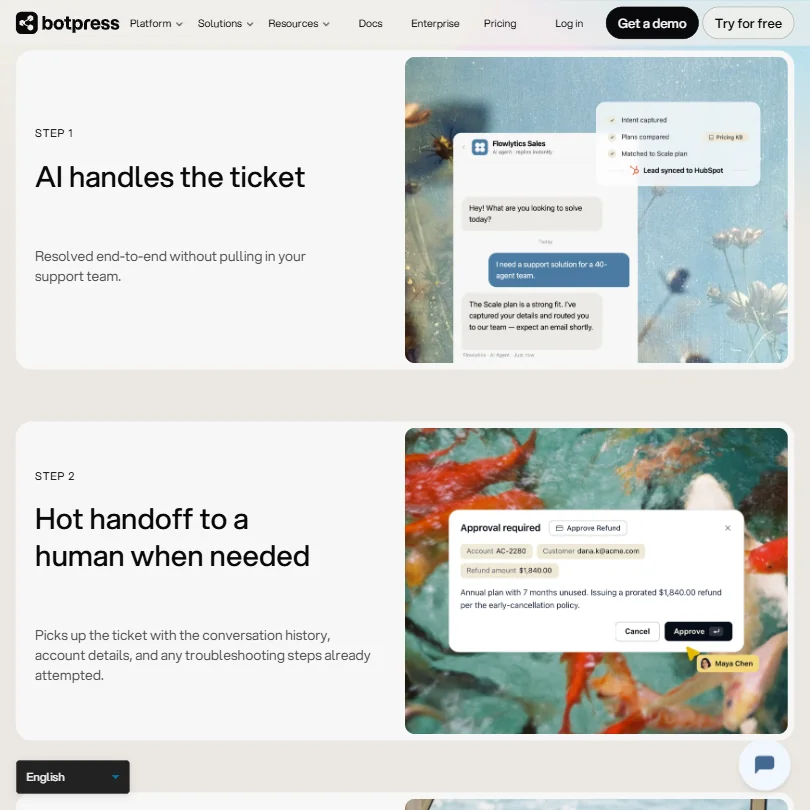
Human handoff works the way it should. When an agent escalates, the human picking it up gets the full conversation history, account context, and a summary of what the agent already tried. We kept seeing this praised in G2 reviews. Agents describe it as the difference between a real handoff and just getting a transcript dumped in their lap.
Email automation and proactive outreach sit inside Botpress Desk. The documentation describes an email inbox strategy but the specifics are thin on the public-facing side. Dig deeper into that before committing to email-heavy workflows on this platform.
The multilingual support covers 100-plus languages via the LLM translation layer. No separate language packs to manage. The translation happens at the model level, which simplifies setup considerably.
Sentiment analysis isn't part of the listed feature set. For teams that route tickets based on customer frustration signals, ask about it before signing a contract.
Botpress Bot Quality: How Well Does It Handle Real Customer Queries?
This is where Botpress earns most of its credibility. Multi-step resolution is the core claim, and the evidence across user reviews suggests it's not an empty one.
The distinction they make is worth taking seriously. A lot of support bots retrieve an answer and stop. Botpress agents are built to keep going: update the account, trigger a refund, close the loop, then log what happened so the next similar ticket gets handled faster. That feedback loop, where one resolved ticket becomes permanent knowledge, is how the platform is supposed to compound over time.
G2 reviewers in technical and operations roles confirm that complex ticket flows work better than they expected. That doesn't mean the quality is flawless. A recurring complaint from developers and technically experienced users involves the initial configuration overhead. Getting an agent to behave precisely on edge cases takes iteration. The platform is capable, but it needs someone willing to spend time tuning it.
The multi-LLM backend is an advantage here. Running different models for different task types isn't just a spec sheet feature. In practice, it means you're not forcing a reasoning-heavy workflow through the same model you use for quick FAQ responses.
We're cautiously optimistic on the bot quality, more so than most tools in this category. The underlying infrastructure has been built for a decade. That shows.
Botpress Channel Coverage: Which Platforms Does It Support?
Web, WhatsApp, and webchat are the standard channels available broadly. Voice is listed, but it's flagged as an Enterprise feature. If voice support is core to your use case, you're looking at a custom contract.
The API opens things up considerably. If a channel isn't natively supported, a developer can wire it in. The Hub integrations cover Shopify and Salesforce, plus HubSpot, Slack, and a few others. More than 100 integrations total, per the documentation. We can't independently audit all of them for quality, but the major ones are confirmed in the docs.
For most support teams, the native channel set is fine. WhatsApp plus webchat covers the bulk of customer-facing volume for most SMBs and mid-market companies. Voice being locked to Enterprise is the only real friction point, and it's a significant one if you're in a phone-heavy support environment.
That tracks with how most AI-first support tools approach voice. It's genuinely harder to do well. Botpress at least offers it, which is more than several competitors manage.
Is Botpress Easy to Set Up and Manage?
The free tier gets you access to Studio and Desk with no time limit. Three agents, three seats, 100 conversations per month. That's a workable sandbox, not just a teaser.
The documentation is extensive. Help Center is available on all plans, alongside a Discord community and a separate community forum. For a developer-oriented platform, the self-service materials are solid.
Here's where we have to be honest about a tension in the product. Botpress was built by and for people who want to control how their agents think. That's a strength for technical teams. It's friction for non-technical ones.
G2 reviews from smaller teams consistently surface a learning curve that goes beyond what the onboarding flow prepares you for. Users who came from simpler chatbot builders describe feeling like they'd walked into a much bigger product than they needed. That's not a bug exactly. It's a design philosophy. But it's worth knowing before you show up expecting something plug-and-play.
Plus plan and above gets you technical support via live chat. The free tier gives you the bot, which is a fairly blunt way of saying "figure it out yourself" at the start. There are worse. Human support earlier in the customer journey would help, especially given the setup complexity.
Botpress Pricing: Is It Worth It for Support Teams?
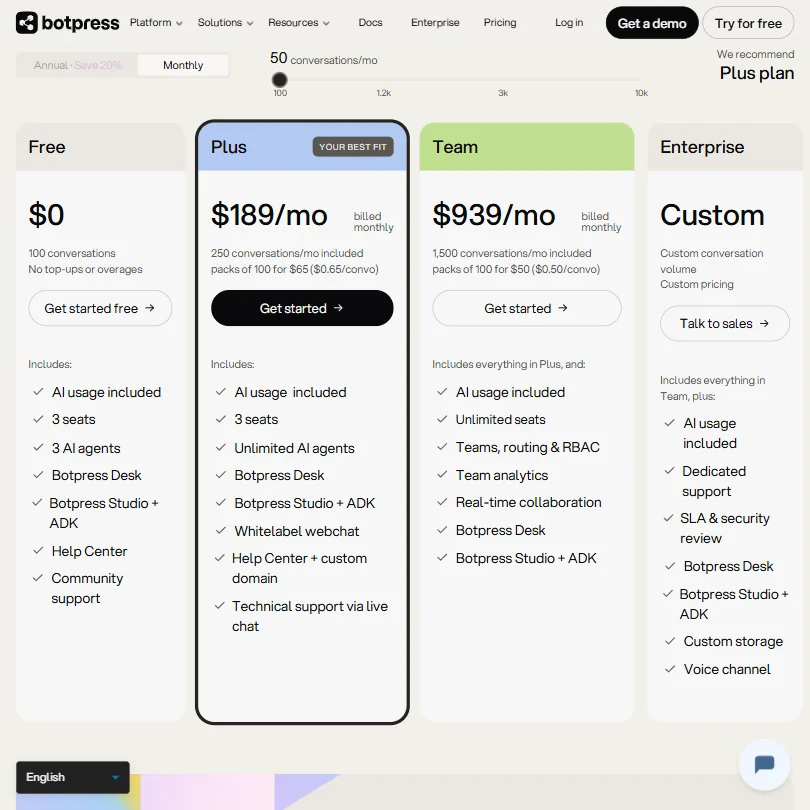
The free plan is real. 25 conversations a month, three seats, three agents. Studio and Desk both included. No credit card, no time limit. That's a genuine start.
The Plus plan starts at $189 a month billed monthly, with 250 conversations included and add-on packs of 100 conversations available at $65 per pack, or $0.65 per conversation. Team runs $939 a month and includes 1,500 conversations, with add-on packs at $50 per hundred, or $0.50 per conversation. Enterprise is custom. There's no per-seat fee. That's the thing they lead with, and it's a legitimate differentiator.
Botpress's homepage calculator currently shows a $9,000 annual Botpress estimate for 1,200 monthly conversations, with competitor costs varying according to seat count. The direction is probably right. Per-seat pricing at scale gets expensive fast.
The model is priced on conversations and usage rather than headcount. That works in Botpress's favor as teams grow. It also means your bill scales with volume, not staff, which is a different kind of risk. High-traffic months could push costs up quickly if you're not tracking conversation counts.
No refund policy is publicly stated. That matters. If you pay for a year upfront and something doesn't work, there's no documented path to a refund. We'd ask about that explicitly before committing to an annual contract.
AI usage is included in the plans rather than billed as a separate line item. That's more honest than a lot of competitors. Some platforms charge for seats and charge for AI token usage on top. Botpress rolls it together. Fair.
If the no-per-seat pricing model appeals to you but you want something more tightly scoped to ecommerce, Gorgias is worth a look. Different audience, but it solves a similar pricing frustration for Shopify-heavy teams.
Botpress vs Intercom: Which Customer Service AI Wins?
Intercom has the brand recognition, the polish, and the sales motion. Botpress has the infrastructure depth and the pricing model.
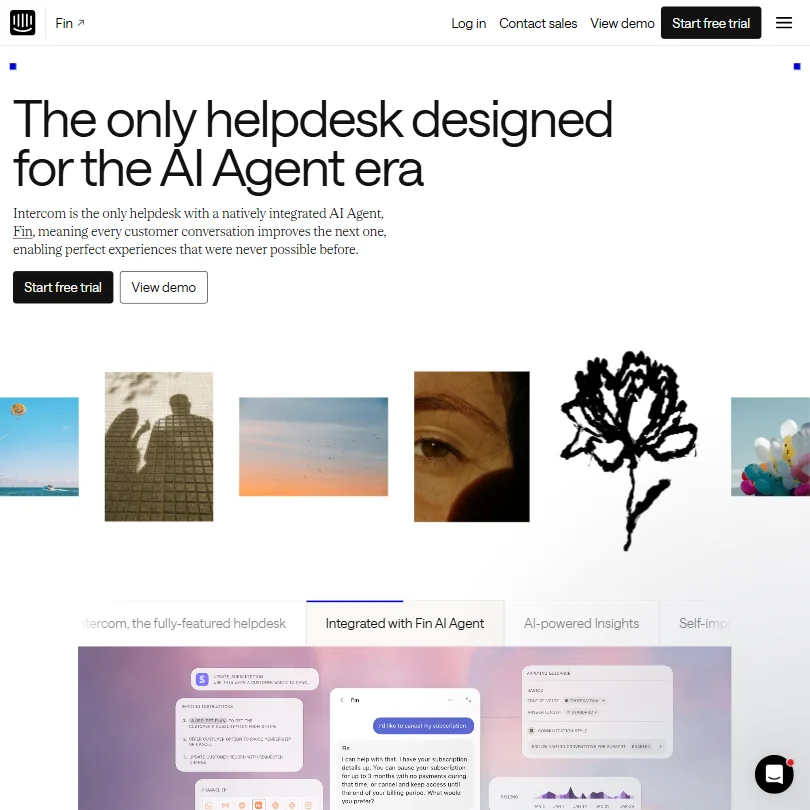
The core difference is what the AI is actually doing. Intercom's Fin handles conversations well. It's clean, well-documented, and has strong CRM integrations. But its workflow automation is shallower than what Botpress ships by default. Botpress agents are built to take action inside other systems, not just surface answers. That's a meaningful gap for support teams that need the AI to actually do things, not just chat.
Botpress doesn't charge per seat, and Intercom does. At any meaningful headcount, that difference compounds into a large number fast, as the homepage calculator illustrates. For teams that are growing headcount quickly, that pricing structure shapes the long-term budget conversation.
Intercom wins on onboarding speed. The setup experience is more polished. Botpress requires more upfront investment to configure well. For teams that want something working in an afternoon, Intercom is probably faster. For teams willing to spend a week getting the agent architecture right, Botpress pays back that investment.
G2 reviewers who'd switched from Intercom to Botpress consistently cited pricing as the driver. Quality retention. Intercom users who switched away from Botpress mentioned complexity. Both findings make sense.
If you're evaluating against a pure AI agent approach, Fin by Intercom is the direct comparison. Different philosophy about what automation should feel like, but it's the same buyer audience.
Who Should Use Botpress? (And Who Shouldn't)
Technical support teams at SMBs and mid-market companies. That's the fit. Teams where someone can own the agent configuration, iterate on it, and isn't looking for a pre-built flow that runs with zero adjustment.
Growing teams worried about seat-based pricing. The no-per-seat model gets more valuable as headcount climbs. If you're adding five agents this quarter and five more next quarter, the math works differently than with Intercom or Zendesk.
Developers building custom support infrastructure. The ADK and full API access on every plan mean Botpress can sit inside a larger architecture without requiring a platform migration.
Solo operators or very small teams who want a working support bot in 24 hours. Not the right tool. The complexity overhead is real. It'll frustrate you before it helps you. Businesses with voice as a primary support channel should also think twice. Enterprise-only voice means a custom contract before the feature even becomes available.
Botpress Review Verdict
Botpress is a serious product. Ten years of AI infrastructure is not trivial, and the multi-step resolution capability is genuinely better than what most alternatives ship. The no-per-seat pricing holds up under scrutiny, especially for teams that expect to grow.
The configuration overhead is the honest concern. The gap between what Botpress can do and what a non-technical team can actually deploy without help is wider than the marketing suggests. The documentation is good. It doesn't fully close that gap.
The free tier is real and worth using to test the architecture before committing to $189 a month. SOC II certification and GDPR compliance are documented. KPMG pen-testing is a specific credential, not a generic enterprise security claim. Those matter for procurement conversations.
A public refund policy, earlier access to human support rather than gating it to Plus, and more transparency on the email automation feature set would make Botpress easier to recommend for teams that lean heavily on email channels.
For technical teams that are serious about automation depth and want a pricing model that doesn't punish growth, Botpress earns a place in the shortlist.
How Botpress compares
Botpress scores 7.5 out of 10 among the AI chatbot builders we rate. These two do the same job and are the closest to it, compared on what each vendor publishes.
DocsBot
DocsBot's cheapest paid plan is $49 a month, compared to Botpress at $189 a month, and DocsBot answers in 100 languages. Botpress runs its own helpdesk, Botpress Desk, with a shared inbox, a hosted help center and automation rules; DocsBot has none of those and instead plugs its AI answers into a helpdesk you already use, like Zendesk or Freshdesk. Both offer a free plan and connect to Salesforce and Slack.
Pick DocsBot if price matters most and you already run a separate helpdesk.
Pick Botpress if you want the chatbot and the helpdesk in one product.
Wonderchat
Botpress's AI drafts ticket summaries for your human agents; Wonderchat's AI has no equivalent feature, working only on the customer facing chatbot. Wonderchat hosts data in the EU by default, while Botpress keeps it in the US. Wonderchat's cheapest plan is $124 a month against Botpress at $189 a month, and Wonderchat adds SMS as a channel that Botpress does not list.
Pick Wonderchat if you want data kept in the EU and a lower price.
Pick Botpress if your agents need AI drafted summaries at handoff.
Frequently Asked Questions
Does Botpress have a free plan?
Yes, and it's not a trial. The free tier runs indefinitely with 25 conversations a month, three seats, and three agents. Both Studio and Desk are included, which means you get the full agent-building environment and the helpdesk layer without paying anything. The main limitations are conversation volume and the absence of features like custom knowledge base domains and role-based access controls, which come in on paid plans.
How does Botpress pricing work compared to Intercom and Zendesk?
Botpress doesn't charge per seat. The Plus plan starts at $189 a month billed monthly and scales based on conversation volume, not headcount. Intercom and Zendesk both charge per agent seat, which compounds quickly as teams grow. Botpress's homepage calculator puts the annual cost difference at a substantial figure for mid-sized teams, currently showing around $9,000 a year for Botpress at 1,200 monthly conversations, with competitor totals varying depending on seat count. The math favors Botpress more as headcount grows, but high-volume months can push conversation costs up, so tracking usage matters.
Is Botpress good for non-technical teams?
Honestly, not the easiest starting point. The platform is built for teams that want precise control over agent behavior, and that power comes with real configuration complexity. G2 reviewers without a technical background consistently flag the learning curve as steeper than expected. The documentation and Discord community help, but live chat support only kicks in on the Plus plan. Teams without someone willing to own the setup and iterate on it will likely hit friction early.