
Relevance AI's homepage is specific in ways most AI tool sites aren't. Real task volumes, named agents, per-agent eval scores. That either means they have genuine ops infrastructure or a very confident design team. It's mostly the former. Founded in 2020 out of Sydney, the company has moved well past the "AI wrapper" phase, and its architecture is doing something genuinely different from the trigger-action automation tools this category usually produces.

What is Relevance AI?
A platform for building teams of specialist AI agents. Not one general-purpose bot that does everything poorly. Separate agents per task, each running on whatever model hits the right quality-to-cost ratio, each scoped to a specific job.
Their documented use cases cluster around revenue-facing teams: sales, customer success, marketing, and HR. Agents that prep call briefs, chase overdue invoices, enrich CRM records, or draft outbound sequences. The workflow is agent-first from the ground up. That's not how most automation platforms are built, and it shows in how the product is structured.
The company positions itself as enterprise and mid-market focused, and the feature set reflects that honestly. Role-based access control, SSO, audit logs, a dedicated account manager, and a deployment team that helps you get live. This isn't a tool for hobbyists running personal automations. Honestly, they're not even trying to be.
Relevance AI Features: Workflows, AI Agents & Automation Capabilities
The no-code agent builder is the entry point. You build agents visually, assign tasks, wire them to data sources, and connect them to tools. Over 2,000 app integrations are listed, covering the obvious ones like Salesforce and HubSpot, and a few others. Respectable library.
Beyond the builder, the feature stack gets genuinely interesting. There's a multi-model LLM router that benchmarks models against your quality bar and routes tasks to the cheapest one that passes. Their own homepage dashboard shows agents running on Gemini Flash, Claude Haiku, and a couple of others simultaneously, each picked for cost efficiency on that specific task. We cross-referenced this with their docs and the claim holds up.
Human-in-the-loop approval flows are built in, not bolted on. Job queuing means failed runs retry rather than disappear into a log. Full agent tracing with OTEL export is documented, and an MCP Gateway rounds out the integration layer for teams who need programmatic access. The operational monitoring alone separates this from most no-code automation tools. We've seen platforms charge extra for the equivalent of what Relevance AI ships as table stakes.
Version control and shared agent teams are also documented. That's a lot of infrastructure that competitors ask you to assemble yourself from LangChain, Braintrust, and a job queue you've cobbled together.
Relevance AI Automation Power: How Complex Can Your Workflows Get?
Pretty complex. That's the short answer.
The platform supports event and signal triggers, scheduled runs, and webhooks, plus app-based triggers. Conditional logic is baked into agents, not tacked on as a filter step. Their Deal Reviewer and Forecast Roll-up agents, both documented with named eval metrics, evaluate criteria and route decisions autonomously. That's not basic if-then logic.
Custom agent logic is supported. Developers can extend behavior beyond what the visual builder covers, and multi-agent orchestration means agents coordinate with each other on larger workflows. Data enrichment runs through context layers, tables, and file handling, which their docs describe in some detail.
We dug into the job queue architecture and it's one of the more thoughtful reliability features we've seen documented at this level. For teams running over a million tasks a month, the retry logic matters more than it sounds. Their homepage cites 1.24 million tasks per month from one customer, with a 4.9x year-over-year increase. That tracks for a platform with this kind of queuing infrastructure. We didn't test it ourselves, to be clear. G2 reports from people running real workloads are generally positive, but complexity surfaces edge cases that documentation never mentions.
Relevance AI AI Agent Capabilities: What Can It Actually Do Autonomously?
This is where Relevance AI is most differentiated from tools like Zapier, which is a trigger-action platform rather than an agent-first system. Not a criticism of Zapier. Different tool, different job.
Their documented agent roster is specific. Pre-meeting Prepper, Post-call Actioner, Outbound Prospector, Proposal Builder. These aren't templates. They're purpose-built agents with evals, cost tracking, and model assignment baked in. The homepage dashboard shows per-agent eval pass rates, 96% for the Proposal Builder on Claude Sonnet and 92% for the Deal Reviewer on GLM-5. That reads like a genuine ops dashboard, not a marketing mock-up.
Multi-agent orchestration is real. Agents can be grouped into teams, coordinated, and managed as a workforce. User feedback and docs say it works at scale. Ask how agents handle genuinely novel situations outside their trained scope. Technical reviewers on G2 occasionally mention debugging, documentation, and customization friction. No one called it a dealbreaker. Worth knowing.
Is Relevance AI Easy to Set Up Without Code?
Easier than LangChain or CrewAI. Much easier. But not as simple as dragging a Zap together.
The no-code builder handles the basics without requiring Python. G2 reviewers without engineering backgrounds report getting workflows running, which is a meaningful bar for a platform this capable. Where it gets harder: more sophisticated agent logic means working with eval criteria and model configuration. That's not a criticism. It's the nature of building something that actually reasons. Teams expecting plug-and-play at the advanced end will have a real learning curve.
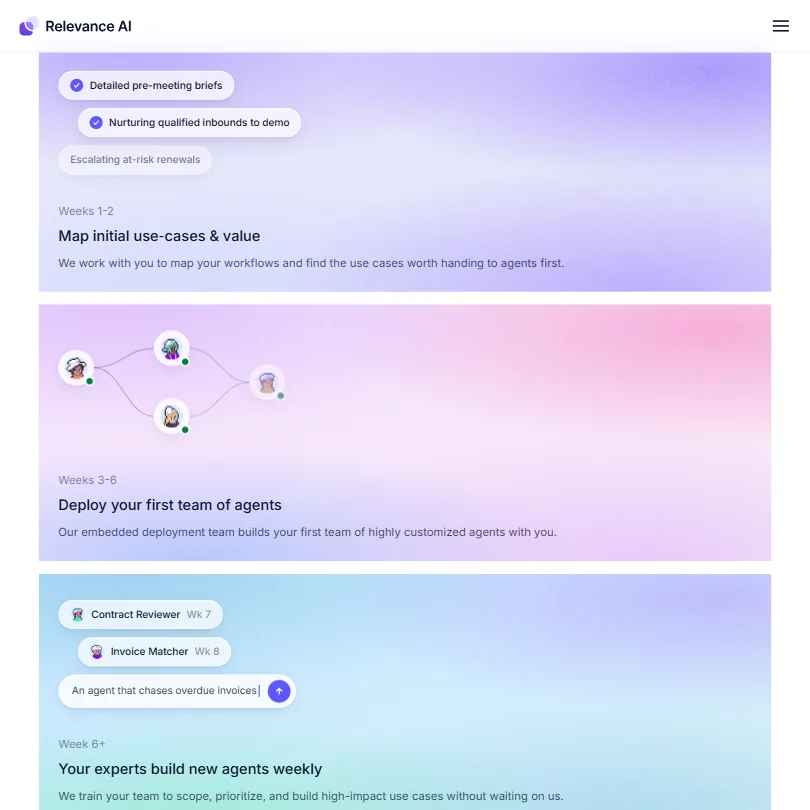
Relevance AI's documented onboarding model includes an embedded deployment team for Enterprise customers. Weeks 1 and 2 are for mapping workflows. Weeks 3 through 6 are for building the first agent team. Week 6 and beyond is when your team takes over. Honestly, that structured ramp is rarer than it should be in this category. Most vendors throw you a documentation link and wish you luck.
Relevance AI pricing: what each plan gives
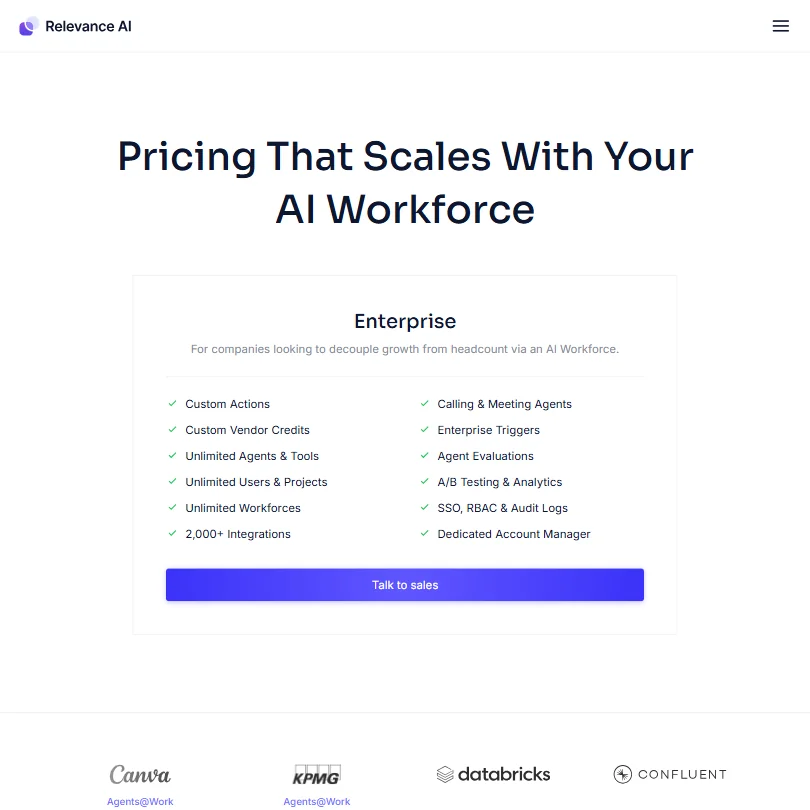
Opaque. That's the word.
The pricing page offers no public figures. No starter price, no per-seat cost, no task-volume tiers. Everything routes through "Talk to sales." Enterprise custom pricing only, as far as we can tell from the screenshot, which shows a single Enterprise plan covering Custom Actions, Unlimited Agents and Tools, Unlimited Workforces, Calling and Meeting Agents, Enterprise Triggers, Agent Evaluations, A/B Testing and Analytics, SSO with RBAC and Audit Logs, and a Dedicated Account Manager.
Their homepage does publish cost-per-task metrics from a customer dashboard: $0.01 for a Deal Reviewer run, $0.11 for a Forecast Roll-up, $0.09 average. The customer cited is running 1.24 million tasks a month at $11.8k monthly spend, reduced from what would have been significantly more before model optimization kicked in. Useful context. It doesn't tell you what you'd actually pay Relevance AI for platform access.
Comparing value against Make or Zapier is genuinely impossible without a sales call. We're not going to pretend otherwise. Price-sensitive buyers should budget extra time for discovery here.
Relevance AI vs Zapier: Which Automation Platform Wins?
They're not competing for the same buyer. Worth saying clearly.
Zapier is a trigger-action tool with 7,000-plus app connections and pricing that starts low and publishes publicly. It's great at moving data between apps. Most Zapier users never need to think about model selection or eval pass rates. That's a feature, not a gap.
Relevance AI is asking a different question. Not "how do I move data between apps?" but "how do I build a workforce of agents that makes decisions, handles edge cases, and optimizes costs over time?" Different problem, different architecture.
Zapier wins on integration breadth, pricing clarity, and simplicity for non-technical teams. Relevance AI wins on agent sophistication, model routing, and operational monitoring at scale. If your automation needs involve judgment rather than just data movement, Zapier won't get you there. That's not a knock. It's just not what that tool is built for.
Who Should Use Relevance AI? (And Who Shouldn't)
Enterprise and mid-market revenue teams. That's the fit. Sales operations, CS teams managing renewals, marketing running outbound at volume. Anywhere you need agents that reason, not just route.
Technical teams who want control over model selection and cost optimization will find the multi-model router and evals layer genuinely useful. Built for people who care about that stuff.
Smaller teams and solo operators. Probably not the right tool. The Enterprise-only onboarding structure and custom pricing aren't built for a three-person startup running light automation. Cheaper, simpler tools cover that ground without a sales cycle.
Developers building bespoke multi-agent systems from scratch. They might find the visual abstraction more limiting than working directly with LangChain or a similar framework. Worth checking what you actually need before sitting through a demo.
Relevance AI Review Verdict
Architecturally serious. The multi-model router, job queue, agent tracing, and eval system aren't features you typically find bundled in one platform. Most teams building at this level are stitching those things together from Braintrust, a separate job queue, and a custom MCP setup, and doing it badly.
The lack of transparent pricing is the biggest practical friction. We can't give you a number to take to your CFO, and neither can their website. Real barrier for evaluation, especially against platforms that publish tiers.
G2 reviewers consistently highlight the deployment support and the quality of the agent tooling as what keeps them on the platform. The complaints we saw covered debugging and documentation friction on complex configurations. Nothing structural. Nothing that reads like a product problem.
For enterprise teams running serious automation workloads, this is a credible choice. The case is solid. We'd just want to see pricing transparency before calling it a clean recommendation for everyone else.
How Relevance AI compares
Relevance AI scores 8.2 out of 10 among the AI agent builders we rate. These three do the same job and are the closest to it, compared on what each vendor publishes.
StackAI
StackAI has a standing free plan; Relevance AI does not offer one to new signups. StackAI can also be self-hosted, deploying on-premise or into your own VPC, and it moves agents through four separate stages from development to production; Relevance AI offers neither self-hosting nor separate test and live environments. StackAI also holds HIPAA compliance with a signable BAA, which Relevance AI does not claim. Relevance AI connects to a stated 2,000 apps against StackAI's 100.
Pick StackAI if you need self-hosting, HIPAA compliance and a free plan.
Pick Relevance AI if you need far more app connectors to work with.
SmythOS
SmythOS has a free plan for building public agents; Relevance AI does not offer one to new signups. Relevance AI is cheaper to start once you do pay, $29 a month against SmythOS's $39 a month, and Relevance AI lets you bring your own model or key from Pro, while SmythOS includes that on every tier including its free plan. Relevance AI keeps 90 days of run history against SmythOS's 30, and hosts across four regions where SmythOS hosts only from the US.
Pick SmythOS if you want bring-your-own-key on every plan including free.
Pick Relevance AI if you want lower cost, longer run history and more regions.
Gumloop
Relevance AI lets you branch a workflow with conditional logic; Gumloop has no branching feature in its workflow builder. Relevance AI is also cheaper to start, $29 a month against Gumloop's $37 a month, and connects to a stated 2,000 apps against Gumloop's 250. Gumloop counters with a self-hosted option on its Enterprise plan, deploying into your own VPC, which Relevance AI does not offer, and Gumloop holds HIPAA compliance, which Relevance AI does not.
Pick Gumloop if you need self-hosting on your own VPC and HIPAA.
Pick Relevance AI if you need branching logic and more app connectors.
Frequently Asked Questions
Does Relevance AI require coding knowledge to build agents?
Not for most use cases. The visual no-code builder handles agent creation, task assignment, and integration connections without code. Where custom logic is needed beyond the builder's scope, the platform supports custom development for technical users. G2 reviewers without engineering backgrounds have reported successfully building working agents, though more complex configurations take time to learn.
What AI models does Relevance AI support?
The platform runs a vendor-agnostic model router across GPT, Claude, Gemini, Kimi, and GLM, among others. The router benchmarks models against your defined quality threshold and automatically routes tasks to the cheapest one that passes. Not a feature most competitors have built natively, including Cohere and Dust.tt.
How does Relevance AI compare to Make for workflow automation?
Make is a visual workflow builder that excels at connecting apps and automating multi-step processes at a transparent price point. Relevance AI is doing something different: building agent workforces that make decisions, track performance, and optimize costs over time. Teams that need serious agent orchestration and are willing to go through a sales process will find Relevance AI more capable. Teams that need affordable, clearly priced app automation should look at Make first.







