SAASINSPECTOR

Comicink Review

Writers, educators, hobbyists, and indie creators who want to turn stories into comics without drawing skills

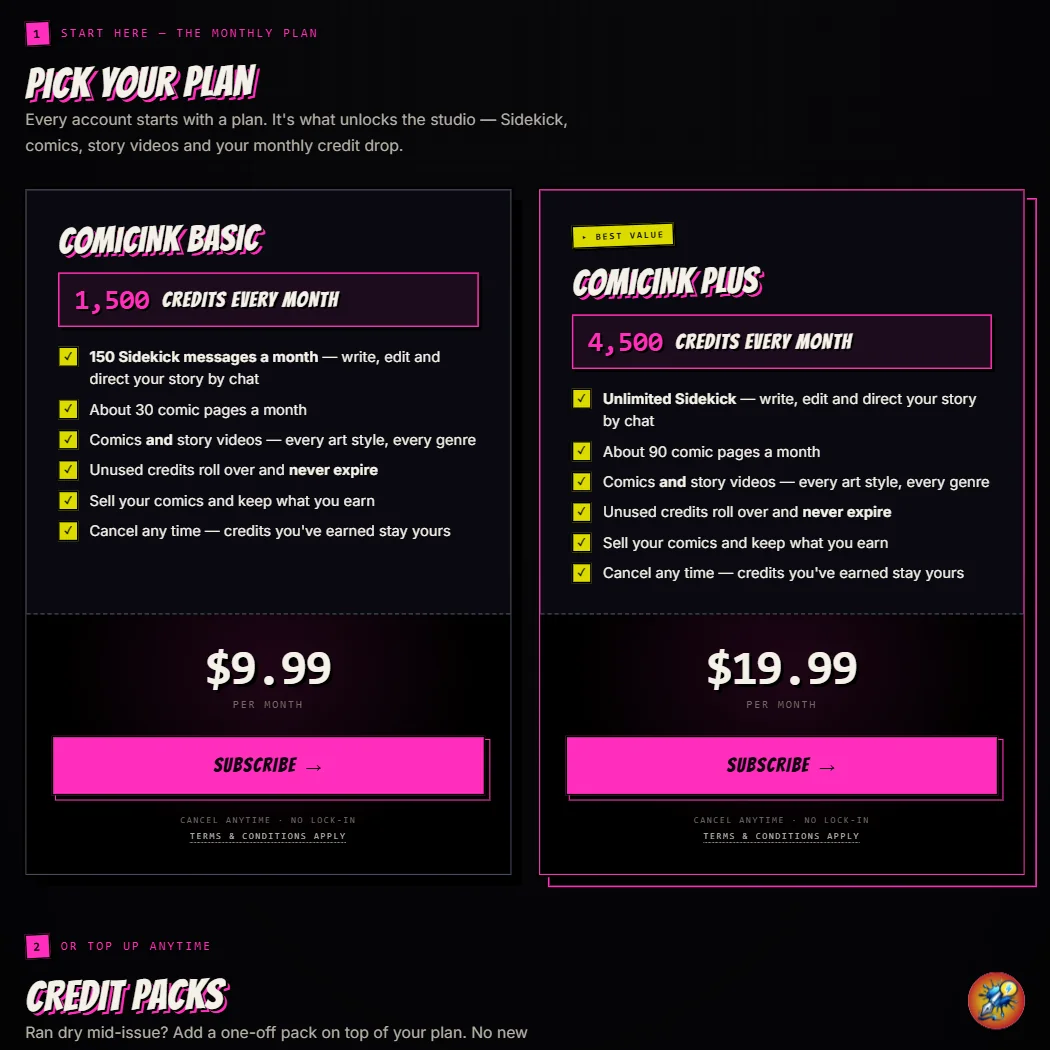
Visit ComicinkFrom $9.99 (Lite — 1,500 credits)

Research-based review. We analyzed vendor documentation, customer reviews on G2, Capterra, and Reddit, and live pricing — not hands-on testing yet. We update as our team puts tools through real workflows.

The verdict

Comicink is a web and iOS tool that converts written scripts and prompts into multi-panel AI-generated comic books, with a standout focus on character consistency across issues. It's aimed at writers, educators, and hobbyists who want to create or even sell comics without drawing skills. While it earns genuine interest for its monetization layer and active development, transparency around company background and its miscategorization as a video tool are worth flagging.

Pros

  • Character consistency is maintained across panels and entire issues, keeping the same face and outfit throughout — a technically difficult problem that Comicink appears to solve well.
  • Built-in Creator Store lets users monetize their comics with a 70/30 revenue split in the creator's favor, an unexpected feature at this price point.
  • Story arc planning supports multi-issue storylines, not just single images or one-off pages, making it useful for serialized content.
  • Twelve art styles are available including custom visual aesthetics, giving creators meaningful stylistic control.
  • A no-signup demo at comicink.ai/quick lets users generate a 4-page comic from a single prompt before committing to an account.
  • The April 2026 v1.5.0 update added 15-language translation and an iOS app, indicating active and substantive product development.
  • Targets a clear audience of writers, educators, and hobbyists who want finished comics without drawing skills, making it accessible to non-artists.

Cons

  • Despite being categorized as an AI video tool, Comicink produces only static comics — no video, voice cloning, or animation, which may mislead users arriving with video expectations.
  • The company's founding date and headquarters are unknown, raising questions about transparency and long-term stability.
  • Monthly traffic sits around 12,200 visitors, suggesting the tool is still growing and lacks a large established user community for support or shared resources.
  • The review team was unable to personally test the no-signup demo, leaving hands-on performance claims unverified.
  • The vendor homepage overpromises, which is a common trust signal issue that may set unrealistic expectations for new users.
  • Limited public information makes it difficult to assess the depth of customer support or enterprise-readiness.
From $9.99 (Lite — 1,500 credits)Free plan YesFree trial Yes

Our research on Comicink started, as it often does, with a vendor homepage that promises more than any tool reasonably delivers. We dug through the docs, cross-referenced user reports on Product Hunt, and looked hard at what people were actually saying in Reddit threads about AI comic tools before writing this comicink review. The honest version: it's more interesting than we expected. Not perfect. But interesting.

What is Comicink?

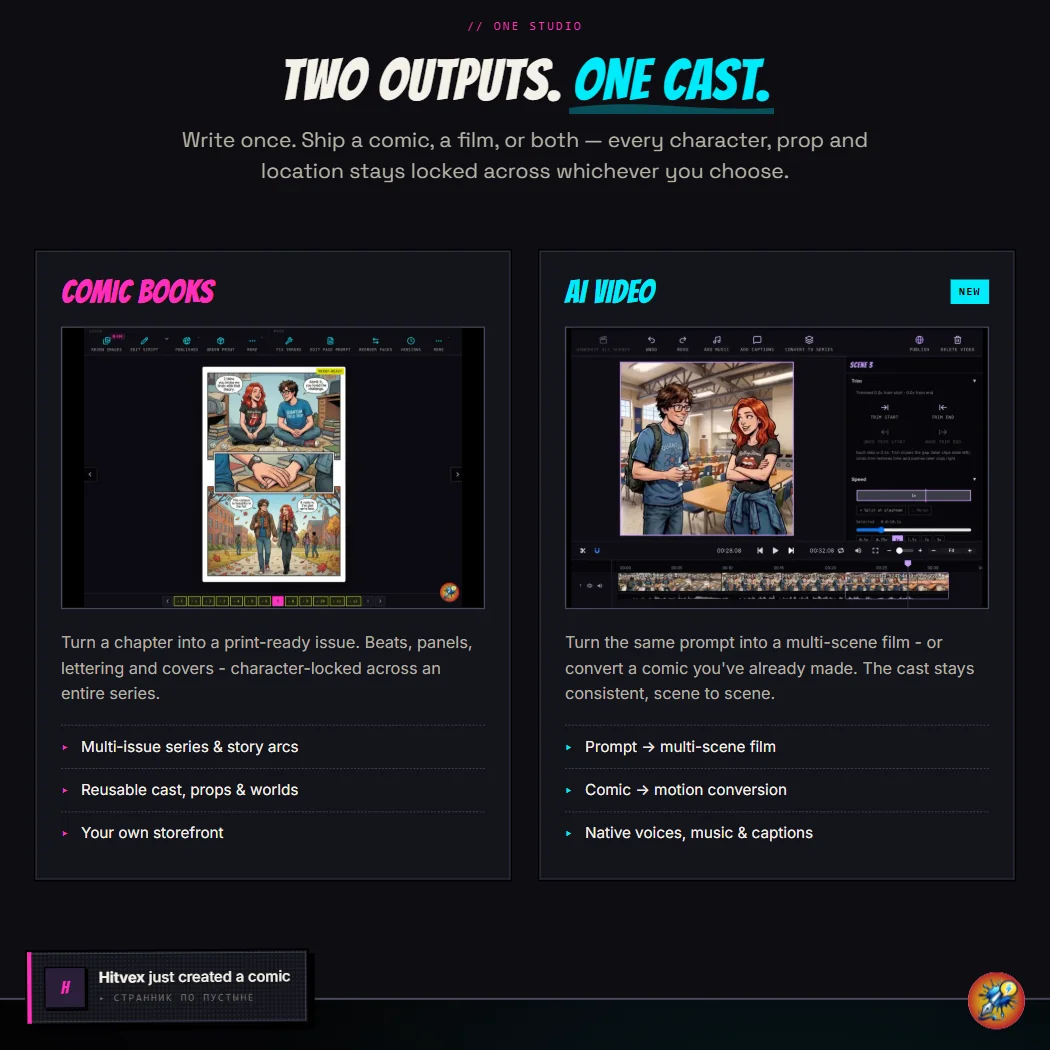
Comicink is a web and iOS tool that turns written stories into multi-panel comic books using AI. You write a script or a prompt. It generates the pages. The pitch that separates it from most tools in the category is character consistency: the same face, the same outfit, carried through every panel and every issue. That's harder to pull off than it sounds, and it's the thing we kept hearing about when we read through Product Hunt comments.

The tool targets writers, educators, and hobbyists who want finished comics without drawing skills. There's a Creator Store built in, where you can actually sell what you make. Comicink keeps 30%, you keep 70%. We weren't expecting a monetization layer in a tool at this price point. That surprised us.

Founded date is unknown. HQ is unknown. Monthly visitors sit around 12,200, which puts it firmly in the "growing but not yet loud" category. The April 2026 v1.5.0 update added new art styles, 15-language translation, and an iOS app. That's a real update, not a changelog filled with bug fixes.

Comicink Features: Video Generation, Editing & AI Capabilities

Let's be direct about something. Despite being categorized as an AI video tool, Comicink doesn't make video. No talking heads. No voice cloning. No screen recording. What it makes is comics. Static, multi-panel, illustrated comics. The "video tool" label comes from the category taxonomy, not the product itself.

What it does have is a script-to-page engine. You write natural language. It generates comic pages. The story arc planning feature lets you map multi-issue storylines, not just one-off pages. We've seen tools stop at single images. Comicink is built around the idea of a series.

Twelve art styles are available, including what the docs describe as custom visual aesthetics. There's a no-signup demo at comicink.ai/quick that generates a 4-page comic from a single prompt. We'd have loved to test that ourselves. We didn't, but Product Hunt users who tried it generally came away positive on the speed of the first result. Quality at deeper generations was more mixed.

The team collaboration feature lets you invite co-creators by email to work on the same series. That's not a feature you typically see at the $34.99 price point. Fair.

What's missing: API access isn't publicly stated. Batch processing isn't mentioned. Export resolutions aren't listed anywhere we could find. That last one is genuinely frustrating if you're trying to evaluate whether the output files are usable for print.

Comicink Video Quality: How Good Does the Output Actually Look?

Again, no video here. But on illustration quality, the picture is mixed. Reddit threads and Product Hunt comments from 2025 and early 2026 show users pleased with the first few panels, then noticing drift in character faces by page three or four. The character consistency claim is real, but it's not airtight. We're skeptical of the "every panel" language in the marketing.

Twelve art styles gives you range. Users mentioned the manga-adjacent style as the strongest. The more Western superhero styles drew more complaints about stiffness. None of this is based on our own eyes. That's the honest position.

Comicink AI Avatars & Voiceover: How Realistic Are They?

There aren't any. No avatars. No voiceover. No text-to-speech. This section exists in our template because it matters for the category. For Comicink, the answer is just: not applicable. If you're here for talking heads or AI narration, this isn't your tool.

Worth noting: the 20-language support is real and meaningful for non-English creators. The translation feature landed in v1.5.0. That's a genuine draw for indie creators outside the US market.

Is Comicink Easy to Use?

The free entry point is unusually clean. 100 credits on signup, no credit card required, credits that never expire. That's a better free tier than most tools at this tier manage. The demo at comicink.ai/quick sets expectations fast. One prompt, four pages, no account needed.

Where it gets murkier is the credit system itself. We couldn't find a clear breakdown of how many credits each action costs. That's a recurring frustration pattern we see with credit-based AI tools generally. You sign up, you spend credits, then you hit a wall you didn't see coming.

The iOS app is new as of April 2026. Mobile comic creation is genuinely useful for a tool aimed at hobbyists and educators. Whether the mobile experience matches the web version, we can't say from research alone.

Comicink Pricing: Is It Worth It for Creators & Teams?

Three paid tiers. The Lite plan is $9.99 for 1,500 credits. The Creator plan is $34.99 for 7,000 credits. Pro is $79.99 for 20,000 credits. No enterprise pricing is publicly stated.

The refund policy isn't publicly stated anywhere we could find. That's a problem. Buying credits on a tool you've never used, with no clear credit-cost-per-action breakdown and no stated refund path, is a real risk for first-time buyers. We'd want that clarified before dropping $34.99.

The Creator Store changes the math a little. If you're generating comics to sell, the 70% revenue share means the tool can theoretically pay for itself. Whether the audience exists in the Creator Store to make that happen is a separate question. We don't have traffic data on the store itself.

Comicink vs OctoComics: Which AI Video Tool Is Better?

OctoComics is the most direct competitor. Both are AI comic generators built around consistency. Where Comicink wins clearly is the Creator Store and the multi-issue story arc tools. OctoComics doesn't have a built-in marketplace as far as our research shows.

On art styles, OctoComics has historically leaned more into manga-specific output. Comicink's 12 styles give broader range. Whether that range is consistent in quality across all 12 is the open question.

Tooning and Fantoons target a more educational or casual audience. Canva's comic maker is a template tool, not an AI generator. Different category really. Comicink sits between "creative writing tool" and "indie publishing platform," which is either a smart position or a confusing one depending on who's looking.

Who Should Use Comicink? (And Who Shouldn't)

Writers who want to see their stories illustrated. That's the clearest fit. Educators building visual materials in multiple languages are a real use case too, especially post v1.5.0.

Indie creators with an existing audience who want to monetize comics directly. The Creator Store makes that realistic in a way most tools don't.

Who shouldn't bother: anyone expecting video output or audio features. Also, anyone who needs clear export specs before committing. The missing information on resolutions and credit costs is a barrier, not a minor footnote.

Comicink Review Verdict

Comicink does one specific thing with more depth than most alternatives: it turns written stories into multi-panel comics, with character consistency, across 12 art styles and 20 languages, and it gives you a place to sell the result. That's a real product with a real use case.

The gaps are real too. No API documentation. No stated refund policy. No export resolution specs. Support is email-only with a basic FAQ. The review trail is thin because the tool is still small, which means we're reading between lines more than we'd like.

At $9.99 to start, the risk is low. The free tier with no credit expiry is genuinely good. But the pricing transparency issues and the missing technical documentation hold it back from a stronger recommendation. We'd want to see a clearer credit cost table and a stated refund policy before telling anyone to drop $79.99 on Pro.

Not a bad tool. Not yet fully documented. Keep an eye on it.

Frequently Asked Questions

Does Comicink require any drawing skills?

No. The whole workflow is text-in, comic-out. You write a script or prompt in natural language, and the AI handles the illustration. That's the core use case, and it's what most users we read about were there for.

Can you actually make money selling comics on Comicink?

The Creator Store is real and the 70% revenue share is better than most marketplace splits. What we can't tell you is how much traffic the store actually gets, because that data isn't public. The infrastructure is there. Whether the audience is there is a different question.

Is the free plan actually useful or just a demo?

100 credits with no expiry and no credit card required is a real free tier, not a 7-day trial with a wall at the end. Whether 100 credits gets you through a meaningful comic depends on how many credits each action burns, and that breakdown isn't clearly published anywhere we found.

Comicink is featured in

Alternatives to Comicink

See all Comicink alternatives →

Other AI Video Tool options we've reviewed.

User reviews

Review Comicink

Your rating

Reviews are moderated and appear once approved.