SAASINSPECTOR
Artbreeder logo

Artbreeder Review

Artists, hobbyists, and creators who want to blend, mutate, and remix AI-generated imagery iteratively

Visit ArtbreederFrom $8.99/mo (Starter)

Research-based review. We analyzed vendor documentation, customer reviews on G2, Capterra, and Reddit, and live pricing — not hands-on testing yet. We update as our team puts tools through real workflows.

The verdict

Artbreeder is an AI image generation platform built around a genetic blending workflow that lets users evolve and mix images through visual sliders rather than relying solely on text prompts. It's best suited for artists and creators working on portraits, character development, and iterative abstract imagery who value a unique lineage-based creative process. With 14 million users and an SDXL backbone, it remains a legitimate option, though its competitive edge has narrowed as the broader AI image generation market has matured.

Pros

  • The genetic blending workflow is genuinely unique, allowing users to mix two images with visual sliders in a way no other major tool replicates.
  • Gene sliders let users tweak specific attributes like age and color with fine-grained control that feels intuitive for iterative creative work.
  • The tool suite covers multiple use cases including blending (Splicer), collage, text-to-image (Composer), and pattern generation.
  • Artbreeder runs on Stable Diffusion XL as its backbone, giving it a credible modern foundation for image quality.
  • With 14 million users, the platform has a large community and established track record spanning back to 2018.
  • Portrait work, character variants, and abstract iterative imagery are areas where users consistently report results unavailable elsewhere.
  • The evolutionary branching workflow suits creative exploration rather than one-shot generation, making it useful for artists developing visual lineages.

Cons

  • Free plan users are limited to 512px PNG exports, which users report are too low-resolution for print or large-format use.
  • The tool's core angle — genetic blending — may no longer be differentiated enough given how far competing AI image generators have advanced since 2018.
  • The platform is not optimized for photorealistic single-image generation from a cold text prompt, limiting its appeal for that common use case.
  • Questions persist in user communities about whether the proprietary blending engine keeps pace with modern alternatives.
  • This review is based on secondary research rather than hands-on testing, meaning edge cases and UI nuances may not be fully captured.
  • Paid plans are required to unlock 2048px resolution, creating a meaningful paywall for users who need production-quality outputs.
From $8.99/mo (Starter)Free plan YesFree trial No

We spent time across Reddit, Product Hunt threads, and every corner of Artbreeder's own documentation we could find. This **artbreeder review** is built from that pile of research, not from hands-on time with the product. What we kept seeing was a tool with a genuinely unusual angle on AI image generation, surrounded by questions about whether that angle is still enough in 2024. Artbreeder launched in 2018 out of San Francisco, which makes it one of the older names in this space. That's not automatically a good thing.

Artbreeder homepage screenshot
Artbreeder — Homepage

What is Artbreeder?

The core idea behind Artbreeder is different from almost every other tool in this category. Most AI image generators take a text prompt and produce an image. Artbreeder does that too, but the thing that sets it apart is the blending workflow. You can mix two images together using visual sliders, tweak attributes like age, color, or other traits through what they call "gene sliders," and branch off variations in a way that feels more like evolving an image than generating one.

The tool suite has grown over the years. There's the **Splicer** for blending existing images, the Collage tool for combining shapes with text prompts, the Composer for standard text-to-image generation, and a Patterns tool for description-based images. Under the hood, it runs on Stable Diffusion XL alongside its own proprietary blending engine.

Honestly, the genetic blending concept is still clever. Whether it's powerful enough relative to where the rest of the market has landed is a different question.

14 million users is a real number. Worth keeping in mind.

Artbreeder Image Quality: How Good Are the Results?

The output quality question is complicated by what Artbreeder is actually optimized for. It's not trying to produce the most photorealistic single image from a cold prompt. The genetic blending workflow produces images that feel like they belong to a lineage. That's intentional.

From what we saw across Reddit threads and Product Hunt comments, users who lean into the blending workflow tend to get results they wouldn't get anywhere else. Portrait work, character variants, abstract imagery that evolves across iterations. That's where **Artbreeder's SDXL backbone** does something genuinely useful.

Where it falls short is the ceiling on resolution. Free plan users get 512px PNG exports. Paid plans unlock 2048px. That gap is real. Several users mentioned the free outputs looked fine on screen but unusable for print or larger applications.

We're skeptical of any claim that the image quality competes directly with MidJourney's latest iterations. It doesn't, based on what we read. Different tools, different aims.

Artbreeder Features: Text-to-Image, Video & Editing Tools

Artbreeder features screenshot
Artbreeder — Features

No video. Artbreeder is not primarily a video generator, but it does list an Animator tool for animating text and images. For a lot of users that won't matter at all, but it's worth knowing before you go in.

The image side has more to work with. The Collage tool handles text-to-image generation by letting you lay out shapes and images with a text prompt layered on top. It's not a standard prompt box. The Splicer and **Splicer2** tools do the image-to-image blending that Artbreeder built its reputation on. You bring in source images, adjust the blend weights, and pull out variants.

Style controls come through gene sliders. The attribute list isn't exhaustive, but it covers the things that matter most for portrait and character work. Age, gender, color. A few others depending on the image type.

No LoRA support. No ControlNet mentioned anywhere in the docs. Outpainting is publicly listed; inpainting is not clearly documented. That's a meaningful gap compared to what tools like OpenArt offer at similar price points.

Batch generation exists on paid plans through unlimited Composer generations. Private mode is available per-image or globally. Google Drive sync shows up on paid tiers. The API situation is unclear. Not publicly documented.

That's our concern. A lot of "not publicly stated" in the feature sheet points to a documentation problem, not just a feature gap.

Is Artbreeder Easy to Use?

Mixed picture here. The genetic blending concept has a learning curve that standard text-to-image tools don't. You're not just typing a prompt. You're choosing parent images, adjusting blend ratios, and iterating. For users who want to understand what they're doing, that workflow is interesting. For someone who just wants a quick image, it's friction.

Reddit threads surface a recurring complaint about the interface feeling dated in spots. A few users mentioned that finding specific tools within the product took longer than expected on first use. The Collage builder has drawn more positive reactions, particularly from users who like the shape-and-text approach over pure prompt input.

**No live chat support.** Email support exists but there's no public SLA. The help center is described as basic, and the Discord community is the main place where users get answers from each other. That's fine for a tool at this price point. Not great for anyone who hits a real problem.

Artbreeder has been around since 2018, and the community aspect is actually one of its underrated strengths. The ability to remix public images from other users gives the platform a depth that purely solo tools can't replicate.

Artbreeder Pricing: Free Plan vs Paid — Is It Worth It?

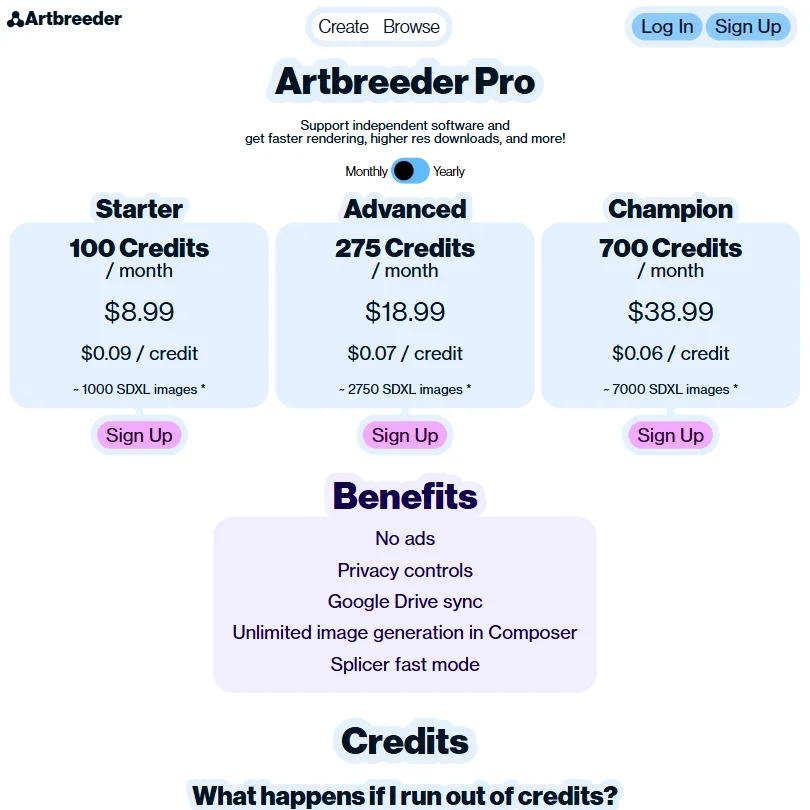
Artbreeder pricing screenshot
Artbreeder — Pricing

The free plan exists. It gives you 512px exports and limited generations. Enough to understand what the tool does, not enough to do serious work.

Paid plans start at **$8.99 per month** for the Starter tier. The Advanced plan runs $18.99 per month. The top Champion plan sits at $38.99 per month. No enterprise tier is listed publicly.

The refund policy is not publicly stated. That's a problem. We dug through the pricing page and the FAQ and found nothing. For a tool with a subscription model, the absence of a clear refund policy is the kind of thing that drives churn. Reddit users have flagged this too.

At $7.49, the entry price is reasonable. But the feature gaps at that tier push real use cases toward the $15.99 level. At $15.99, you're competing with tools that have broader feature sets. That math doesn't fully work in Artbreeder's favor.

No free trial beyond the free plan. That's a fair approach if the free plan is generous. It's less fair when the free plan's export resolution is 512px.

Artbreeder vs MidJourney: Which AI Image Generator Wins?

These two tools aren't really solving the same problem. MidJourney, at its core, is about producing the most aesthetically striking single image from a text prompt. That's what it optimizes for. Artbreeder optimizes for iterative mutation and blending. The output goals are genuinely different.

If you want raw image quality and prompt control, **MidJourney is the better tool**. That's not a close call. The aesthetic ceiling on MidJourney is higher, the community is enormous, and the prompt sophistication is ahead.

Where Artbreeder wins is the workflow that MidJourney can't replicate. Blending two portraits together with a slider. Branching off twenty variants from a single ancestor image. Building a character lineage across dozens of iterations. MidJourney doesn't do that. Neither does Stable Diffusion out of the box.

The honest comparison isn't Artbreeder versus MidJourney. It's Artbreeder versus nothing, because nothing else does quite the same thing. Whether that niche is worth the subscription is the real question.

Who Should Use Artbreeder? (And Who Shouldn't)

Artists who work iteratively. That's the fit. People who think of image generation as an evolutionary process rather than a one-shot output. Character designers. World builders. Anyone who wants to mix reference images and see what happens.

Hobbyists with a creative curiosity about the blending workflow will get genuine value from the free plan. Power users in that same lane will probably hit the $15.99 Advanced tier and stay there.

Marketing teams looking for fast, polished outputs should look elsewhere. The feature set isn't built for that workflow.

Developers looking for API access will find nothing confirmed in the docs. That's a hard stop for any integration use case.

Users who need video, inpainting, or outpainting shouldn't expect those features here. The tool does what it does and largely sticks to it.

Artbreeder Review Verdict

Artbreeder is a genuinely unusual product that has been doing its specific thing since 2018. The genetic blending engine still doesn't have a real equivalent. For the users it's built for, that's enough.

The weaknesses are real though. **The missing public API documentation** limits technical use cases. The refund policy gap is a trust problem. The 512px free-tier ceiling feels tight. Support is thin. And the feature set hasn't kept pace with where the rest of the market has moved on things like inpainting and ControlNet.

At $7.49 to start, the price is low enough that curious users can explore without much risk. The creative workflow is distinctive enough that a subset of those users will stay. Everyone else will probably drift toward tools with broader capabilities.

Not a bad tool. Not a complete one either. That's where it sits.

Frequently Asked Questions

Is Artbreeder free to use?

Yes, there's a free plan. It gives you access to the core tools but caps exports at 512px PNG, which is usable for on-screen work and not much else. The free plan is good enough to understand the blending workflow before committing to a paid tier.

What makes the Artbreeder Splicer tool different from standard image editing?

The Splicer isn't editing in the traditional sense. You're not adjusting layers or applying filters. You're blending the underlying "genetics" of two images and pulling out offspring. The result is often something that couldn't have come from either source image alone. That's a fundamentally different creative process from anything in a standard editing tool, and it's the main reason people stick with Artbreeder specifically.

Does Artbreeder support commercial use?

This is unclear. Commercial rights aren't publicly documented on the pricing or terms page based on our research. Before using Artbreeder outputs in any commercial project, you'd want to contact them directly and get something in writing. We've seen tools in this category handle commercial licensing in a range of ways, and assuming it's included without checking is a risk not worth taking.

Artbreeder is featured in

Alternatives to Artbreeder

See all Artbreeder alternatives →

Other AI Image Generation options we've reviewed.

User reviews

Review Artbreeder

Your rating

Reviews are moderated and appear once approved.