Dream is a prompt-based AI art and video generator from WOMBO, built around a large catalog of named style presets and separate Create, Edit and Video tools. It runs on a free plan plus two credit-metered paid tiers, and what decides whether it suits you is whether the style library and video tool matter more than fine control over composition or character consistency, since neither is offered.

What is Dream?
Dream is made by WOMBO, a company headquartered in Canada. It runs on the web and has native apps on iOS and Android.
All 145 style presets, spread across four model generations, are WOMBO's own, with no other company's model offered inside the product.
What you can make with Dream

Dream's Create tool works from a text prompt plus a choice from 145 named style presets across four model generations, V1 through V4, with an optional reference image alongside the prompt. There is no pose, sketch or seed control, and no feature to keep a character consistent across separate generations.
The Edit tool takes up to 4 reference images and a text description of the change, but offers no dedicated outpainting, upscaling or background-removal action, only free-text prompt edits. There is no option to train a style on your own pictures.
Video generation is included from the Standard plan, with dedicated Text to Video and Image to Video tools on the site alongside Create and Edit.
Working with other people
Dream has native apps on iOS and Android alongside the web version. Support runs only through email.
Dream pricing: what each plan gives
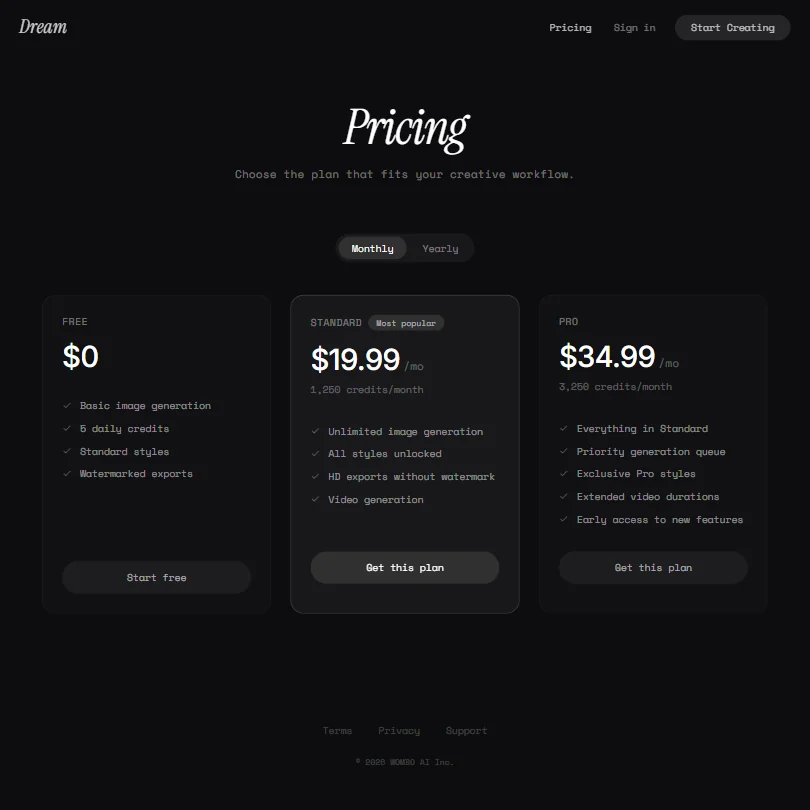
The Free plan costs nothing and gives 5 daily credits for basic image generation with standard styles only, and exports carry a watermark.
Standard costs $19.99 a month ($8.33 a month billed yearly, $99.99 a year) and includes 1,250 credits a month, unlimited image generation, HD exports without a watermark, and video generation. Pro costs $34.99 a month ($16.67 a month billed yearly, $199.99 a year) and also includes unlimited image generation.
There is no trial of a paid plan.
Who Dream suits
Dream suits people who want a large, named style library to browse and a video tool alongside image generation, and who are happy working from a single prompt plus an optional reference image rather than precise pose or structure controls.
It suits less well anyone who needs to keep a character consistent across a series of images, wants a dedicated outpainting, upscaling or background-removal tool, or needs more than email for support.
How Dream compares
Dream scores 6.1 out of 10 among the AI art platforms we rate. These three do the same job and are the closest to it, compared on what each vendor publishes.
Artbreeder
Dream costs $19.99 a month against Artbreeder's $8.99, but it generates video and ships a native iOS and Android app, both of which Artbreeder lacks. Artbreeder instead releases every image as CC0, so you and anyone else can resell it, and adds a public gallery, challenges and remixing that Dream does not have. Dream's free plan drops the export watermark and gives a daily free allowance too.
Pick Artbreeder if you want commercial rights built in and a community gallery.
Pick Dream if you want video generation and a native phone app.
Playform
Playform costs $10 a month against Dream's $19.99, and both generate video, though Dream needs its Standard plan for that. Playform also trains a private model on your images, upscales and keeps a character consistent across generations, none of which Dream offers. Dream's advantage is a native iOS and Android app; Playform has no app at all.
Pick Playform if you need to train a private model or keep characters consistent.
Pick Dream if you want a native phone app for iOS or Android.
NightCafe Creator
NightCafe costs $12.49 a month against Dream's $19.99, and both generate video and offer a daily free allowance. NightCafe adds upscaling, keeps a character consistent across generations, and runs a public gallery with daily challenges, none of which Dream has. Dream's edge is a native iOS and Android app; NightCafe only installs as a browser PWA.
Pick NightCafe Creator if you want upscaling, consistent characters and a public gallery.
Pick Dream if you want a real iOS or Android app to install.
Frequently Asked Questions
How much does Dream cost?
Dream has a free plan with 5 daily credits and watermarked exports. Paid plans start at Standard for $19.99 a month ($8.33 a month billed yearly) and rise to Pro at $34.99 a month ($16.67 a month billed yearly).
How many styles does Dream offer?
145 named style presets, spread across four model generations from V1 to V4.
Does Dream generate video as well as images?
Yes, video generation is included from the Standard plan, alongside dedicated Text to Video and Image to Video tools.