Whether the growth reflects product quality or effective distribution is a question worth keeping open.
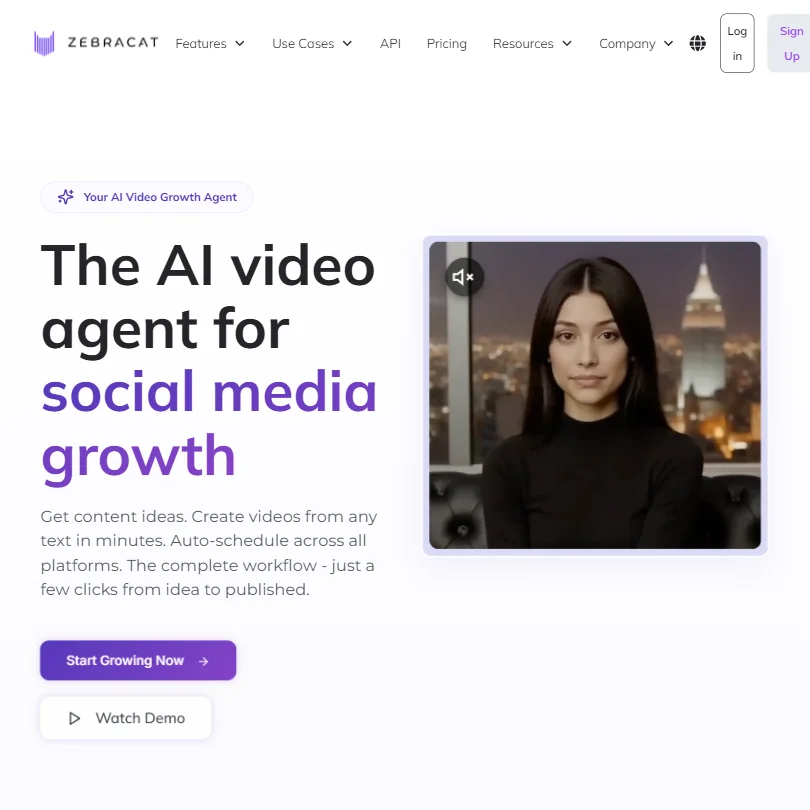
What is Zebracat?
Not just another text to video generator. That's how Zebracat frames itself, and the framing is deliberate. The pitch is that you hand it a website URL and it handles the full cycle: strategy, creation, scheduling, and performance feedback. One tool. One loop.
Ambitious positioning for a company barely two years old. In practice, the core product converts text prompts, blog URLs, or site URLs into short-form social videos, then handles posting. That's genuinely useful for small teams otherwise bouncing between a video editor, a caption tool, and a separate scheduler.
Solo content creators and small business owners running social media. That's the actual fit, not film studios, not enterprise L&D teams, though the enterprise tier exists. The use case is specific, which we appreciate. A lot of tools in this category try to be everything to everyone and end up being nothing in particular. Zebracat's focus on the social content loop is at least a coherent product decision.
Zebracat Features: Video Generation, Editing & AI Capabilities
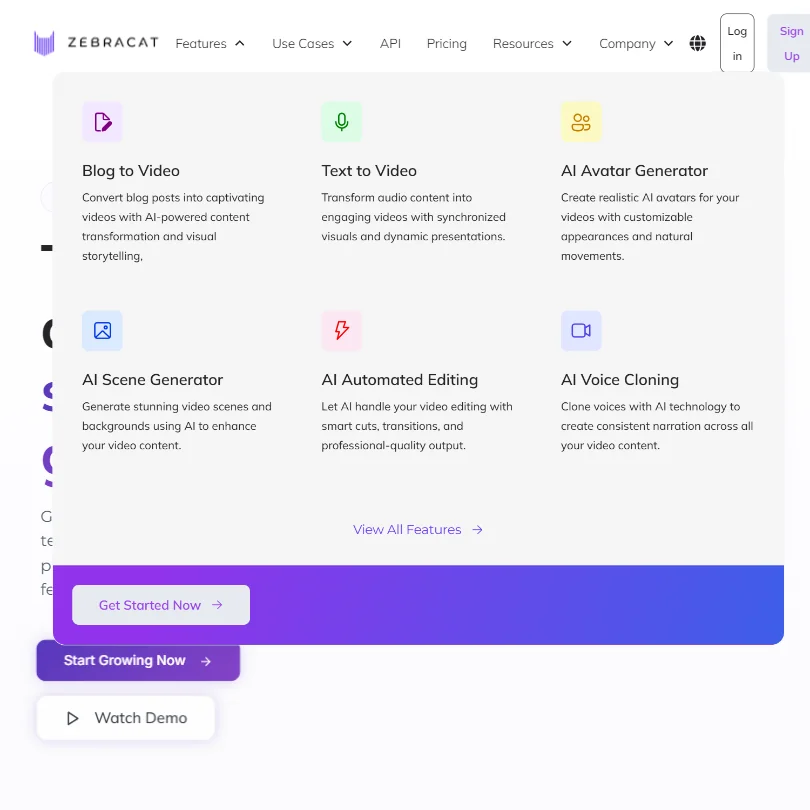
The core workflow goes like this. You give it a prompt or URL. It generates a short-form video with AI visuals, voiceover, and captions. You adjust what needs adjusting. Then it schedules and posts. That's the loop.
On the creation side, the tool includes AI auto captioning with multiple style options. Voice cloning runs at 5 clones per month on the base plan, 10 on Super Cat. Translation covers 25+ languages, and the TTS voice library spans 175+ languages. Wide net for global creators.
Honestly, the strategy layer is the piece we'd watch most carefully. Zebracat claims it analyzes your site and niche to propose video themes and posting cadence before anything gets created. If that works as described, it's the most interesting part of the product. Most AI video editing software stops at generation. A recommendation engine sitting on top of that is a different kind of ambition entirely.
Zebracat doesn't publish details on batch processing, export resolution options, or whether background removal exists. Ask about them. They're standard questions for any video tool, and the answers matter when you're comparing plans.
API access lives behind the Enterprise tier at $599+/month. Team collaboration features too. For a tool that markets itself primarily to small businesses, locking both of those that high is a genuine constraint worth calling out.
Zebracat Video Quality: How Good Does the Output Actually Look?
The AI visuals are generated, not stock footage. That distinction matters. Generated visuals can look uncanny or repetitive across outputs. Common complaint across this whole category, not unique to Zebracat.
Zebracat offers an ongoing free plan, while some product pages also advertise a seven-day free trial. Either way, you have an entry point to test output quality before committing. Use it for that. Generate a few clips in your niche before you decide.
Zebracat AI Avatars & Voiceover: How Realistic Are They?
120+ premium AI avatars on paid tiers. Custom avatar creation runs at 5 per month on Super Cat, 10 on Unlimited Cat, with unlimited slots on Enterprise. The Cat Mode plan lists limited AI avatars, which suggests access but with constraints. Custom avatars at enterprise quality are gated to the Enterprise plan, which is standard industry behavior but still worth naming explicitly.
Voice cloning is included across paid tiers. Five clones a month on Cat Mode, ten on Super Cat. If you're producing across multiple brand voices, ten is probably workable. Five feels tight for anything beyond a single-brand operation.
The TTS library covering 175+ languages is one of the wider ranges in this category. For multilingual content at scale, that's a real differentiator. Synthesia targets enterprise teams doing formal multilingual training content at a very different price point. Zebracat is pitched at a scrappier, faster workflow. Different tools for different contexts.
Is Zebracat Easy to Use?
Web-only. No mobile app listed, no desktop client. That limits where you can actually work, which matters for solo creators who operate across locations.
The workflow design is intentionally simplified. URL in, video out. The promise is minimal friction between idea and published content.
Zebracat has a Help Center, a Skool community linked from the homepage, and the contact page explicitly directs users to try live chat first. The homepage also names an in-app HelpCat chatbot and a support email. For small business owners with limited technical resources, having self-serve options alongside live chat is meaningfully better than email-only.
Dedicated success manager is still Enterprise-only. Fair. That's standard at the $599+ level.
Zebracat Pricing: Is It Worth It for Creators & Teams?
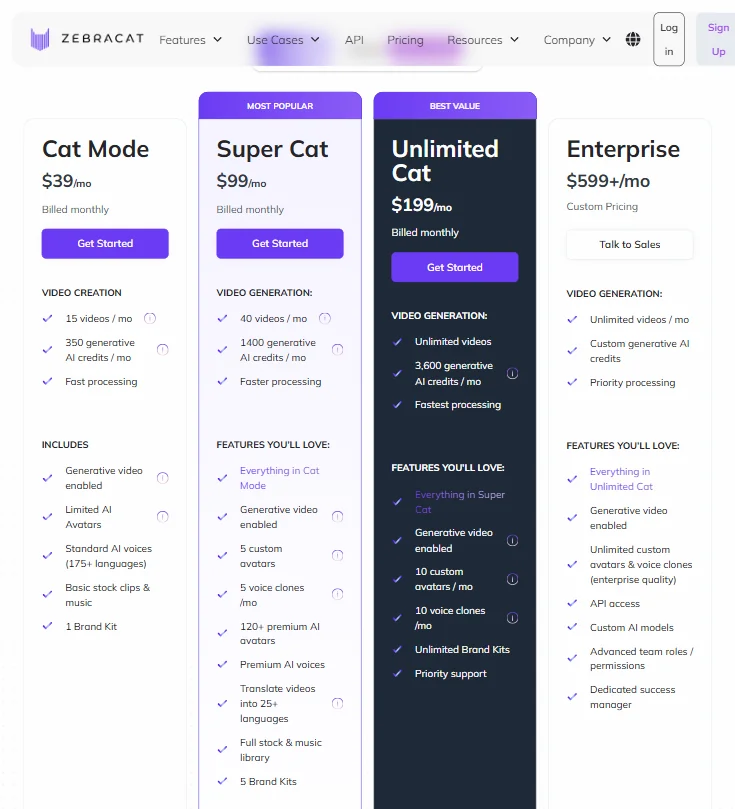
Four tiers. Cat Mode at $39/month billed monthly, Super Cat at $99, Unlimited Cat at $199, and Enterprise starting at $599+ with custom pricing. The screenshot shows monthly billing rates. Annual billing brings those numbers down.
Cat Mode includes 15 videos per month and 350 generative AI credits. Super Cat steps up to 40 videos and 1,400 credits. Unlimited Cat delivers exactly what the name says on both fronts, at 3,600 generative AI credits per month. The credit structure matters because generative video is credit-gated, not just video-count-gated.
Worth flagging: Super Cat includes translation into 25+ languages and a full stock and music library, features that don't appear on Cat Mode. If those matter to your workflow, the jump from $39 to $99 isn't purely a volume decision.
The gap from $199 to $599 for Enterprise is steep. API access, custom AI models, and advanced team roles all sit behind that wall. For agencies or content teams wanting collaboration without going full Enterprise, there's no middle option. That's a real pricing gap.
Zebracat vs Pictory: Which AI Video Tool Is Better?
Pictory is the more established tool. Longer track record. Zebracat doesn't have that depth yet.
Where Zebracat differentiates is the strategy and scheduling layer. Pictory generates videos from content. Zebracat tries to own more of the posting workflow. If automated scheduling to social channels is a core requirement, Zebracat has a clearer answer than Pictory does at comparable price points. Different priorities.
Pictory is generally cited as more reliable for long-form content conversion, blog posts especially. Zebracat leans shorter and more social-native. Not the same tool for the same job.
Avatar-focused creators should also look at HeyGen. It's built around avatar realism. Zebracat is a broader content workflow tool. HeyGen is more specialized. Know which problem you're solving first.
Who Should Use Zebracat? (And Who Shouldn't)
Social media managers running content for a single brand. The scheduling layer baked in rather than bolted on from a separate tool makes this a natural fit.
Small business owners without a video editor on staff. The simplified workflow exists for them. The Super Cat tier at $99 monthly gives enough volume and features for consistent posting without requiring technical skill.
Agencies managing multiple clients. They'll hit the Enterprise wall fast. Team collaboration and API access both require $599/month. That's a large commitment before the workflow is validated.
Anyone needing serious export control or detailed format specifications. Zebracat's documentation doesn't address those publicly. That ambiguity is not great for professional production contexts.
Zebracat Review Verdict
The strategy-to-schedule loop is a genuine attempt to own more of the content workflow, not just the generation step. Most tools in this category hand you a file and call it done. Zebracat's attempt to close the loop from URL input to published post is the most interesting thing about the product.
The weak spots are also real. A steep jump to Enterprise for team features. A pricing structure where meaningful features like translation and stock libraries are gated mid-tier rather than progressively unlocked.
Young company. Some of this is expected. But it means more upfront trust is required than we'd typically be comfortable recommending at face value.
At the Super Cat tier, the feature set is reasonable for the price. The scheduling and strategy angle is genuinely differentiating in a crowded space. Not yet.
How Zebracat compares
Zebracat scores 6.0 out of 10 among the text to video tools we rate. These two do the same job and are the closest to it, compared on what each vendor publishes.
Pictory
Pictory turns a PDF or slide deck straight into a video, which Zebracat's site does not describe, and its cheapest paid plan is $29 a month against Zebracat's $39 a month. Zebracat has a free plan while Pictory does not, only a 14 day trial, and Zebracat posts straight to YouTube, TikTok and Instagram where Pictory has no direct publishing. Pictory holds SOC 2, which Zebracat does not state, while Zebracat covers 170 languages against Pictory's 29.
Pick Pictory if you need PDF to video and SOC 2 compliance.
Pick Zebracat if you want a free plan and direct social posting.
Lumen5
Lumen5 turns a PDF or slide deck into a video, which Zebracat's site does not describe, while Zebracat generates new video footage using models like Veo 3 and Kling rather than only arranging stock and uploaded clips the way Lumen5 does. Lumen5 is cheaper at $29 a month against Zebracat's $39 a month and adds single sign on, which Zebracat does not state. Zebracat posts straight to YouTube, TikTok and Instagram and offers an API, neither of which Lumen5 provides.
Pick Lumen5 if you need PDF to video and single sign on.
Pick Zebracat if you want generated footage, direct posting and an API.
Frequently Asked Questions
Does Zebracat offer a free plan?
Zebracat offers an ongoing free plan with recurring credits, while some product pages also advertise a seven-day free trial with no credit card required. The two are separate. If output quality is your primary evaluation concern, use whichever entry point gives you the most generation credits to test with your actual content before committing to a paid tier.
Can Zebracat create videos in multiple languages?
Yes. The TTS voice library covers 175+ languages, and video translation is supported across 25+ languages, though that translation feature appears on Super Cat and above, not on the base Cat Mode plan. For multilingual content at scale, the plan tier matters as much as the feature itself. Test your target languages during the trial window before assuming the quality holds.
How does Zebracat compare to other AI video generators?
The main advantage over tools like Pictory or Lumen5 is the built-in scheduling and strategy layer. Most AI video generator tools stop at exporting a file. Zebracat tries to handle posting too, which reduces tool count for solo creators. The tradeoff is less pricing transparency compared to more established competitors. That tradeoff is real and worth factoring in.