SAASINSPECTOR
PromeAI logo

PromeAI Review

Architects, interior designers, product designers, game/animation creators, and creative professionals needing sketch-to-image and AI video tools

Visit PromeAIFrom $24.50/mo (Base, billed yearly)

Research-based review. We analyzed vendor documentation, customer reviews on G2, Capterra, and Reddit, and live pricing — not hands-on testing yet. We update as our team puts tools through real workflows.

The verdict

PromeAI is a web-based AI image and video generator built primarily for design professionals like architects and interior designers, with its Sketch Rendering workflow being its strongest differentiator. It scores a 4.4 on G2 but from only 18 reviews, making that rating hard to rely on. It excels at controlled, professional-grade rendering but falls short of tools like Midjourney for general creative image generation.

Pros

  • Sketch Rendering workflow converts rough sketches into photorealistic renders quickly, making it highly effective for architects and interior designers.
  • C-AIGC model provides a large style library that offers controllable creative direction not prioritized by general-purpose generators like Midjourney.
  • Wide feature set for a tool launched in 2022, covering text-to-image, image-to-video, background removal, and fashion mockup modes.
  • AI Supermodel mode provides specialized e-commerce and fashion mockup functionality not commonly found in competing tools.
  • Results are described by G2 reviewers as usable quickly without needing to fight the tool, reducing professional workflow friction.
  • Creative Fusion feature allows style blending, adding versatility beyond standard single-style generation.
  • Over one million users suggests meaningful adoption and platform stability for a relatively young product.

Cons

  • General text-to-image quality trails behind Midjourney in aesthetic output, making it a weaker choice for purely creative or artistic use cases.
  • Only 18 reviews on G2 makes it difficult to draw reliable conclusions from the 4.4 average score.
  • Marketing positions the tool more broadly than its actual strengths, which are narrowly focused on design professionals.
  • Video generation quality is difficult to evaluate from available sources, leaving that feature set largely unverified.
  • The tool's value proposition is significantly weaker for users outside architecture, interior design, or product design workflows.
  • Reliance on proprietary models like C-AIGC means limited transparency into how the generation process works compared to open-source alternatives.
From $24.50/mo (Base, billed yearly)Free plan YesFree trial No

Our research on PromeAI started, as it usually does, with the homepage pitch. This **promeai review** pulls from vendor documentation, G2 comments, Reddit threads, and pricing data, not hands-on testing. What we kept seeing, across those sources, was a tool that genuinely serves a specific professional niche well. Architects. Interior designers. Product teams who need to turn rough sketches into something that looks real. That's the actual story here, and it's narrower than PromeAI's marketing wants it to be.

PromeAI homepage screenshot
PromeAI — Homepage

Founded in 2022, PromeAI runs on a mix of proprietary models. The C-AIGC model is their calling card. A handful of other models sit behind the same generator, including Seedance 2.0 and Seedream 4.5. Over a million users is the number they cite. With only 18 reviews on G2, the review trail is thin enough that we're cautious about reading too much into the 4.4 average.

What is PromeAI?

PromeAI is a web-based AI image and video generator that skews heavily toward design professionals. The pitch isn't "make any image." **The pitch is controlled generation**, where you feed it a sketch and it produces a photorealistic render in the style you pick. That's the Sketch Rendering workflow, and it's the feature that separates PromeAI from the more general-purpose generators.

Beyond that, the tool covers a lot of ground. Text-to-image. Image-to-video. Background removal. A fashion and e-commerce mockup mode they call AI Supermodel. Creative Fusion for blending styles. It's genuinely wide-ranging for a tool that launched in 2022. Whether all of it works well is a different question.

PromeAI Image Quality: How Good Are the Results?

G2 reviewers who work in architecture and interior design speak well of the Sketch Rendering output. Consistently. The common thread is that the results look usable fast, without needing to fight the tool. That tracks with what PromeAI is actually built for.

**Where the quality story gets murkier is in general text-to-image tasks.** Reviewers comparing PromeAI to Midjourney, directly or indirectly, tend to land in the same place: Midjourney's aesthetic output is harder to match. PromeAI's strength isn't raw image beauty. It's controllability. The C-AIGC style library gives you a specific kind of creative direction that the big general-purpose generators don't prioritize. Honestly, that's a real advantage in professional workflows. It just won't win a beauty contest.

Video quality is harder to evaluate from the outside. The tool supports 4K generation on the Pro plan and lists HD Upscaler as a feature. User feedback on the video side is sparse. We wouldn't treat video as a primary reason to pick this tool yet.

PromeAI Features: Text-to-Image, Video & Editing Tools

PromeAI features screenshot
PromeAI — Features

The feature list is long. Longer than you'd expect for a focused tool. Text-to-image works through an AI Image Generator and a Text Effects module. The **Sketch Rendering** and Consistency Rendering tools handle image-to-image workflows. There's an Erase & Replace tool for inpainting and an Outpainting option for extending images. HD Upscaler covers resolution bumps. Background Remover is there too.

On the video side, there's Image to Video and a Text to Video option. The Pro plan adds 4K video generation. That's a real differentiator over some competitors.

Batch generation goes up to 40 pending jobs. Six run concurrently on Pro. That's useful for anyone running volume work.

Region Rendering functions similarly to ControlNet, letting you direct specific areas of an image. Combined with the C-AIGC style library, that's actually a capable customization setup for professionals. We've seen worse from tools charging more.

What's missing is API access. It's not publicly documented. No Photoshop plugin. No Figma integration. **The lack of API access is the feature gap that will cost PromeAI the most enterprise deals.** For a professional tool pitched at design teams, that's a real problem.

Is PromeAI Easy to Use?

The web-only setup keeps things contained, which helps. G2 reviewers generally don't flag the interface as a pain point. The tool has a PromeAI Academy with tutorial videos, and there's a community section with challenges and shared work. Basic onboarding, but it exists.

**Where ease of use probably breaks down is for new users coming from general-purpose image generators.** The Sketch Rendering workflow, specifically, assumes you're bringing a sketch. If you're not in architecture or product design, the tool's best features aren't immediately obvious. It takes a specific kind of professional to walk in knowing exactly what to do with it.

The Chat with AI Agent feature suggests some attempt at guided prompting. That's useful. Whether it actually flattens the learning curve enough, we can't say from the outside. We're mildly skeptical.

PromeAI Pricing: Free Plan vs Paid — Is It Worth It?

PromeAI pricing screenshot
PromeAI — Pricing

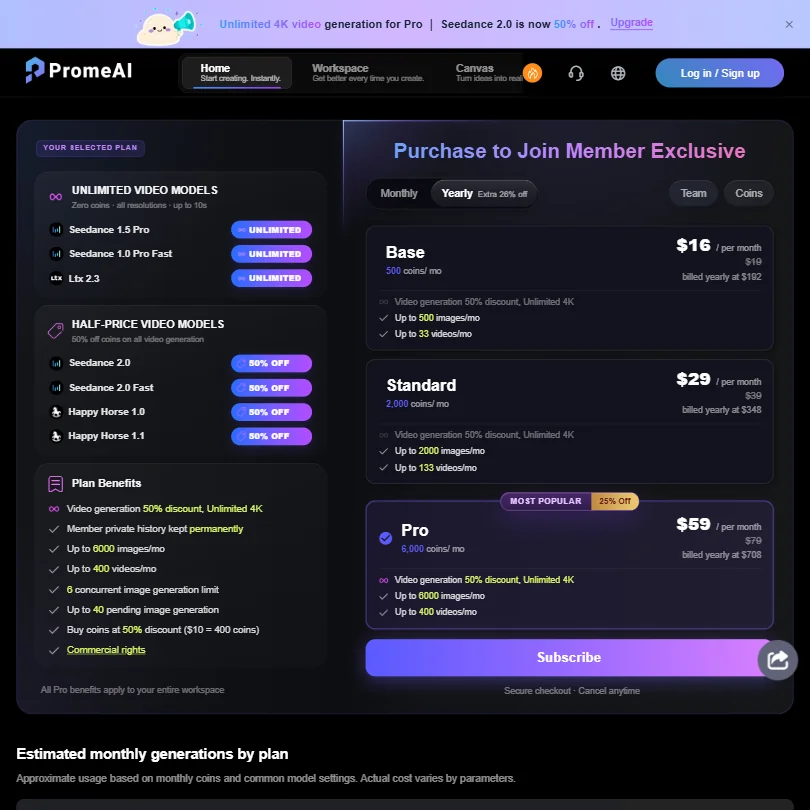
There is a free plan. No free trial on paid tiers. The Base plan runs $24.50 per month billed yearly. Standard is $29 per month on the same billing cycle. **Pro is $59/month when billed yearly**, which is where you get 4K video and the higher concurrency limits.

No enterprise pricing is publicly listed. That's a gap. For a tool that wants to serve design studios and architecture firms, hiding the enterprise ask is frustrating. The refund policy is also not publicly stated, which we flagged. That's not a great sign for buyer confidence.

The $24.50 entry point is reasonable for an individual designer. The jump to $59 for Pro is steep if you're only using a fraction of the video features. We'd want clearer documentation of what each tier actually limits before committing.

PromeAI vs Midjourney: Which AI Image Generator Wins?

This is the wrong comparison for most PromeAI users, but it's the one people search for, so here it is. Midjourney wins on pure aesthetic output. It's built for that. Artists and designers chasing a specific visual style and aren't starting from a sketch will find Midjourney more satisfying.

**PromeAI wins on control.** If your workflow starts with a real drawing or schematic, the Sketch Rendering tool produces usable professional output faster than Midjourney's general prompting approach. That's not a small advantage for architects or product designers. It's the whole point.

The two tools aren't really competing for the same user. They're competing for the same marketing keywords. Worth keeping that distinction in mind.

For creatives who want a broader general-purpose image and video suite without the professional-design focus, Krea covers more ground and might be a better fit.

Who Should Use PromeAI? (And Who Shouldn't)

Architects, interior designers, and product designers. That's the core fit. The Sketch Rendering workflow was built for them and the G2 feedback confirms it performs.

Game asset creators and animation teams also show up as a reasonable match, given the **ai video generator** and style-transfer capabilities. The volume batch generation helps there.

Fashion and e-commerce teams might find the AI Supermodel mockup feature useful. We'd test it before committing.

General creatives who want maximum aesthetic freedom. Not the right tool. Midjourney or Adobe Firefly serve that better. Teams that need API access or plugin-based workflows. PromeAI isn't there yet. And anyone who needs enterprise-grade support with SLAs should keep looking, because nothing public suggests that infrastructure exists.

PromeAI Review Verdict

PromeAI is a focused tool that works well inside its actual use case. The **ai architecture rendering** and sketch-to-image workflow are genuinely good for professional designers. The C-AIGC style library gives real creative control. The feature set is wider than you'd guess from a niche tool.

The problems are real though. No API access. No plugin ecosystem. Pricing transparency on the enterprise side is nonexistent. The refund policy being unstated is a low-grade red flag for anyone spending real money here. The review trail is too thin to lean on heavily.

For individual architects and product designers who've been wrestling with general-purpose AI generators, PromeAI might be a relief. The tool is built for their workflow. For anyone outside that specific professional lane, there are probably better fits.

Frequently Asked Questions

Does PromeAI have a free plan?

Yes, there's a free plan available. It doesn't come with a free trial on any of the paid tiers, so you'd need to test the free version before deciding whether to pay. Based on what we've seen in user reports, the free tier gives a reasonable feel for the Sketch Rendering and text-to-image tools, but limits on batch generation and output resolution will push professional users toward a paid plan fairly quickly.

Is PromeAI good for architects and interior designers?

Based on G2 feedback and how the tool is built, yes. The Sketch Rendering workflow is where PromeAI earns its keep. Users in architecture and interior design roles consistently describe usable, professional-looking outputs from rough sketches. That's the specific use case PromeAI was designed around, and it shows. General creative users will find the tool less immediately rewarding.

Does PromeAI offer API access?

Not publicly. The documentation doesn't mention an API, and we found no user reports of API-based integrations. This is one of the more significant gaps in the product for professional teams who want to build PromeAI's output into a larger workflow. Until that changes, it's a tool you use through the web interface and nothing more.
PromeAI is featured in

Alternatives to PromeAI

See all PromeAI alternatives →

Other AI Image Generation options we've reviewed.

User reviews

Review PromeAI

Your rating

Reviews are moderated and appear once approved.