Most people encounter Photoroom through its background remover. That makes sense, because that's where it started. Look past that and you're looking at something more specific, a product visual platform built almost entirely around e-commerce. It's a focused tool that earns its reputation inside a narrow lane, with a pricing structure that's less straightforward than the homepage makes it look.
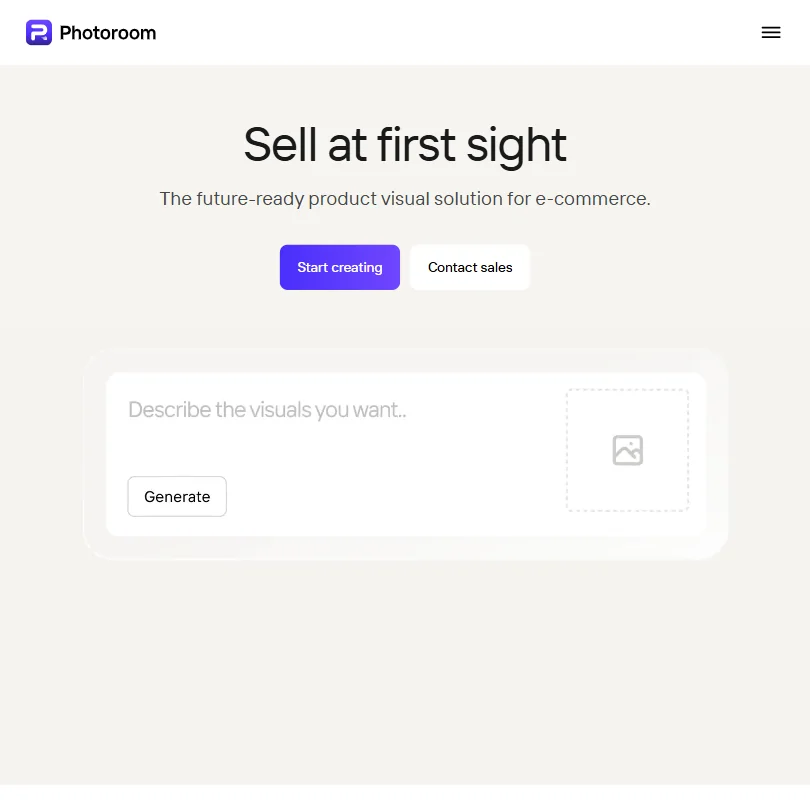
What is Photoroom?
Founded in 2019, out of Paris. The original pitch was fast background removal on mobile. That early version found real traction. The 80 million user figure cited for the background remover is not a vanity metric. That's a meaningful base built on a specific, repeated need.
Since then the product has grown. Today Photoroom markets itself as an end-to-end visual production platform for e-commerce. The background remover is still where most users enter, but it now sits inside a system that includes AI product photography, batch editing, Brand Kit enforcement, a video generator, and a native Shopify integration called Marketplace Sync. A few other things too, but those are the ones worth naming.
Available on web, iOS, and Android. The API is real and documented. An Enterprise tier exists, with custom AI models and SLA-backed uptime.
The e-commerce focus is not incidental. It shapes every product decision. Photoroom isn't trying to be a general-purpose design tool. Worth understanding that before you evaluate it.
Photoroom Features: Logo, Graphics, UI & Brand Design Capabilities
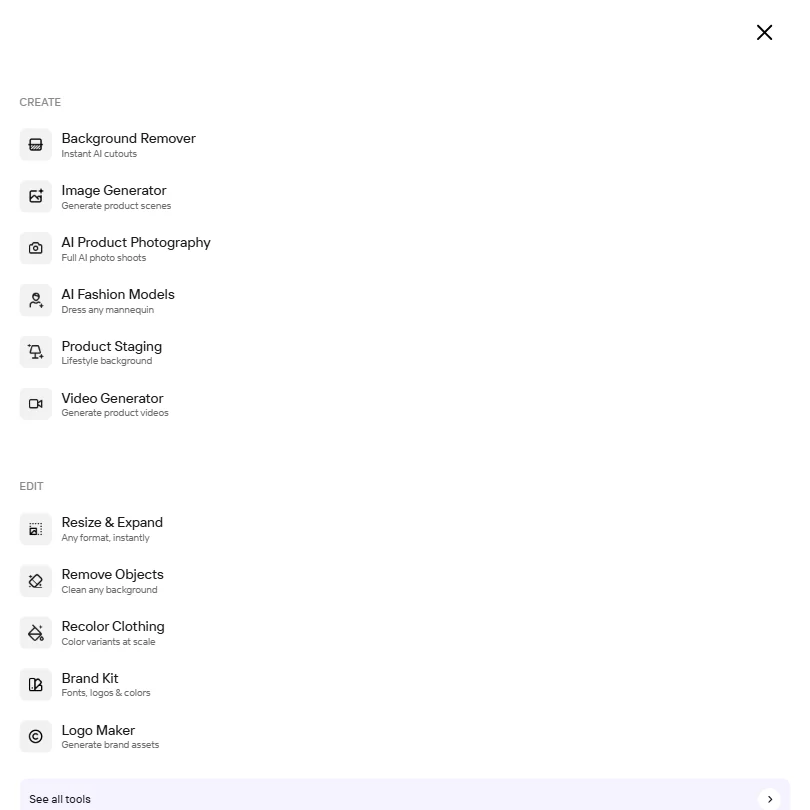
No logo generator here. No wireframing, no presentation builder. That's not a gap worth docking points for, because those workflows aren't who this tool is aimed at. But buyers expecting a general creative suite will hit that wall quickly.
The background remover is the oldest and most proven piece. Users across review platforms consistently describe it as fast and accurate on product images with clean subjects. Where it gets messier is complex edges like hair or translucent packaging.
AI backgrounds and product staging let you drop a product into a generated environment or lifestyle scene. The basic version ships on lower tiers. The more controlled, seasonal-scene outputs live higher in the plan structure.
The Brand Kit locks colors, logos, and layouts so every image produced through the platform stays consistent automatically. For a solo seller, optional. For a team running multiple SKUs across multiple channels, that's the feature that makes Photoroom something other than a background-removal app. Honestly, it sounds like marketing copy until you actually need it.
Batch editing runs AI edits across large image sets at once, via the web app or via API. We cross-referenced that claim with developer-facing Reddit threads and found it mostly holds up, though some users noted inconsistency in output quality across very large batches. Not great.
The video generator takes product images and outputs short-form video, aimed at Reels and TikTok. Template-driven. Not a full video editor.
The REST API is properly documented and supports custom AI model endpoints. That matters for enterprise buyers building their own pipelines, not typical creative users.
Photoroom Design Quality: How Good Are the AI-Generated Results?
User feedback gets more nuanced here. The background remover earns consistent praise across sources. That's the part of the product with the most maturity behind it.
We dug through Reddit threads from 2024 and 2025. The pattern we kept seeing: sellers using Photoroom for white-background catalog images are largely satisfied. The tool was built for exactly that. Where feedback turns lukewarm is in the more generative territory, specifically when users push the AI product photography feature toward complex lifestyle staging.
Some outputs look clean. Others look like a product was pasted into a stock photo, because functionally that's close to what's happening. We're not dismissing the feature. The gap between the marketing examples and the average user output is real, and users notice it.
AI shadow and recolor get better marks. Adding a natural drop shadow to a floating product image is a specific, contained task. The AI handles it well. Recolor draws positive comments from apparel sellers in particular, which tracks.
AI Fashion Models is a feature that appears in the plan breakdowns. It lets sellers place products on generated model figures. The e-commerce use case is obvious. Output quality is worth testing on your own products before you rely on it.
The video output is competent. Nobody is writing home about it. It serves the "I need a quick Reel for this product launch" need. It doesn't replace motion design work.
Photoroom Templates & Assets: How Deep Is the Library?
Templates cover the expected formats. Instagram and Amazon are explicitly called out, Shopify too. TikTok and Reels get video templates. The library is built around e-commerce distribution channels, not general creative workflows.
Template variety rarely comes up as a frustration. It gets mentioned occasionally, but it isn't a dominant theme. Ask Photoroom for a template count if that matters to you.
Instant Resize handles format conversion. One image, resized for every channel. Straightforward, works as described based on user reports.
For teams on Max and above, Marketplace Sync pushes images directly to Shopify. That integration is native, not a third-party connector and not a Zapier bridge. Direct Shopify sync from inside the tool is genuinely useful for sellers already managing stores there. Some Shopify sellers have reacted positively to this integration on Reddit and indicated they were willing to upgrade to Max specifically to access it. Fair.
Asset depth outside templates is harder to evaluate. PIM and DAM connectors are listed in enterprise docs. Photoroom also launched an MCP integration, which is new and aimed at AI pipeline builders more than typical creative users.
Compared to something like Picsart, which comes from a broader creative platform background, Photoroom's asset library is narrower but more purposeful. That's a reasonable tradeoff for the target audience.
Is Photoroom Easy to Use for Non-Designers?
The mobile app is where most non-designers start. Reviews from that context are largely positive. Upload a product photo, remove the background, swap it for something clean. Low friction.
The web app is more feature-dense and accordingly more complex. Users managing large SKU catalogs via batch editing or API workflows aren't typical non-designers. That's a different profile entirely.
What we kept seeing in user reports: the basic use cases, background removal and simple template application, are accessible to anyone. More advanced workflows, Brand Kit setup and Marketplace Sync configuration, require more familiarity. Not developer-level knowledge for all of them, but not a five-minute onboarding either.
Vendor materials describe support documentation as comprehensive. There's an API reference, guides, and a blog. Email support exists. A user community would help a product with 80 million users. That many users generate questions, so ask where they get answers.
Collaboration tops out at 50 seats on paid plans. Shared Spaces let teams work together on designs. Functional. Not deep enough to replace a proper creative ops workflow.
Photoroom Pricing: Is It Worth It vs Hiring a Designer?
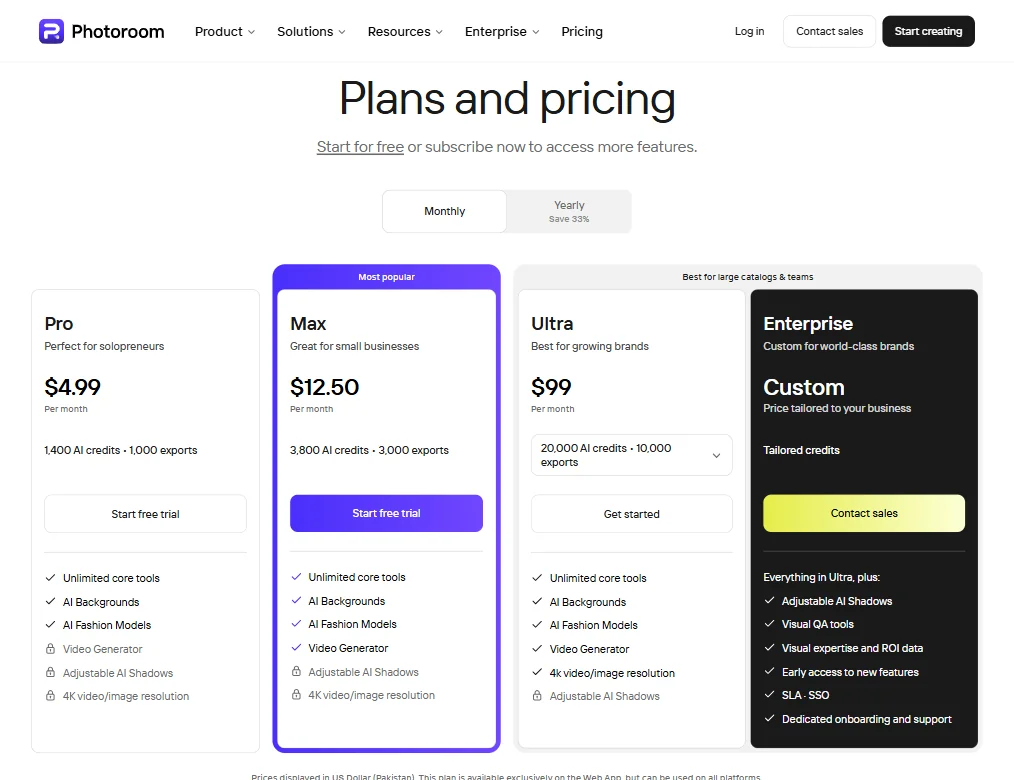
Four tiers. Pro is $12.99 a month, or $7.50 a month billed yearly. Max is $34.99, or $20.99 billed yearly, and Ultra is $99, or $82.50 billed yearly. Enterprise is custom, with tailored credits and a contact-sales flow.
Each plan's credit and export limits are laid out clearly. Pro gets 8,000 AI credits and 1,000 exports. Max gets 25,000 credits and 3,000 exports. Ultra sits at 75,000 credits and 10,000 exports, with a dropdown suggesting adjustable limits at that tier.
The key limitations that push users up the tier ladder: Video Generator is locked at Pro level. Adjustable AI Shadows and 4K resolution are locked behind Max, and even then, the Max plan shows those features as unavailable. Ultra unlocks 4K video and image resolution, plus the Video Generator. Enterprise adds Visual QA tools, early access to new features, SLA and SSO, and dedicated onboarding. That's a meaningful feature gap between tiers, not just a credits gap.
Photoroom has a free plan, but it is for personal use only: exports are capped each month, AI generations are limited, batch mode and the API are locked, and commercial use is not allowed. Canva and Remove.bg also have free tiers, and Adobe Firefly includes credits in its free tier. For a seller, the free plan is a way to try the tools rather than a working option. Product photos for a store need a paid plan, and Pro and Max both start with a free trial.
The refund policy isn't publicly stated. That's worth flagging before anyone commits to an annual plan. Not a dealbreaker. But the kind of detail that shows up in complaints after the fact.
Against hiring a photographer or a retouching service for catalog images, the math clearly favors Photoroom at scale. That's the value case they're making. For a seller with hundreds of SKUs and a consistent product type, it likely holds.
Photoroom vs Remove.bg: Which AI Design Tool Wins?
Remove.bg does one thing. Background removal. It does it well and it has a free tier with limited credits. That's the whole product.
Photoroom started in the same place and grew. The background remover is described by users as comparable in accuracy to Remove.bg for standard product images. Some say Photoroom is better. Some say Remove.bg handles certain edge cases more cleanly. We've seen both claims and can't settle it without direct testing.
What's not a close comparison: feature breadth. Remove.bg is a one-trick tool. Photoroom is a production platform. Brand Kit, batch editing, video templates, Shopify sync. None of that exists in Remove.bg.
Solo user who only needs background removal and wants a free option. Remove.bg is the pragmatic answer.
The more interesting competitive question is Canva. Canva has background removal, a broad template library, team collaboration, and a free tier. What it doesn't have is e-commerce depth. No Marketplace Sync. No batch API built around SKU workflows. No AI product photography. Canva is a general design tool that does some e-commerce tasks, while Photoroom is an e-commerce tool that does some general design tasks. Different starting points, different target users.
Who Should Use Photoroom? (And Who Shouldn't)
E-commerce sellers running volume. That's the fit. A Shopify merchant with 200 product listings who needs white-background catalog images, lifestyle shots, and platform-specific format variants is exactly who this tool was built for.
Enterprise teams managing visual production across large SKU catalogs. The API, custom model support, and Brand Kit are genuinely useful at that scale. Not everyone needs all of that, but if you do, it's there and documented properly.
Small businesses wanting quick, clean product images for social and marketplace listings. The mobile app is fast enough that the ROI is real even at low volume.
General designers or marketers needing a broad creative tool. Photoroom won't replace your design stack.
Sellers who want to stay on a free plan. The free plan does not allow commercial use, so product photos for a store mean paying once the trial on Pro or Max ends.
Teams needing deep collaboration infrastructure. Fifty seats and shared Spaces is functional. Not a creative ops platform.
Photoroom Review Verdict
Background removal, AI product photography, batch editing at scale. Those three things work, and for e-commerce sellers, that's often enough. The product earns its reputation inside a specific lane.
The free plan's ban on commercial use is the most defensible criticism. You can test the tools for free, but anyone selling has to move to a paid plan before using the results. Ask about the refund policy before you commit to yearly billing.
Output quality is strong in the contained use cases and more variable in the generative ones. The gap between the marketing imagery and average user output on AI product photography is real, and buyers should set expectations before committing to Max or Ultra on the strength of those demos.
That said, for the right user, this tool saves real money and real time. The Shopify integration has drawn genuine interest from sellers already in that ecosystem. The API is legitimate. The Brand Kit is useful at team scale. These aren't features bolted on for pricing justification.
Not the tool for everyone. Clearly the tool for some.
Frequently Asked Questions
Does Photoroom have a free plan?
Yes, for personal use. Every account starts on the free plan, with a monthly export limit, a low limit on AI generations, and no batch mode or API. Commercial use needs a paid plan, and Pro and Max start with a free trial.
How does Photoroom's background remover compare to Remove.bg?
User reports suggest comparable accuracy on standard product images, though edge case performance varies. The more relevant difference is that Photoroom is a full production platform while Remove.bg is purely a background removal tool. For volume e-commerce work, the comparison isn't really about background removal quality alone.
Is Photoroom worth it for small sellers with a limited budget?
The Pro plan is $12.99 a month, or $7.50 a month billed yearly. The honest answer depends on volume. If you're listing products regularly and spending time on image prep, the time savings add up quickly. If you only need occasional background removal for personal use, the free plan covers it. For anything you sell, you need a paid plan.