SAASINSPECTOR

NightCafe Creator Review

Hobbyist artists, casual creators, and community-focused AI art enthusiasts

Visit NightCafe CreatorFrom $12.49/mo — AI Hobbyist

Research-based review. We analyzed vendor documentation, customer reviews on G2, Capterra, and Reddit, and live pricing — not hands-on testing yet. We update as our team puts tools through real workflows.

The verdict

NightCafe Creator is a web and mobile AI art generator that runs multiple models including Stable Diffusion and DALL-E, built around a unique community credit system that rewards user engagement. With over 10 million users since 2019, it has found a loyal audience among hobbyists and enthusiasts, though it requires prompt engineering knowledge to reach its quality ceiling. It scores well for community features and no-watermark output, but falls short for professional or enterprise users who need consistent, high-quality results without the learning curve.

Pros

  • Supports multiple AI models under one roof, including Stable Diffusion with ControlNet and LoRA support, and DALL-E, giving experienced users significant creative flexibility.
  • Generated images have no watermarks, which is a meaningful advantage over many competing tools that brand their outputs.
  • Unique community credit system lets users earn free generations by participating and engaging, reducing the cost barrier for active members.
  • Has built a loyal user base of over 10 million people since launching in 2019, indicating strong product-market fit for its target audience.
  • Available across web, iOS, and Android, making it accessible on multiple platforms.
  • Experienced users can produce cohesive, stylistically consistent, high-quality images using prompt weighting and negative prompts.
  • The social layer with community posting and rating is genuinely unusual among AI art tools and adds a discovery dimension other platforms lack.

Cons

  • Image quality is inconsistent for casual users who are unfamiliar with negative prompts and prompt weighting techniques.
  • The gap between NightCafe's best output and Midjourney's default output is noticeable, with Midjourney producing more polished results from loose prompts.
  • The community-driven credit model does not scale well into professional or enterprise workflows.
  • Reaching the quality ceiling requires significant effort and prior knowledge, creating a steep learning curve for newcomers.
  • Despite its large user base, NightCafe is largely absent from the enterprise conversation, suggesting limited suitability for business use cases.
  • Older generation methods like VQGAN+CLIP are still present, which may clutter the interface for users seeking only modern model options.
From $12.49/mo — AI HobbyistFree plan YesFree trial Yes

Ten million users. NightCafe has quietly accumulated that number since launching out of Brisbane in 2019, and most enterprise AI art conversations still don't mention it. That's not an accident. It found a specific audience and stayed there. Our research pulled from Reddit threads, Product Hunt discussions, Discord communities, and the vendor's own documentation. We haven't run the tool ourselves. What follows is what we kept seeing.

What is NightCafe Creator?

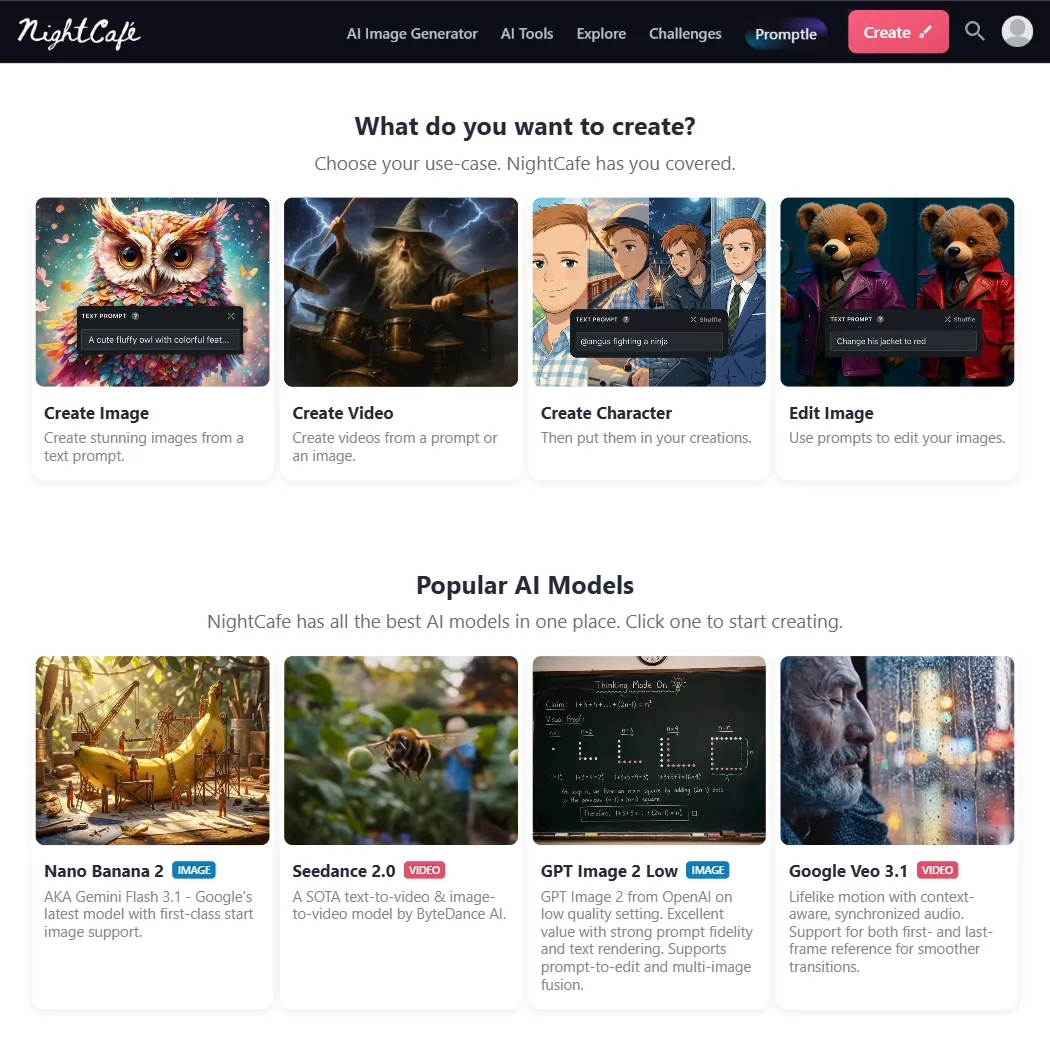
Web-based, with iOS and Android apps. NightCafe runs several AI models under one login, with Stable Diffusion and DALL-E being the most-referenced ones. A few older generation methods like VQGAN+CLIP are still available too, though we see less discussion of those in recent threads.

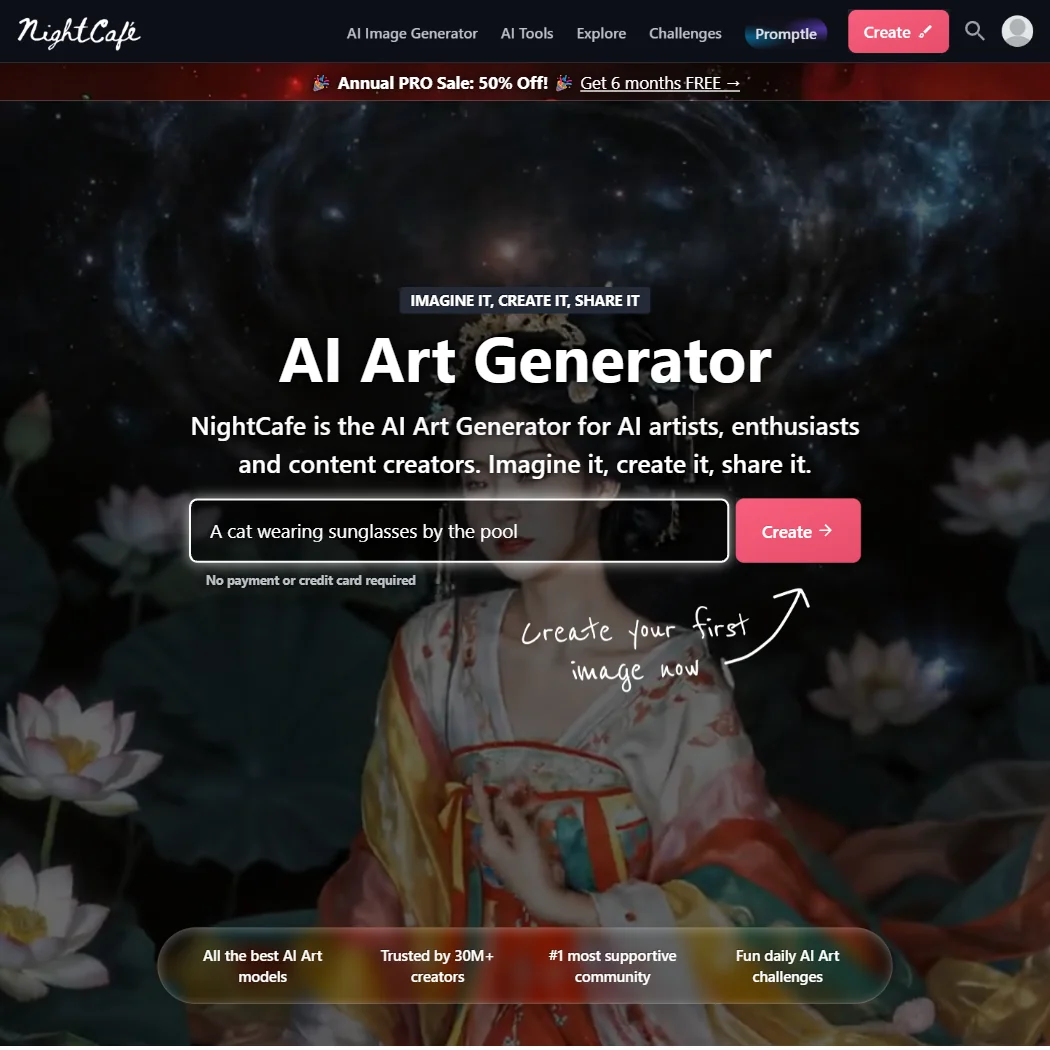
The model access isn't really the pitch, though. NightCafe built a social layer on top of the generation tools. Users post their work, rate others' images, and earn free credits for participating. You can grind your way to additional generations just by showing up. No other major AI art tool we cross-referenced ties credit accumulation to community behavior this directly. Not Midjourney. Not Leonardo AI. Not Adobe Firefly.

Whether that loop works for professional output is a separate question. We'll get there.

NightCafe Creator Image Quality: How Good Are the Results?

Depends on the model and the person running it. Stable Diffusion with ControlNet and LoRA support gives experienced users real control, and Reddit threads from 2024 show genuinely cohesive, stylistically consistent output when users know how to handle prompt weighting and negative prompts.

Casual users see more variance. That tracks.

The gap between NightCafe's ceiling and Midjourney's default output comes up constantly in user comparisons, and we don't see a reason to argue against that read. Midjourney produces aesthetically strong results from loose prompts. NightCafe rewards people who already understand what negative prompts do. Different assumption about who's sitting at the keyboard. Not a flaw, exactly, but worth being clear-eyed about.

No watermarks on generated images. Several tools in this category still brand everything that comes out. NightCafe doesn't. Fair.

NightCafe Creator Features: Text-to-Image, Video & Editing Tools

The toolkit is wider than the price suggests. Text-to-image is the core, image-to-image transformation runs through the Stable Diffusion pipeline, and inpainting and outpainting are both available. AI upscaling is in there. ControlNet support exists. So does custom LoRA model loading.

Honestly, the depth surprised us.

The gaps matter though. No text-to-video. The screenshot we reviewed shows video model access on higher tiers, with basic AI Video models on the entry plans and full AI Video model access starting at the AI Enthusiast level, but that's still image-adjacent video, not generative video in the way Runway or Pika handle it. Background removal isn't documented in vendor materials. API access status is genuinely murky, with nothing publicly stated that we could find.

LoRA support and ControlNet access are the features worth calling out specifically for anyone coming in with Stable Diffusion experience. These aren't standard at this price tier.

Integrations are thin. There's Discord connectivity for the community features and not much else. No Photoshop plugin, no Figma connector. For creatives who live in those tools, NightCafe operates in a separate corner of the workflow entirely.

Is NightCafe Creator Easy to Use?

The basic loop is approachable. Pick a model, write a prompt, generate. A first-time user can get something out within minutes.

Friction appears when you go deeper. The multi-model interface means users have to understand which model they're picking and why. VQGAN+CLIP behaves differently from Stable Diffusion. DALL-E behaves differently still. There's no strong hand-holding through those distinctions.

A recurring pattern shows up across Reddit: newer users burning credits on generations that don't land because they misconfigured the model they chose. That's a UX problem wearing a learning curve as a disguise.

The community layer compensates more than you'd expect. Browsing other users' published prompts and settings functions as informal guidance in ways that formal documentation doesn't always manage. We saw this referenced repeatedly as a shortcut for beginners. Not documentation exactly, but it works.

English-only interface. Worth knowing before you commit.

NightCafe Creator Pricing: Free Plan vs Paid — Is It Worth It?

The free tier runs 5 credits per day, plus whatever you earn through community participation. Enough for experimentation. Not enough for volume.

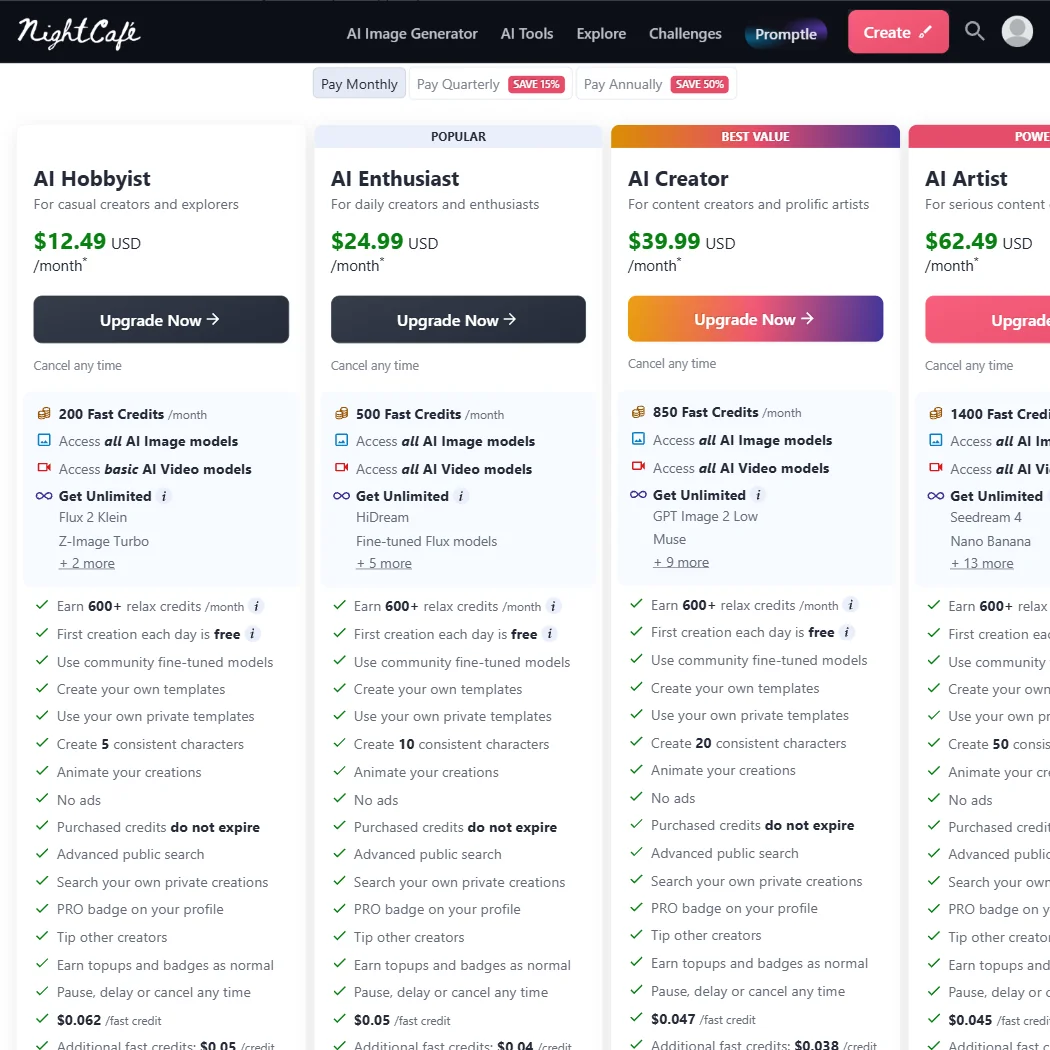
Paid plans are currently discounted 40% across the board. The AI Hobbyist tier sits at $7.49 per month, billed as $89.91 annually. AI Enthusiast runs $14.99 per month, billed $179.91 per year. AI Creator is $23.99 per month, billed $287.93 annually. The top plan, AI Artist, comes in at $37.49 per month, billed $449.91 per year. The screenshot shows original prices of $12.50, $25, $40, and $62.50 respectively, suggesting a promotional rate is currently active. All plans note "cancel any time."

Credit allocations scale with price. AI Hobbyist gets 200 Fast Credits per month. AI Enthusiast gets 500. AI Creator gets 850. AI Artist gets 1,400. All tiers also show 600-plus relax credits per month and a free daily first creation. The Hobbyist tier unlocks unlimited generations on Flux 2 Klein and Z-Image Turbo, and a couple of others. Enthusiast adds HiDream and fine-tuned Flux models, and more. The higher tiers progressively expand the unlimited model roster.

We're skeptical of how intuitive the credit-to-generation math actually is for new users. Reddit complaints about unexpected credit burn are consistent enough that we'd treat it as a documented pattern, not isolated complaints.

Private generation mode, keeping work off the public community feed, doesn't appear until higher tiers. On entry plans, your images are publicly visible by default. For anyone generating commercial content, that's not a minor footnote.

No publicly stated refund policy that we could locate. No live chat support. Email and Discord are the documented options. If something goes wrong on a monthly billing cycle, the resolution path isn't obvious.

NightCafe Creator vs Midjourney: Which AI Image Generator Wins?

Midjourney wins on raw aesthetic output. That's the consistent read across everything we've reviewed, and we don't see a reason to push back on it. Stronger default results, less technical effort required from the user.

NightCafe wins on configuration depth. Multiple model access, LoRA support, ControlNet, inpainting, outpainting. Midjourney doesn't offer that level of hands-on control. For users with a specific technical workflow, NightCafe's multi-model architecture covers ground Midjourney simply doesn't.

NightCafe also wins on entry price. Even at undiscounted rates, the Hobbyist plan came in below Midjourney's Basic plan. At current promotional pricing, the gap is wider. For hobbyists watching spend, that matters.

The community differentiator is real too. Midjourney runs a Discord server. NightCafe has wired the community directly into the credit system. That's a functionally different relationship with the platform.

Creative professionals needing reliable commercial-grade output should probably look at Midjourney first. Users working inside Adobe's ecosystem will likely find Adobe Firefly a more natural fit. NightCafe is a serious option for the user who wants control and doesn't mind earning it.

Who Should Use NightCafe Creator? (And Who Shouldn't)

Hobbyist artists and community-driven creators. That's the fit. NightCafe was built for people who enjoy the process, want to share work, and don't need a professional pipeline at the end of it.

Users with existing Stable Diffusion experience looking for a cloud-based alternative to running AUTOMATIC1111 locally. The LoRA and ControlNet access makes that a reasonable trade.

Not commercial studios. No API documentation, no enterprise tier, and privacy isn't default on lower plans. Those aren't minor gaps for production work.

Marketing teams and product teams. Look elsewhere. The missing integrations aren't closing fast enough to matter for those workflows right now.

NightCafe Creator Review Verdict

Five years since launch. NightCafe has had that time to push toward professional credibility and has consistently chosen community-first instead. That's a deliberate positioning, not an oversight. The question is whether that choice aligns with what you actually need.

The strengths are real. LoRA support and ControlNet access at this price point aren't common. The community credit system is genuinely clever. The free tier functions. No watermarks. The current 40% discount across all plans, down to $7.49 for Hobbyist and $37.49 for AI Artist, makes the entry cost lower than most comparable options.

The problems are also real. Credit burn behavior confuses users consistently. Privacy defaults favor the community over the creator on lower tiers. No API to speak of. Support is email and Discord. The refund policy isn't visible. Getting to strong output requires more effort than competing tools.

Not great for professional pipelines. Genuinely good for the audience it was built for.

Casual creators who want an affordable, multi-model playground with an actual community around it will find NightCafe a fair bet. Everyone else should be clear about the gaps before they commit.

Frequently Asked Questions

Does NightCafe Creator have a free plan?

Yes. Five credits per day on the free tier, plus additional credits earned through community participation, rating other users' work, and general platform engagement. Enough to experiment. Not enough to generate at any real volume without either paying or investing consistent community time.

Does NightCafe Creator support commercial use?

Paid plan users retain commercial rights to generated images. Free tier users should read the current terms carefully before using anything commercially. Private generation mode, which keeps work off the public feed, requires a higher-tier paid plan, so users on entry-level paid plans should note that their images may still be publicly visible by default.

How does NightCafe Creator compare to other AI art generators?

More configurable than most at its price point. LoRA support, ControlNet, inpainting, and multi-model access in one interface are genuine differentiators at this tier. Raw output quality doesn't consistently match Midjourney without meaningful technical effort from the user. For anyone who wants hands-on control and doesn't need enterprise integrations, NightCafe holds up. For anyone who needs strong output reliably and fast, there are better-suited options.

NightCafe Creator is featured in

Alternatives to NightCafe Creator

See all NightCafe Creator alternatives →

Other AI Image Generation options we've reviewed.

User reviews

Review NightCafe Creator

Your rating

Reviews are moderated and appear once approved.