SAASINSPECTOR
mnml.ai logo

mnml.ai Review

As an AI room and building renderer, mnml.ai turns a floor plan or a text prompt into a photorealistic still or a walkthrough video. It starts you with a one-time credit grant rather than a free plan, and the vendor states it does not train its AI on your renders.

Visit mnml.aiFrom $29/mo

Research-based review. Features and prices are checked on the vendor's own website, and the score is worked out from those facts. We haven't tested it hands-on yet.

The verdict

mnml.ai stands out for video walkthroughs and single sign-on on higher tiers, but Spacely AI's free plan and native SketchUp and Rhino plugins suit firms already working in those programs.

Pros

  • Every new account gets 100 free credits that never expire, with no card required.
  • Renders can start from a sketch, a photo, a floor plan or a written description.
  • 8K upscaling and video generation are included on every plan.
  • Style presets and settings for time of day, weather and camera angle come built in.
  • The Flow workspace gives real-time collaboration with live cursors and shared boards.
  • mnml.ai states it never trains AI models on your uploads, prompts or renders.
  • It is GDPR, CCPA and APPI compliant.

Cons

  • There is no permanent free plan, only a one-time grant of credits.
  • There is no plugin for SketchUp, Revit or Rhino; a view must be exported as an image first.
  • There is no template library, only generation-parameter presets.
  • mnml.ai's own SOC 2 and ISO 27001 certification is not confirmed; only its infrastructure partners hold it.
  • Single sign-on is available only on the Enterprise plan.
  • No seat count is stated for Lite, Plus or Studio, so team pricing only appears on the separate Enterprise plans.
From $29/moFree plan NoFree trial Yes
4.8/10

Spec Score

mnml.ai against 2 AI room and building renderers
#2
of 2 AI room and building renderers
-0.9
vs the average
100%
from published facts
Ahead of other AI room and building renderers
Privacy and trust+0.8
Behind other AI room and building renderers
Pricing-2.4What you can render-1.3
Every criterion
Tap a row for the facts
What you can render5.0
-1.3 vs 6.3 avg17.5 of 35 points
What a render can start from4 kinds of input3 / 3
Plugins for CAD tools0 CAD plugins0 / 3
Renders video or walkthroughsyes2 / 2
Template libraryno0 / 2
Why these numbers

What a render can start from: Counted from input_types. floor_plan confirmed on a dedicated page: 'upload a 2D floor plan and get a rendered plan view and photorealistic interiors from the same drawing' (mnml.ai/floor-plan-ai). text from the dedicated 'Text to Render' quick tool, distinct from the image-based 'Sketch to Image' tool. CAD 'views' (SketchUp/Revit/Rhino) are exported as a 2D image before upload, per the FAQ, so they fall under photo rather than a native 3d_model input.

Plugins for CAD tools: Counted from cad_plugins. The vendor explicitly states no plugin exists for any CAD tool; users export a view as an image (JPG/PNG/WebP) and upload it instead.

Renders video or walkthroughs: Video generation allowance scales by plan (10 on Lite, 30 on Plus, 100 on Studio); also a 'Walkthrough Animation' quick tool on the homepage and a 'Video AI' API endpoint on mnmlai.dev.

Template library: Checked the homepage feature list and pricing page for a 'templates' library; not found. The product instead offers generation-parameter presets (Style: Photoreal/CGI/Sketch Model/Watercolor; Time of day; Weather; Camera angle) rather than ready-made design templates.

Workflow and teams5.5
+0.2 vs 5.3 avg12.1 of 22 points
Apps it connects to0 integrations0 / 4.5
Comments and approvalyes3.5 / 3.5
Single sign-onyes2 / 2
Why these numbers

Apps it connects to: Counted from integrations. Checked the homepage, use-cases and pricing pages for named third-party app integrations (Notion, Slack, Figma, etc.); none found.

Single sign-on: Also 'SSO/SAML & admin controls' on the pricing page's Enterprise Plans block, and 'Require SSO sign-in for addresses on your verified domains' on the Enterprise page.

Pricing2.6
-2.4 vs 5.0 avg6.5 of 25 points
Cheapest paid plan, monthly$292.6 / 6.5
Free planno0 / 3.5
Why these numbers

Cheapest paid plan, monthly: Cheapest paid plan on the monthly term. Read both sides of the Monthly/Annual toggle in the browser.

Free plan: There is no $0-forever plan card alongside Lite/Plus/Studio; every new account instead gets a one-time, non-expiring grant of 100 credits to try the paid tools before subscribing (see free_trial_days).

Privacy and trust6.5
+0.8 vs 5.7 avg11.7 of 18 points
Does not train AI on what you uploadyes4 / 4
SOC 2no0 / 2
GDPRyes1.5 / 1.5
Ways to reach support2 support channels1 / 2.5
Why these numbers

Does not train AI on what you upload: Also restated on the About page: 'mnml.ai does not train AI models on customer work, not uploads, not prompts, not renders' and as a bullet ('No model training on your data') on every paid plan (Lite/Plus/Studio) and Enterprise on the pricing page. Stated as an unconditional policy, not an opt-out.

SOC 2: This certifies mnml.ai's infrastructure partners, not a SOC2 report or badge for mnml.ai itself; no independent mnml.ai SOC2 certification was found.

GDPR: Also shown as a standalone 'GDPR Compliant' badge on the same page.

Ways to reach support: Counted from support_channels. Plus a Help Center (mnml.ai/help) with categorized articles. Checked for live chat, phone or a public support forum; none found ('Sharing & Community' on the Help Center is a public render-publishing/profile feature, not a support forum).

yesnonot published average for AI room and building renderers
How the Spec Score works

Scored from what mnml.ai publishes on its own site. Not a hands-on test.

Compared with 2 AI room and building renderers. Facts checked 20 Sep 2026.

A fact the vendor does not publish gets half the points, or the typical value for a number, and says so. It never counts as a no. How we score.

mnml.ai turns a sketch, a photo, a floor plan or a written description into an architectural or interior render, with video walkthroughs and 8K upscaling built into every plan. What decides whether it suits you is whether you can work from an exported image rather than a live CAD file, since mnml.ai has no plugin for SketchUp, Revit or Rhino.

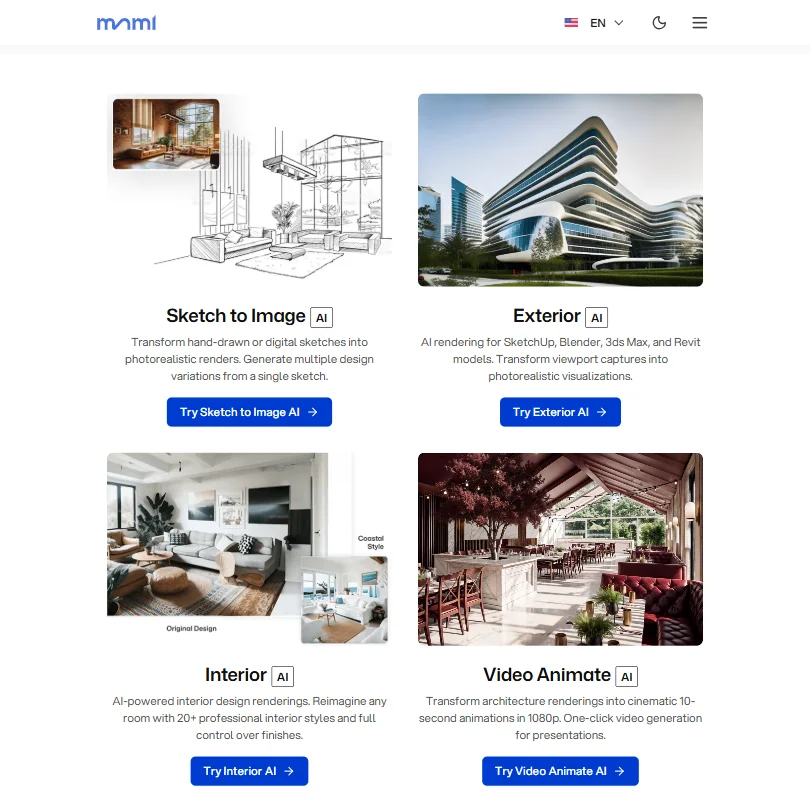
mnml.ai homepage screenshot
mnml.ai, Homepage

What is mnml.ai?

mnml.ai is based in the United Arab Emirates. It runs only on the web, with no native mobile or desktop app and no plugin for SketchUp, Revit or Rhino; a view from those programs is exported as an image and uploaded instead.

Rendering with mnml.ai

A render can start from a sketch, a photo, a floor plan, or a written description through the Text to Render tool. There is no plugin for SketchUp, Revit or Rhino: a view is exported as a JPG, PNG or WebP file and uploaded rather than opened as a live project.

Editing tools include a Render Enhancer, an 8K Upscaler, Style Transfer and Sketch to Image, plus an Inpaint tool for redoing one area of a render without regenerating the whole image. Style presets cover Photoreal, CGI, Sketch Model and Watercolor, alongside settings for time of day, weather and camera angle. 8K upscaling and PNG and DXF export are included on every plan.

Video generation is also included on every plan, scaling from 10 generations a month on Lite up to 100 on Studio.

Working with other people

The Flow workspace supports real-time collaboration: live cursors show where collaborators are working, and a board can be shared with someone as a viewer or an editor. Sticky notes and group frames support review directly on a board. A developer API at mnmlai.dev covers exterior, interior, render enhancement, virtual staging, style transfer, sketch to image, inpainting and video generation, with its own documentation and SDK.

mnml.ai pricing: what each plan gives
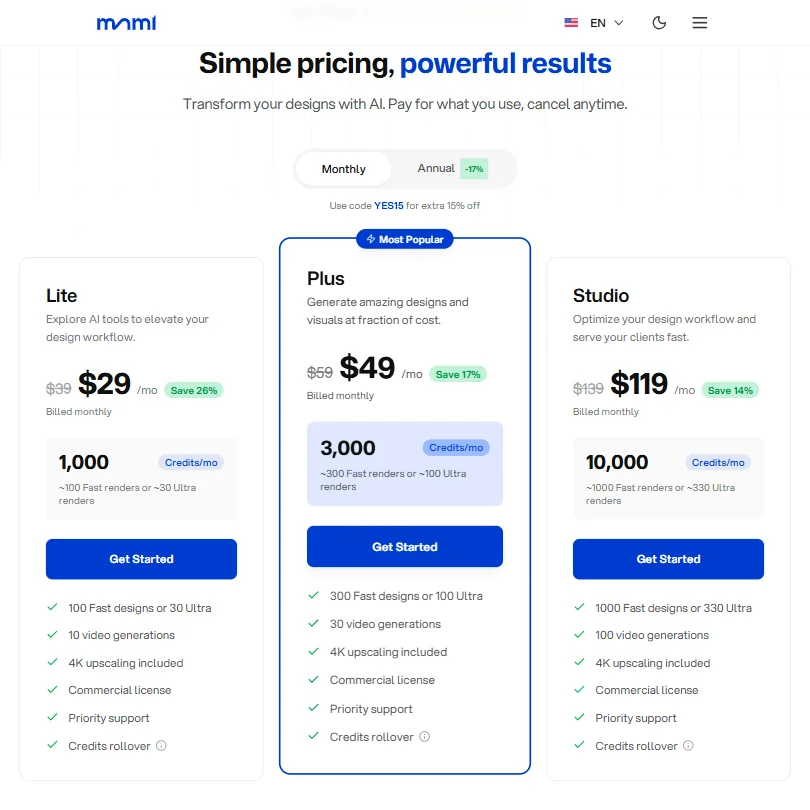
mnml.ai pricing screenshot
mnml.ai, Pricing

There is no permanent free plan. Instead, every new account gets 100 credits on signup that don't expire and need no card, rather than a time-limited trial.

Lite costs $29 a month, or $24 a month billed yearly, for 1,000 credits a month, about 100 fast renders or 30 ultra renders. Plus costs $49 a month, or $41 a month billed yearly. Studio costs $119 a month, or $99 a month billed yearly.

Every plan includes a commercial license, along with PNG and DXF export.

Privacy and support

mnml.ai states it never uses uploaded images, prompts or generated renders to train AI models, and does not share them with third parties beyond the infrastructure and model providers it needs to operate. It is GDPR, CCPA and APPI compliant. Its infrastructure partners hold SOC 2 Type II and ISO 27001 certification, which certifies those partners rather than mnml.ai itself.

Single sign-on is available on the Enterprise plan. Support runs through email and a help center of articles, with priority support on paid plans.

Who mnml.ai suits

mnml.ai suits architecture and interior visualization work where you're comfortable exporting a view as an image, and teams that want real-time board collaboration through Flow, video walkthroughs and 8K upscaling included by default. Its stated no-training policy also suits anyone who wants a clear answer on how their uploads are used.

It suits less well anyone who needs a native plugin for SketchUp, Revit or Rhino, since none exists, or a permanent free plan, since only a one-time grant of credits is offered. Teams that need single sign-on below Enterprise won't find it here either.

Frequently Asked Questions

Does mnml.ai have a free plan?

No. Every new account instead gets 100 credits on signup that don't expire and need no card, rather than a recurring free tier.

What does mnml.ai cost?

Lite costs $29 a month, or $24 a month billed yearly. Plus costs $49 a month, or $41 a month billed yearly. Studio costs $119 a month, or $99 a month billed yearly.

Does mnml.ai work with SketchUp, Revit or Rhino?

Not through a plugin. A view from those programs is exported as a JPG, PNG or WebP image and uploaded, since mnml.ai has no plugin for any of them.

Does mnml.ai train on my uploads?

No. mnml.ai states it never uses uploaded images, prompts or generated renders to train AI models, and does not share them with third parties beyond the infrastructure and model providers it needs to operate.

Screenshots

mnml.ai features screenshot
mnml.ai, Features
mnml.ai is featured in

Alternatives to mnml.ai

See all mnml.ai alternatives →

Other AI Design Tool options we've reviewed.

Adobe logo

Adobe

Professional design teams who need vector editing, video editing and mockups within one desktop suite

8.4
Rank #1 of 6 AI graphic design tools
Best:Workflow and output10
Weakest:Pricing3
Does not train AI on what you upload: yesPublishes or schedules to social: yes
From $69.99No free plan
97% from published facts · checked 19 Sep
Figma logo

Figma

Product teams wanting one shared workspace for design systems, prototypes and developer handoff

8.1
Rank #2 of 6 AI UI design tools
Best:Teams and platforms10
Weakest:What you can make7
Free plan: yesFree trial: noAPI: yes
Price not publishedFree plan
96% from published facts · checked 19 Sep
Canva logo

Canva

Small teams making branded social posts, print and video without hiring a designer

7.8
Rank #3 of 6 AI graphic design tools
Best:Teams and platforms10
Weakest:What you can make7
Publishes or schedules to social: yes
From $18Free plan
90% from published facts · checked 19 Sep
Recraft logo

Recraft

Professional creators and teams needing AI image and video generation

Not scored yet
Free plan: yesFree trial: noAPI: yes
From $12Free plan
Gemini logo

Gemini

Everyday productivity, creative work, and AI assistance at work, school, or home

Not scored yet
Free plan: yesFree trial: noAPI: yes
From $4.99Free plan
HeyGen logo

HeyGen

Solo creators and advanced individuals creating AI videos at scale

8.9
Rank #1 of 7 AI avatar video tools
Best:Avatars10
Weakest:Pricing6.9
Free plan: yesFree trial: noAPI: yes
From $29Free plan
95% from published facts · checked 16 Sep

User reviews

Review mnml.ai

Your rating

Reviews are moderated and appear once approved.