Let's Enhance is a browser-based AI image upscaler and enhancer that enlarges images up to 16x, with output as large as 512 MP. It is sold as monthly credit subscriptions or one-time credit bundles, so what decides whether it suits you is how many images you process each month and how large you need them to print.
What is Let's Enhance?
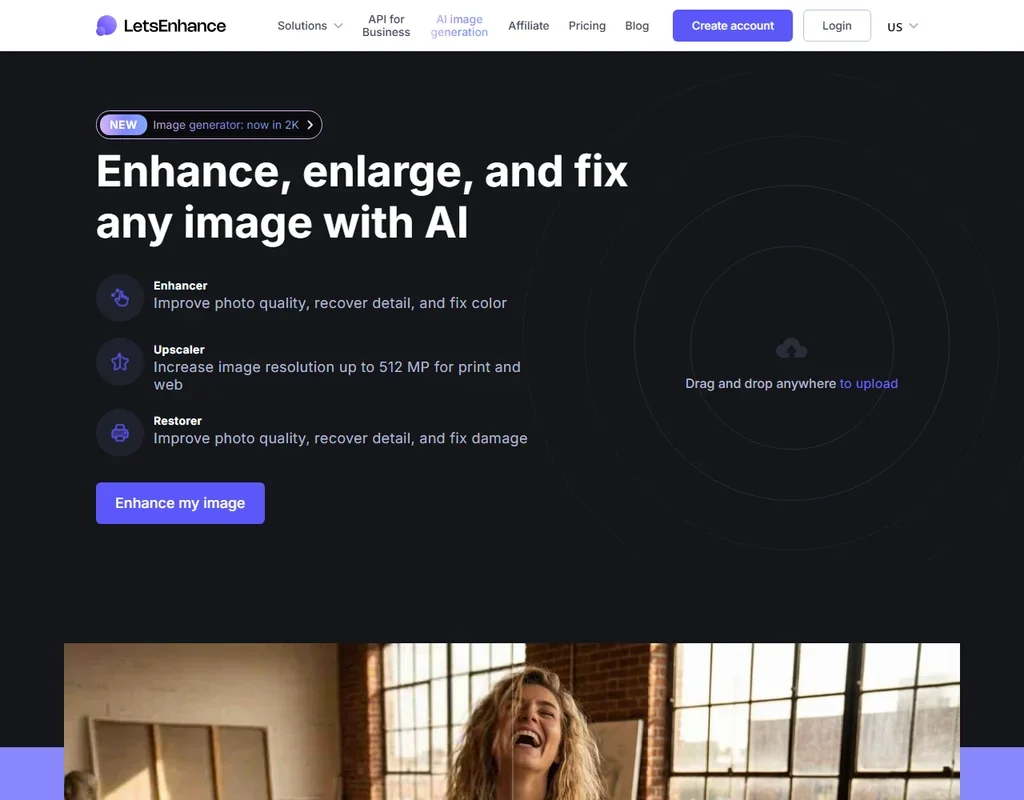
Let's Enhance runs in the browser with nothing to install: you drag and drop an image anywhere on the page to upload it, and the processing happens in the cloud. There is no desktop app.
Beyond the upscaler it offers a face enhancer, a sharpener, an unblur tool, a denoiser and a video upscaler. Developers reach the same upscaling through an API sold on Claid.ai, the company's developer platform.
Upscaling with Let's Enhance
You pick 2x, 4x, 8x or 16x enlargement, or set custom dimensions, with output up to 512 MP. Several models handle different kinds of image. Balanced is built to improve images that have had a tough life.
Ultra is the creative model: two controls set its Intensity, meaning how creative the AI gets, and its Size of Changes, meaning how broadly those changes apply. Ultra can use more than one credit per image at large sizes, while most jobs cost 1 credit per image.
The face enhancer brings clarity to faces, and the separate sharpener, unblur and denoiser tools clean up noise and blur. The video upscaler takes video to 4K.
For larger jobs you can edit 20 images at once. How big the output can go depends on the plan: up to 256 MP on Starter, 350 MP on Pro and 512 MP on Max.
The Let's Enhance API
The API, sold through Claid.ai, offers up to 16x enlargement, 4K and 8K resolution, and batch and asynchronous jobs, with 50 free test credits to start. Business plans are sold on a separate tab from the personal plans.
You own what you upload: Let's Enhance claims no ownership rights over your content, and paid plans carry no separate restriction on commercial use.
Besides the three monthly plans and the one-time bundles, Business plans are sold on their own tab. On every monthly plan, unused credits roll over up to six times the monthly allowance, so a quiet month does not cost you credits.
Let's Enhance pricing: what each plan gives
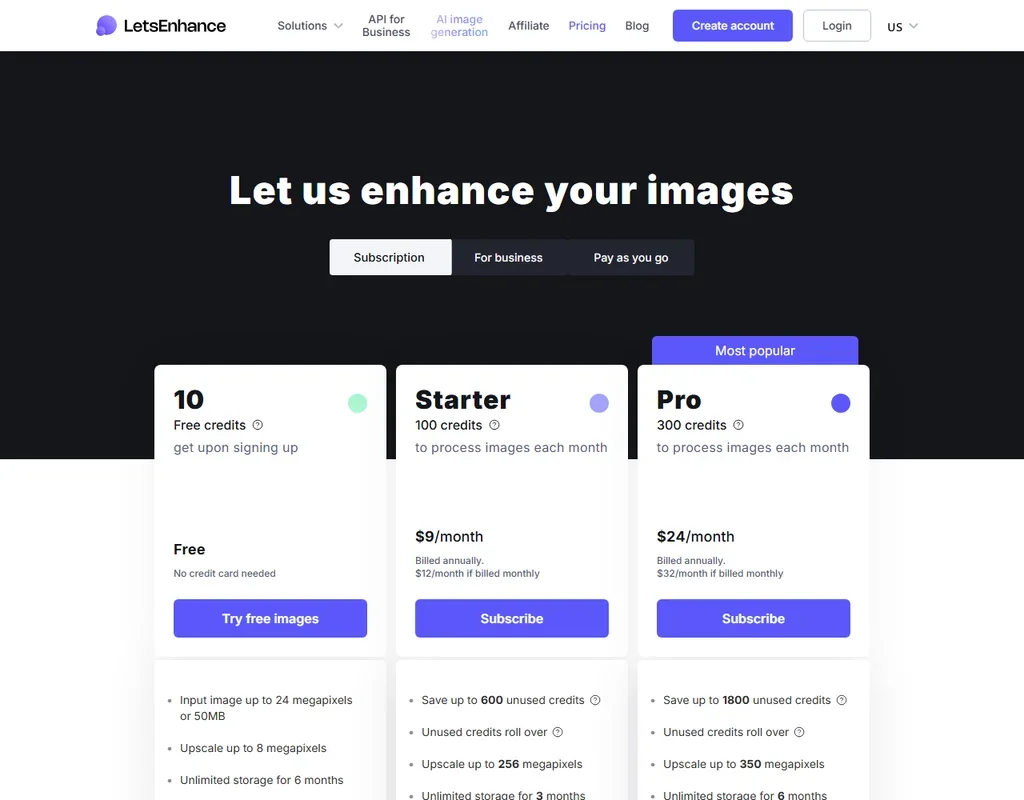
The free tier gives 10 credits when you sign up, with no credit card needed. One image costs one credit. Free results carry a watermark, which paid plans remove, and free accounts accept input images up to 24 MP or 50 MB and keep unlimited storage for 6 months.
- Starter: $12 a month, or $9 a month billed annually, for 100 credits a month. Unused credits roll over up to 600, and output goes up to 256 MP.
- Pro: $32 a month, or $24 a month billed annually, for 300 credits a month, rolling over up to 1,800, with output up to 350 MP.
- Max: $45 a month, or $34 a month billed annually, for 500 credits a month, rolling over up to 3,000, with output up to 512 MP.
One-time bundles suit occasional work, and their credits never expire: 20 credits for $9, 50 for $19 and 120 for $39.
Privacy and security
Let's Enhance offers a Data Processing Agreement for customers to sign to ensure GDPR and CCPA compliance. Images are processed in the cloud rather than on your own computer.
Support runs through a help centre, email and chat. Chat is on paid plans, and free accounts get email support.
Who Let's Enhance suits
Let's Enhance suits print shops, online sellers and creators who need very large, print-ready upscales without installing software. The tunable Ultra model suits anyone who wants the AI to add detail, credits that roll over suit uneven months, and one-time bundles suit occasional jobs.
It suits less well anyone who wants to keep images on their own computer, since everything is processed in the cloud. Heavy use of Ultra at large sizes spends more than one credit per image, and free results carry a watermark.
Frequently Asked Questions
How much does Let's Enhance cost?
Starter costs $12 a month, or $9 a month billed annually, for 100 credits. Pro and Max cost $32 and $45 a month for 300 and 500 credits. One-time bundles start at $9 for 20 credits that never expire.
How big can Let's Enhance make an image?
It enlarges 2x, 4x, 8x or 16x, or to custom dimensions, with output up to 256 MP on Starter, 350 MP on Pro and 512 MP on Max.
Does Let's Enhance have a creative upscale mode?
Yes. The Ultra model adds detail, and you can tune its Intensity and Size of Changes. It can use more than one credit per image at large sizes.
Is Let's Enhance free?
New accounts get 10 free credits with no credit card needed. Free results carry a watermark, which paid plans remove.