
Our research into Fathom started with the free tier, as it usually does. We pulled vendor docs, dug through Reddit threads from 2024 and 2025, and cross-referenced homepage claims against what actual users report. Founded in 2020 out of San Francisco, Fathom has reached 300,000+ companies without making much noise about it. That restraint is either confidence or a marketing problem. Probably both.

What is Fathom AI Notetaker?
Records your meeting. Transcribes it. Sends you a summary before you've closed the tab. That's the core loop, and it works across Zoom, Google Meet, and Microsoft Teams. What separates it from most of the field is an option to do all of this without dropping a bot into your call. No "Fathom has joined the meeting." No robot in the participant list.
That matters more than it sounds. Reddit threads from 2024 show a recurring frustration with competitor bots. Clients complain. Some calls get derailed. Fathom's bot-free capture mode sidesteps that entirely, which honestly surprised us. Most tools in this category treat the bot as unavoidable infrastructure.
The product is trying to serve two audiences at once. Individuals who want clean notes after a call. Sales teams who want CRM auto-updates and coaching metrics. Those two groups have genuinely different needs, and the tension shows in the pricing structure, where the solo free plan is generous and the team features sit behind a paywall.
Fathom AI Notetaker Features: Automation, AI Assistant & Workflow Capabilities
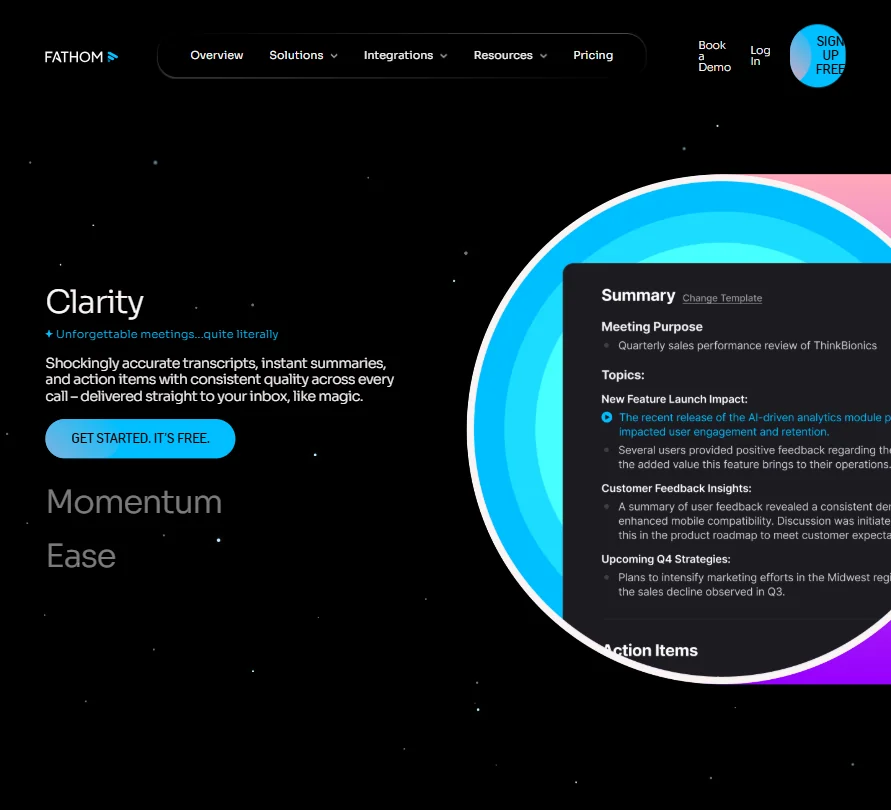
After a call ends, Fathom generates action items and drafts a follow-up email. The transcript is already waiting. Users across multiple review sources call out post-call delivery speed specifically, not as a secondary observation but as a lead reason for switching to Fathom from something else.
AI-generated action items that push directly to Asana or HubSpot are what people mention first when recommending the tool. We kept seeing that pattern in Reddit comments. Not transcription quality. The action items, and what happens to them next.
The conversational meeting assistant, listed on paid plans as a distinct upgrade from the free tier, lets you query past calls by asking natural questions. What did a client say about budget three calls ago? You can ask. It searches across your full call history. That's useful, though we're mildly skeptical of any RAG-based call search until the user feedback gets more specific about failure cases. So far it leans positive.
Team collaboration features include folders, keyword alerts, playlists of meeting highlights, and collaboration via comments. These only unlock at Team ($15/mo, two-user minimum) or above. Worth separating that clearly from what the free plan actually delivers.
Fathom AI Notetaker AI Quality: How Smart and Useful Is the Assistant?
Transcript accuracy is where Fathom's reputation is strongest. "Shockingly accurate" keeps appearing in user language that doesn't read like planted reviews. People in technical fields, HR interviews, and sales calls all flag transcription quality as a real differentiator. Some users report preferring Fathom's transcript accuracy over Fireflies.ai, although comparative opinions are mixed, and at least one user in the same discussion thread came down the other way.
The AI summaries use a proprietary model, with optional integrations to ChatGPT and Claude. That's a practical hedge. If your team already works in Claude, you can pipe Fathom's output there without copy-pasting. The LLM integration options are listed even on the free plan, which is a meaningful differentiator against tools that gate AI quality behind a paywall.
Support for 25-plus languages is documented, though some users in non-English threads note accuracy drops in accented or mixed-language calls. Not unique to Fathom. We wouldn't hold it against them specifically, but it's worth knowing before you commit to using it for multilingual sales calls.
The ask-across-all-calls feature is genuinely ambitious. What it does at scale, say 500 calls in, is something we haven't tested. User reports from heavier users are positive. That's the data we have. Not great, but not nothing.
Fathom AI Notetaker Integrations: What Does It Connect To?
Slack and Salesforce are there. So is HubSpot. Notion and Asana handle the notes-to-tasks pipeline, and a few others round out the stack. Zapier and Make extend things further. A public API and MCP access exist for teams that want to build on top.
Zoom is the primary platform by a clear margin. Google Meet follows. Microsoft Teams support exists but generates noticeably less confident user feedback than Zoom does, which is a pattern we'd want to investigate further before recommending Fathom to a Teams-heavy organization. That gap in the public record is real.
No Google Drive integration is publicly documented. Mildly annoying for teams that live in Drive, but not a dealbreaker. The CRM auto-sync into Salesforce and HubSpot is what sales teams are actually paying for on higher tiers. Users in sales roles describe it reducing post-call admin by a meaningful margin. That tracks with what the product is designed to do.
Is Fathom AI Notetaker Easy to Use?
Setup is short. Install the Chrome extension or the Mac/Windows desktop app, connect your calendar, and it starts detecting meetings automatically. Google Calendar and Microsoft Outlook calendar both work. That's about as much friction as we'd want from a tool in this category.
Interface feedback skews positive across review sources. People describe it as clean. Users who aren't technically inclined report getting it running without help, which is the kind of cross-demographic consistency that's actually meaningful.
Bot-free capture requires the desktop app, which adds one install step compared to the Chrome extension alone. Most users seem to run both and stop thinking about it. That's the best possible outcome for background infrastructure like this.
Fathom AI Notetaker Pricing: Is It Worth It vs Free Alternatives?
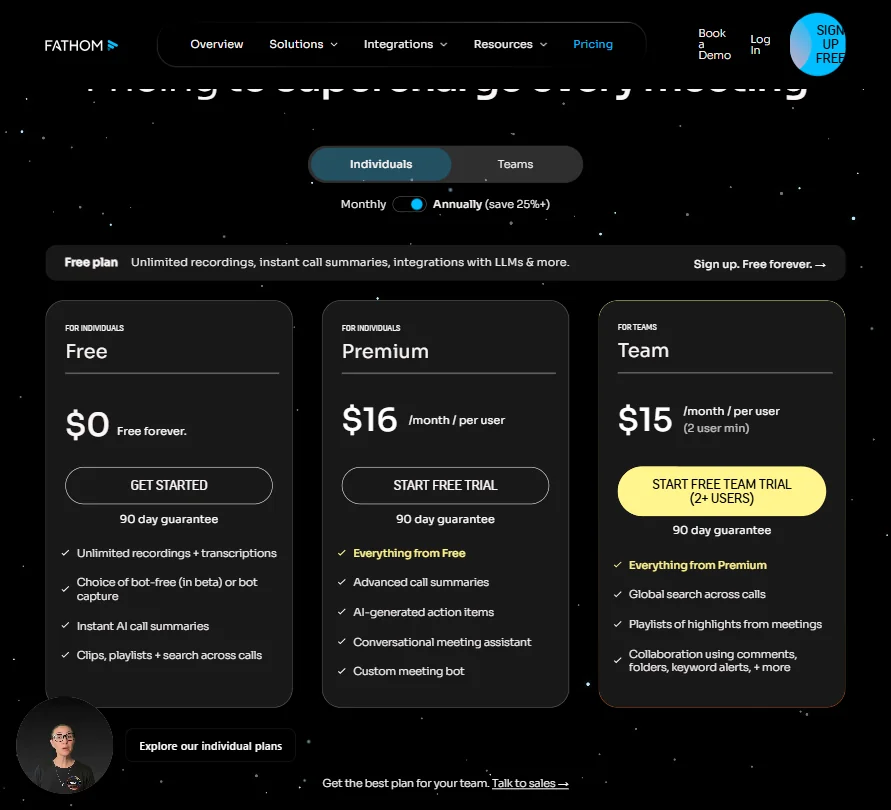
The free plan is unlimited for individuals. Unlimited recordings, unlimited transcriptions, AI summaries, clips, and search across calls. No artificial cap at 300 minutes or five meetings a month, which is how most competitors structure their free tiers. Fireflies.ai limits storage and integrations on free. Otter.ai caps transcription minutes. Fathom doesn't cap either.
Paid plans sit at $16/month for Premium (individual) and $15/month per user for Team, with a two-user minimum. The screenshot shows the Team plan is actually a dollar cheaper than Premium per user at the annual rate, which is a slightly odd pricing signal. Business lands at $25/month. Enterprise is custom.
The 90-day money-back guarantee on all paid plans is one of the more generous refund windows we've seen in this space. Most tools offer 14 days. Some offer nothing.
For solo users, the free plan is a credible long-term option, not just a trial. For teams, $15/seat/month is reasonable, though it depends heavily on whether your team is Zoom-first and whether the CRM sync actually replaces manual work you're currently doing.
Fathom AI Notetaker vs Fireflies.ai: Which Productivity Tool Wins?
Fireflies.ai has a larger integration list and a longer track record in enterprise settings. It's also heavier. More setup, more features you might not use, and the bot is always present. Some clients find that off-putting, and that friction shows up repeatedly in the Reddit threads we read.
Fathom moves faster post-call. The summaries arrive quicker. The bot-free capture option is a genuine functional advantage Fireflies doesn't offer, and for client-facing roles where bot presence creates awkwardness, that one feature might settle the comparison on its own.
Some users report preferring Fathom's transcript accuracy, though comparative opinions are mixed, and at least one user in the same discussion credited Fireflies overall. We're not going to overstate the evidence. It's not a clean sweep for either tool.
Otter.ai is the budget comparison most people make. Otter works fine for basic transcription, doesn't have CRM depth, and doesn't do bot-free. It's a lower-ambition product at a lower price. If basic notes are all you need, our coverage of Granola is worth reading. That tool takes a quieter approach and might fit better for someone who finds Fathom's feature set heavier than necessary.
Who Should Use Fathom AI Notetaker? (And Who Shouldn't)
Solo professionals and freelancers. The free plan is hard to argue against, and setup takes minutes.
Sales teams running high call volume. The CRM auto-updates and deal view are built for this workflow, and teams doing ten or more calls a week will feel the time savings quickly.
Anyone in client-facing roles where a bot joining the call creates friction. Fathom handles that more cleanly than almost anything else in the category right now.
Who shouldn't use it. Teams running almost entirely in Microsoft Teams where the feedback on native integration is thin. Also, anyone who needs confirmed mobile support. Fathom publicly references an upcoming iOS app, but its current availability is unclear from conflicting official documentation. One help article says coming soon, another says mobile is not currently supported. That's a real gap for people who take calls on the go, and we'd want that resolved before recommending Fathom to a mobile-first user.
Fathom AI Notetaker Review Verdict
An unlimited free tier with real AI summaries is genuinely rare. Most competitors manufacture scarcity. Fathom doesn't, and that alone makes it worth trying for individuals.
The combination of bot-free capture, fast post-call summaries, and deep CRM sync puts Fathom ahead of most tools in this category for a specific user type. That user runs a lot of external calls, uses Salesforce or HubSpot, and is tired of re-entering notes after every meeting. For that person, the case is strong.
The gaps are real but narrow. No confirmed mobile app. Microsoft Teams support that doesn't generate as much confident user feedback as Zoom. No Google Drive integration. None of these are fatal. They're friction.
For individuals and small sales teams, we'd recommend Fathom without much hesitation. For large enterprises or Teams-heavy organizations, we'd want more evidence before pulling them off a competitor. The 90-day guarantee means you're not risking much by testing it. Start there.
If your workflow is less about call volume and more about organization-wide knowledge management, something like Read AI covers more of that ground, though it's a different product with different tradeoffs.
Frequently Asked Questions
Does Fathom AI Notetaker work without a bot joining the call?
Yes. The bot-free capture mode uses the desktop app instead of dropping a participant into your meeting. It records locally and still produces a full transcript and summary. Most competitors in this category don't offer this. It's one of the few differentiators in the space that's actually hard to copy without rearchitecting how the recording works.
Is Fathom AI Notetaker free to use?
The free plan is unlimited for individuals, covering recordings, transcriptions, AI summaries, clips, and search with no cap on meeting count. Paid plans start at $15/month per user on Team, which is where CRM sync and collaboration features unlock. The 90-day money-back guarantee on paid plans is longer than most tools in this category offer.
How does Fathom compare to Otter.ai for fathom vs otter ai use cases?
Otter.ai caps transcription minutes on its free plan. Fathom doesn't. Otter has no bot-free option and lighter CRM integration overall. For basic personal transcription, Otter is fine. For anyone who needs post-call automation or CRM updates, Fathom is the stronger fit by a meaningful margin. Different tools at different ambition levels.