
Every score is worked out from the vendor's own pages · How we score →Disclosure
SAASINSPECTOR
Edcafe logo

Edcafe Review

Edcafe is an AI platform for teachers that builds quizzes, lesson plans, slide decks and flashcards from a topic, file, webpage or video. It also grades student work and runs classroom chatbots. It is best for teachers who want their class material made in one place.

Visit Edcafe →From $7.99/mo

Research-based review. Features and prices are checked on the vendor's own website, and the score is worked out from those facts. We haven't tested it hands-on yet.

The verdict

Worth paying for if you make class material every week and need slides or audio; the free plan covers lighter use, and paid plans are billed annually.

Pros

  • The Free plan has no time limit and gives 100 AI generations a month, 3 chatbots and 3 assignment graders.
  • One source can become a quiz, lesson plan, slide deck, flashcards and a reading activity, including quizzes from YouTube videos.
  • Students join activities as participants without paid seats.
  • Inknoe's trust center lists US FERPA, US COPPA, SOC 2 and GDPR compliance.

Cons

  • The slides generator, AI images, text to speech and file uploads are not on the Free plan.
  • Pro and Premium are shown with annual billing only, with no month-to-month price.
  • Edcafe does not state on its public pages whether content is used to train AI models.
From $7.99/moFree plan Yes
8.1/10

Spec Score

Edcafe against 6 AI teacher platforms
#4
of 6 AI teacher platforms
+0.1
vs the average
79%
from published facts
Ahead of other AI teacher platforms
In the classroom+1.3
Behind other AI teacher platforms
Pricing-1.0
Every criterion
Tap a row for the facts
What it makes for teachers8.8
+0.4 vs 8.4 avg35.2 of 40 points
Quizzesyes1.5 / 1.5
Slide decksyes1.5 / 1.5
Levels a text for different readersnot published, half points0.8 / 1.5
Feedback on student workyes2 / 2
Rubricsnot published, half points0.5 / 1
Builds material from a videoyes0.8 / 0.8
Builds material from your own filesyes0.8 / 0.8
Number of teacher toolsnot published, typical value used1 / 1
Why these numbers

Quizzes: Also flashcards and reading activities.

Slide decks: Pro plan and above. Slides export to PowerPoint.

Feedback on student work: Assignment Grader: 3 on Free, 20 on Pro, unlimited on Premium.

Builds material from your own files: Reading activities also take files and webpages. Uploading your own files as AI knowledge starts on Pro.

In the classroom8.0
+1.3 vs 6.8 avg16 of 20 points
Students use the AI themselvesyes3 / 3
Students join without a paid seatyes2 / 2
Learning platforms it connects to3 platforms2 / 3
Works inside Google Docs and other sitesnot published, half points0.5 / 1
Export formats1 format0.5 / 1
Why these numbers

Students use the AI themselves: Students use teacher-made chatbots, quizzes, flashcards and reading activities.

Students join without a paid seat: Students join as participants without a paid seat. The cap is 40 on Free, 200 on Pro and 1000 on Premium per activity.

Learning platforms it connects to: Premium and Schools & Districts only.

Export formats: Pro adds export to various file formats; only PowerPoint is named.

Pricing7.0
-1.0 vs 8.0 avg15.4 of 22 points
Cheapest paid teacher plan, monthly$7.997 / 10
Why these numbers

Cheapest paid teacher plan, monthly: Pro. Only the annual-billing monthly equivalent is shown.

Student data and trust8.2
-0.3 vs 8.5 avg14.8 of 18 points
FERPAyes2 / 2
COPPAyes2 / 2
Student privacy pledge or sealnot published, half points0.5 / 1
Signs data privacy agreements with schoolsyes1 / 1
SOC 2yes1 / 1
GDPRyes0.5 / 0.5
Does not train AI on teacher or student contentnot published, half points1 / 2
Ways to reach support1 support channel0.2 / 0.5
Why these numbers

FERPA: From the trust center of Inknoe, the company behind Edcafe.

COPPA: From the trust center of Inknoe, the company behind Edcafe.

Signs data privacy agreements with schools: Premium plan.

SOC 2: Premium adds an annual SOC 2 Type 2 report for schools.

GDPR: Data is hosted in the United States.

Ways to reach support: Schools get priority support. A service status page is published.

yesnonot published average for AI teacher platforms
How the Spec Score works

Scored from what Edcafe publishes on its own site. Not a hands-on test.

Compared with 6 AI teacher platforms. Facts checked 15 Oct 2026.

A fact the vendor does not publish gets half the points, or the typical value for a number, and says so. It never counts as a no. How we score.

Edcafe is an AI platform built for teachers: it turns a topic, a document, a webpage or a YouTube video into quizzes, lesson plans, slide decks, flashcards and reading activities, and it can grade student work. Whether it suits you comes down to how much class material you make each month and whether the free plan's 100 AI generations cover it.
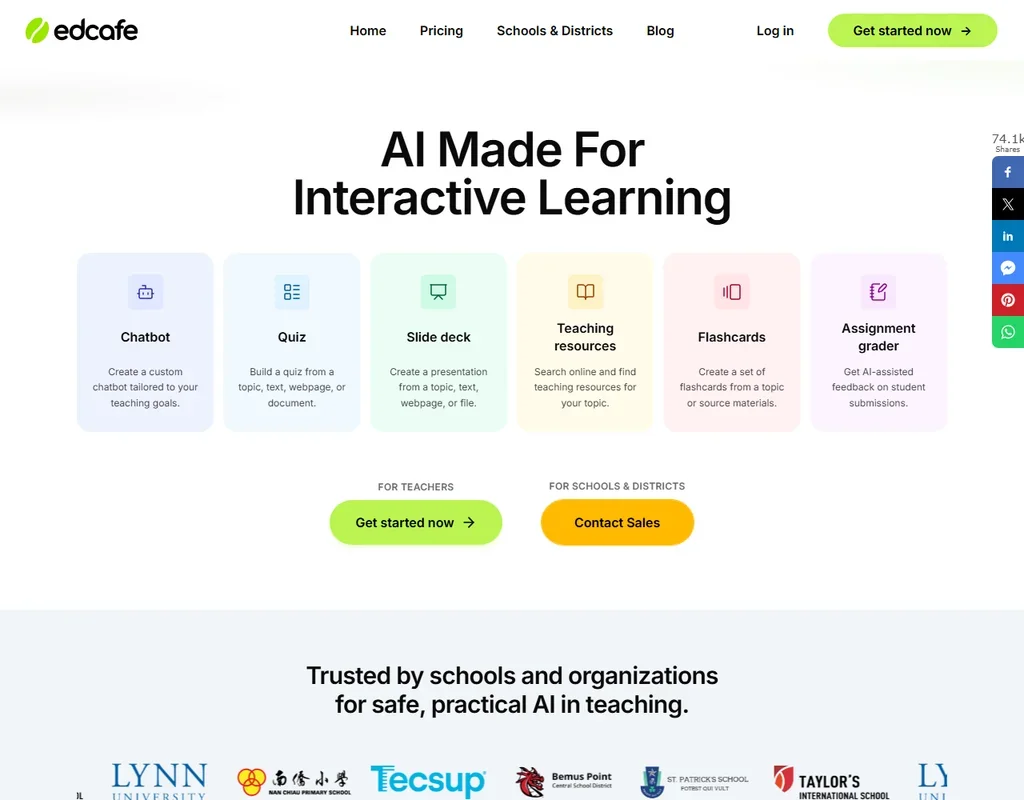
Edcafe homepage screenshot
Edcafe, Homepage

What is Edcafe?

Edcafe is made by Inknoe, the company behind the ClassPoint classroom tool. It runs in the browser, with no separate desktop or mobile app listed. Teachers sign up on their own, and students join each quiz, chatbot or graded activity as participants, so they do not need paid seats. Schools and districts can buy it as a group, with pricing by quote.

What you can make with Edcafe

Most of Edcafe is a set of generators. You give it a topic, some text, a file or a webpage, and it builds the material:

  • Lesson plans from a topic, text, webpage or document.
  • Quizzes from the same sources, plus a separate tool that builds a quiz from a YouTube video.
  • Slide decks from a topic, text, webpage or file. The slides generator starts on Pro.
  • Flashcards, summary notes and reading activities, the last one built from vocabulary, text, files or a webpage.
  • A teaching resources finder that searches online for material on your topic, from Pro.
  • AI images and text to speech, which turns written content into spoken audio for listening and accessibility. Both start on Pro.

Two features go beyond making material. Custom chatbots let you set up a chatbot for your teaching goals that students talk to, and on Pro you can upload your own files as its knowledge. The assignment grader gives AI-assisted feedback on student submissions. The free plan includes three of each.

Edcafe does not name the AI models it uses.

Working with students and schools

Students take part without paid seats. The limit is per activity: 40 participants per quiz, chatbot or grader on Free, 200 on Pro and 1,000 on Premium. For a single class the free cap is usually enough; for a teacher running the same quiz across several sections, it is the first limit you meet.

Schools get more on Premium and the Schools & Districts offer: integration with Moodle, Canvas and Blackboard, a custom data privacy agreement, an annual SOC 2 Type 2 report, custom training and onboarding, and a dedicated account manager. Edcafe does not describe a public API or single sign-on.

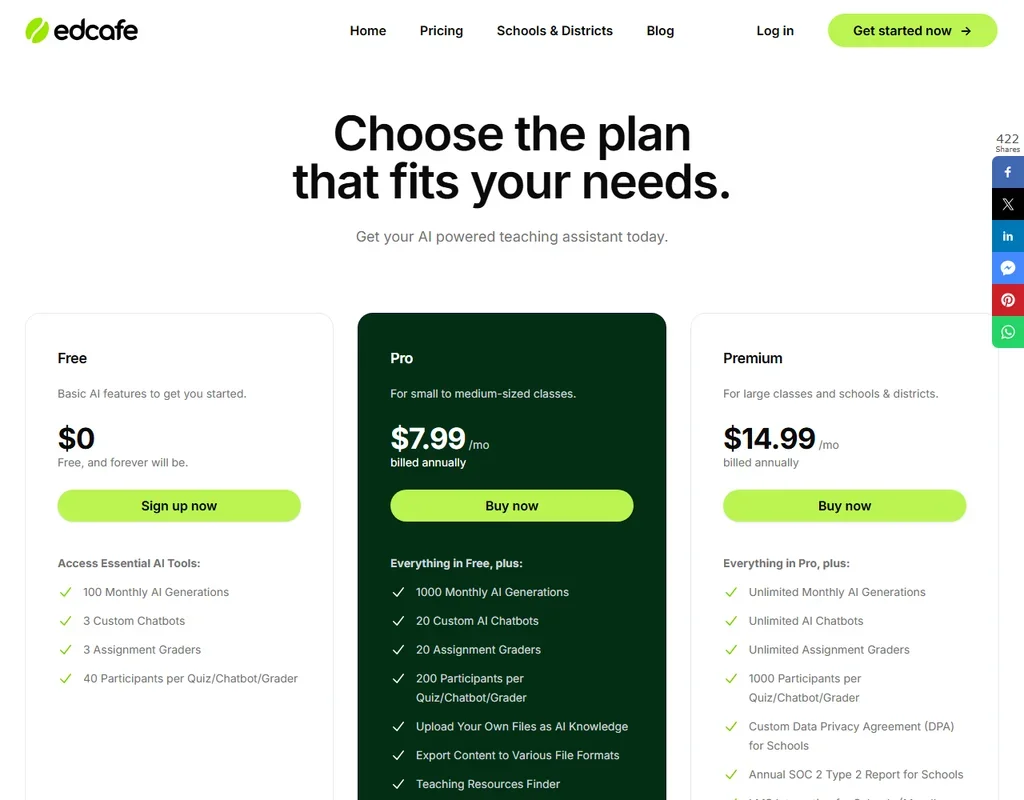
Edcafe pricing: what each plan gives
Edcafe pricing screenshot
Edcafe, Pricing

The Free plan costs nothing and has no time limit. It gives 100 AI generations a month, 3 custom chatbots, 3 assignment graders and 40 participants per activity. Uploading your own files, exporting to other formats, the resources finder, the slides generator, AI images and text to speech are not included.

Pro costs $7.99 a month billed annually. It raises the allowance to 1,000 AI generations a month, 20 chatbots, 20 graders and 200 participants per activity, and it adds file uploads, exports, the resources finder, slides, images and text to speech.

Premium costs $14.99 a month billed annually, for large classes and schools. It removes the limits on generations, chatbots and graders, allows 1,000 participants per activity and adds the school features above.

Schools & Districts is priced by quote through sales. Edcafe shows only annual billing for Pro and Premium, with no month-to-month price.

Privacy and security

Inknoe's trust center lists SOC 2, GDPR, US FERPA, US COPPA, ST4S and Singapore PDPA compliance, and it shows Edcafe's data hosted in the United States on Microsoft Azure and MongoDB Atlas. FERPA and COPPA are the two that matter most in US schools, since they cover student records and children's data. Schools on Premium can ask for a custom data privacy agreement and an annual SOC 2 Type 2 report. Edcafe does not state on its public pages whether content is used to train AI models.

Support is by email at help@edcafe.ai and through a help center, with priority support for schools and a public service status page.

Who Edcafe suits

Edcafe suits teachers who make a lot of class material and want it in one place: a quiz, a lesson plan, a reading activity and a deck from the same source, plus a chatbot or grader students can use. The free plan is generous enough to try it on a real unit, and the student data compliance gives a school something concrete to approve.

It suits less well teachers who mostly need a general assistant for everything else they write, since it is built around classroom material, or anyone who wants to pay month to month, since the paid plans are billed annually. Teachers who need slides or text to speech will also need Pro, as those are not on the free plan.

Frequently Asked Questions

Is Edcafe free?

Yes. The Free plan has no time limit and gives 100 AI generations a month, 3 custom chatbots, 3 assignment graders and up to 40 participants per activity. Slides, AI images, text to speech and file uploads need Pro.

How much does Edcafe Pro cost?

Pro is $7.99 a month billed annually, with 1,000 AI generations a month. Premium is $14.99 a month billed annually, with unlimited generations and school features.

Do students need an account?

Students join quizzes, chatbots and graded activities as participants without paid seats. The cap is 40 per activity on Free, 200 on Pro and 1,000 on Premium.

Is Edcafe FERPA and COPPA compliant?

The trust center of Inknoe, the company behind Edcafe, lists US FERPA and US COPPA compliance, along with SOC 2 and GDPR. Schools on Premium can also get a custom data privacy agreement.


Edcafe is featured in

Alternatives to Edcafe

See all Edcafe alternatives →

Other AI Productivity Tool options we've reviewed.

Glean logo

Glean

Large companies that want AI search and agents across their own apps, bought through a sales team

Unranked: no like-for-like peers
Free plan: noFree trial: yesAPI: yes
Price not publishedNo free plan
→
Asana logo

Asana

Teams that plan across many projects with goals, portfolios, timelines and intake forms

7.2
Rank #7 of 8 AI work management tools
Best:Privacy and trust8
Weakest:Working with others7
Free plan: yesFree trial: noAPI: yes
From $13.49Free plan
73% from published facts · checked 26 Sep
→
ChatGPT logo

ChatGPT

People who want images, voice, memory and deep research in one assistant, starting on a free plan

8.8
Rank #1 of 11 AI assistants
Best:What it can do10
Weakest:Privacy and trust6.2
Free plan: yesFree trial: noAPI: yes
From $8Free plan
100% from published facts · checked 16 Oct
→
Jamie logo

Jamie

Professionals who want private meeting notes with no recording kept, and storage and processing in Europe

6.8
Rank #11 of 17 AI meeting assistants
Best:Where it works10
Weakest:What it captures4.5
Keeps the meeting video: no
From $27 (€25)Free plan
87% from published facts · checked 21 Sep
→
Read AI logo

Read AI

Anyone who wants a personal meeting coach on the free plan, plus in-person meetings captured through the phone app

8.2
Rank #3 of 17 AI meeting assistants
Best:Where it works10
Weakest:Privacy and trust7.5
Keeps the meeting video: yes
From $19.75Free plan
98% from published facts · checked 21 Sep
→
monday logo

monday

Teams who want board-based projects with AI meeting notes and answers about their whole workspace built in

8.1
Rank #4 of 8 AI work management tools
Best:Privacy and trust10
Weakest:Working with others4
Free plan: yesFree trial: noAPI: yes
From $12Free plan
96% from published facts · checked 22 Sep
→

User reviews

Review Edcafe

Your rating

Reviews are moderated and appear once approved.






