What is vidIQ?
Chrome extension first. That's still the origin, and honestly it's still the most accurate description of what vidIQ does best. You install it, connect your channel, and it starts surfacing data alongside YouTube's native interface, keyword scores, competition levels, view velocity on competing videos. Over the past few years they've added an AI coach, a daily ideas feed, and some content repurposing tools on top of that core.
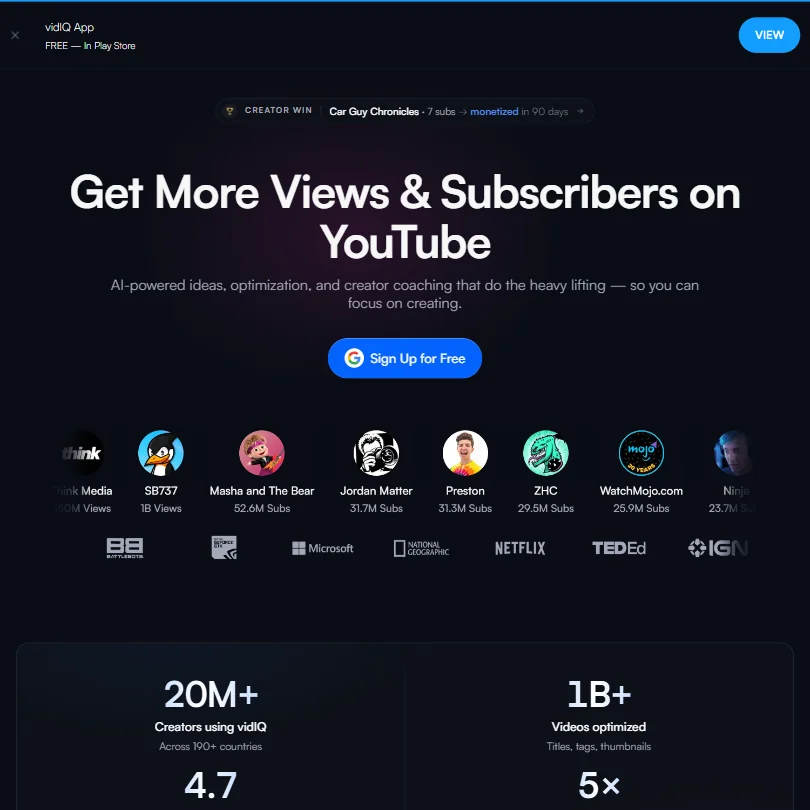
The current version also covers Instagram Reels, which is a genuine product move and not something most YouTube-focused competitors have done. TubeBuddy hasn't gone there. Morningfame certainly hasn't. That cross-platform angle is the clearest differentiator they have right now, and it's worth naming plainly.
Their free plan gives you 150 AI credits per month, access to niche trends, and a basic content ideas feed. Honestly, that's more than we expected. No free trial exists on the paid plans. You pay or you don't.
The Coaching plan at $399 per month includes actual human one-on-one sessions. That's a big number. We'll come back to it.
vidIQ Features: Clipping, Thumbnails & AI Capabilities
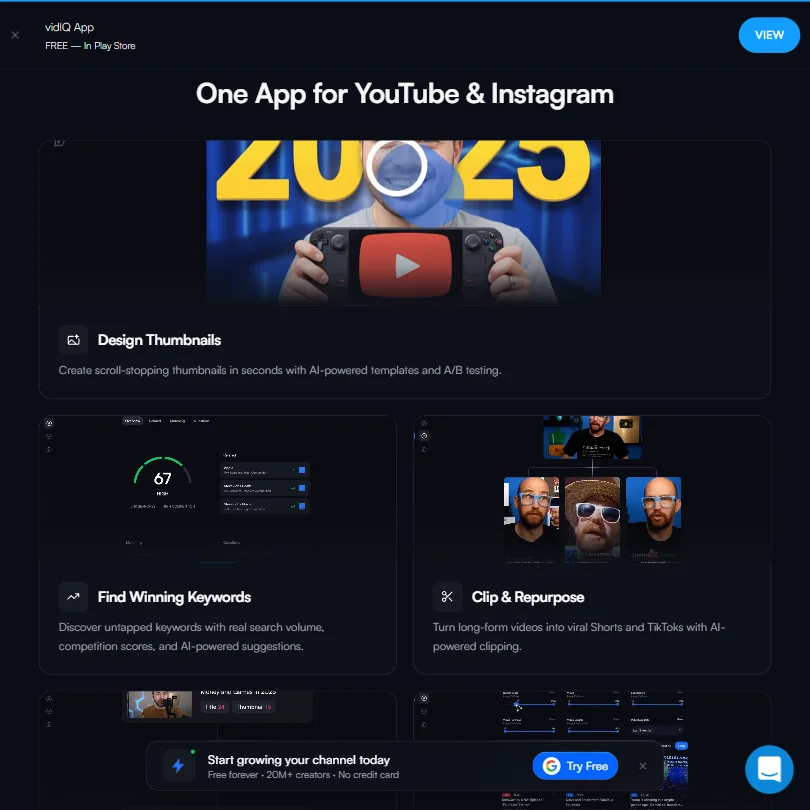
The AI-powered clipping tool is the flashiest recent addition. Takes long-form YouTube content and cuts it into Shorts-length clips. That's the pitch. The clips are generated, not curated. You still have to review them.
Thumbnail templates with AI assistance are included on paid plans. Not a full design suite. More of a templated workflow, and if you want real creative flexibility on thumbnails, you're still going to a separate tool. Canva handles that side better for most solo creators.
The bulk optimization dashboard pushes titles, tags, and descriptions to multiple videos from one place. Not glamorous. Exactly the kind of thing that matters if you're managing a larger channel or a small portfolio of channels.
What vidIQ doesn't do: no text-to-video, no AI avatars, no voice cloning. No screen recording or auto-subtitles either. It's an optimization and growth tool with some editing capability bolted on, and being clear about that before you buy matters more than most pricing pages suggest.
The keyword research function pulls real search volume and assigns competition scores. That's the product's original value. Finding low-competition terms that actually have volume is harder than it sounds.
vidIQ Clips & Thumbnails: What You Get
vidIQ doesn't generate video from scratch. What it produces are clips from your existing footage and thumbnail images from templates.
Thumbnail output quality depends entirely on the template you start with. The AI assistance adjusts text and some layout elements. You're getting a filled-in frame, not a designed thumbnail.
No documentation on export resolutions is stated on the site. That's a gap. Most tools at this price point at least list specs. Watermark policy on the free plan is also not stated publicly. Minor frustration, but a real one when you're trying to figure out whether the free tier is genuinely usable.
Is vidIQ Easy to Use?
The Chrome extension setup is fast. Install it, connect your Google account, and it starts showing data on top of YouTube's existing interface. That part, fine.
The web dashboard is a different story. There's a lot on screen at once: score overlays, keyword difficulty indicators, search volume numbers, and competitor data. The onboarding doesn't do much to sequence the learning. You're largely left to figure out which numbers matter first.
The AI coach provides personalized growth recommendations.
Mobile apps exist for iOS and Android. Functionality is limited compared to the web dashboard.
vidIQ Pricing: Is It Worth It for Creators & Teams?
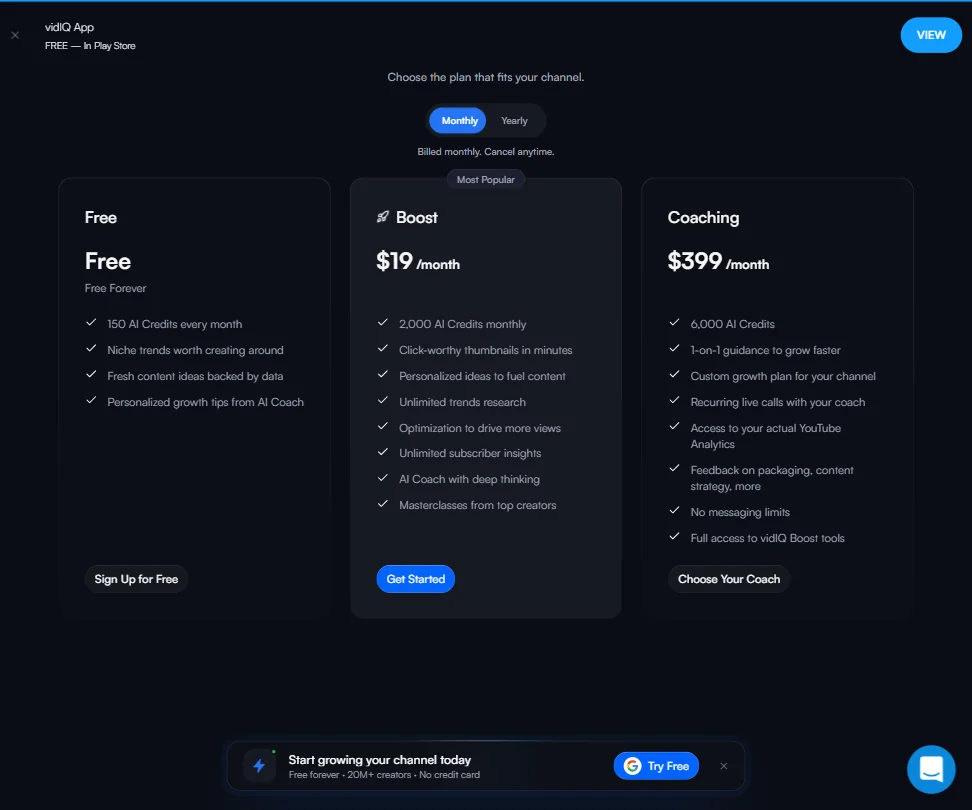
Three public tiers plus Enterprise. Free at $0, Boost at $19 per month on a monthly billing cycle, and Coaching at $399 per month. Enterprise is custom pricing, contact sales. The screenshot shows monthly billing with a yearly option available, and monthly plans cancel anytime.
The Boost plan at $19 per month lands just above the category median for YouTube SEO tools. Not expensive. Not particularly cheap either. The Boost plan includes 2,000 AI credits monthly, click-worthy thumbnail generation, personalized content ideas, unlimited trends research, unlimited subscriber insights, AI Coach with deep thinking, and Masterclasses from top creators.
The jump from $19 to $399 is enormous. It exists because Coaching includes human sessions, not just more software features. The logic is clear, but most creators probably won't get enough from those sessions to justify the number. The Coaching tier includes 6,000 AI credits, 1-on-1 guidance, a custom growth plan, recurring live calls, and access to your actual YouTube Analytics data, plus no messaging limits.
No refund policy is publicly stated. That's a problem. At $399 per month, you'd want some assurance before committing.
The free plan is legitimately usable. 150 AI credits per month and niche trend access is more than a teaser. For a hobbyist creator who just wants keyword guidance, the free tier might be enough to stay on indefinitely.
vidIQ vs TubeBuddy: Which YouTube Growth Tool Is Better?
TubeBuddy is the natural comparison. Both are Chrome extensions, both focus on YouTube keyword research and channel optimization.
TubeBuddy's strength is A/B testing thumbnails and titles natively inside YouTube Studio. vidIQ doesn't offer that. vidIQ's edge is the AI content ideas feed and Instagram Reels support, which TubeBuddy hasn't matched. If you publish on both platforms, that cross-platform angle is a real differentiator and not a minor one.
Price-wise, they're comparable at the entry level. The real divergence is vidIQ's coaching tier. TubeBuddy doesn't have an equivalent for that.
We'd call it a coin flip for most creators at the keyword research level. The tiebreaker is which secondary features you actually use.
Who Should Use vidIQ? (And Who Shouldn't)
Small YouTube channels trying to figure out why their videos aren't getting found. That's the core fit. The keyword tools and AI ideas feed are genuinely useful at that stage, and the free plan covers the basics without asking for a credit card.
Creators active on Instagram Reels who want one tool covering both platforms. There's a real case here that simply doesn't exist with most competitors.
Content teams running multiple channels. The bulk optimization dashboard and Enterprise team features are practical for that workflow. Not flashy. Practical.
Anyone who needs to actually produce video from scratch. vidIQ won't help there. And anyone who prioritizes thumbnail A/B testing should probably start with TubeBuddy first.
The $399 Coaching tier. That's a commitment that requires more diligence than most creators do before buying.
vidIQ Review Verdict
vidIQ does the YouTube optimization job it was designed for. The keyword research is solid, the Chrome extension is fast and well-integrated, and the AI ideas feed is a genuine daily-use feature for active creators. That's a coherent product a lot of people find useful.
The problems are real though. The missing refund policy at the higher tiers is a genuine issue. The absence of export specs and watermark documentation is a consistent irritant. The clipping feature, while present, doesn't feel finished. Not great.
The Coaching tier needs to earn its $399 price with more transparent outcome data. A plan at that level should come with clearer proof of what the investment actually returns.
For YouTube-focused creators who want keyword research and growth suggestions, vidIQ is a reasonable choice. It's not the most impressive tool in the category on raw feature count. Just go in knowing what it is and what it isn't.
Frequently Asked Questions
Does vidIQ have a free plan, and is it actually useful?
Yes, and more useful than most free tiers in this category. You get 150 AI credits per month, niche trends access, and the basic content ideas feed. For a new creator who just wants to understand keyword research before committing money, it's enough to get started. The limits become real once you want historical data or deeper competitor analysis, but the free plan isn't a trap. It works.
How does vidIQ's AI coach actually work?
The AI coach pulls from your channel data and suggests growth actions based on where your channel is underperforming. Think of it as a feedback loop built on your own analytics, not a general tips generator. The human coaching on the $399 Coaching plan is a separate thing entirely, those are actual scheduled sessions with real people.
Is vidIQ worth it compared to TubeBuddy?
Depends entirely on what you're trying to do. For thumbnail A/B testing inside YouTube Studio, TubeBuddy has the advantage. For Instagram Reels support and the daily AI ideas feed, vidIQ is ahead. At the keyword research level, they're close enough that most creators won't feel a meaningful difference in results. Pick based on the secondary features, not the core keyword function.