
What is TaskMagic?
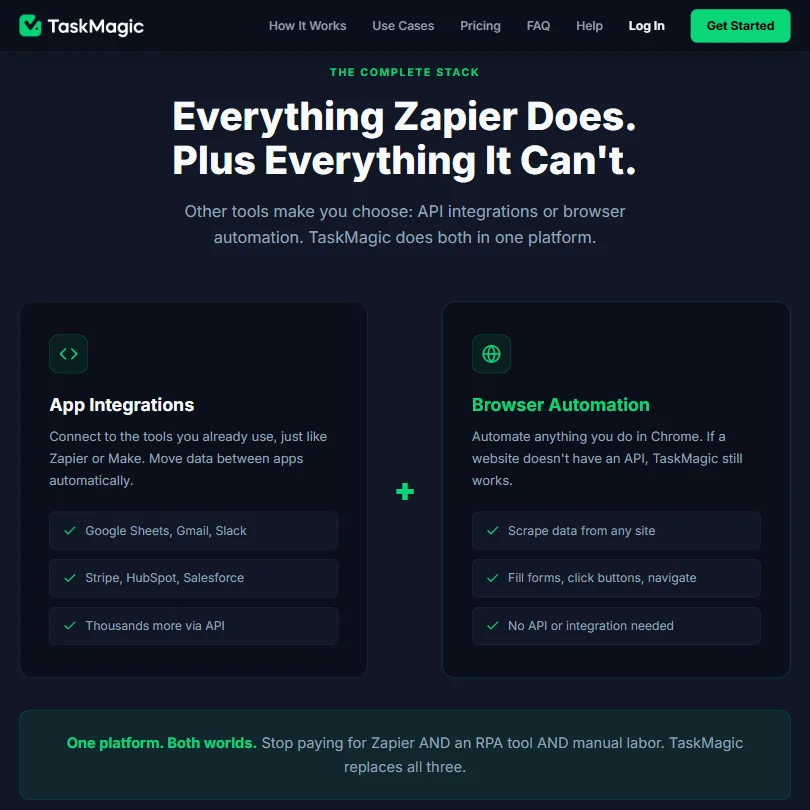
No-code automation out of Los Angeles. TaskMagic combines two things most tools keep separate: API-based app integrations, the part Zapier owns, and browser automation, the part that belongs to RPA tools. Describe what you want in plain English, the AI generates a step-by-step plan, you review it, then it runs on a schedule or on demand.

That pairing is the actual story here. TaskMagic does both API connections and browser automation from one interface, which matters when the site you need to automate has no API. Not many tools at this price point offer that combination. Bardeen and Browserflow get close on the browser side, but neither one handles the full app-integration layer the way TaskMagic attempts to.
The homepage leans hard into the ambition. An Inc. 5000 badge. Microsoft and Salesforce logos in the trust bar. The site currently claims more than 30,000 users and cites 4,000-plus paying customers. We cross-referenced those figures with what third-party sources actually confirm. Honestly, the user count is plausible given the Product Hunt traction and the community size. The enterprise logo placement is doing more work than the context justifies.
TaskMagic Features: Workflows, AI Agents & Automation Capabilities
The core loop is simple enough. You describe a goal. The AI breaks it into discrete steps. You approve the plan before anything runs. Then it executes, on a schedule, via webhook, form submission, or on-demand trigger. The visual builder lets you edit individual steps after the AI's first draft, so you're not locked into whatever it generates.
Conditional logic is editable post-build. Data transformation between app actions and browser steps is supported, which is the part that makes real workflows function rather than just shuffle data from one place to another. Integrations include Google Sheets, Slack, and HubSpot, plus Stripe and Salesforce. Via API the docs claim broader coverage, and the core business app set looks solid even if we can't verify the full count independently.
TaskMagic does document error handling, specifically an Allow Error option that lets an automation continue when a selected step fails, plus a No Error on Failure setting on HTTP actions. Execution logs are covered too: Traffic Control shows in-progress, completed, failed, and queued runs, with step-level detail available on individual runs. Failed runs link out to logs that identify where execution stalled. Custom JavaScript is also documented, running async scripts in the browser-page context and returning values for later steps.
Not great that none of this is surfaced prominently in marketing materials. Users have to find it.
TaskMagic Automation Power: How Complex Can Your Workflows Get?
Browser automation is where TaskMagic earns separation from pure-API platforms. It can scrape data, fill forms, click through navigation flows, all without an API key from the target site. For solopreneurs pulling competitor pricing or agencies running repetitive web tasks, that's the practical reason to look here instead of Zapier.
The more complex end of the picture is less settled. Conditional logic works. Error handling has more depth than it first appears, as noted above. But publicly available information on loop behavior and multi-branch recovery is thin. Anyone building workflows that need to fail and recover cleanly will want to probe the documentation and the community before committing, not after. That's a reasonable ask when the help center has been described as basic by multiple Reddit users across 2024 and 2025 threads.
We don't buy the idea that the documentation gaps are trivial. They're improving, but they're still real.
TaskMagic AI Agent Capabilities: What Can It Actually Do Autonomously?
The "AI agent" label is doing heavy lifting. What TaskMagic actually offers is AI-assisted workflow construction: describe the goal, the model generates the steps, you approve, and from that point it runs deterministically. It doesn't self-correct mid-run. It doesn't adapt if a page element shifts or a site changes its layout. It builds the plan once and executes it.
That's useful. It's not what "agent" implies in 2025. Fair.
The human-in-the-loop design is genuinely sensible. Requiring approval before the plan builds anything is the right call for automation work where a bad step can write data somewhere it shouldn't, or submit a form you didn't mean to submit. The review gate before execution is a feature, not a limitation, even if the marketing frames the AI piece as more autonomous than it is.
Is TaskMagic Easy to Set Up Without Code?
For non-technical users, the plain-English entry point removes a real barrier. You don't need to understand data schemas or node-based logic to start. The AI handles the structural thinking on the first pass, and simple workflows seem to come together without friction, based on what we kept seeing in user reports from Product Hunt and Reddit through early 2025.
Debugging is a different story. When a workflow breaks, the step-level logs in Traffic Control do give you somewhere to start, but getting from the log to a fix requires understanding what the steps were doing in the first place. The 4,000-member community helps. Community support and solid documentation are not the same thing, though, and multiple users have noted the help center doesn't close that gap.
TaskMagic also supports custom JavaScript for users who do have technical chops. That's a meaningful ceiling-raiser for the tool's actual power, even if most of the marketing skips past it.
TaskMagic pricing: what each plan gives

The Solo plan runs $29 a month and includes 5,000 credits monthly. Full access to the builder, unlimited connections for both app integrations and browser automations, unlimited active flows, three tables, and a single seat. MCP access is locked to Pro at $79 a month. Bring-your-own-API-key unlocks at Business, which runs $119 a month based on the pricing tier shown in the plan selector.
No free plan. TaskMagic advertises a 7-day free trial with 1,000 credits. No refund policy listed on the pricing page. That last part is a real problem.
Zapier has a free tier. Make gives you 1,000 operations a month before you pay anything. Both let you test the actual product before committing. TaskMagic asks you to spend $29 on faith, with no published guarantee to soften the risk. In 2025, that framing is a harder sell than it needs to be, especially when the G2 and Capterra review presence is thin enough to be nearly useless as a cross-reference.
TaskMagic vs Zapier: Which Automation Platform Wins?
On integrations, documentation quality, reliability track record, and free access, Zapier wins. Not close. The ecosystem is larger, the docs are deeper, and the product has years of at-scale user reports behind it.
The comparison only gets interesting in one specific place. Zapier doesn't do browser automation. At all. If the site you need to work with has no API, Zapier can't help you. TaskMagic can. That browser automation layer is where TaskMagic's actual competitive case lives, not in the feature checklist overall.
The honest question isn't which tool is better in general. It's whether you need to automate a site that has no API. If yes, look at TaskMagic seriously. If you're connecting apps that already expose clean APIs, Zapier's stability and ecosystem are the safer bet at a comparable spend.
Who Should Use TaskMagic? (And Who Shouldn't)
Solopreneurs doing repetitive browser tasks. That's the core fit. Agencies pulling structured data from sites without APIs. Small teams that want both app integrations and web automation without managing two separate tools.
Enterprise teams who need audit trails, documented error-recovery behavior, and a proven reliability record. Not the right tool yet, not on current public evidence. The error handling documentation exists, but the broader operational confidence that enterprise evaluation requires isn't there.
TaskMagic Review Verdict
The core idea is legitimate. Combining API integrations with browser automation in a plain-English interface targets a real gap, and it's a gap that Zapier, Make, and most of their competitors don't address. User reports suggest it works for the workflows it handles well.
The gaps are real too. No free trial. No published refund terms. A help center that users consistently describe as thin. For $29 a month with only a 7-day trial period, the trust ask is high relative to what they've published publicly. The error handling and logging capabilities are more developed than first appearances suggest, which is a point in their favor. But surfacing those capabilities requires digging, and most prospective users won't dig before they decide.
A targeted recommendation for solopreneurs and small agencies with a specific browser-automation need. A harder pass for anyone who needs operational confidence before the first payment clears.
Frequently Asked Questions
Does TaskMagic have a free plan or free trial?
No free plan, though a 7-day free trial with 1,000 credits is advertised on the pricing page. The entry point is the Solo plan at $29 a month for 5,000 credits. There's no published refund policy to fall back on if it doesn't fit, which is a friction point worth knowing before you commit.
How does TaskMagic handle websites that don't have an API?
Browser automation. TaskMagic interacts directly with any website, clicking through navigation, scraping data, filling forms, without needing an API key from the target site. That's the capability that separates it from pure-API tools like Zapier, and it's the main reason to consider it for workflows involving sites that don't offer developer access.
Is TaskMagic suitable for non-technical users?
The plain-English prompt interface removes a real barrier for simple workflows. You describe the goal, the AI generates a step plan, you approve before anything runs. That flow works. Debugging and customizing complex workflows will push you toward manual step editing and the community forum, since the help center has limited depth. Technical users can also access custom JavaScript steps, which extends the ceiling considerably.







