Stockimg AI is a broad AI design platform covering logos, product photos, avatars, posters and social posts, with native scheduling to five social networks built in. It has a free account with limited, unquantified features, so what decides whether it suits you is whether the paid monthly plans give you enough credits, and whether the custom Enterprise tier's model training and character consistency matter to your use case.

What is Stockimg AI?
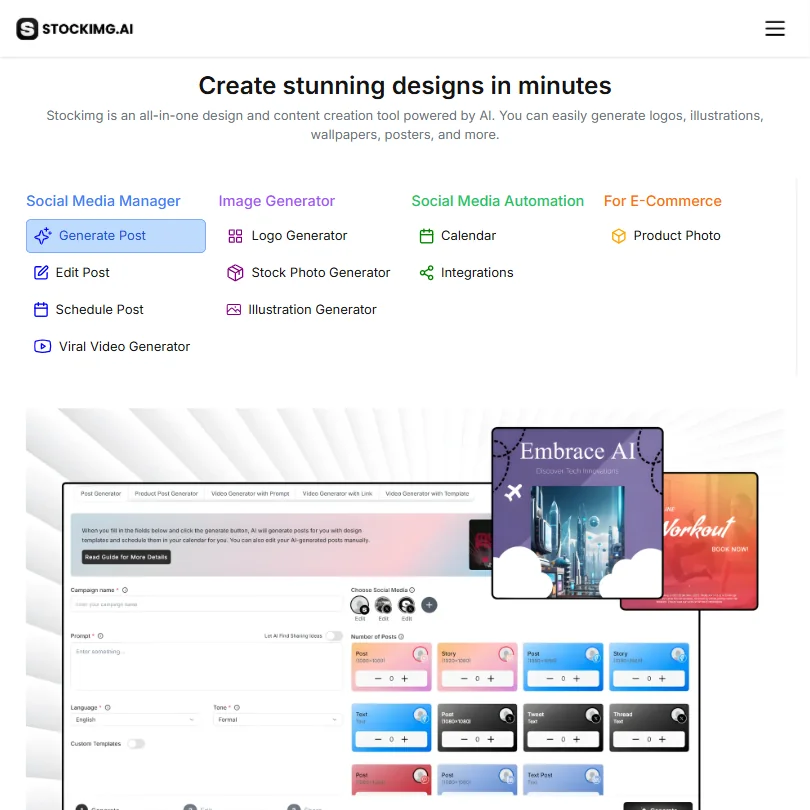
Stockimg AI, Inc. runs as a web app, with iOS and Android apps also available. The product spans many separate generators, logos, product photos, avatars, posters, wallpapers and short-form video, each offering a library of named style models to choose from.
What Stockimg AI is built for
A dedicated AI Product Photo Generator turns an uploaded product into finished photos, and a separate Avatar Generator produces styled headshots from your own photo. Training a persistent visual model on your own images, and keeping a character consistent across separate generations, are both reserved for the custom Enterprise plan rather than the self-serve Starter, Premium or Ultra tiers.
The Brand Kit Generator stores on-brand templates, fonts and colors, and separate category generators cover posters, wallpapers and social posts from preset layouts.
Stockimg AI lets you generate 4 logos or 4 product photos in a single run, and a public API adds batch operations for developers. There is no shared team workspace: the plan and Enterprise pages' "team" language does not correspond to a shipped multi-seat feature.
Working with other people
Stockimg AI runs on the web, iOS and Android. Support runs through email and a help center, and the option to book an online meeting for personalized help.
Stockimg AI pricing: what each plan gives
A free account is available with limited features; the amount is not quantified.
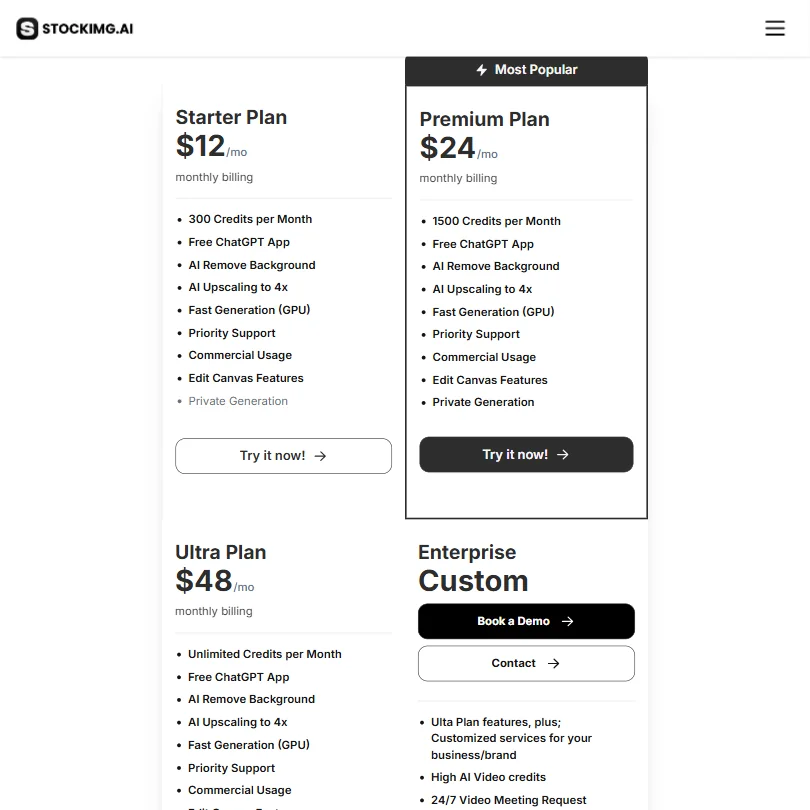
Starter costs $12 a month ($10 a month billed yearly) and includes 300 credits a month. Premium costs $24 a month ($20 a month billed yearly). Ultra costs $48 a month ($40 a month billed yearly). A separate Enterprise plan is priced by contact rather than a published figure.
Commercial use is available only to paying subscribers: "if you are subscriber, you will own the commercial and copyright rights to all your creations."
Rights and privacy
Stockimg AI assigns full ownership to the creator: "you own all Assets you create with the Services and... we hereby assign to you all rights, title and interest in and to such Assets for your personal or commercial use." Its indemnity clause runs the other way, from you to Stockimg AI, not the reverse.
Private Generation is included on every paid plan.
Who Stockimg AI suits
Stockimg AI suits someone who wants one platform for logos, product photos, avatars and social content, with vector export and built-in scheduling to Facebook, Instagram, LinkedIn, Pinterest and X.
It suits less well anyone who needs a consistent character across images or a trained private model on a self-serve plan, since both are reserved for the custom Enterprise tier, or anyone who wants commercial rights without paying, since that requires an active subscription.
Screenshots
How Stockimg AI compares
Stockimg AI scores 7.8 out of 10 among the brand and product image tools we rate. These three do the same job and are the closest to it, compared on what each vendor publishes.
exactly.ai
Stockimg AI has a flat $12 a month starting price; exactly.ai instead charges only when you download a licensed image and gives 5 free credits a day. Stockimg stores your brand colours, fonts and logos and generates headshots from your own photo, neither of which exactly.ai offers. Exactly.ai does not train on what you upload and keeps your trained style private.
Pick exactly.ai if you want training data kept private with pay-per-download pricing.
Pick Stockimg AI if you want stored brand colours, fonts and on-model headshots.
Astria
Stockimg AI publishes a $12 a month starting price; Astria's price sits behind a sign-in wall instead. Stockimg stores your brand colours, fonts and logos and renders readable text inside a design, neither of which Astria offers. Astria and Stockimg both train a private model on your pictures, put your product into a new scene, and expose a public API, but only Stockimg publishes or schedules the result to social networks.
Pick Astria if you want character consistency without an enterprise-only paywall.
Pick Stockimg AI if you want a published price and social scheduling built in.
PromeAI
Stockimg AI starts at $12 a month against PromeAI's $19, and both have a free plan. Stockimg stores your brand colours, fonts and logos, renders readable text in a design, and schedules posts to social networks, none of which PromeAI offers. PromeAI instead gives you a shared team workspace on its Pro plan, which Stockimg does not have.
Pick PromeAI if you need a shared team workspace for collaboration.
Pick Stockimg AI if you want brand colours stored and posts scheduled automatically.
Frequently Asked Questions
How much does Stockimg AI cost?
Starter costs $12 a month ($10 a month billed yearly), Premium costs $24 a month ($20 a month billed yearly), and Ultra costs $48 a month ($40 a month billed yearly). A free account with limited features is also available, and a custom Enterprise plan is priced by contact.
Does Stockimg AI generate product photos?
Yes. The AI Product Photo Generator turns an uploaded product into finished photos automatically, one of many category generators alongside logos, avatars, posters and social video.
Can I train a private model or keep a character consistent in Stockimg AI?
Only on the custom Enterprise plan. Both "training the on-demand visual model" and a "consistent visual character model" are Enterprise-only capabilities, not available on Starter, Premium or Ultra.
Who owns what I make with Stockimg AI?
You do. Stockimg AI's terms assign you all rights to what you create, and commercial and copyright rights on your creations, though this is limited to paying subscribers rather than the free account.