Every score is worked out from the vendor's own pages · How we score →Disclosure
SAASINSPECTOR
Spline logo

Spline Review

Spline is a 3D design editor with AI text and image to 3D built in, made for interactive scenes on websites and in apps. It is best at turning a prompt or a picture into a textured model you can light, animate and publish to the web, iOS or Android.

Visit Spline →From $15/mo

Research-based review. Features and prices are checked on the vendor's own website, and the score is worked out from those facts. We haven't tested it hands-on yet.

The verdict

Worth paying for if you design interactive 3D for websites and apps and want AI generation in the editor; the catch is no rigging, no engine plugins and uploads shared for training.

Pros

  • Scenes export to the web and natively to iOS and Android.
  • AI textures include base colour, metallic-roughness and normal maps.
  • Spline holds SOC 2 and ISO 27001 and fully complies with the GDPR.
  • The credit cost of a generation shows before you send it.

Cons

  • The free plan includes no AI credits, so it cannot generate AI 3D models.
  • The privacy policy allows sharing your uploads with AI companies to train their models.
  • Spline does not rig models and has no game engine or 3D tool plugins.
From $15/moFree plan YesFree trial No
6.2/10

Spec Score

Spline against 6 AI 3D model generators
#5
of 6 AI 3D model generators
-1.3
vs the average
77%
from published facts
Ahead of other AI 3D model generators
Pricing+1.7
Behind other AI 3D model generators
Files and tools-3.3What it makes-2.4Privacy and trust-1.0
Every criterion
Tap a row for the facts
What it makes5.8
-2.4 vs 8.2 avg23.2 of 40 points
Rigs a character for animationno0 / 2
Animates a modelyes2 / 2
Builds one model from several viewsnot published, half points0.8 / 1.5
PBR materialsyes1.5 / 1.5
Quad topologynot published, half points0.8 / 1.5
You set the polygon countnot published, half points0.8 / 1.5
Why these numbers

Rigs a character for animation: Spline imports already-rigged FBX models but does not rig models itself.

Animates a model: Keyframe and state-based animation in the Spline editor, not AI motion.

Files and tools4.5
-3.3 vs 7.8 avg9 of 20 points
File formats it exports4 formats2.5 / 4
Plugins for 3D apps and game engines0 plugins0 / 4
Where it runs3 platforms2 / 2
Why these numbers

File formats it exports: Counted from export_formats. Also web embeds, code, iOS and Android exports.

Plugins for 3D apps and game engines: Counted from engine_plugins. Spline integrates with web tools such as Webflow and Framer, not game engines or 3D tools.

Where it runs: Counted from platforms. Browser editor plus desktop apps. Scenes can be exported natively to iOS and Android.

Pricing9.0
+1.7 vs 7.3 avg22.5 of 25 points
Cheapest paid plan, monthly$154 / 4
Free planyes2.5 / 2.5
Free models may be used commerciallynot published, half points1 / 2
Paid models stay privateyes1.5 / 1.5
Why these numbers

Cheapest paid plan, monthly: Per seat, monthly billing.

Paid models stay private: Files are shared or published only when you choose.

Privacy and trust4.8
-1.0 vs 5.8 avg7.2 of 15 points
Does not train AI on what you uploadfalse0 / 4
SOC 2yes1.5 / 1.5
GDPRyes2 / 2
Ways to reach support2 support channels1.3 / 2.5
Why these numbers

Does not train AI on what you upload: The privacy policy allows sharing your uploads and usage data with AI companies to train their models.

SOC 2: Reports available on request through the Trust Center.

Ways to reach support: Counted from support_channels. Documentation at docs.spline.design; priority support on Enterprise.

yesnonot published average for AI 3D model generators
How the Spec Score works

Scored from what Spline publishes on its own site. Not a hands-on test.

Compared with 6 AI 3D model generators. Facts checked 31 Oct 2026.

A fact the vendor does not publish gets half the points, or the typical value for a number, and says so. It never counts as a no. How we score.

Spline is a 3D design editor for building interactive 3D scenes for websites and apps, with AI generation added on top: text and image to 3D, and AI textures with PBR maps. Whether it suits you depends on what you are making: Spline is built for designing and publishing interactive scenes, it does not rig models or plug into game engines, and its AI generation needs a paid seat.
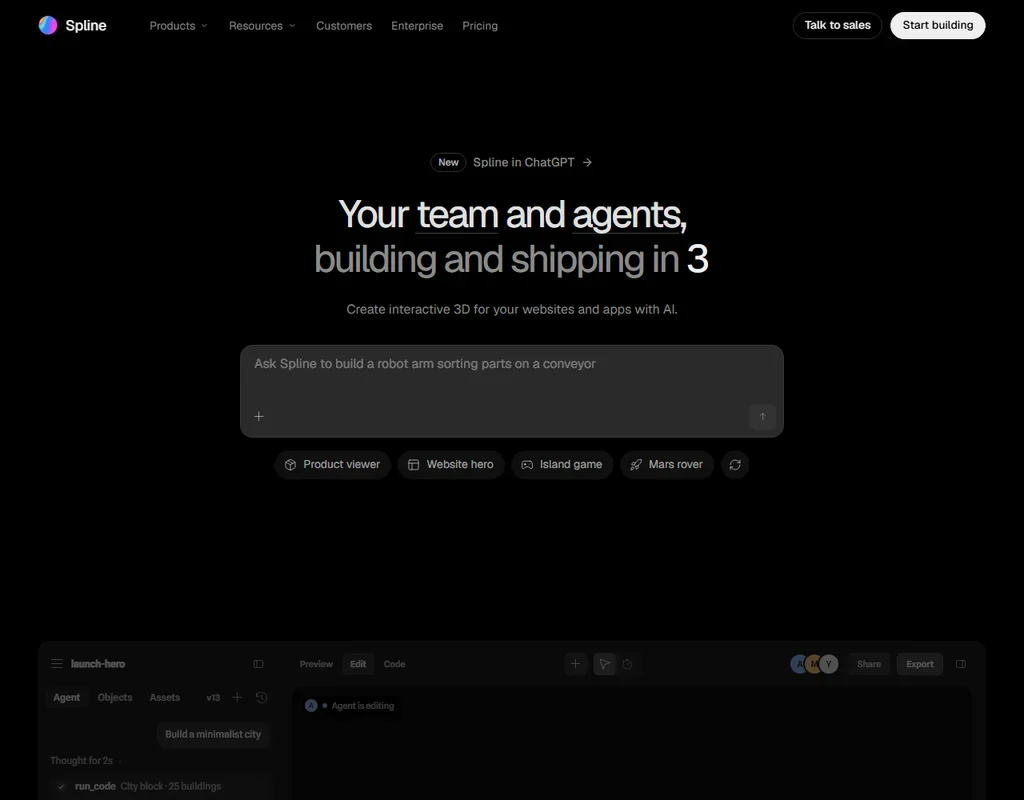
Spline homepage screenshot
Spline, Homepage

What is Spline?

Spline is a collaborative 3D design editor. It runs in the browser, with desktop apps for Mac and Windows, and scenes can be exported natively to iOS and Android as well as to the web.

The editor is the core product: you light, animate and publish scenes in it. The AI features generate models and textures inside that editor, and a generated model opens in Spline to light, animate and publish.

Making 3D models with Spline

Describe an object or drop in an image, and Spline turns it into a textured 3D model. Image to 3D accepts a photo, a sketch or a screenshot. AI 3D generation runs on AI credits, and the free plan includes none, so generation starts on a paid seat.

A generation is billed in two steps, first image previews and then the 3D model, and the credit cost shows before you send it. AI texture generation, on paid plans, puts PBR materials on the mesh: base colour, metallic-roughness and normal maps.

Animation in Spline is keyframe and state-based animation in the editor, not AI motion. Spline does not rig models itself, though it imports FBX models that are already rigged.

Scenes export as GLTF, GLB, STL for 3D printing and USDZ for iOS AR, and USDZ, STL and textured GLTF need Pro. Beyond files, Spline exports web embeds, code, and iOS and Android builds. Spline integrates with web tools such as Webflow and Framer, and embeds work on platforms like Notion; it does not connect to game engines or 3D tools.

Working with other people

Spline is collaborative, with paid plans priced per seat and unlimited file viewers on every plan. On Pro and above, unlimited variables, APIs and webhooks connect scenes to outside data. An MCP server lets AI agents work with Spline, with 20 MCP tool calls a day on the free plan.

Spline pricing: what each plan gives
Spline pricing screenshot
Spline, Pricing

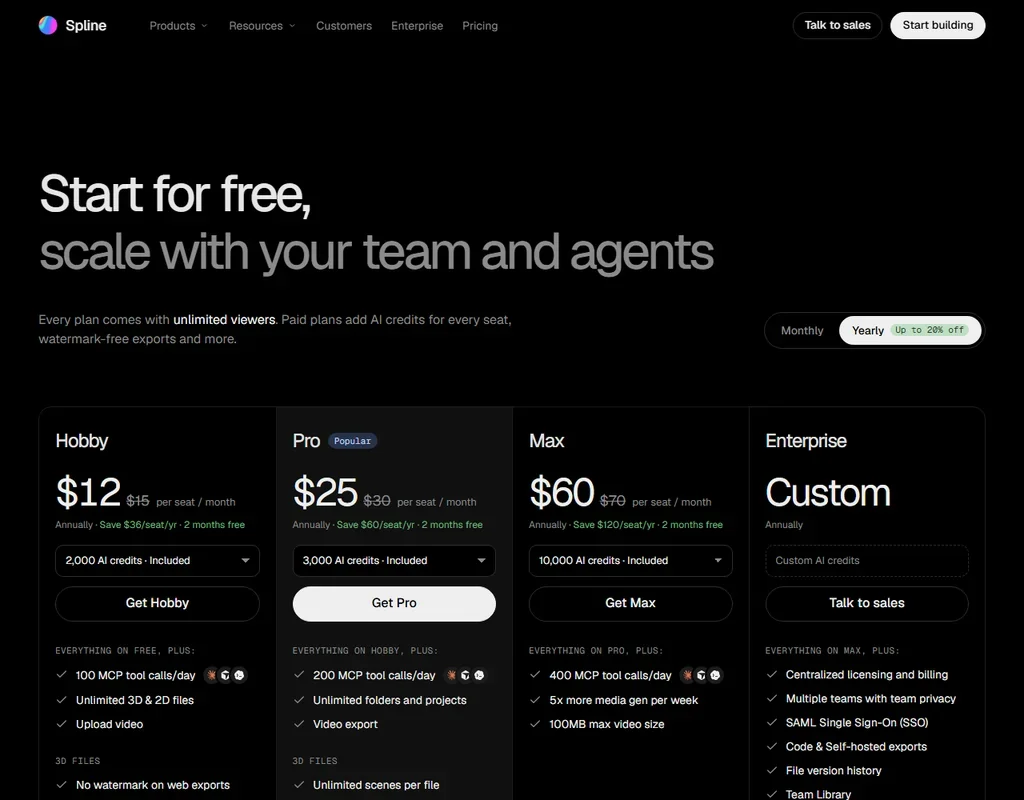
The free plan costs nothing and includes no AI credits, so it cannot generate AI 3D models. It gives limited personal files, unlimited file viewers, web exports with a watermark and 20 MCP tool calls a day.

Hobby costs $15 a seat a month, or $12 billed yearly, with 2,000 AI credits a seat each month. Pro costs $30 a seat a month, or $25 billed yearly, with 3,000 AI credits a seat, USDZ, STL and textured GLTF export, and the APIs and webhooks. Max costs $70 a seat a month, or $60 billed yearly, with 10,000 AI credits a seat.

Extra AI credits cost $5 a month for 1,000 per seat, and credits do not roll over. Enterprise is priced on request.

Privacy and security

Spline's privacy policy allows sharing your uploads and usage data with AI companies to train their models; in its words, Spline "may share, sell, license, or otherwise make available your Personal Information". Files are shared or published only when you choose, and you keep ownership of what you make.

Spline holds SOC 2 and ISO 27001, with reports available on request through its Trust Center, and it fully complies with the GDPR. Support runs by email at help@spline.design, with documentation and priority support on Enterprise.

Who Spline suits

Spline suits designers building interactive 3D for websites and apps who want AI generation inside the editor they design in, with PBR textures, keyframe animation and export to the web, iOS and Android. Teams get seats, unlimited viewers, APIs on Pro and SOC 2 reports.

It suits less well anyone who needs a rigged character or an asset for a game engine, since Spline does not rig and has no engine or 3D tool plugins. The free plan has no AI credits at all, and the privacy policy allows uploads to be shared with AI companies for training.

Frequently Asked Questions

How much does Spline cost?

Spline is free without AI credits. Hobby is $15 a seat a month or $12 billed yearly, Pro is $30 or $25, and Max is $70 or $60. Extra AI credits cost $5 a month for 1,000 per seat.

Can Spline generate 3D models from text?

Yes, on paid plans. Describe an object or drop in an image and Spline turns it into a textured 3D model, billed in AI credits with the cost shown before you send.

Can I export Spline models to a game engine?

Spline exports GLTF, GLB, STL and USDZ files, with USDZ, STL and textured GLTF on Pro. It integrates with web tools such as Webflow and Framer rather than with game engines or 3D tools.

Does Spline use my uploads to train AI?

Its privacy policy allows sharing your uploads and usage data with AI companies to train their models.

Spline is featured in

Alternatives to Spline

See all Spline alternatives →

Other AI Design Tool options we've reviewed.

Figma logo

Figma

Product teams wanting one shared workspace for design systems, prototypes and developer handoff

8.1
Rank #2 of 8 AI UI design tools
Best:Teams and platforms10
Weakest:What you can make7
Free plan: yesFree trial: noAPI: yes
Price not publishedFree plan
96% from published facts · checked 19 Sep
→
Canva logo

Canva

Small teams making branded social posts, print and video without hiring a designer

7.8
Rank #3 of 8 AI graphic design tools
Best:Teams and platforms10
Weakest:What you can make7
Free plan: yesFree trial: yesAPI: yes
From $18Free plan
90% from published facts · checked 19 Sep
→
Visme logo

Visme

Brand teams producing polished decks and reports that export to almost any format

6.9
Rank #3 of 5 AI presentation makers
Best:Workflow and output7.2
Weakest:Teams and platforms5.5
Free plan: yesFree trial: noAPI: no
From $29Free plan
85% from published facts · checked 26 Sep
→
Adobe Firefly logo

Adobe Firefly

Creative Cloud users who want generation inside the apps they already use, from a vendor that does not train on their content

8.1
Rank #1 of 7 AI image generators
Best:Rights and privacy9.2
Weakest:Openness and support3
Weights published under a named licence: noDoes not train on what you make: yes
From $9.99Free plan
78% from published facts · checked 8 Oct
→
Krea logo

Krea

Designers who want one of the broadest model menus, plus a node canvas, an AI agent and an API

9.4
Rank #1 of 13 multi-model AI platforms
Best:For video10
Weakest:Privacy and trust7.2
SOC 2: yesOffers Veo 3.1: yesOffers Nano Banana Pro: yes
From $9Free plan
93% from published facts · checked 28 Oct
→
Wix logo

Wix

Small business owners building a site and store themselves, with a phone line for help

8.0
Rank #1 of 7 AI website builders
Best:Teams and platforms9.5
Weakest:Pricing7
Free plan: yesFree trial: noAPI: yes
From $17Free plan
85% from published facts · checked 19 Sep
→

User reviews

Review Spline

Your rating

Reviews are moderated and appear once approved.