Seven dollars and fifty cents a month for unlimited output. Rytr is a solid budget tool that knows exactly what it is. It just has a ceiling, and that ceiling comes up faster than the homepage suggests.
What is Rytr?
Launched in 2021, Rytr is a web-based AI writing tool built around a library of 40-plus templates covering short-form content needs. Product descriptions, email copy, social captions, CTAs, SEO meta titles. That's the territory. It runs on a proprietary fine-tuned model built on GPT architecture, and it's available as a web app with a Chrome extension that works across other websites.
The company is remote-based out of India, which goes some way toward explaining the price point. They're not burning San Francisco rent on the pricing model. Eight million registered users is a real number, not a rounding exercise.
The tool targets freelancers, marketers, and small business owners who need a volume of short-form content without paying Jasper AI prices. That's the positioning. Honestly, it holds up better than we expected.
Rytr Features: What You Actually Get

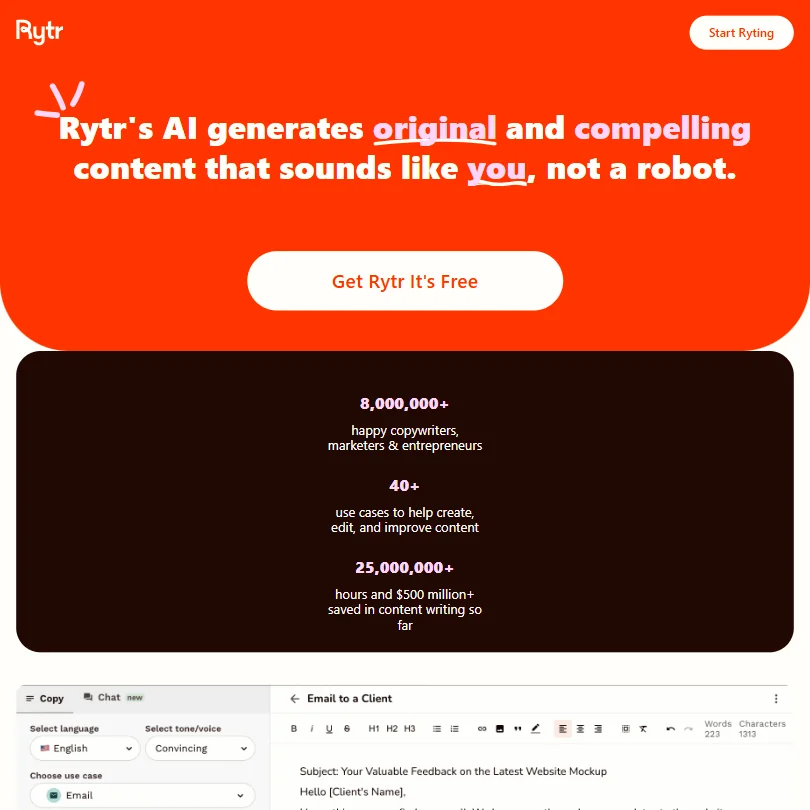
The core workflow is simple. Pick a use case from the template library. Fill in a brief. Get output. Edit in the built-in content editor.
The editor itself isn't just a text box. There's an autocomplete function and a continue writing feature. There's also a sentence shortener and a text improver, which are more useful than they sound, especially for cleaning up the AI's rougher outputs. The built-in plagiarism checker caps at 50 checks per month on the Unlimited plan and 100 on Premium. That's enough for most freelancers. Not enough if you're running an agency.
On the brand voice side, Rytr has something called My Voice. You feed it a writing sample and it tries to match your tone. Up to five custom tones on the Premium tier. We're mildly skeptical of how well tone-matching actually holds over longer pieces.
Long-form content exists here too, via the Long Form Content and SEO template paired with the paragraph generator. It works. It's not going to replace a dedicated long-form tool, and anyone comparing it to something like Koala AI for SEO-focused articles will find the gap obvious.
Integrations are thin. Chrome extension and API access. That's it. There's no WordPress connector or Google Docs integration, so ask about Zapier support. For a lot of solo users that's fine. For teams expecting to plug Rytr into a content workflow, it's a constraint worth naming upfront.
Rytr has also continued expanding beyond its original writing tools, adding chat functionality. It's not the reason most people are here, but the team is clearly still building.
Rytr AI Output Quality: Is It Good Enough?
Short answer: yes, for short-form content.
The bar there isn't that high, but Rytr clears it without much drama. That's a reasonable result for the price.
Longer content is a different story. That tracks with what we'd expect from a tool that was clearly optimized for short-form use cases first. The Long Form Content template keeps the content going, but staying on-topic requires active steering.
The 30-plus language support is real, though quality drops outside of English. We've seen worse from tools charging twice the price, so fair.
Is Rytr Easy to Use?
Very. That's the short version.
The interface is clean. Template selection takes a few seconds. No onboarding maze, no feature overload on the first screen.
The Chrome extension is a genuine convenience. It lets you run the tool inside Gmail, WordPress, or wherever you're already working, which removes the copy-paste step that slows down a lot of AI writing workflows. Not a flashy feature. Genuinely useful though.
Where ease of use breaks down is in long-form work. The continue writing feature is manual. You nudge it forward, check the output, nudge again. The tool is just built for shorter bursts.
Rytr Pricing: Is It Worth the Cost?
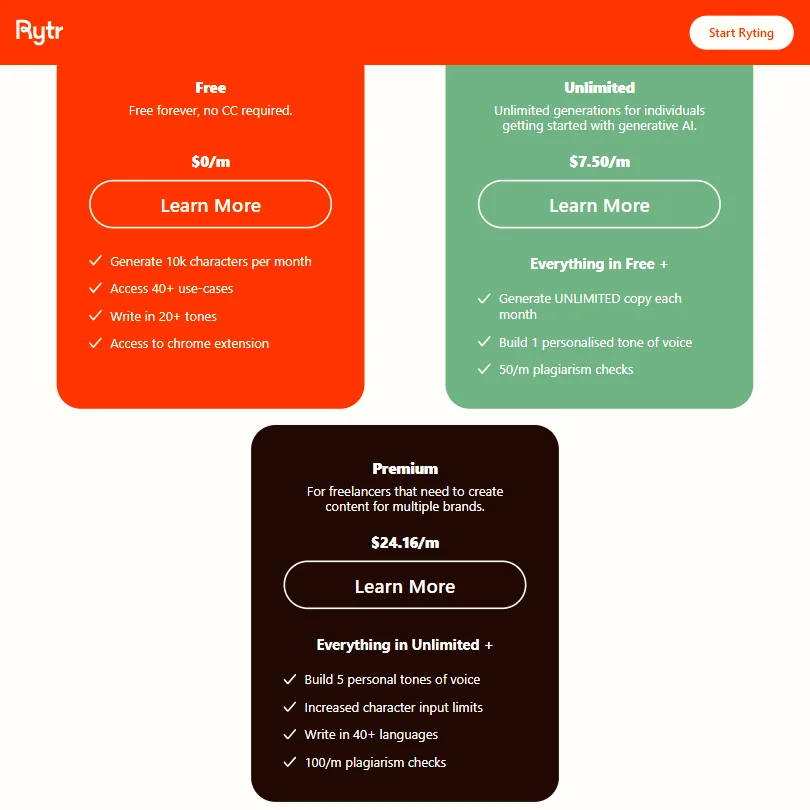
There's a free plan. It's character-limited but functional enough to test the tool properly. No free trial on paid plans, which is a normal tradeoff.
The paid tiers are genuinely affordable. $7.50 per month gets you the Unlimited plan, which removes character limits and includes 50 plagiarism checks per month. The Premium plan sits at $29 per month and adds more plagiarism checks and the expanded My Voice functionality. Annual commitments are 12-month lock-ins with no stated refund policy.
No enterprise tier is listed. That's a gap if you're a team of ten trying to standardize on one tool. For a solo freelancer, the Unlimited plan at $7.50 is probably the better-priced AI writing option on the market right now. Hard to argue with that.
The concern isn't the price. It's the ceiling. You'll get real value for a few months, then start bumping into limitations that the next tier doesn't fully solve.
Rytr vs Copy.ai: Which Is Better?
Copy.ai and Rytr compete for the same budget-conscious user, but they've grown in different directions. Copy.ai has pushed harder into workflow automation and longer content pipelines. Rytr has stayed focused on cheap, fast, short-form output.
Copy.ai's free plan is more generous on the feature side. Rytr's paid plan is cheaper once you need unlimited output. That's the real comparison. Neither is a great choice for enterprise content operations.
For someone who just needs quick email drafts or product descriptions on a budget, Rytr wins on price. For someone who wants automated content workflows or multi-step sequences, Copy.ai is further along. We'd call it a draw at the category level, but the specifics matter depending on what you actually need.
Who Should Use Rytr? (And Who Shouldn't)
Freelancers grinding through short-form deliverables. That's the core fit. Social captions, email copy, product descriptions. Rytr handles that work quickly and cheaply. If you're billing clients for that output, the $7.50 plan has a clear ROI case.
Small business owners without a content budget. Also a fit. The tool is approachable enough that someone with no copywriting background can get usable drafts out of it.
Content teams expecting deep integrations or long-form SEO content at scale. Not the fit. The integration list is too short and the long-form output requires too much human steering to make it efficient at volume.
Anyone evaluating tools for an enterprise content operation should look elsewhere. No enterprise tier, no CMS connectors, and a support setup that tops out at a help center and a bot means the risk profile is wrong at that scale.
Rytr Review Verdict
Rytr does what it advertises, at a price that's genuinely hard to beat. The short-form output is clean. The editor is simple. The Chrome extension works. For the freelancer or small business owner who needs AI writing help without a $50-per-month commitment, this is a credible option.
The gaps are real though. Integration support is the weakest part of the product by a wide margin, and anyone who needs to plug an AI writing tool into an existing content stack will feel that immediately. Long-form quality is uneven. The refund policy situation on annual plans is worth thinking about before you commit.
Rytr launched in 2021 and has grown mostly on the strength of its price point, not because it's technically ahead of the field. The team has kept building, adding chat functionality along the way. Whether those additions close the gap with competitors is still an open question. We don't buy the framing that they fundamentally change what this tool is.
For now, it earns a qualified recommendation in the budget tier. Just go in knowing where the edges are.
How Rytr compares
Rytr scores 4.1 out of 10 among the AI copywriting tools we rate. These two do the same job and are the closest to it, compared on what each vendor publishes.
Jasper AI
Jasper has no free plan and starts at $69 a month for Pro; Rytr has a free plan and its cheapest paid tier is $9. Jasper builds a whole campaign's assets from one brief and generates images, both missing from Rytr. Rytr includes an API on its plans but lacks the team plans, office add-ins and SOC 2 certification Jasper has. Rytr's policy states no commitment on training AI with customer content, while Jasper says it does not let third parties train on customer data.
Pick Jasper AI if you want campaigns, images and team features built in.
Pick Rytr if you want a free plan and the lowest monthly price.
ContentBot
Both Rytr and ContentBot price their cheapest paid plan at $9 a month, but Rytr also has a free plan and ContentBot's homepage lists no free trial at all. ContentBot publishes straight to WordPress and Zapier; Rytr has no direct publishing integration listed. ContentBot includes a team plan on every tier, including its cheapest; Rytr has no team plan. Rytr has an API and a saved brand voice called My Voice, neither of which ContentBot offers.
Pick ContentBot if you want direct publishing to WordPress and Zapier.
Pick Rytr if you want a free plan, an API and a saved voice.
Frequently Asked Questions
Does Rytr have a free plan?
Yes. The free plan is character-limited but lets you test the templates and editor before paying anything. There's no free trial on the paid plans, so the free tier is your only low-risk entry point. It's enough to figure out whether the tool fits your workflow.
Is Rytr good for long-form content?
It has a Long Form Content and SEO template and a continue writing feature, so it can generate longer pieces. In practice, the output quality drops off on longer content and needs more active editing than short-form work does. If long-form SEO content at scale is your primary use case, there are better-suited tools for that job.
How does Rytr compare to Jasper AI on price?
The gap is significant. Jasper AI's entry pricing sits considerably higher than Rytr's $9 per month Unlimited plan. Jasper AI offers deeper brand voice tooling and more integrations, but the price difference is hard to ignore if your needs are primarily short-form. For budget-conscious users, Rytr is the obvious answer. For teams that need brand consistency at scale, the Jasper AI feature set starts to justify the premium.