
What is MindStudio?
A no-code platform for building AI agents. Not automations in the old Zapier sense. Actual agents, with branching logic, multi-model orchestration, and the ability to loop back on themselves when something doesn't resolve cleanly.
The company is San Francisco-based and has been running since 2023. They claim over 400,000 AI agents deployed across the platform. That number is worth sitting with. It either means the tool is genuinely approachable for non-technical users, or the free tier is doing a lot of heavy lifting attracting people who build one agent and disappear. Probably some of both.
What sets MindStudio apart from most of the AI builder crowd is the MindStudio Service Router, a layer that routes agent requests across 200+ AI models without locking you to a single provider. You can point at Anthropic Claude, Google Veo3, and a few others from the same workflow, depending on what the task actually needs. That's a real structural advantage, not a bullet point.
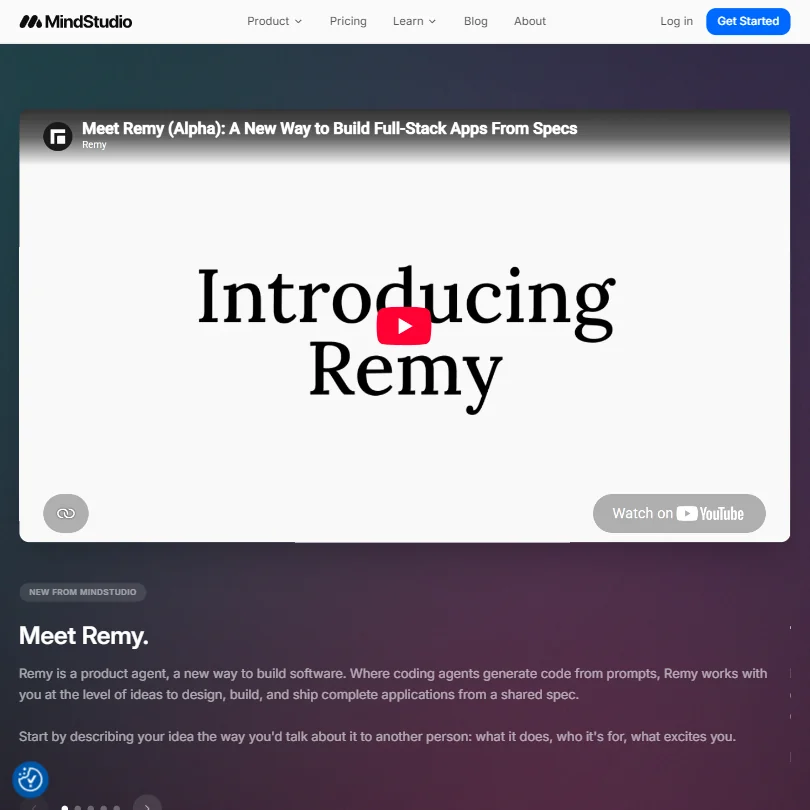
They've also introduced something called Remy, a product agent designed to take a plain-language idea and build out a working app with its own spec, architecture, and database setup. It's live but in alpha. We're watching it. We're not basing anything on it yet.
MindStudio Features: Workflows, AI Agents & Automation Capabilities

The core build experience is a drag-and-drop visual editor. No code required, though custom code is available when you need to go off-script. That's the right call. Most no-code tools pretend code doesn't exist. MindStudio just makes it optional.
Agents can run on a schedule, trigger off a webhook, or start from an API call. Manual runs are available too, which is useful during testing. The conditional logic supports real branching, not just if/then. Multi-step branching across different models and data sources.
There's a human-in-the-loop option, where an agent pauses and waits for a person to review before continuing. Genuinely useful for anything touching customer data or financial decisions. Most agent platforms bolt this on as an afterthought. MindStudio seems to have thought it through more carefully.
The integration library sits at 1,000+ pre-built connections. Google Workspace is in there, so is Slack, and the roster covers most of what business teams actually use day to day. Honestly, we expected fewer at this stage of the company's life.
MindStudio Automation Power: How Complex Can Your Workflows Get?
This is where MindStudio tries to separate itself from lighter tools like Zapier. The visual builder isn't just for simple triggers. You can build agents that reason across steps, call different models at different points, transform data mid-flow, and handle errors without the whole thing collapsing.
Their pricing page features a customer testimonial from Malachi Rose, VP of Growth at Mavan, claiming he personally spent 95% less time debugging compared to tools like n8n. That's one person's experience, not a documented platform benchmark, so don't treat it as representative. Across forums and early adopter threads, people find the builder less frustrating than Make or n8n when something breaks. That tracks.
Data transformation is built into the agent workflow, not grafted on. You don't need a separate step to massage an output before passing it to the next model. That keeps flows cleaner and shorter than they'd otherwise be.
MindStudio AI Agent Capabilities: What Can It Actually Do Autonomously?
More than most. That's the honest answer.
Agents can personalize their behavior based on context, coordinate across multiple models in a single run, and include memory-like structures for ongoing tasks. The multi-model orchestration is real, not just a checkbox. You can tell an agent to use Claude for reasoning and FLUX for image generation, and it handles the handoff natively.
Independent stress-testing is thin. MindStudio isn't listed on G2 or Capterra yet. No Trustpilot presence either. That's not automatically a bad sign for a two-year-old tool, but it does mean the evidence comes more from documentation and early adopter forums than from a broad base of verified user experience. Worth keeping in mind before anyone commits a team to this.
The agents support personalization, meaning they can adapt outputs based on user-supplied variables or prior context. That makes them usable for customer-facing workflows, not just internal automation.
Is MindStudio Easy to Set Up Without Code?
For a non-technical user, yes. That's the clearest thing we can say.
The visual editor is drag-and-drop. The free tier gets you one agent and 1,000 runs a month with access to the full model library. That's a meaningful free plan. Not a crippled one. You can actually test something real before spending money.
The training library is substantial, and that's putting it mildly. Hundreds of hours of video walkthroughs are available on demand, alongside live weekly workshops run by the MindStudio team. That's unusual for a tool this young. Most early-stage SaaS platforms have three tutorial videos and a FAQ doc.
The Slack community sits behind the Individual plan, not the free tier. Free users get community job postings but not the full builder network. A little stingy. Not unusual.
MindStudio pricing: what each plan gives
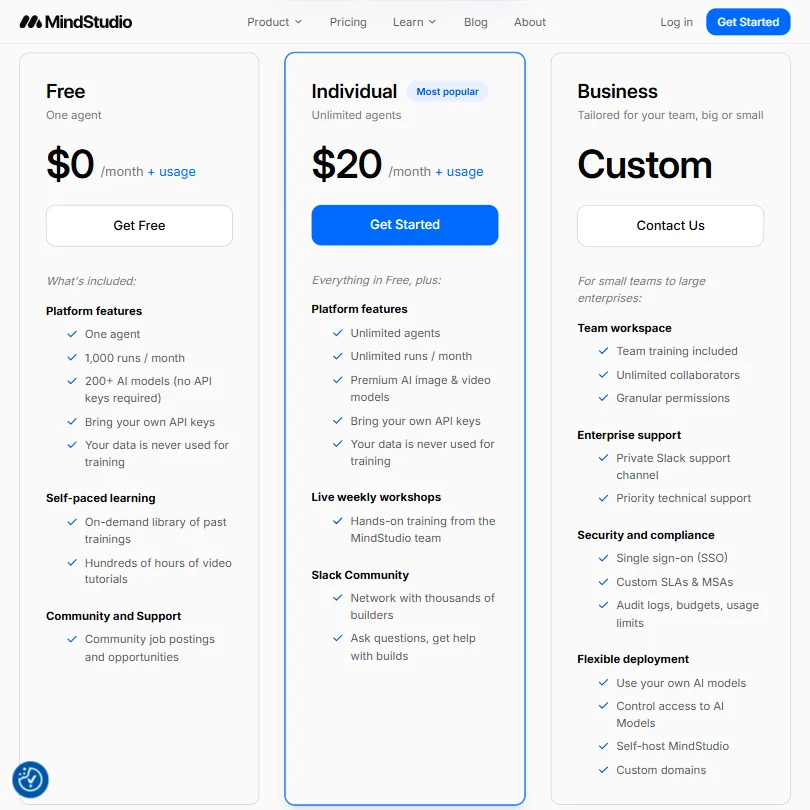
The free tier starts at $0. One agent, 1,000 runs per month, real access to 200+ models. That's the floor, and it's a reasonable one.
The Individual plan runs $20 a month, which unlocks unlimited agents, unlimited runs, and premium AI image and video models. Business is custom pricing, which is the part of any pricing page that makes us groan. No public number means a sales call, and a sales call means friction for anyone who just wants to know if they can afford it.
Ask about the refund policy before you pay, since none is published.
Compared to Zapier, MindStudio is cheaper at entry and more focused on AI agent behavior than simple app-to-app triggers. Zapier has 9,000+ integrations and a decade of reliability behind it. MindStudio has better native AI orchestration. Different tools, different problems. For teams that want real agent behavior, $20 a month is a reasonable ask. For teams that just need to connect Slack to a spreadsheet, Zapier still wins that argument easily.
MindStudio vs n8n: Which Automation Platform Wins?
Depends entirely on who's building.
n8n is built for technical teams. Developers, DevOps people, anyone comfortable writing JavaScript inside a workflow node. The ceiling is higher. The floor is much steeper.
MindStudio is the opposite shape. The ceiling might be a little lower on raw technical flexibility, but most non-developers will never hit it. What they will notice is that they can actually build something without filing a ticket to engineering.
The Service Router is a real differentiator against n8n. n8n can call AI APIs, but it doesn't have anything managing cross-model orchestration natively the way MindStudio does. That matters for teams building agents that need to pick the right model for the right job, not just call one and hope.
Error handling is where n8n earns its fans. Battle-tested, detailed logs, a mature debugging experience. MindStudio's error management looks good on paper. Whether it holds up at the same scale is still to be proven, since the install base is young.
Who Should Use MindStudio? (And Who Shouldn't)
Non-technical business teams. That's the obvious fit.
Operations people who've been waiting for someone in engineering to build an internal tool. Marketing teams who want to automate content workflows without a developer involved. Those are the core users this platform is clearly designed around.
MindStudio also makes sense for enterprises that want to standardize AI agent deployment across teams without requiring every department to understand what a model API is. The Business tier includes team workspaces, granular permissions, and audit logs. That's enough governance for most mid-market use cases.
Who shouldn't bother? Developers who want full infrastructure control. They'll find the visual builder constraining before long, and they'll probably be right to feel that way.
Also: anyone counting on a large verified review base before adopting a tool. That base doesn't exist for MindStudio yet. The G2 and Capterra pages are empty. Not a reason to walk away, but a reason to run a real pilot before committing a team to it. That's our actual recommendation, not a disclaimer.
MindStudio Review Verdict
MindStudio is doing something genuinely useful. The visual agent builder is approachable without being toy-like. The model routing across 200+ options is a real structural advantage. The free tier is honest, not a bait-and-switch.
The biggest gap is trust infrastructure. No public reviews on major platforms, no published refund policy, and a custom pricing wall at the Business tier. For a tool asking enterprise teams to route real workflows through it, those gaps matter in practice. They're not fatal flaws. They're fixable, and they're the kind of thing that often resolves as the company matures and the review base catches up.
For non-technical teams that want production-capable AI agents without hiring a developer, there isn't much that competes at this price and this level of approachability. That's a real claim. We don't say it lightly.
Frequently Asked Questions
Does MindStudio require coding to build AI agents?
No. The platform is designed around a drag-and-drop visual builder. Custom code is supported as an option when you need it, but nothing in a standard agent workflow requires writing code. That's the core promise and, from what we can tell, it holds up.
How does MindStudio pricing compare to competitors?
The free plan is genuinely usable at $0 per month. One agent and 1,000 monthly runs with full model access is more than most free tiers offer. The Individual plan sits at $20 a month. Business is custom, which means a conversation with sales. Ask for Business pricing up front.
Is MindStudio suitable for enterprise use?
The Business tier includes the features enterprises usually ask for: team workspaces, granular permissions, audit logs, and a private Slack support channel with priority technical support. The platform is young, and the verified review trail at enterprise scale is thin. We'd recommend a scoped pilot before any broad rollout, not because the tool looks unreliable, but because the independent evidence base isn't there yet to say otherwise.







