

Humata got Google's Gradient Ventures money in 2023. That sets the frame for everything after. Institutional backing on a document-query tool that's, by most accounts, still finding its footing.
What is Humata?
San Francisco, 2023, $3.5 million from Gradient Ventures. That's the origin story. The product itself is simpler to describe: upload your files, ask questions, get answers with citations that link back to the exact source pages.
The pitch isn't novel. Plenty of tools let you chat with a PDF. What Humata's team angle actually adds is shared file libraries, folder-level permissions, and role-based access controls. That's infrastructure most solo-focused PDF tools don't bother building. Whether that justifies the price over something like ChatPDF depends entirely on your situation.
The free plan is real. No credit card. Sixty pages per month, one user. We'll get to why that ceiling matters.
Humata Features: Search, Synthesis & Research Capabilities
The pricing screenshot tells you a lot. Four tiers: Free, Expert at $9.99/month, Team at $49 per user per month, and Enterprise at custom pricing. Free caps out at sixty pages monthly and one user. Expert opens to 500 pages and three users. Team goes to 5,000 pages and ten users. Additional pages cost $0.02 per page on Expert, $0.01 per page on Team.
That page-based model is worth understanding before you commit. Not seat-based. Not word-based. Pages. For teams processing high-volume document libraries, that math compounds fast.
The multi-document query capability is the feature that comes up most in comparative discussions. Not just reading files in parallel, but actively querying across multiple documents at once. For someone managing a research library with dozens of PDFs, that's a genuine time saver. The inline citation behavior handles the verification layer: answers link back to the exact source page rather than leaving you to hunt.
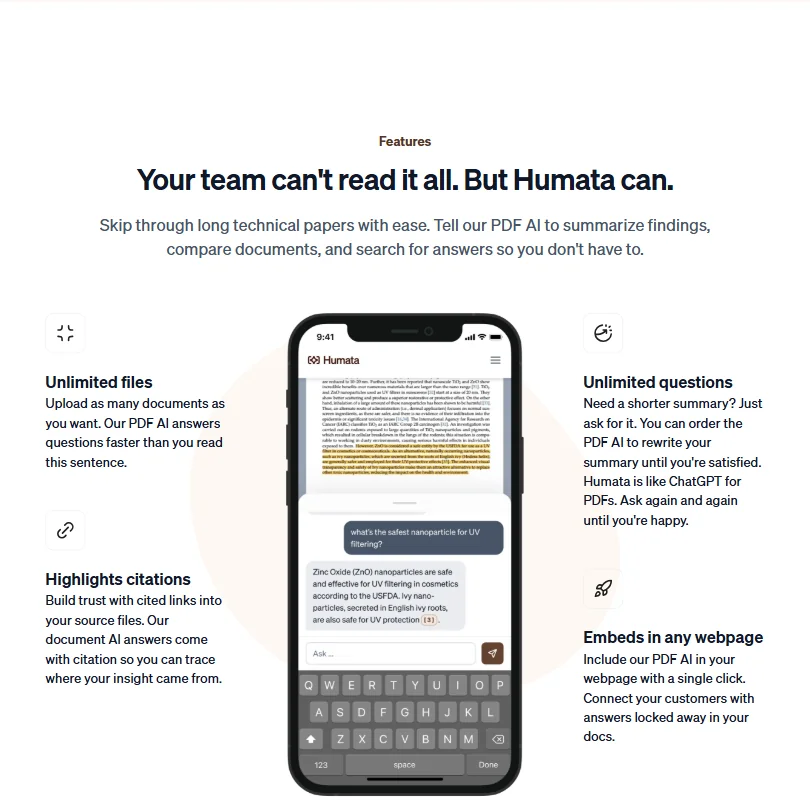
The AI summarization function supports follow-up iterations. Ask for a shorter version. Ask again. Paid plans support unlimited follow-up questions, which keeps the workflow iterative rather than forcing a single-prompt pattern.
Some things it doesn't do. No web search. No connection to PubMed or arXiv. No browser extension on the public pricing page. No Zotero integration, which is a genuine miss for academic workflows. Ask which export formats you can get your work out in.
The webpage embed feature surprised us. Single-click, apparently. A document-query interface you can surface for customers or internal users without any custom build. We didn't expect that at the Expert tier's $9.99 price point.
Humata Research Quality: How Accurate and Trustworthy Is It?
No published hallucination benchmarks. No documented fact-checking layer. Nothing.
The citation system carries essentially all of the trust weight here. Answers include page-level links back to the source material. The model is: here's the answer, here's where we got it, go verify. Reasonable for a document tool. Puts the burden back on the user, though.
Reddit threads we cross-referenced show a consistent pattern. Users trust the citations more than the summaries. Summaries drift. Citations tend to hold. That tracks. Summaries are generated output. Citations are mechanical references to existing text. One is more failure-prone by definition.
The "answers you can trust" homepage language oversells it. Citations help. They don't guarantee accuracy on the synthesis layer.
Humata Source Coverage: What Does It Actually Search?
Document-based only.
You bring the files. That's the whole search corpus. No PubMed connection, no live web crawl, no arXiv pull. If the answer isn't in what you've uploaded, Humata isn't finding it.
For teams working with proprietary documents, that closed-library model is often the point, not a constraint. Legal teams, compliance teams, finance. Anyone who specifically doesn't want their documents touching external sources. The contained environment is a deliberate architectural choice.
Academic researchers who need to range across published literature they haven't already downloaded are a different user entirely. Elicit is built for that kind of literature-first workflow. Humata isn't competing there, and we'd say so plainly.
On multilingual support: Humata's homepage, pricing, security and docs pages publish no language claim, and there's no accuracy breakdown by language on the main site. Treat multilingual claims as plausible but unproven, and test with your own documents before committing to any non-English workflow.
Is Humata Easy to Use for Researchers and Professionals?
Web only. No mobile app. Some users will stop reading here.
The interface follows a recognizable upload-then-chat pattern. Not complicated. The team configuration on the Team tier ($49 per user per month) adds permission-layer overhead, but that's expected for anything with shared libraries and folder-level access controls.
Support is gated. Chat support is absent from the Free tier and doesn't appear until Expert, per the pricing grid. Free users get email support and a basic help center. No community forum we could locate.
The review volume situation is unusual. A tool with prominent user-growth messaging on its homepage that hasn't accumulated meaningful G2 or Capterra coverage. Not a dealbreaker. But we noticed it, and we'd normally weight third-party review volume heavily in an assessment like this.
Humata Pricing: Is It Worth It vs Free Alternatives?
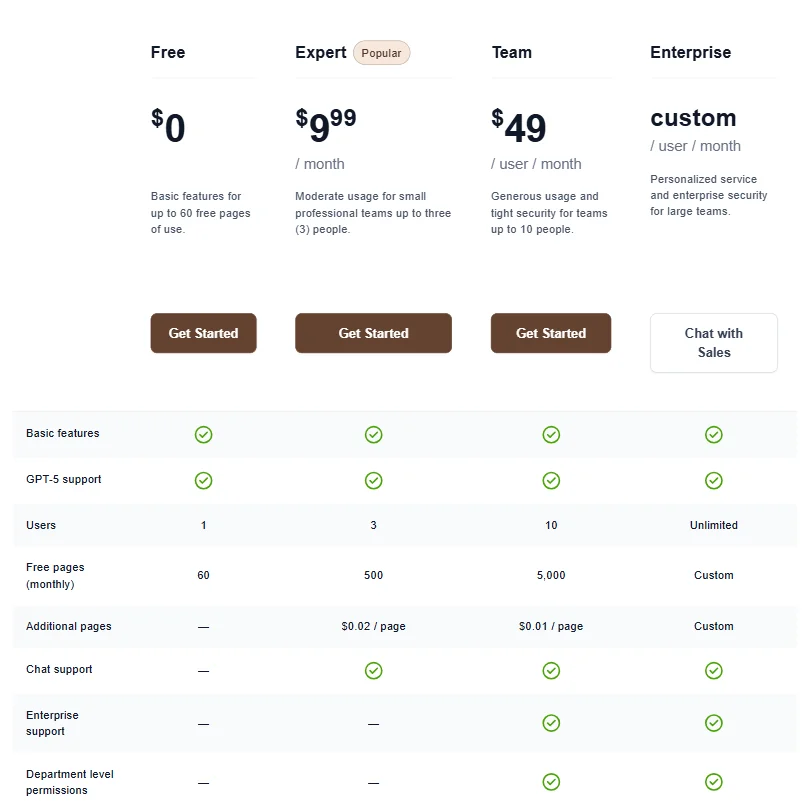
Four tiers. Free at $0, Expert at $9.99/month, Team at $49 per user per month, Enterprise at custom. All tiers include basic features and GPT-5 support, per the feature grid.
The Free plan gives you sixty pages per month and one user. No credit card. That's a clean entry point for light testing, though sixty pages runs out fast if you're working on anything substantial.
Expert at $9.99/month gets you 500 pages monthly, three users, additional pages at $0.02 each, and chat support. For a small team doing moderate document work, that's a reasonable number.
Team at $49 per user per month is where things shift meaningfully. 5,000 pages, up to ten users, $0.01 per additional page, and enterprise features appear at this tier. The per-page overage cost is half what Expert charges, which matters if you're regularly going over your monthly allotment.
Compared to ChatPDF's Plus plan at $19.99/month, Humata's Expert tier is cheaper and covers three users. The Team tier is pricier but offers capabilities ChatPDF doesn't approach, particularly the multi-user permissions layer and the lower overage rate at scale.
One thing we'd flag before anyone commits: the non-refundable purchase policy in Humata's Terms of Service (there's no annual plan here, only monthly billing). Cancellation and a refund are not the same thing. Worth understanding that distinction before locking in twelve months.
Humata vs ChatPDF: Which AI Research Tool Is Better?
ChatPDF is fast and simple. Single document, no setup, no folder structure. Paste a link or upload a file and you're querying in under a minute.
The honest humata vs chatpdf comparison hinges on whether you need anything beyond that single-document pattern. Humata does multi-document querying. Humata has team permissions. Humata has a page-based model that scales across users in ways ChatPDF doesn't support. Those aren't marginal differences for teams with shared document libraries.
Where ChatPDF wins is zero overhead. No configuration, no permissions, no folder management. Humata's depth is also its setup cost.
Solo users doing occasional document lookups will probably find ChatPDF faster. Teams managing shared proprietary files have a genuine case for Humata's Expert or Team tier. Neither tool does web search or academic database access. On that front, equally limited. We've also covered Google NotebookLM if you want document-grounded querying at no cost.
Who Should Use Humata? (And Who Shouldn't)
Teams with large internal document libraries. Legal, finance, compliance. Multiple people querying the same proprietary file sets. That's the fit.
Small professional teams of two or three. The Expert plan at $9.99/month with three users and 500 pages per month is genuinely competitive at that price.
Researchers expecting academic database access. Wrong tool. Not great.
Anyone who needs clean export formats or integration with existing tools should pause before committing. Notion, Zotero, meaningful LMS connections, none of these appear on the public feature grid. Enterprise features show up at the Team tier and above, but the specifics aren't fully documented publicly.
Humata Review Verdict
The core loop works. Multi-document querying, page-level citations, team file management, and a page-based pricing model that's actually legible across the four tiers. Expert at $9.99/month for three users is a reasonable price. Team at $49 per user per month is where you start doing real math.
The gaps are real. No external search. No integrations worth naming. No mobile app. The absence of meaningful third-party review coverage makes it harder than usual to validate vendor claims with outside data, and we weight that gap accordingly.
The non-refundable policy makes monthly commitments riskier than the "cancel anytime" language implies. The product is better suited for document-heavy teams than for researchers ranging across open literature. For the latter, Elicit or Consensus are purpose-built for what Humata isn't trying to do.
Worth trying on the Free tier. Worth reassessing carefully before bringing it into a ten-person team workflow at $490 a month.
Frequently Asked Questions
Does Humata work with non-PDF file types?
The tool is positioned primarily around pdf question answering, but vendor documentation references "document files" more broadly. Ask which formats are supported, and test on the Free tier before assuming your file types are covered.
Is Humata safe for sensitive or confidential documents?
Enterprise security features appear at the Team tier and above, per the feature grid. The vendor references 256-bit SHA encryption and a private cloud setup. Role-based access controls are present at the Team level. That's a reasonable baseline for many professional environments. Heavily regulated industries should request compliance documentation directly before uploading anything sensitive. Published certification details aren't available on the public pricing page, and we wouldn't assume them without confirmation.
How does Humata's free plan compare to paying?
Free gives you sixty pages per month and one user. No credit card, which is a clean way to test. The AI document summarizer functionality is present on the free tier, just capped at that sixty-page ceiling. Expert at $9.99/month opens to 500 pages and three users, adds chat support, and brings additional pages at $0.02 each. Team at $49 per user per month is only necessary if you actually need 5,000 pages monthly, ten users, enterprise features, or the lower $0.01 per-page overage rate at volume.


